Published: June 18, 2026
Last Updated: October 1, 2026
Most people searching for smart switches don’t want a fully automated home. They want one room to work better — maybe turn the lights off from bed, or just tell Alexa to handle it when their hands are full. That’s a completely reasonable goal, and you don’t need to rewire anything to get there.
This guide answers the questions that actually matter: why switches beat bulbs as a starting point, which three models are worth buying in 2026, and what trips people up on their first install.
Summary
The best beginner switches don’t make you guess. Neutral wire in your box? A budget Wi-Fi switch covers you. No neutral — Caséta is worth paying more for. It’s built for older wiring and the setup process is genuinely beginner-friendly. Before buying, confirm compatibility is spelled out clearly for your specific assistant, check that safety approvals are on the box, and look up whether the brand has pushed firmware updates recently — some go quiet after year one.
Why beginners should choose smart switches
Smart switches swap out your existing wall switch, so the physical control and the app stay in sync — always. Everyone in the house still flips the same switch. You just add scheduling, scenes, and remote control on top.
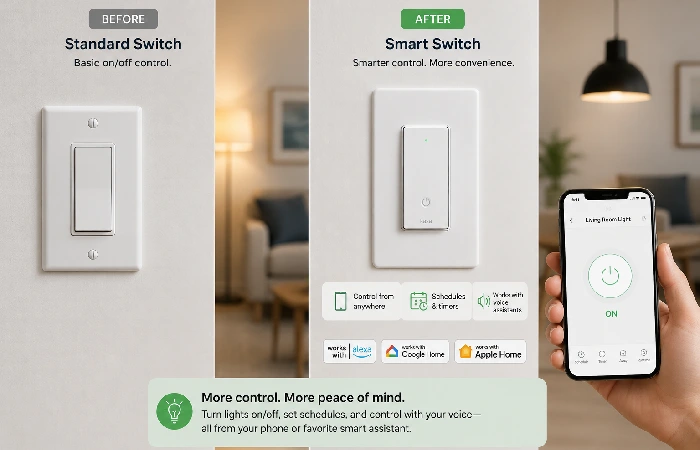
Switch vs. smart bulb for first timers
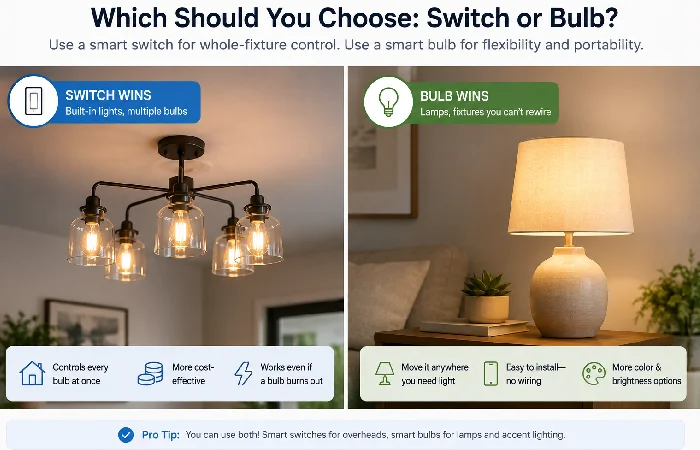
A switch makes sense when you want the whole room to respond consistently regardless of how it’s controlled. Bulbs work better for lamps, rentals where you can’t touch the wiring, or when you’re only dealing with one or two lights.
Quick picks: the best entry‑level smart switches for beginners
Here’s the decision flow that keeps you out of trouble: wiring first, then assistant, then features.
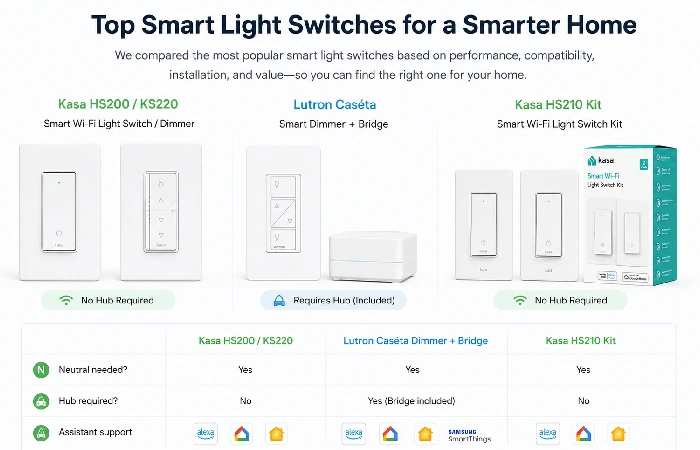
If you have a neutral wire (single-pole)
- TP-Link Kasa HS200 (on/off): The terminals are clearly labeled, the app is reliable, and it won’t cost you much if this is your first attempt at a smart switch. Best for single-pole circuits where you just need lights on or off — no dimming required.
- TP-Link Kasa KS220 (dimmer): The app is the same as the HS200, and the switch face adds a physical brightness bar — useful when you just want to nudge the lights down without unlocking your phone. One thing to sort before ordering: your bulbs need to actually say “dimmable” on the box. Regular LEDs will flicker or just ignore the dimmer entirely.
No neutral wire or older homes
- Lutron Caséta PD-6WCL (dimmer) + Caséta bridge: Few systems handle no-neutral installs as cleanly as Caséta, and the reliability track record is hard to argue with. Yes, the bridge adds cost and takes up a spare outlet — but most beginners who go this route don’t regret it. Setup is straightforward and everyday control just works. Works with Alexa, Google, and Apple Home through the bridge.
3‑way circuits made simple
- Kasa HS210 Kit (on/off): Built for 3-way locations with neutrals, and both switches arrive pre-paired so you’re not hunting for a companion device. The app has a wiring diagram that walks you through each step — once you’ve followed it and tested the circuit, you’re done.
- Lutron Caséta PD-6WCL + Pico remote: Running traveler wires to a second switch location is the kind of job that turns a Saturday afternoon into an evening. The Pico skips all of that — it mounts wherever you want a second control point and behaves like a normal switch without any wall fishing.
For a bigger-picture overview of brands and price tiers, see our best smart switches for home guide.
Features that make setup truly easy
Guided apps, QR setup, and clear terminals
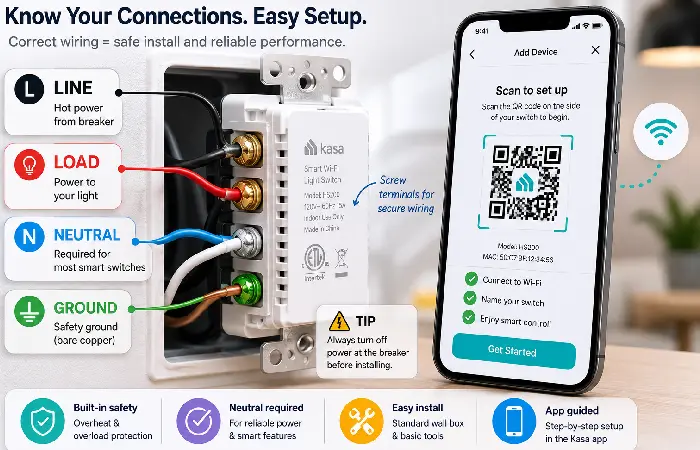
Look for switches with a printed QR or in-app wiring diagrams built for single-pole vs. 3-way installs. Clear screw terminal labels — LINE, LOAD, NEUTRAL, GROUND, TRAVELER — matter more than any spec sheet when you’re standing at the wall box trying to figure out which wire is which.
Reliable radios and good support windows
Look for a reputable Wi-Fi brand with mature firmware, or a hub-based system with a strong reliability track record — Lutron’s long-running RF being the obvious example.
Dimming that plays nicely with LED bulbs
-
For dimmers, the first thing to check is whether your bulbs actually say “dimmable” on the box — plenty of LEDs don’t, and pairing the wrong ones with a dimmer usually means flicker or a range that barely moves. Adjustable low-end trim on the switch helps with any shimmer that creeps in at low brightness; the U.S. Department of Energy specifically flags mismatched LED/dimmer combinations as a common source of both issues, so it’s a detail worth sorting before you commit to a switch.
Install basics and the mistakes beginners make
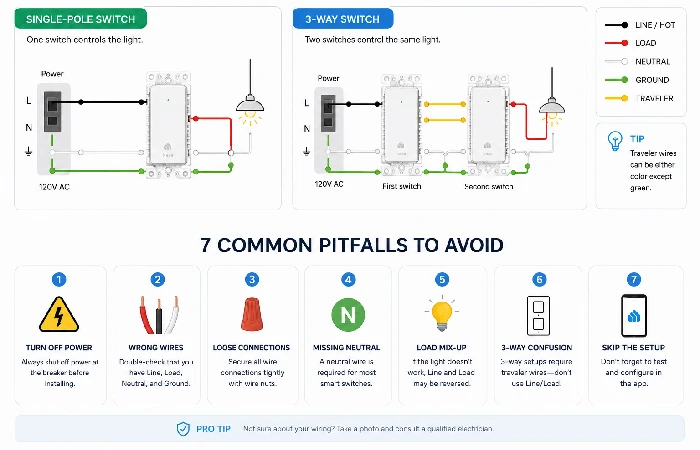
A 10‑minute pre‑install checklist
- Take a photo of the existing wiring with the breaker off.
- Identify LINE vs. LOAD — a non-contact tester helps a lot here.
- Confirm NEUTRAL presence (typically the white bundle in U.S. boxes).
- Check if it’s single-pole or 3-way (two switches controlling the same light = 3-way).
- Verify bulb type and wattage rating.
- Have your Wi-Fi SSID and password handy — most Wi-Fi switches prefer 2.4 GHz.
The 7 most common wiring/app pitfalls
- Swapping line and load: The switch won’t power correctly, or the light stays on — double-check the labels.
- Missing neutral on a neutral-required switch: The device won’t boot. No neutral in your box means Caséta or another no-neutral option.
- Forgetting to cap the unused traveler in a single-pole conversion can cause odd behavior.
- Shallow wall boxes catch a lot of people off guard, especially in older homes. If the wiring is too cramped to fit the new switch, either swap in a deeper box or look for a switch with a slimmer body — some are noticeably thinner than others.
- Not matching dimmers to LED bulbs: Expect flicker or drop-outs at low levels.
- Firmware updates are easy to ignore until something stops working. The app flags them when they’re ready — worth spending two minutes on it every few months.
- During setup, your phone might be on 5 GHz while the switch is hunting for 2.4 GHz — and they’ll never find each other. If your router doesn’t handle band steering on its own, giving the two bands different names is the simplest fix.
Compatibility and standards that prevent headaches
Alexa/Google/Apple Home — what “works with” really means
- Alexa and Google: Most Wi-Fi switches support both. If a listing says “Alexa only,” don’t assume Google will work.
- Apple Home (HomeKit): Either buy a model with native Apple Home support, or use a bridge that exposes the switch to Apple Home — Lutron Caséta’s Smart Bridge does this well.
Matter, Wi-Fi, Thread, and hubs in 2026
Matter lets devices work across ecosystems using common data models — many switches now use Matter over Wi-Fi, while Thread shows up more in battery-powered sensors (Connectivity Standards Alliance). It helps future-proof multi-assistant homes, but your wiring situation doesn’t change: neutral, dimmer, and 3-way needs still apply regardless of the protocol. Hub-based systems like Caséta cost more, though the reliability and ecosystem support they deliver is genuinely hard to match with a Wi-Fi-only setup.
New to the category? Start with our Smart Switch for Home pillar to see how switches fit into a whole-home setup.
When to choose a smart bulb instead (and when not to)
Renters, multi-lamp fixtures, and low budgets
Renting, or can’t replace a hardwired switch? Smart bulbs or smart lamp dimmers are your best option — fast to deploy, no wall box needed.
Why switches still win for whole-room control
If your ceiling fixture has four bulbs in it, buying four separate smart bulbs gets expensive and fiddly fast — one switch handles the whole thing for less money and less hassle. The wall toggle still works normally too, which matters when someone else in the house just wants to hit the switch without thinking about it.
Smart home expansion tips for first‑timers
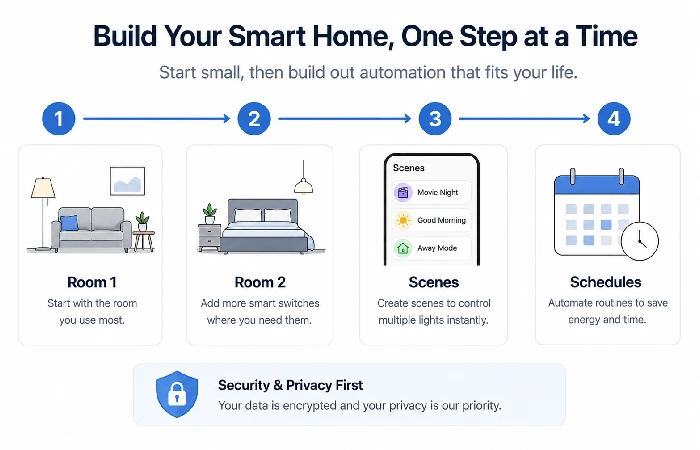
Most people start by automating too much at once and end up with three half-working systems and a drawer full of switches they’re not sure about. Pick one room — ideally the one you walk through most — and live with it for a week before adding anything else. That single circuit will tell you more about what you actually want than any buying guide, and it gives you a chance to settle on a brand before you’re twelve switches deep into the wrong ecosystem.
Security, updates, and labeling to look for
Look for vendors that document their security practices and commit to ongoing updates. In the U.S., the FCC’s Cyber Trust Mark program is rolling out to help shoppers identify devices that meet baseline security criteria
Conclusion
The best smart switch for a beginner is the one that fits your wiring and works with the assistant you’re already using. Neutral wire — go budget Wi-Fi. No neutral — Caséta is worth the extra cost. Add one circuit at a time from there.
FAQs
1. Do I need a neutral wire for a smart switch?
Most Wi-Fi switches do. If your box has no neutral, go with a no-neutral system like Lutron Caséta or look specifically for “no-neutral” models.
2. What’s the easiest smart switch to install for beginners?
Kasa HS200/KS220 are the easiest starting point if your box has a neutral wire — the app is straightforward and the terminals are clearly labeled. No neutral? Lutron Caséta with the bridge is designed for exactly that situation and the setup process is still beginner-friendly.
3. Do smart switches work in 3-way circuits?
Yes, but you need a model or kit that’s actually built for it. Kasa’s HS210 kit covers 3-way installs with neutrals. If you’re going the Caséta route, a Pico remote handles the second location without running traveler wires.
4. Will my LED bulbs flicker with a smart dimmer?
They can, and it’s almost always a bulb issue rather than the switch. If the packaging doesn’t say “dimmable,” the dimmer has nothing to work with — you’ll get flicker or a range that barely moves. A switch with adjustable low-end trim helps with any shimmer that lingers at low brightness once you’ve got the right bulbs in.
5. Do I need a hub?
Many Wi-Fi switches don’t need one. Caséta uses a small bridge — it adds cost but meaningfully improves reliability and ecosystem support.
6. Is Matter important for beginners?
It helps over time, but wiring and brand reliability are still the bigger day-one decisions for most people
7. Best smart switches for beginners if I use Apple Home?
Lutron Caséta via its bridge works well. Some models offer native Apple Home support — check the box for “Works with Apple Home.”
