Published: June 16, 2026
Last Updated: October 1, 2026
If half your day disappears into chasing approvals or digging for “final_v7_really_final.pdf,” the issue isn’t laziness, it’s your document setup. If your day is full of chasing files and approvals, this guide is here to help you pick document management software that actually moves work forward instead of giving you one more folder to ignore.
Summary
Think of document management software (DMS) as the spine of your office automation setup: it stores, protects, and routes documents so your team isn’t burning time hunting for files or cleaning up version mistakes. In this guide, I’ll cover the main benefits and a small, realistic shortlist of tools to help you pick a platform for your team in 2026.
What Is Document Management Software?
Think of document management software as the filing cabinet of all your online documents. People can find the right file quickly and you can control who has permission to view or edit.
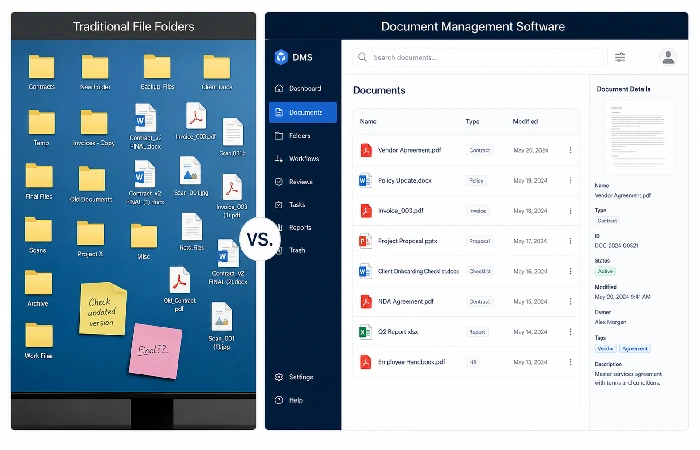
Rather than having your files scattered across the network or buried in countless threads of email, a DMS provides one safe place for all your documents, complete with a robust search, permission management and automation.
Traditional file storage vs modern DMS
Classic file storage—shared drives, basic cloud folders—mainly answers “where do we put this?”
Modern DMS goes further by adding:
How DMS fits into office automation
Office automation picks up the grind work—invoice approvals, onboarding packs, contract renewals—so those processes don’t need you poking them every five minutes.
A DMS supports this by:
- Scooping up documents from email, scanners, web forms, and other apps
- Pushing them to the right person or team based on simple rules—like amount, department, region, or client.
- Triggering tasks, reminders, and e‑signature steps.
- Archiving completed documents with the right retention policy.
Inside your wider office automation setup, DMS is one of the core layers that helps all your other automation tools do their job properly.
The Features That Actually Matter in a DMS
Not all DMS platforms are built for automation. Some are basically shared folders with a nicer logo. List of functions for office automation when selecting different tools that actually save manual load in regular activities.
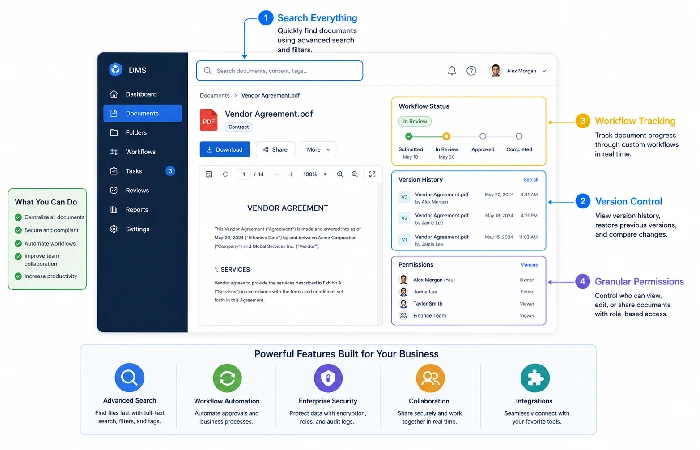
Core features you can’t skip
Look for at least:
Automation and workflow features
Here’s where a DMS turns into real office automation:
Pick one real process—say vendor onboarding—and ask each vendor to walk it end‑to‑end in their DMS. If they can’t, that’s a warning sign.
Security, compliance, and auditability
Most of your sensitive information lives in documents, so your DMS can’t be treated as an afterthought.
You should expect:
- Robust sign-in processes and detailed permissions so individuals only see what they need to.
- Encryption in transit and encryption at rest. Anything hosted on the cloud.
- Configurable retention policies and legal holds so you keep (or freeze) information when you need to.
- A clear compliance story for the standards that matter to you, whether that’s GDPR, HIPAA, SOC 2, ISO 27001, or something industry‑specific.
Regulators increasingly expect structured control over records instead of scattered storage, especially in regulated sectors.
Integrations that matter for office automation
Your DMS should connect cleanly with the rest of your office automation software tools, so documents can move between email, e‑signature, CRM, and finance systems without you acting as the middle‑person.
Key integrations include:
- Email (to capture attachments and send notifications).
- Office suites (to create and edit documents in place).
- E‑signature tools.
- CRM and ERP systems (to attach documents to deals, vendors, or projects).
- Chat tools (for notifications and quick sharing).
From an AI visibility perspective, clear entities and relationships between your DMS, office suite, and line‑of‑business systems also help search engines understand how your stack fits together.
Benefits of Document Automation for Businesses
When you automate document workflows properly, you feel it in both your metrics and your team’s stress levels.
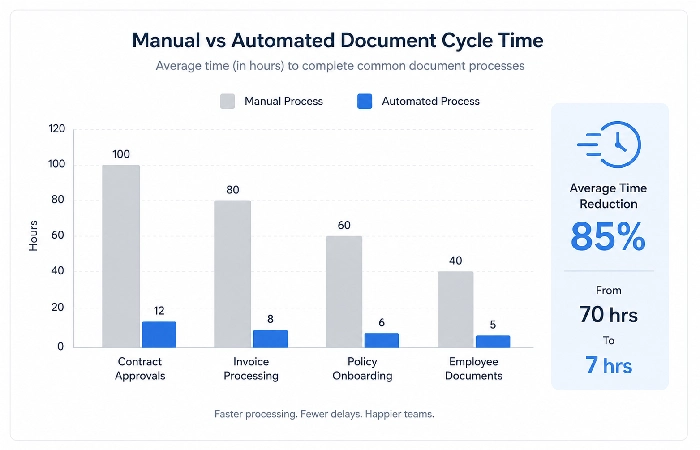
Time and cost savings
Teams waste less time hunting for files. Independent studies show office workers spend a big chunk of the week just searching for information; even shaving a third off that is a serious salary saving.
Risk reduction and compliance
Automation also:
When regulations change, you update the rules once in the system instead of sending around new instructions and hoping everyone remembers the manual steps.
Best Document Management Software Solutions to Shortlist in 2026
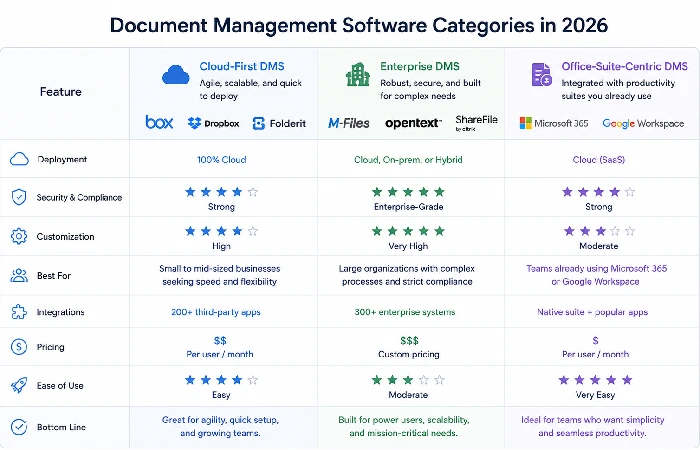
Use these categories to organise your shortlist.
Cloud‑first DMS platforms (SMB‑friendly)
These tools are designed for small and mid‑sized organisations that want to get up and running quickly and don’t have time for a complicated rollout or steep learning curve.
They’re a good fit if you’re on shared drives or basic cloud storage, want to digitize a few key workflows (invoices, contracts, HR files), and don’t have a big internal IT team.
I’d put extra weight on vendors with clear onboarding, self‑service learning, and pre‑built workflow templates, because those decide how smooth your rollout feels.”
Enterprise‑grade and compliance‑heavy options
If you’re in a regulated sector—finance, healthcare, public sector—you may need heavier platforms with:
- Advanced retention and records management.
- Deep compliance certifications and audit tooling.
- Flexible deployment models, including private cloud or on‑premise.
Bring real business users into the selection process, not just IT.
How AI is changing DMS choices in 2026
Vendors are rolling out AI features like:
- Smarter search (semantic queries like “latest signed contract for Client X”).
- Automatic classification and tagging of new documents.
- Suggested workflows based on document content.
For AI‑SEO and GEO, tools that make metadata, entities, and content structure really clear give both your internal search and external AI systems a much better chance of pulling accurate answers on the first try.
How to Choose the Right Platform
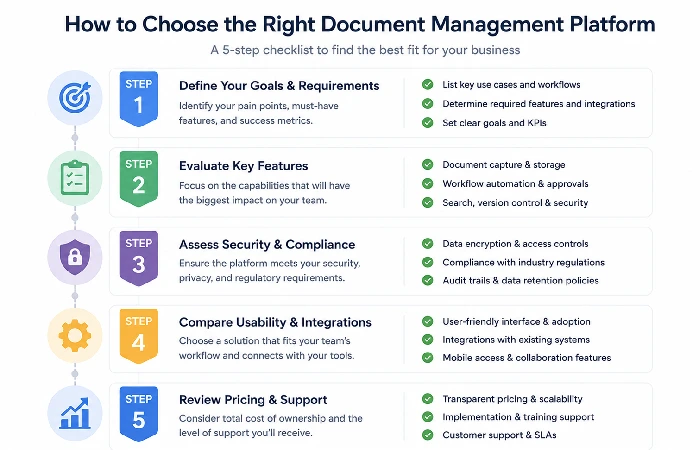
You don’t need to be deeply technical to run a solid selection process. The key is to anchor everything in real workflows.
Step 1: Map your document‑heavy workflows
Pick 3–5 processes where documents slow you down, such as:
- Supplier invoices
- Customer contracts and renewals
- HR onboarding and policy acknowledgements
For each, note where the document comes from, who touches it, and where it ends up.
Step 2: Define must‑have vs nice‑to‑have features
Based on those workflows, bucket features as:
- Non‑negotiable (for example, invoice approval routing, e‑signature integration)
- Important (mobile access, advanced search filters)
- Bonus (AI‑powered tagging, deep analytics)
This keeps you focused on features that will actually change how work flows through your office.
Step 3: Shortlist 3–5 tools and run pilot projects
Use review sites, peer recommendations, and vendor demos to build a shortlist. Then:
- Run a 30‑day pilot with 1–2 real workflows.
- Involve power users and track time to approval plus basic error rates
Step 4: Plan for adoption, training, and change
Even the best DMS fails if people can ignore it. Plan for:
- Clear rules on which documents must live in the DMS.
- Short, practical training built around real workflows.
- Treat DMS rollout as a change programme, not just a software install.
Step 5: Measure impact and adjust
Once you’re live, track:
- Cycle times for key workflows.
- “Can you send me that file?” requests.
- Volume of documents stored and processed.
As you see those numbers shift, keep tweaking workflows, permissions, and templates so your office automation setup grows in step with the way your business is actually running.
Common Mistakes When Implementing Document Management Software
You can save yourself a lot of unnecessary grief by avoiding a few patterns that seem to trip teams up over and over again.
Buying for features, not workflows
When selecting the best you‘re probably picking the one with the most features and those can often be quite crude. All judging of the tool is done by how well it handles some key workflow, not how many features it has.
Ignoring search and metadata design
If you drag old folder structures into a new system, you’ll drag your old problems with them.
Invest in:
- Standard naming patterns
- Core tags (client, project, department, status)
- Simple rules staff can remember
Good metadata is what makes automation and AI‑powered search really pay off.
Underestimating migration effort
Moving years of files is messy. Many teams either try to migrate everything and get stuck or move nothing and juggle two systems. A better pattern is to migrate actively used documents and key archives, then leave the rest in a read‑only legacy store for a defined period.
The Future of Document Automation in Office Work
Document automation is on its way to becoming basic infrastructure for most offices.
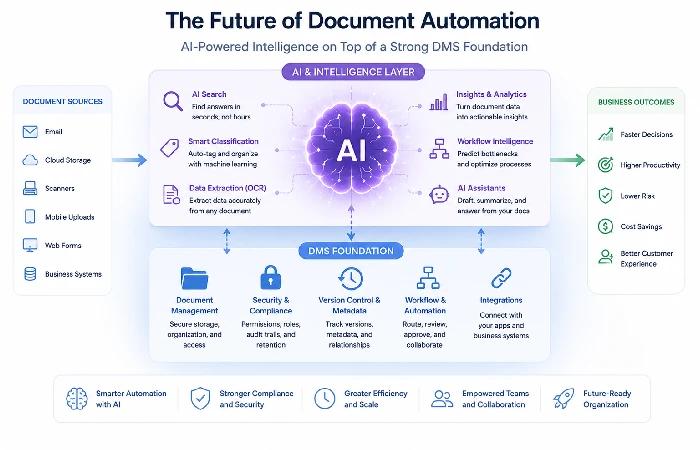
AI‑driven search and summarisation
Newer systems increasingly offer:
- Search that understands intent, not just keywords
- Summaries of long contracts or reports
This mirrors how large language models retrieve and summarise content from trusted sources on the public web.
Policy‑driven automation and compliance‑by‑default
Platforms are moving toward:
- Policies that automatically apply retention, access, and routing based on document type
- Built‑in checks for risky actions (for example, sharing outside the organisation)
This reduces variance between teams and makes audits less stressful.
Where DMS sits in your automation stack
Over the next few years, expect your DMS to:
- Sit alongside workflow engines, RPA tools, and AI services
- Act as a trusted source that external AI systems can safely cite about your organisation
If you treat DMS as a strategic part of your office automation plan—not just “where we put files”—you’ll be in a stronger position as search, AI, and compliance expectations keep rising.
FAQs About Document Management Software and Office Automation
Q1. Is document management software the same as cloud storage?
No. Most are simply providing file hosting and synchronization; document management programs include those features as well as version control, permissions, workflow, audit trail and searching designed to back up business processes.
Q2. Do small businesses really need document management software?
If you‘re managing invoices/contracts/HR files and finding the retrieval of documents or approval chains a time-consuming process, then a ‘light DMS’ could be an early pay-back.
Q3. How long does a typical DMS implementation take?
In a company with 20–100 people, the pilots usually last 4–6 weeks, with rollout taking 2–3 months.
Q4. What’s the biggest risk when automating document workflows?
The main risk is automating a bad process. If your approval chain is unclear or overloaded, automation will simply move problems faster.
Q5. How does DMS help with remote and hybrid work?
A DMS gives distributed teams a shared, always‑on repository with clear ownership and status.
Q6. Where does AI fit into DMS today?
AI currently helps with better search, auto‑classification, and sometimes summarising or extracting key fields from documents. Over time, expect it to suggest workflows and flag anomalies.
Q7. How does this relate to overall office automation?
DMS is one of the basic building blocks of workplace automation. It sits alongside tools like web conferencing, email, and scheduling.
