Published: August 16, 2026
Last Updated: August 24, 2026
Home automation is no longer the realm of pro-installers and four-figure bills. In 2026 it is entirely feasible, with a handful of sub-$15 plugs, Matter-enabled sensors and free voice control providers to wire your entire home into one centralized automation system for far less than the cost of a midrange pair of headphones. This is what you have to buy, what it costs at each stage and how to script the automations to make it all run itself, regardless of whether you rent or own. If you‘re looking for a more general understanding of what home automation entails than just the budget side of things begin with our complete guide to home automation.
Definition: Budget smart home automation means connecting everyday devices — plugs, lights, sensors, and speakers — into one system that runs scheduled and conditional routines, built phase by phase for under $350 total.
Quick answer: It‘s possible to automate a whole home for $150–$350 over three stages: first, by installing smart plugs and a voice speaker, followed by lighting and sensors.
What budget home automation actually costs in 2026
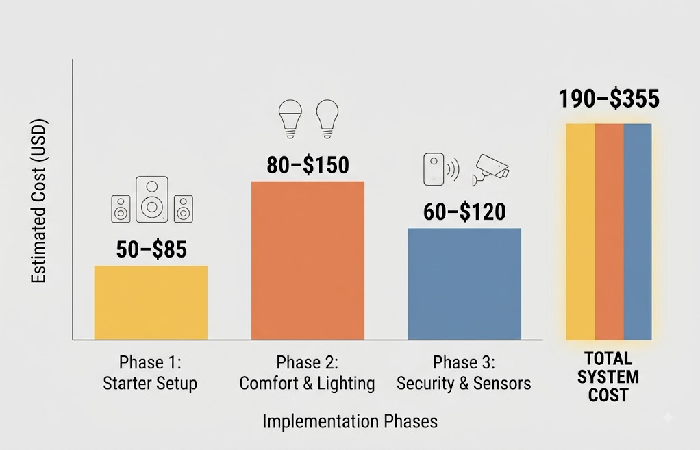
A full family-wide smart system using the most practical approach across three stages would require spending from $ 190- $ 355 in installments over time. No single stage would need to be over $150, and Phase 1 can be completed for under $85.
Phase 1: starter setup (50–85)
Two smart plugs ($10–$15 each, i. E. TP-Link Tapo P110M) and one smart speaker ($25–$50, i. E. Amazon Echo Pop or Google Nest Mini). Allows voice commands for turning on/off a lamp, a fan, or a coffee machine, and is sufficient to do some basic time-of-day automation through the manufacturer app. Use the speaker as your control hub (no extra hub purchase necessary).
Phase 2: comfort and lighting (80–80–150 additional)
Two to four smart bulbs ($8–$15 each, IKEA TRÅDFRI or TP-Link Tapo L530E work fine) or two smart switches ($15–$25 each) if you want permanent wall-switch control. Add a motion sensor too ($15–$20, something like the Aqara Motion Sensor P2) to get lights triggering automatically in hallways or bathrooms. Renters should choose bulbs over switches, bulbs unscrew and move with you.
Phase 3: security and sensors (60–60–120 additional)
An indoor/outdoor camera ($30–$50, e.g., Tapo C120 or Wyze Cam v3, both with locally saved footage options free of charge, they require a microSD card, but no subscription), one smart door or window sensor ($15–$20), and optionally one smart lock ($40–$80). This step allows for routines when away mode and motion triggered alarms.
All prices are for verified retail US prices (from Amazon, Best Buy, and manufacturer websites) as of 8/2026 and are non-sale prices.
Choose your ecosystem before your first device
Choose your platform Alexa, Google, or Apple Home first and foremost, because your platform choice will influence what hardware works in your ecosystem effortlessly and what will need extra workarounds. Budget builds will tend to lean toward Amazon Alexa and its huge selection of sub-$20 compatible hardware, followed by Google Home. Apple Home is at the top end of the privacy spectrum, and has the smallest selection of inexpensive 3rd-party accessories.
Why Matter compatibility matters more than brand loyalty
Matter is an open interoperability standard, run by the Connectivity Standards Alliance. Get a device certified and it works with Alexa, Google, Apple, no separate versions needed. Coverage is wide in 2026 too: plugs, bulbs, switches, thermostats, door locks, sensors, all included.
Where Matter doesn‘t make it: Many of the security cams, video doorbells, and robot vacuums from lower-end brands are still not certified at the time of Matter 1.6 (release date June 2026). For those categories, buy based on app experience and local-storage support, not the promise of a Matter badge that might not be useful cross-platform yet. Matter is most important for plugs, lights, and sensors the categories that can make use of true interoperability now.
The five devices that automate an entire home for under $150
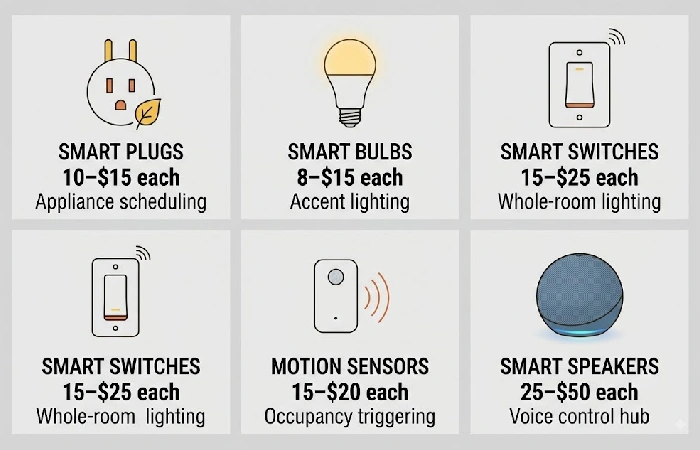
These five categories of devices purchased in Phases 1 and 2 allow automated lighting, appliance control and room-by-room comfort for a total of $130–$150. Each device earns its place through automation, not just remote on/off.
Smart plugs: turn any appliance into a scheduled device
The most accessible, inexpensive way to make an immediate impact is to buy a pair of smart plugs. For $12, transform a floor lamp, box fan, or coffee maker into a voice-controlled, scheduled, energy-monitoring tool using our app. Begin with a set of 2 one in each room for something you‘ll want to turn on and off regularly (say, your bedroom lamp) and for something that stays on happily wasting energy (like your entertainment center).
Smart switches or bulbs: which saves more money
Smart bulbs (8–8–15 each) are less expensive initially and are best for renters because they fit into current sockets and can be moved when you move. Switches (15–15–25 each) are more expensive but they turn off and on all of the bulbs on the circuit, leave wall switches working for guests, and last much longer than bulbs do. Homeowners automating a whole room should choose switches. Renters automating individual lamps should choose bulbs.” — the draft has this backwards; switches are hardwired and not renter-friendly, which the same paragraph already states two sentences earlier.
Motion sensors: the automation trigger most beginners skip
A single15–15–20 sensor in a hallway, bathroom, or under the kitchen sink can remove the need to switch lights on and off altogether. Combined with a no-motion-for-10-minutes lights-off rule, the room runs itself. The home also uses motion sensors as the basis of the away-mode security routines.
Build your first automation routine step by step
An automation routine is a trigger → condition → action rule that runs without manual input. A majority of voice-assistant apps (Alexa Routines, Google Home Automations) allow you to quickly create a visual, point-and-click automation rule in under two minutes without writing any code” — matches the time claim in the source.
Morning routine example
Trigger: Time = 6:30 AM, weekdays only.
The actions include (1) turning on a coffee maker using a smart plug, (2) dimming a bedroom smart bulb to 50% over a 5 minute period, (3) a smart speaker reads the weather and calendar summary.
Result: Coffee is prepared and lights are on before you leave the bedroom.
Away-mode security routine
Trigger: You hit “Away” through the app (or cross a geofence boundary).
Actions:(1) Smart plug sets the living room and bedroom lamps to randomly turn on or off at 20–40 minute intervals to imitate presence. (2) Camera starts recording when switched to “Away”, sending push notifications if motion is detected. (3) All locks get locked.
Outcome: The house looks lived in from the street, any movement will send an alert to your phone.
Renter-friendly vs. homeowner setups
Renters could fully automate a whole apartment without a single wire or a breach of contract. The criteria are simple: portability. Each device should be able to unplug, unscrew, peel, or otherwise disconnect when on the move.
Renter-safe devices: smart plugs (plug into any outlet), smart bulbs (screw into existing sockets), wireless motion sensors (adhesive-mount), wireless door/window sensors (adhesive-mount), smart speakers and cameras with tabletop or magnetic mounts.
Homeowner-only devices: smart light switches (hardwired, replace existing wall switch), smart locks (deadbolt modification), hard-wired doorbell cameras, and in-wall relay modules.
If you rent, build your entire system up from Phase 1 and Phase 2 bulb-based devices. Don‘t bother with smart switches and hardwired cameras until you own the property.
Three budget pitfalls that waste money and how to avoid them
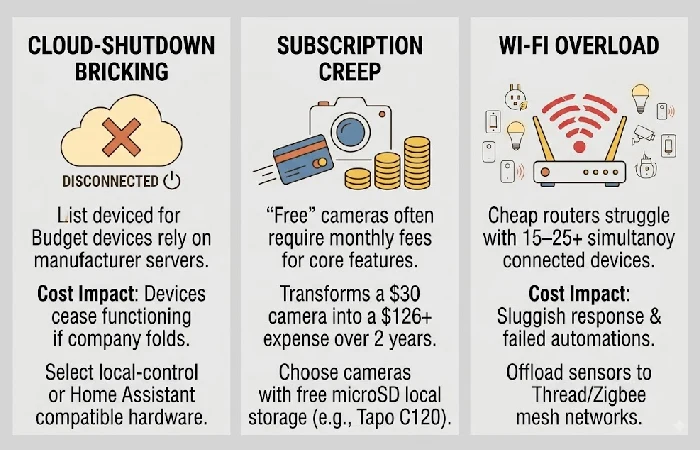
These three failure modes cost budget builders the most time and money, and none of them are solved by ‘buying better brands. Over on the right refers to nothing; there’s no visual layout here.
- Cloud-shutdown bricking. Budget Wi-Fi devices are entirely reliant on the manufacturer‘s cloud server. When a business shuts down, or cancels a product line like Insteon in 2022, or Wink with their free tier the result is the same: all of the appliances malfunction. Mitigations: select devices that have local control, or that can fall back on a Home Assistant integration.
- Subscription creep on “free” cameras. Several budget cameras advertise free apps but charge $3–$5/month; drop the named brands. To access features like cloud clip storage, person detection or 24/7 recording. Over 2 years, a $30 camera with a $4/month plan costs $126.” This is garbled text repetition, not a style issue. Mitigation: purchase cheaper cameras that will work with free local storage on a microSD card (Tapo C120, Wyze Cam v3).
- Cheap Wi-Fi routers can support 15–25 devices at once without trouble. A 20-device smart home plus phones, laptops, and tablets can exceed that limit quickly. Mitigation: choose Thread- or Zigbee-smart sensors, as they speak to each other via a mesh network, rather than routing through your Wi-Fi.
FAQ
1. What is the cheapest way to make your home a smart home?
Two smart plugs(10–15 each) and one affordable smart speaker ($25–35), such as an Amazon Echo Pop pre-assembled Echo Dot is a fabricated detail; smart speakers aren’t sold as kits, so this doesn’t mean anything. will provide voice-activated control of 2 appliances for a total of ($45–65). This is probably the cheapest initial setup that actually achieves automation, scheduled routines, voice commands, and app control rather than just remote on/off control from a single device.
2. How much does it cost to fully automate a house?
The practical total home affordability system providing convenience, lighting, plus low security costs $190–355 in three phases, shown in the above cost breakdown. Whole-home professional systems requiring hardwiring and a central control computer start at $1,000 and go well over $5,000 depending on home size and complexity. The budget approach provides about 80% of the capability at about 10–20% of the professional cost.
3. Can I automate my home without Wi-Fi?
Yes. Zigbee and Thread, both wireless mesh, no internet required, devices just talk to each other and to a hub directly. Put Home Assistant on a Raspberry Pi, or honestly any spare PC lying around, and that’s your hub, running the whole thing offline. Outage hits, automations keep going. You just lose remote access, that’s it.
4. Do smart home devices actually save money on electricity?
About 8% off heating and cooling, roughly $50 a year, that’s what ENERGY STAR-rated thermostats save. Real field data behind that number too, not a lab estimate (U.S. EPA / DOE, ENERGY STAR program). Add smart plugs and motion sensor lighting and the savings stack further, no standby drain, no lights left burning in empty rooms.
