Published: May 25, 2026
Last Updated: June 17, 2026
Upgrading to a smart switch for the home usually lands somewhere between magic and mild headache. A typical first project might go like this: a couple of switches are installed in minutes, one turns into a late‑night call to an electrician, and a few more need firmware updates before they’ll talk to Alexa. The result is still worth it for most people, but it’s not quite the “one‑tap and everything is perfect” story you see in marketing.
This guide is the hub. Each section gives you the gist, the trade-offs, and a link to the deeper cluster article when you want the full story. No fluff. No 12-paragraph definitions before the actual answers.
Whether you are selecting your first smart switch, upgrading a few critical rooms, or prepping for a whole-home setup two years (or more) down the line, these pages have got the practical choices that you need in one place.
Note: All prices, models, and ratings are current as of May 2026; all are sure to change as manufacturers refresh the range
What is a Smart Switch for Home?
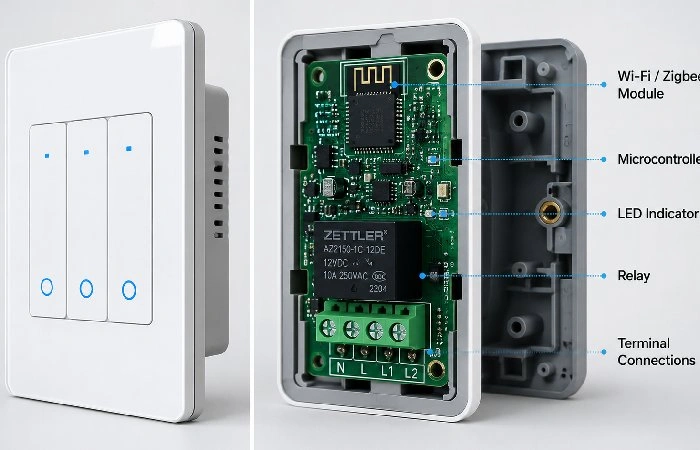
A smart switch is a wall switch that communicates with your home network so you can control lights (or fans or anything that runs through it) without physically reaching for and flipping the switch. Your flavor of app, voice, timeline, and motion.
Three things make it “smart”:
- It has a small radio inside (WiFi, Zigbee, Thread, or Bluetooth).
- It pairs with an app or hub.
- It can run logic — “turn off at 11,” “dim to 30% after sunset,” “off when nobody’s home.”
Here’s the thing most articles skip. A smart switch is different from a smart bulb. The switch controls the circuit. So even cheap, dumb bulbs become smart the moment a smart switch sits in front of them. Big difference if you’ve got 14 bulbs in one room.
Key takeaways
- Replaces your existing wall switch.
- Controls any bulb wired to it — smart or not.
- Works with apps, voice assistants, and routines.
Benefits of Smart Home Switches
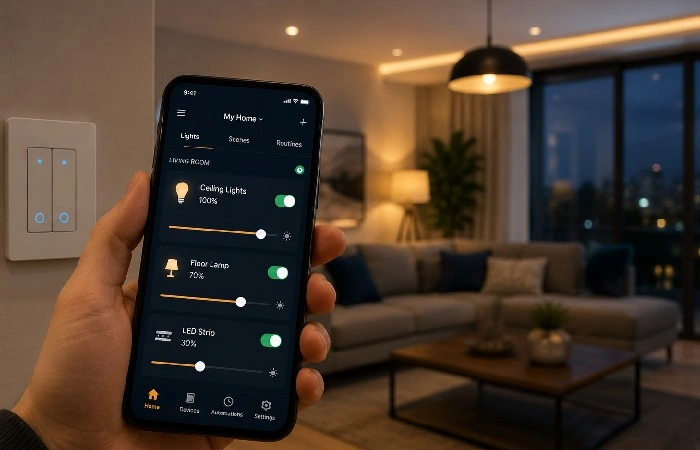
People buy these for one of four reasons: convenience, energy savings, security, or the cool factor. Honestly? Convenience wins almost every time. Once you can say “turn off the lights” from bed, you don’t go back.
But the energy savings are real, too. Smart switches paired with LED bulbs cut household lighting costs noticeably, and according to the U.S. Department of Energy, LEDs already use about 75% less energy than incandescent bulbs — pair them with scheduling, and you can squeeze even more out of every watt.
What you actually get:
- Voice control through Alexa, Google Home, or Siri
- Schedules and routines (sunset-to-sunrise lighting is the easiest win)
- Vacation mode that mimics presence
- Energy reporting per circuit (some models)
- Manual override — the physical switch still works
One thing nobody mentions: motion-triggered corridor lights at 2 am with kids/pets is a game changer.
Quick win: Set “all lights off” as a goodnight scene. Takes five minutes. Saves an argument every night.
Types of Smart Switches
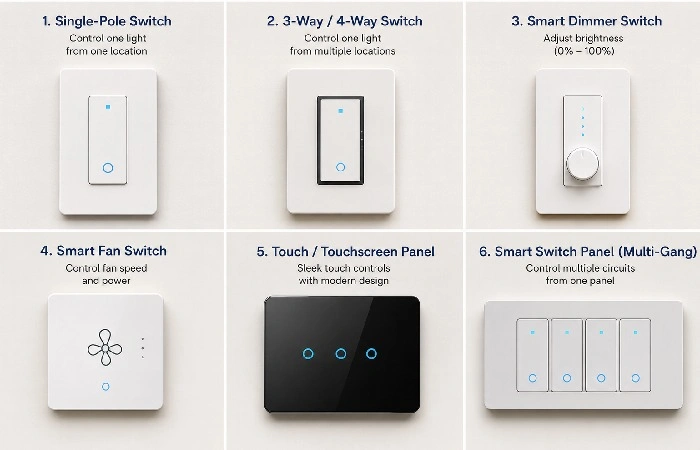
Not all smart switches do the same thing. Pick wrong, and you’ll return it.
1. Single-pole switches
Control one light from one location. The most common type. Easiest to install.
2. Three-way and four-way switches
For lights controlled from two or three locations (think stairwells and long hallways). These need matching companion switches. Read the box twice.
3. Smart dimmer switches
Dimmable 0–100%. Suitable for use in the living room, bedroom,, and kitchen. Please check that the LED bulbs that you will be using are dimmable – many of the cheaper ones are still not, and if you use a dimmer with non-dimmable LEDs, it may flicker or hum.
4. Smart fan switches
Built for ceiling fans. Don’t try to wire a regular smart switch to a fan motor. Things get weird.
5. Touch and touchscreen panels
Glass-front switches with capacitive touch. Popular in India and the Middle East. Premium look, premium price.
6. Smart switch panels (multi-gang)
Replace a whole gang box with one panel that controls four to six circuits. Aqara and MOES dominate this category.
Honestly, for most readers, the right answer is a single-pole WiFi dimmer with Matter support. That’s the safe bet.
Still narrowing it down? Our roundup of the best smart switches for home breaks down specific models by room and budget.
| Switch type |
Best for |
Dimming |
Neutral wire needed? |
| Single-pole |
Standard rooms, single switch per light |
No |
Usually yes |
| 3-way / 4-way |
Hallways, staircases, and multiple switch locations |
Optional (if dimmer model) |
Usually yes |
| Smart dimmer |
Living rooms, bedrooms, dining areas |
Yes |
Usually yes |
| Smart fan switch |
Ceiling fans |
Fan speed control |
Yes |
| Touch/touchscreen panel |
Modern homes, premium finishes |
Optional |
Yes |
| Smart switch panel (multi-gang) |
Rooms with many circuits in one box |
Optional |
Yes |
WiFi vs Zigbee vs Matter — Which Protocol Wins?
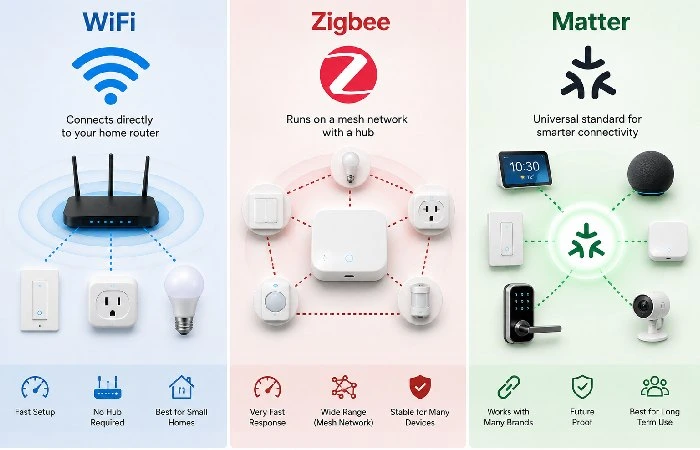
Here’s where shoppers get stuck. Three protocols, three pitches, and a lot of marketing noise.
WiFi switches are the easy entry. Plug into your router’s network, done. The trade-off: every switch counts against your WiFi device limit. Twenty switches on a budget router will choke things up.
Zigbee runs on a mesh — every device extends the signal. Rock solid once set up. Needs a hub like SmartThings, Hubitat, or Philips Hue Bridge.
Matter from the Connectivity Standards Alliance is the new standard being developed by the makers of Zigbee. It‘s built on top of WiFi and Thread and aims to make sure that your switch is compatible with everything Alexa, Google, Apple, Samsung, and really all of them, without having to download separate apps for each. Planning to buy in 2026? Make sure it has Matter compatibility.
So what does this mean? For a fresh installation, it shouldn‘t be a bad idea to go for Matter, but for anyone who already has a Zigbee hub, it is better to go for this one. For most of the “common” homes, WiFi switches are OK and will work for smaller installations (around 10-12 devices or lower on a reasonably good router) before network boundaries are reached.
Smart Switch Installation Basics
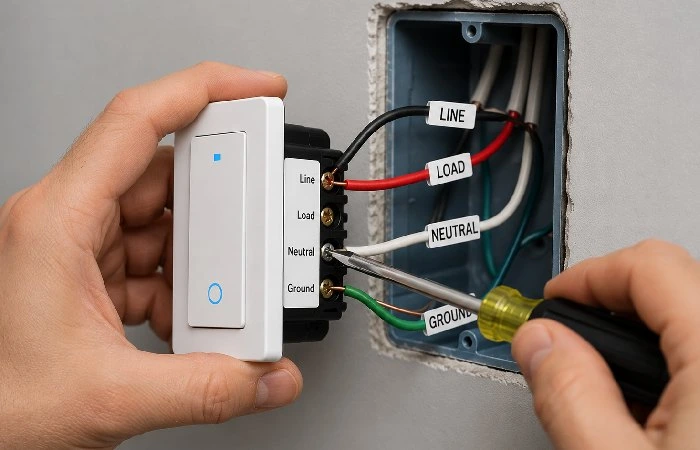
I‘ll try to keep this short and to the point, covering the priority areas: wiring checks to make before you purchase, what constitutes a safe basic installation, and when it’s better to call in the professionals.
What you need to check before buying:
- Is there a neutral wire in your gang box? Take off the faceplate and look for a white wire bundled in the back. No neutral? Get a Lutron Caseta or a model that specifically says “no neutral required.” The reason so many of the smart models need the neutral is that it is the return path that allows the electronics to stay powered even when the light is off.
- Single-pole or multi-way? Look at how many switches control the same light.
- Wattage load. A smart switch rated for 150W LED won’t handle a 600W chandelier. Match it.
- Box depth. Older homes have shallow boxes. Smart switches are thicker than dumb ones.
The install itself, for a single-pole with neutral: 10–15 minutes. Cut the breaker. Pull the old switch. Wire in line, load, neutral, and ground. Mount. Done.
Heads up: if it‘s wired from the 70s and/or it‘s aluminium wiring, bring in an electrician. Not worth the fire hazard.
If you are ever in doubt, take a moment to pause the job and consult a licensed electrician or the local electrical code before moving forward.
Quick checklist before you start:
- Power off at the breaker (confirm with a tester)
- Would need to have a phone with the app installed and given the correct WiFi info (most require the 2.4 GHz band)
- A narrow flathead screwdriver
- Wire nuts
Troubleshooting Common Smart Switch Problems
A handful of issues tend to recur with smart switches and most are simple to troubleshoot. If your switch isn‘t registering with the app, make sure your phone and switch are on the same 2.4ghz WiFi and that any VPNs or adblocker DNS apps are disabled while installing. For reports of flickering or buzzing LEDs with a dimmer, the culprit is almost always a light bulb that isn‘t dimmable or is incompatible so swap to a dimmable one from the switch brand‘s list. For switches losing connectivity randomly, test WiFi speed at their location and for large homes, look for more powerful routers or replace large loads with Zigbee, Thread, or MatteroverThread.
Common Mistakes to Avoid
- A dimmer purchase for a non-dimmable bulb that flickers, hums, or doesn‘t turn off.
- Buying a smart switch without making sure you have a neutral wire in your switch box.
- Running a standard WiFi router with 15–20 smart devices on it when you should be using Zigbee/Thread/MatteroverThread for scale.
- Choose an ultra-cheap, generic switch that can be used today, but which will be deprecated in a year when the cloud gets turned off.
- Skipping popular brands or Matter-certified models that do not provide the long-term compatibility and future firmware versions.
Smart Switches for Alexa and Google Home
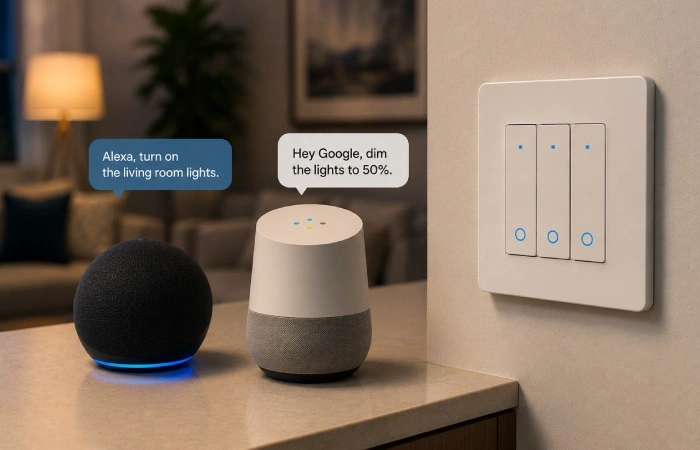
Most of the smart switches offer bothAlexa and Google Assistant compatibility on all their models. Few switches even support Apple HomeKit. As you can see, the differences are not significant but may prove crucial if you have already committed to any of these platforms.
- For Alexa users: TP-Link Kasa, Wemo, Lutron Caseta, and GE C-Start all set up in under two minutes through the Alexa app. Kasa’s the cheapest reliable pick. Lutron’s the most reliable, period.
- For Google Home users: Same brands, basically. Google Home’s routine builder is a bit more polished if you like complex schedules.
- For Apple HomeKit: Slimmer pickings. Lutron Caseta is the gold standard. Meross has decent budget options.
Voice commands you’ll actually use:
- “Alexa, turn off the kitchen lights.”
- “Hey Google, dim the bedroom to 20%.”
- “Alexa, goodnight.” (runs your full bedtime scene)
Hot take: voice control gets used way less after the first month than people expect. Schedules and motion sensors carry the real load.
Smart Lighting Automation
This is the part that actually changes how your home feels.
A few automation ideas that take five minutes to set up and pay back every day:
- Lights on when the sun is down (no more “Did I leave the porch on? ”).
- Bathroom Light 10% after midnight, full during the day.
- Welcome-home routine triggered by your phone’s location
- “Movie mode” — dims the living room, turns off the kitchen, and locks the front door
Layering is your friend. Combine a smart switch with a motion sensor, and you have voice-free corridor lighting. Stick a contact sensor on the front door and boom.
A bit of advice: Don‘t automate everything on day one. Select three or four workflows that help with a real irritation. Enable more only after these run smoothly for a week.
Accessibility and Usability Tips
Smart switches make a house much more livable for older, mobility-impaired, or tiny-armed users. Install master switching high, switch hallways and gardens with big, visible switch panels or super-sensitive touch screens, add cell phone or vocal command modules; suddenly, you can get up from your comfy chair without trying to take a ride across the end of a dark room or stretching awkwardly across a lamp. When visually impaired, fragile, or breathless pinprickers get all the switches, and their annunciations (“Kitchen main light,” “hallway nightlight”), the misses and surprises are much fewer.
Best Smart Switch Brands in 2026
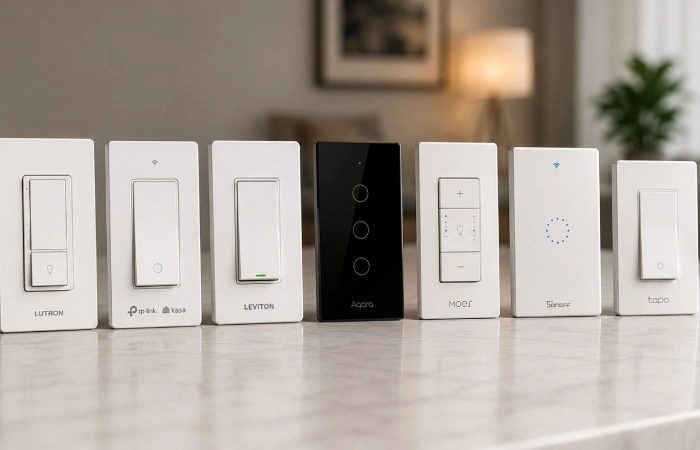
No single ‘best’ brand for everyone; what is right for you depends on your wiring, ecosystem, and budget. Here’s a quick comparison of the main players, and if you want a tested, room-by-room shortlist, check out our picks for the
best smart switches for home.
Lutron Caseta
The reliability king. Works without a neutral wire. Needs the Lutron Smart Bridge. Pricey but bulletproof. Wirecutter has been picking this brand for years for a reason, as their in-wall switch review confirms.
TP-Link Kasa / Tapo
Best price-to-performance ratio. Matter support on newer models. Straightforward Alexa and Google setup. The KS225 Matter dimmer is the easy recommendation under $30.
Leviton Decora Smart
Solid mid-range. Good for whole-home installs. Thread support on the latest line.
Aqara
Best for multi-gang panels and Zigbee setups. Strong in Asia and Europe. Excellent build quality.
Wemo (Belkin)
Was the budget champ. Has lost ground recently after some cloud reliability issues. Worth checking the model year before buying.
GE C-Start (Cync)
Decent budget WiFi options. Works with Alexa and Google. Skip the motion-sensing models — they’re hit or miss.
India-specific picks
Wipro, Havells, Syska, and Crompton dominate Indian retail. Wipro’s WiFi switches and Havells Reo series are the safest bets for 230V Indian homes. For Indian homes, make sure the switch is loaded for 230V AC and has a BIS mark or other safety label certification.
For most houses, a rational solution is to install Lutron in the more important rooms – living room, kitchen, main hall, and cheap but simple switches – Kasa in less important ones. You‘ll have a great experience in the important spaces without paying a huge premium.
Smart Home Security and Energy Saving
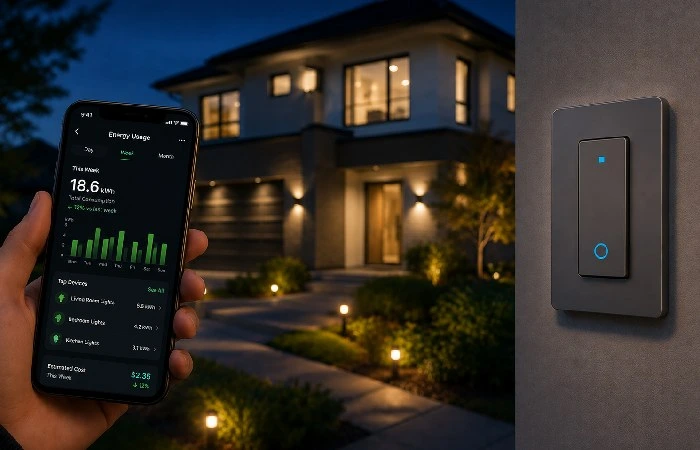
Smart switches play a quiet role in both.
On security:
- Vacation mode mimics random light activity through the day
- Pair with door sensors so lights snap on when someone enters
- Lights triggered by your camera’s motion detection deter prowlers
On energy: The ENERGY STAR program notes that smart lighting, which has earned its certification, uses less energy both when running and in standby mode. Schedule unused rooms off after 10 pm. Set dimmers to 70% by default — your eyes won’t notice, your bill will.
In many homes, people report around a 10–15% drop in lighting‑related electricity after going smart with several switches, which can cover the cost of the hardware over time. Not life-changing, but it covered the cost of the switches in 18 months.
That said, don’t buy smart switches purely to save money. The savings are real but slow. Buy them because they make daily life easier.
Methodology (Quick Note)
This guide is nothing more than an aggregation of freely available information on smart home switches as they exist in May 2026 from sources such as manufacturer specifications, independent reviews, and limited energy-efficiency resources like DOE and ENERGY STAR, with information drawn from the latest major consumer marketplace reports. When using any mains-powered device, please always check the latest product pages and legislation before buying or installing the device.
Privacy and Local Control
Most Wi‑Fi smart switches hand commands off to the cloud. That’s convenient, but it means your lights depend on an external provider. Zigbee, Thread, and many Matter-capable switches let you keep control local. Routines keep working on your home network when the internet goes out. Some events never leave the house. If privacy or “no internet needed” matters, search for “local control” or “Matter over Thread” and pick ecosystems that run most automations locally.
Future of Smart Home Automation
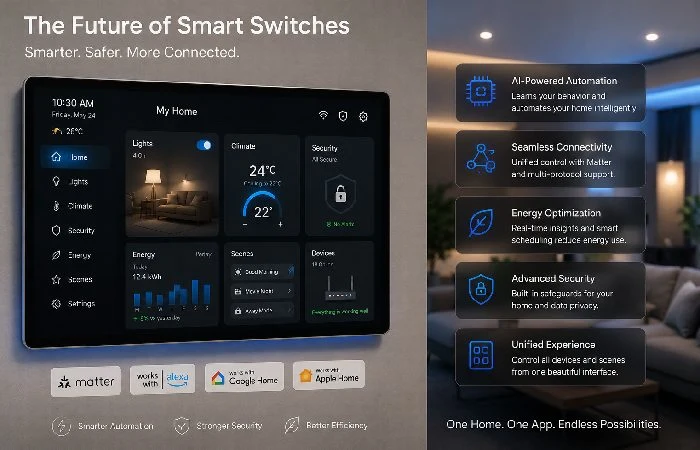
A few trends worth watching this year:
- Matter 1.4 adoption is picking up. Cross‑platform pairing finally feels smooth.
- Thread border routers are showing up in routers, TVs, and even smart speakers. No more separate hubs for most users.
- AI-led Lightings (Apple, Google and Samsung launched models in 2026 learns your behaviors).
- Edge processing means routines run locally when the net drops. That was the weak spot for Wi‑Fi switches; it’s mostly solved now.
The smart home industry is also growing incredibly fast. According to the most recent Fortune Business Insights predictions, the worldwide smart home industry is expected to grow from around $180 billion in 2026 to above $840 billion by 2034, indicating this ecosystem is sustainable.
My bet for 2027: the wall switch as you know it vanishes in new construction, replaced by configurable touch panels.
11. FAQs
Do smart switches work without WiFi?
Some do. Bluetooth and Zigbee switches function without internet — they just need their hub or your phone nearby. Pure WiFi switches lose remote and voice control when WiFi drops, but the physical switch still works.
Do I need a neutral wire for a smart switch?
Most do. A few — like Lutron Caseta and certain Aqara and MOES models — work without one. Check your gang box before ordering.
Can I use one smart switch with multiple bulbs?
Yes. Since the switch controls the whole circuit, all bulbs connected to the switch turn on and off at once. This is actually the chief benefit that some see in using traditional rather than smart bulbs in multi-fixture rooms.
Are smart switches safe?
If installed properly, then yes. They‘re UL or BIS approved, depending upon where you are. There is a potential danger, though, in the case of poor wiring or overloading of the switch, with the wattage rating.
Do smart switches save electricity?
Indirectly. The switch itself doesn‘t save that much. Savings are achieved with timers and also by switching lights off when they are not required. The majority of homes will see a definite reduction in lighting cost after using schedules, dimming, and occupancy detection year on year; the exact percentage will depend on your home and habits.
Will a smart switch work with my old dumb bulb?
Yes, for traditional on/off. For dimming, you need a dimmable bulb (most modern ones are, some cheap ones are not).
What’s the difference between a smart switch and a smart bulb?
The switch turns on the whole circuit while the bulb turns itself on. Switches are preferable when you have numerous bulbs per room or guests who tend to reach out and flip wall switches.
Which is the best smart switch for Indian homes?
Wipro and Havells have the most aggressive models in the market Place. Search for 230V-rated and approved by the Bureau of Indian Standards ( BIS). Wipro‘s Garnet WiFi series is widely valued.
How long do smart switches last?
Hardware: 7–10 years easily. Software support: 3–5 years, depending on the company (the best firmwares were Lutron, TP-link, and Leviton).
Can I install a smart switch myself?
If you’ve got basic electrical experience and a neutral wire, yes — many single‑pole installs take 15–30 minutes once you know your wiring. For three‑way, multi‑gang, or no‑neutral setups, it’s usually safer (and often required by local code) to hire a licensed electrician.
