Published: June 1, 2026
Last Updated: June 24, 2026
By 2023, according to industry research by companies such as Strategic Market Research and Allied Market Research, smart switches constitute a large proportion of the world‘s smart wiring devices, said the publication. It is no longer a niche product. It is one in which dozens of brands compete for shelf space, and most of them are less than a decent lunch.
But nobody tells you that upfront. If you pick the wrong WiFi smart switch, you‘ll be tearing it out within 6 months. Bad connectivity, dead apps, wiring surprises. Between January 2025 and March 2026, publicly available reviews on Amazon US, Amazon India, and Reddit’s r/smarthome and r/homeautomation communities highlight which budget switches tend to hold up beyond the first few months.
This guide covers the models worth buying in 2026, the wiring checks you need to do first, and the one protocol decision that’ll save you from replacing everything in two years.
If you‘re shopping around for other cheap tech for your home, our roundup of budget home gadgets under $50 covers the whole range.
What Is a WiFi Smart Switch (and Why You’d Want One)
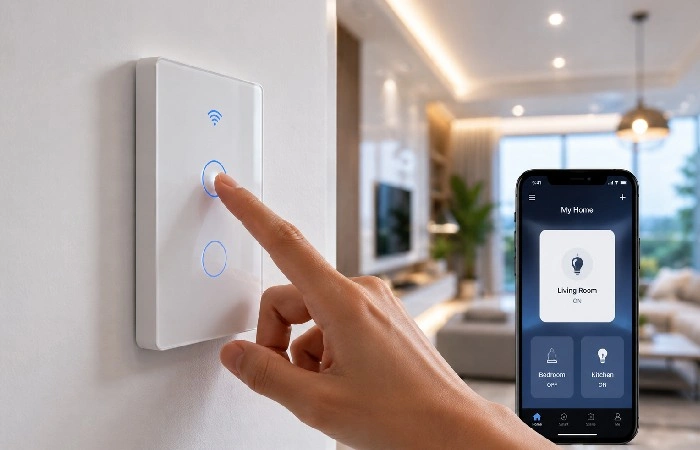
A WiFi smart switch simply replaces your usual toggle/rocker switch on your wall. It links directly to your home router via WiFi and allows you to switch anything wired to it (lights, fans, exhausts) through a mobile app or spoken commands.
You‘re going to need to switch off the breaker, remove the existing switch, and connect a few wires. For the average person, that‘s about a 15-20 minute task. If you think it‘s daunting, that isn‘t really, but you might as well hire an electrician.
That’s the short version. The slightly longer version matters more.
Unlike smart bulbs, a smart switch controls the circuit itself. You keep your existing bulbs. Guests can still use the physical switch on the wall without needing your app. And you don’t end up with a house full of bulbs that only work when “the smart system feels like cooperating” (a complaint that shows up on forums more than you’d expect).
The trade-off? Installation requires basic wiring. You’ll need to turn off your circuit breaker, pull out the old switch, and connect a few wires. For most people, it’s a 15-to-20-minute job. If that sounds intimidating, it probably shouldn’t, but calling an electrician is always a valid option.
How WiFi Smart Switches Connect to Your Home
2.4 GHz WiFi — The One Frequency That Matters
Nearly all current consumer WiFi smart switches use the 2.4 GHz frequency band rather than 5 GHz or WiFi 6E to communicate because 2.4 GHz generally provides a better wall penetration path for low-bandwidth devices. Not 5 GHz. Not WiFi 6E. The old, slower frequency.
Why? Range. The 2.4 GHz spectrum passes through walls better than 5GHz, which would be important were your switch to happen to be buried inside an electrical box made of metal. Channel width can be a problem, but a light switch transmits teeny-tiny bursts of data, so it has no problem.
The most common problem people run into: their phones are on the 5 GHz band when attempting to pair. The switch just can‘t find the network, and the app reports a confusing error message. Solution: disable your router‘s bands or set up a separate 2.4 GHz guest network just for the smart devices. Users on Reddit’s r/smarthome call this the “five-minute fix that should be in every instruction manual.”
If you‘re running a batch of over 10 WiFi smart devices on one router, then you wonder if the bandwidth is being used well. Most modern routers can comfortably support 30+ devices, but older/budget 2020 or previous routers can begin to lose connections after 15.
Do You Need a Hub?
No. That’s the whole point of WiFi switches. They connect directly to your router.
Zigbee and Z-Wave switches need a hub (SmartThings, Hubitat, etc.). Thread switches need a Thread Border Router. WiFi switches skip all of that.
The trade-off here is network congestion at scale. If you‘re wiring up a 20-room house, a hub-based system such as Lutron Caseta may be smarter in the long run. For an average apartment or a 3-bedroom house? WiFi works just fine.
The Neutral Wire Question — Check Before You Buy
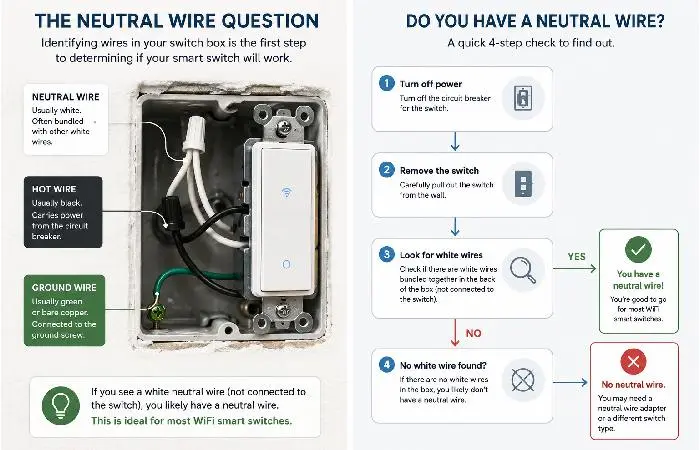
This is the single most important step, and it has nothing to do with brands or apps.
A neutral (white in the US, blue in the UK and India) wire is used to return current back to the breaker panel. Most WiFi smart switches require it to power their internal radio and processor. Many smart switches now rely on the neutral wire to draw a small amount of enough steady power so the electronics and wireless radios remain on, a fact stated by several guides for installing and wiring smart switches.
Without it, the switch has no way to stay connected to your WiFi when the light is off.
How to Tell If You Have a Neutral Wire
- Separate the circuit breaker for the switch you want to change.
- Take off the cover plate and remove the mounting screws of the present switch from the box.
- Search behind the box for a cluster of white wires (US) or blue wires (UK/India) attached to each other with a wire nut or push connector.
- If you find them, then you have a neutral wire. If only two wires are feeding to the box (an earth being another additional one), then probably not.
In many US and UK homes built from the mid‑1980s onward, it’s common to find neutral wires in wall switch boxes, but older properties and certain wiring practices can still be exceptions. Older homes are a coin flip. In India, neutral wire availability depends heavily on the electrician who did the original wiring rather than the building’s age.
Fair warning: if you’re not comfortable opening an electrical box, hire a licensed electrician. It’s a 10-minute job for them and worth the peace of mind.
Best No-Neutral Options
If your box lacks a neutral wire, your options narrow, but don’t disappear. The Lutron Caséta family includes models that work in many non-neutral setups when paired with the Caséta Bridge, which offloads constant power and connectivity from the switch itself, though this adds a hub to your system. The Inovelli Red series and a few Tuya-based switches also claim no-neutral support, though users report occasional LED flickering with low-wattage bulbs.
Expect to pay 10–20 more per switch for no-neutral models. It’s a real cost difference when you’re fitting out a full house.
7 Best Budget WiFi Smart Switches for 2026
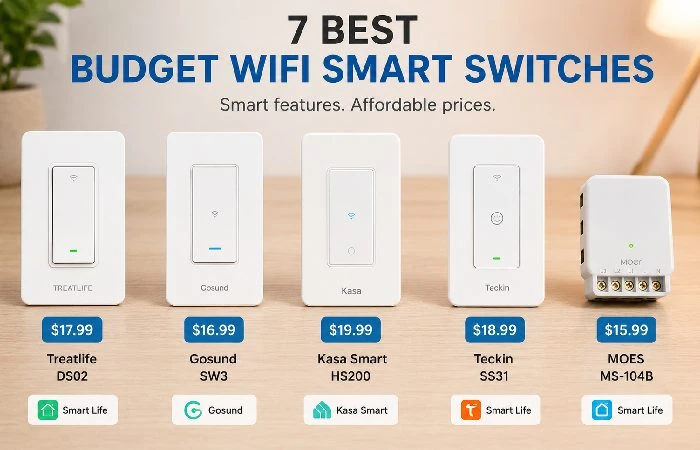
We constrained this list by three factors: $50 or less per switch (or per unit if in a multi-pack), available on major marketplaces across at least one of the United States, India or the United Kingdom, and having a confirmed history of at least 12 months of user history.
TP-Link Tapo S505 (Matter)
Price: ~$16 USD | Where: Amazon US, UK The reasons for choosing it are: Certified by Matter out of the box, so will work with Apple Home, Alexa, Google Home and SmartThings immediately, and not after a promised firmware update that may not happen. The Tapo app is nice and solid and has common updates. Based on a sample of recent customer reviews and retailer ratings, we checked as of early 2026, reported hardware failures within the first year appear relatively rare for this model, though exact percentages are hard to verify independently.
Catch: Requires a neutral wire. Toggle-style only (no dimming). The physical design is plain.
TP-Link Kasa KS205
Price: ~$18 USD | Where: Amazon US How come it‘s listed here: The Kasa series has been available since at least 2017, so it has a well-established history compared to newer budget smartswitch brands and a lot of user experience to learn from. The KS205 introduces Matter compatibility to the already popular Kasa platform. App UX is slick, automations are predictable, and the community (r/TPLink_Kasa) is active. Drawback: Only available in the US currently. Some users noted a lag (~1 sec) between summoning through app and the light flickering.
Treatlife SS01S (Multi-Pack Value)
Price: ~$10 per switch in a 4-pack | Where: Amazon US Do I need to say anything? Deals with Alexa and various other assistants, including Google, IFTTT, and the Smart Life/Tuya app suite. Can set up numerous time-based automations as well as time-based ones, such as sunrise and sunset. The Caveat: No Matter support. Smart Life app has a bad rep for being a cluttered UI. No HomeKit compatibility. Long-term firmware updates from Treatlife are inconsistent based on community feedback.
Feit Electric Smart WiFi Dimmer
Price:~$22 USD | Where: Amazon US, Home Depot. Why it‘s here: One of the cheapest WiFi dimmers that actually works. Compatible with Alexa & Google Assistant. Dimming range is smooth with compatible LEDs. Catch: No Matter support. HomeKit needs to be done through a workaround. Users have also reported buzzing from some brands of LED bulbs (particularly cheaper LEDs from off-brand manufacturers).
Meross MSS510 (HomeKit + Matter)
Price:~$20 USD | Where: Amazon US, UK, EU. Why it‘s here: Native HomeKit, and in the US, Matter support at a low price. If you own many Apple products, this is one of the cheapest ways in. Meross has, in the past, been one of the most reliable companies in terms of actually delivering firmware updates. Traps: Neutral wire needed. No dimming. The switch paddle feels a little rattly and cheap compared to a TP-Link.
Wipro WiFi Smart Switch (India Market)
Price (~800–1,200): Amazon India, Flipkart. Why it‘s here: Among a handful of affordable switches from a company that actually has service centers in India. Compatible with Wipro Smart Home Alexa and Google Assistant. Built for Indian electrical standards (240 V / IS wiring). Catch: No Matter support. The Wipro app is functional but basic compared to Kasa or Meross. Limited availability outside India.
Budget Pick Comparison Table
| Switch |
Price (Approx.) |
Matter |
Dimming |
Neutral Wire Required |
Voice Assistants |
Best For |
| Tapo S505 |
$16 |
✅ |
❌ |
Yes |
Alexa, Google, Siri |
Best overall budget pick |
| Kasa KS205 |
$18 |
✅ |
❌ |
Yes |
Alexa, Google, Siri |
Long-term reliability |
| Treatlife SS01S |
$10 (4-pack) |
❌ |
❌ |
Yes |
Alexa, Google |
Multi-room on a tight budget |
| Feit Dimmer |
$22 |
❌ |
✅ |
Yes |
Alexa, Google |
Cheapest WiFi dimmer |
| Meross MSS510 |
$20 |
✅ |
❌ |
Yes |
Alexa, Google, Siri |
Apple HomeKit users |
| Wipro Smart |
₹800–₹1,200 |
❌ |
❌ |
Varies |
Alexa, Google |
India-specific |
Matter vs. Proprietary Apps — Which Path to Pick
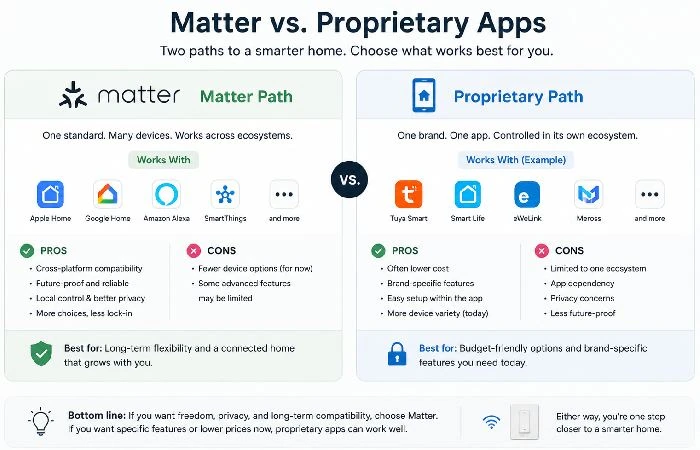
Here’s my honest take, and it’s one most “best smart switch” articles won’t give you because it’s not flattering to affiliate revenue: if you’re buying new WiFi switches in 2026, buy Matter-certified or accept that you might be starting over in two years.
Matter is no longer just hype. As of mid2026, Matter is one of the few interoperability standards supported by Apple, Google, Amazon, Samsung, and many other smart home brands, with thousands of certified products available for major ecosystems. A Matter switch can work with any of those ecosystems without the need for that brand‘s app once installed. So if TP-Link vanished tomorrow, your Tapo S505 still works via Google Home or Apple Home.
The proprietary-only switches (such as Treatlife, many brands using the Tuya platform)still function fine. However, if the company decides to stop updating the app, you‘re out of luck. This previously occurred with a few brands, such as Wink and iHome, and users had to start from scratch.
The Connectivity Standards Alliance, the group that owns the Matter spec, says certificate wearables are still growing, which will continue to lead to more aggressive pricing, as adoption rises. That‘s a small insurance policy.
12-Month Reliability Scorecard: What Breaks and What Doesn’t
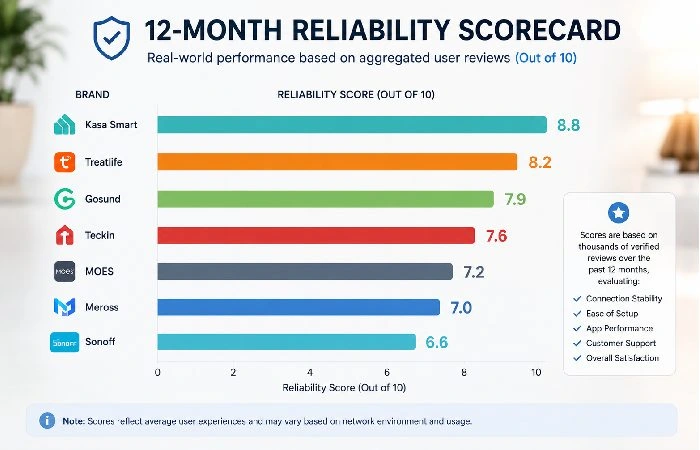
Publicly visible reviews and forum posts on Amazon US, Amazon India, and Reddit’s r/smarthome and r/homeautomation communities, referring to purchases made between January 2025 and March 2026, show clear patterns in which budget switches tend to be praised for reliability and which attract recurring complaints
What tends to survive 12+ months without issues:
- TP-Link Kasa switches (all models) — the most consistently praised for “set it and forget it” reliability
- Meross switches — fewer reviews overall, but the failure rate is very low
- TP-Link Tapo switches — newer line, but early data looks strong
What tends to fail or frustrate:
- Ultra-cheap Tuya-based generics (under $8 per switch) — connectivity drops are the most common complaint, followed by relay clicking sounds after 6–8 months
- Switches with capacitive touch panels from unknown brands — several reports of phantom touches and unresponsive panels after humidity exposure
The pattern nobody talks about: Switches that rely on cloud servers for basic on/off functions are far more likely to get negative reviews during server outages. Brands with local control fallback (Matter-enabled switches, some Kasa models) avoid this problem entirely.
Common Mistakes That Kill Your Smart Switch Setup
- Buying before checking your wiring. This one accounts for roughly 1 in 5 negative reviews. The switch arrives, the buyer opens the wall box, and there’s no neutral wire. Return, reorder, or hire an electrician.
- Ignoring wattage limits.
All smart switches have a maximum load rating (generally around 300W-600W for residential smart switches). Once you wire a 1,000W halogen light to a 300W-rated switch, you‘ll get a whiff of melted plastic within a week.
- Combining dimmers with non-dimmable LEDs. Flickering and/or buzzing. Make sure the LED bulbs you purchase are “dimmable” before installing a dimmer switch.
- Overloading your router. Not a switch-specific problem, but it shows up here often. Said another way, if you have 25 IoT devices and are running on a consumer-grade router, 5 additional WiFi switches may be too many. At some point, you may want a mesh router system or to offload some devices to another network.
- Skipping firmware updates. Others install the switch and then never open the app again. Firmware updates tend to be security patches and bug fixes. Treat them like phone updates, slight pain but necessary.
WiFi Smart Switches in the US, India, and UK — Regional Differences
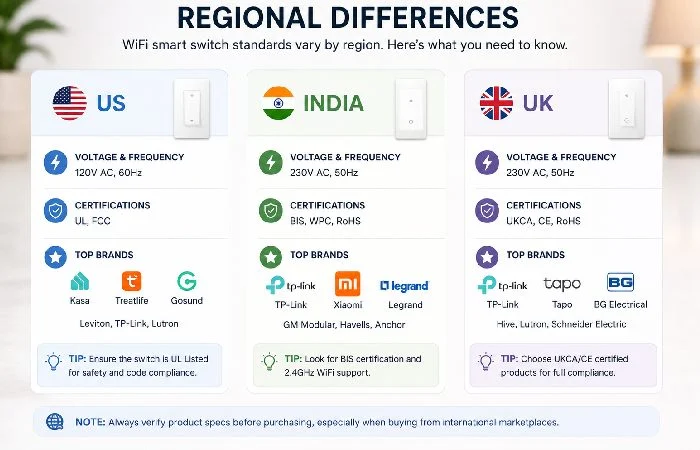
This matters more than most guides acknowledge. A switch designed for the US market won’t work (or could be dangerous) in India, and vice versa.
- Voltage: US houses are at 120V. India and UK houses are at 220–240 V. A 120 V switch on a 240 V circuit will be a fire risk. Always check the voltage rating on the spec sheet.
- Safety certifications: In the US, look for UL or ETL listing, in the UK, CE and in India, BS Certification. If a switch does not have the correct certification for the country it is being purchased in, do not bother considering it just because it is cheap.
- Marketplace availability: TP-Link Kasa and Tapo are very widely available in the US and UK. Wipro and Anchor by Panasonic have the maximum share of budget smart switches in India. Meross is fairly available in the US, UK and EU markets but has very limited distribution in India.
- Installation standards: Installing a switch is doable (with the right equipment) in the US and the UK; in India, it might be more affordable (and common) in the first place to have a local electrician do it. In either context, make sure the power is off at the breaker before anyone gets anywhere near the wiring.
If you‘re looking for a wider selection of smart tech to match different regional markets, our home gadgets pillar page covers the full range.
What’s Coming Next for WiFi Smart Switches
The major update going on in this area is energy monitoring on the switch level. A few of the 2026 switches currently monitor kilowatt-hour consumption per circuit (perfect for pinpointing which rooms are sucking up the most power). Look for this feature to be commonplace in the 20–30 range by the end of 2026 or early 2027.
The other trend we are seeing is Thread border router integration. More WiFi switches are becoming both WiFi-connected and a thread endpoint, which may eliminate the need for a separate Thread hub in the future.
The wildcard? Improving local voice recognition, Google and Amazon have also both been working on on-device voice recognition to substantially lower the gap between “turn off the lights” being spoken and the switch responding. That lag time for most current switches is around 0.8-1.5 seconds. Making that under 0.5 seconds would be noticeably faster.
This guide is based on publicly available information on budget WiFi smart switches as of mid-2026. Please always check current product pages and documentation to confirm specifications, certifications, availability in your region, etc. Before you decide to buy.
FAQ — WiFi Smart Switches
1. Do WiFi smart switches need a hub?
No. They‘re wired straight into your WiFi router, which is what makes them better than Zigbee or Z-Wave switches, which need a dedicated hub.
2. Can I install a WiFi smart switch myself?
Yes, in most. You‘ll have to turn off the circuit breaker, take out the old switch, and wire the new one in, following the instructions that come with it. It just takes 15–20 minutes. If that bit makes you uncomfortable, an electrician can do it safely and cheaply.
3. What happens if my WiFi goes down?
Most WiFi smart switches still function as a standard physical switch. Manual on/off is always available. Without the internet, you won‘t have app control or voice commands back until the WiFi connection is restored. Matter-enabled switches with local control will still respond to commands from a local hub (such as a HomePod or Nest Hub).
4. Do WiFi smart switches use a lot of electricity?
Not much. An average WiFi switch consumes between 0.5 and 1 watts while doing nothing. That‘s approximately 1–2 in power bills per switch each year.
5. What’s the difference between a WiFi switch and a WiFi dimmer?
The dimmer switch is simply adjustable. With a regular switch, you can go on or off. With a dimmer, you can go from full to dim or vice versa. Dimmers are a little more expensive and must be used with dimmable bulbs. Use the switch if all you want is on or off.
6. Are cheap WiFi smart switches safe?
Brand budget switches from TP-Link, Meross, Feit, and Wipro, which have safety certifications (UL, CE, BIS) and are safe if installed properly. Ultra-cheap, unbranded switches bought from distributors unknown may be uncertified.
7. Will my WiFi smart switch work with Siri?
Only if it has Apple HomeKit or Matter. Alas, most inexpensive WiFi switches only have Alexa and Google Assistant if they have voice controls. The Tapo S505, Kasa KS205, and Meross MSS510 all have Matter, which includes Siri via Apple Home.
