Published: May 31, 2026
Last Updated: August 31, 2026
So, if you want cheap devices under $50 that really help your life, go for smart plugs, smart bulbs, light strips, a small smart speaker, and a simple indoor camera. Pay attention to how well they integrate with your ecosystem (Alexa, Google), WiFi necessities and if the company’s app gets updated regularly. For the broader category beyond this price tier, check out our guide to smart gadgets.
A $15 smart plug that works flawlessly for two years costs you less per day than a single pack of gum. A $40 “smart” gadget that dies after four months? That’s just electronic waste with better marketing.
The real question isn’t “what’s cheap?” It’s “what’s cheap and still useful six months from now?” We reviewed a few hundred recent user opinions from early 2025 through mid‑2026 across Amazon, Reddit’s r/smarthome, and product forums to find budget home gadgets that people are still happy with after the honeymoon period ends.
Here’s what made the cut and what didn’t. And if you want the full picture beyond this price bracket, our complete guide to home gadgets is the best place to start.
Here’s what made the cut and what didn’t.
Why Most Budget Gadget Lists Get It Wrong
Most roundups treat this category like a speed run. They list 15–25 products, slap a star rating on each, and call it done.
The problem? They don’t tell you what breaks. They don’t mention that certain $25 smart plugs lose Wi-Fi connection every few weeks, or that the “bestselling” air purifier under $50 has a filter replacement cost that exceeds the device price within a year.
We’re taking a different approach. Fewer picks, more context. Each recommendation here has a reason behind it that goes beyond “it’s affordable.”
Quick comparison: Best budget gadgets under $50
| Gadget |
What it does |
Why it’s worth it |
Typical price |
Best for |
| Smart plug (Wi-Fi) |
Turns devices on/off via voice or app |
Coffee makers, Fastest smart-home upgrade for lamps, & fans |
$8–$25 |
First-time smart home setups |
| Smart bulb |
App-controlled brightness and color |
Instantly changes the room atmosphere without wiring |
$10–$25 |
Living rooms, bedrooms, |
| LED light strip |
Shelves, Accent lighting for TVs, & desks |
Makes spaces feel more polished on a small budget |
$15–$35 |
Gaming desks, TV setups |
| Mini smart speaker |
Smart-home commands, & Voice control, timers, music |
Hands-free control for other smart gadgets |
$25–$50 |
Common areas, kitchens |
| Indoor security camera |
Motion alerts, Live view, motion, and recording |
Extra peace of mind for pets, packages, and entryways |
$25–$45 |
Small homes, Apartments |
| Smart power strip |
Multiple controllable outlets in one device |
Let’s you manage several devices independently |
$25–$50 |
Desks and entertainment centers |
| Motion night lights |
Automatic lighting in dark spaces |
Improves nighttime safety without wiring |
$15–$35 |
Stairs, Hallways, & Closets |
The Cost-Per-Use Framework: How to Judge a $30 Gadget
Here’s a mental model that’s helped us sort the good from the disposable:
Cost per use = purchase price ÷ expected number of uses before failure or irrelevance.
A $12 smart plug you use every day for 18 months? That‘s it costs: $0.02 for each use. A mini $45 projector that you drag out three times, then put away in a drawer? That‘s $15 for every use.
Before buying anything under $50, ask yourself three questions:
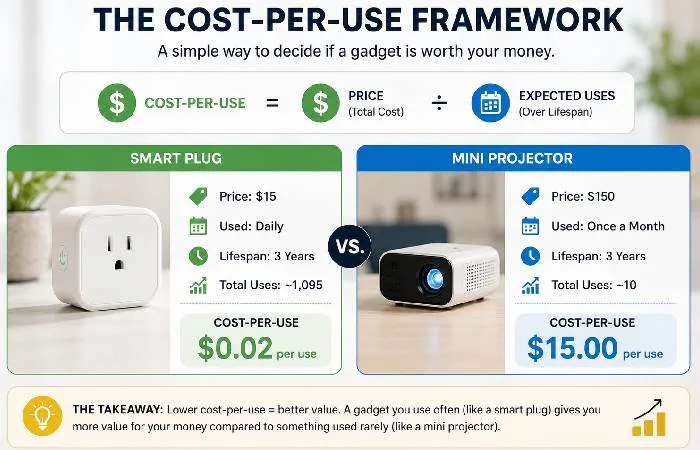
If you can’t answer yes to at least two of those, skip it.
Quick note: this framework isn’t original to us. It’s borrowed from the buy-it-for-life community on Reddit and adapted for electronics, where “lifetime” means 1–3 years, not decades.
Best Budget Smart Home Gadgets Under $50
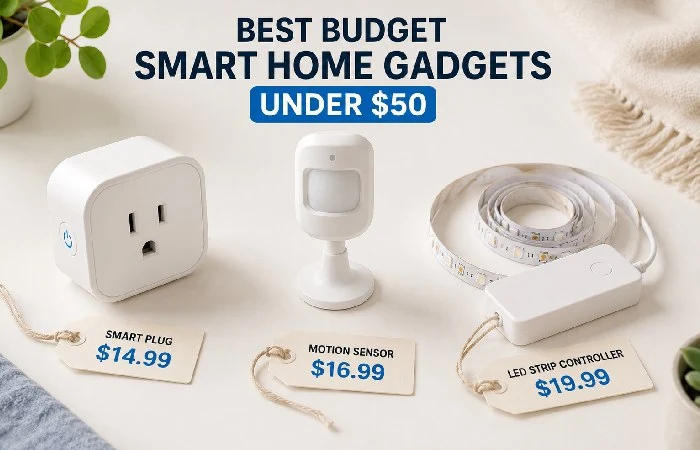
Smart Plugs With Energy Monitoring
Smart plugs remain the single best entry point for home automation on a budget. They’re unglamorous. They don’t make for exciting unboxing videos. But they work.
In our view, plugs with built‑in energy monitoring stand out in 2026 because seeing exactly which devices waste power in standby makes it easier to cut usage enough over time to offset the plug’s cost. Using user summarised reviews from Q4 2025 to Q1 2026, the top for reliability and app quality in this price range by far is the TP-Link Kasa KP125M and Meross MSS310.
Motion Sensors and Smart Buttons. What to look for: Some budget smart plugs are not Matter compliant and might not be compatible with future updates to your ecosystem. If you are building a whole system, rather than just purchasing one device, Matter compatibility counts even at this price point.
A $20 motion sensor in a hallway that triggers lights automatically sounds minor. After a few weeks, you can’t imagine going back to flipping switches.
The Aqara Motion Sensor P2 (typically $18–$22) works with Apple Home, Alexa, and Google, and as of mid‑2026, some users on r/homeautomation report getting 2+ years on a single battery. That’s a cost-per-use ratio that’s hard to beat.
Smart buttons (like the IKEA SOMRIG or Aqara Mini Switch) fall in the $10–$15 range and tend to have high satisfaction precisely because expectations are modest. You press it, something happens. Not much to go wrong.
LED Strip Lights With App Control
Fair warning: this category has the widest quality gap of anything under $50. The difference between a $15 strip that looks great for a year and a $15 strip that flickers after two weeks comes down to the controller chip and adhesive quality, neither of which you can judge from product photos.
As of mid‑2026, Govee appears to lead user satisfaction in this category based on long‑term reviews and community discussions. Their basic Wi-Fi RGBIC strips (usually $25–$35 for a 5-meter roll) get mentioned repeatedly in long-term reviews as “the one that actually stayed stuck to the wall.” That sounds like a low bar. For this category, it isn’t.
Best Budget Kitchen and Household Gadgets
Compact Air Quality Monitors
If you’ve ever wondered whether your apartment’s air quality is actually fine or just feels fine, a $30–$45 air quality monitor answers that question fast. They don’t purify anything; they just measure. But that measurement changes behavior.
According to EPA‘s Indoor Air Quality program, ‘Indoor air is generally 2-5 times more polluted than outdoor air’; it may be even worse than this at a particular home or office building. A small-format AQM such as the Temtop M10 or INKBIRD IAM-T1 offers real time PM2.5 (and sometimes VOCs) readings.
Users report the main value isn’t the device itself but the actions it prompts: opening windows during specific hours, running exhaust fans while cooking, and identifying that a particular candle spikes particulates. That behavioral shift is where the ROI lives.
Multi-Use Kitchen Tools That Earn Their Spot
Here’s where we’re going to be honest and a bit opinionated: most “budget kitchen gadgets” lists are stuffed with unitaskers. Avocado slicers. Egg separators. Herb scissors.
Skip all of them.
The budget kitchen gadgets that people actually keep using, based on patterns we saw in verified‑purchase Amazon reviews at least 6 months old, are:
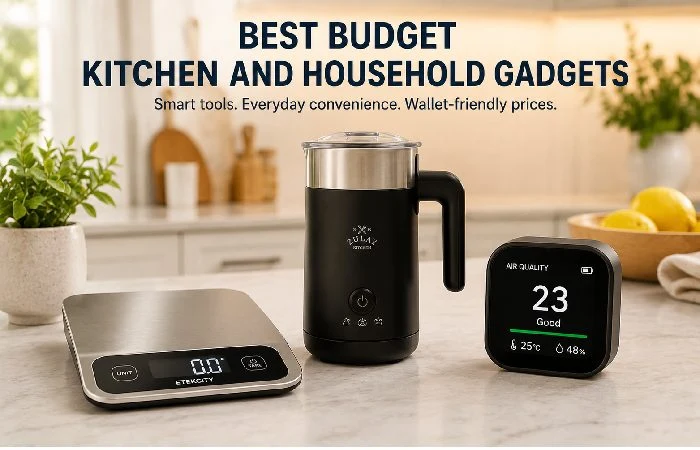
- A decent digital kitchen scale ($12–$18). Not exciting. Wildly useful for cooking, baking, and portioning.
- A USB-rechargeable milk frother ($15–$20). Gets used daily by coffee drinkers. High frequency = low cost per use.
- A silicone splatter screen ($8–$12). Boring. Prevents oil burns. Lasts basically forever.
None of these will trend on TikTok. All of them have review profiles showing consistent use past the 6-month mark.
Gadgets That Sound Great but Aren’t Worth It (The Skip List)
Not everything under $50 deserves your money. Based on patterns we identified across negative reviews and community complaints from 2025–2026:
- Mini Bluetooth projectors under- Mini Bluetooth projectors under $40 — Resolution is often too low for anything beyond a party trick, and many users report fuzzy text, dim output in ambient light, and fan noise that overwhelms the speakers. In a lot of long‑term reviews, these cheap projectors get used a few times and then end up in a drawer.
- No-name smart cameras under $25 — Security concerns aside (and they’re real), the cloud storage fees often exceed the camera’s price within 6 months. The apps tend to be buggy, and firmware updates are rare or nonexistent. You’re better off saving for a $50–$70 option from a brand that’ll still exist next year — our guide to home security gadgets covers which ones are actually worth that extra spend.
- UV sanitizer wand UV disinfecting wands were at their apex during 2020–2021. Several independent experiments showed that many wands costing less than $30 seemed to be either weak or took too long to sanitize effectively, so they may not be sanitizing as well as most shoppers had assumed. They’ve become a solution looking for a problem.
Your mileage may vary with some of these. But the pattern across reviews is clear: high initial excitement, rapid drop-off in use.
Buying checklist for budget gadgets
1. Compatibility: Alexa, Google, or Apple?
Choose your voice assistant (if applicable) before purchasing. Budget devices typically favor Alexa or Google Home, whereas Apple Home is less widely available unless the device is Matter-compatible.
2. Wi‑Fi basics
Most low‑cost smart gadgets use 2.4 GHz Wi‑Fi. Ensure your signal is solid in the location where the device will reside, and patch out dead spots with an extender or mesh node before blaming the gadget.
3. App updates and security
Select brands that are supported and update apps, an published clear privacy policy. Daily or frequent updates, two-factor authentication available, and reasonable default settings.
4. Safety and electrical load
Only use smart plugs and power strips at their rated load. Use them for lamps, fans, chargers and small appliances in the kitchen unless the manufacturer recommends high-wattage appliances.
Smart Home Ecosystem Compatibility at This Price Point
What Works With Alexa, Google, and Apple Under $50
As of mid-2026, Alexa compatibility is still the easiest to obtain at the under $50 level. Google Home support places a somewhat distant second, and Apple HomeKit is still relatively hard to obtain with a tight budget, but changing as in the time of Matrer.
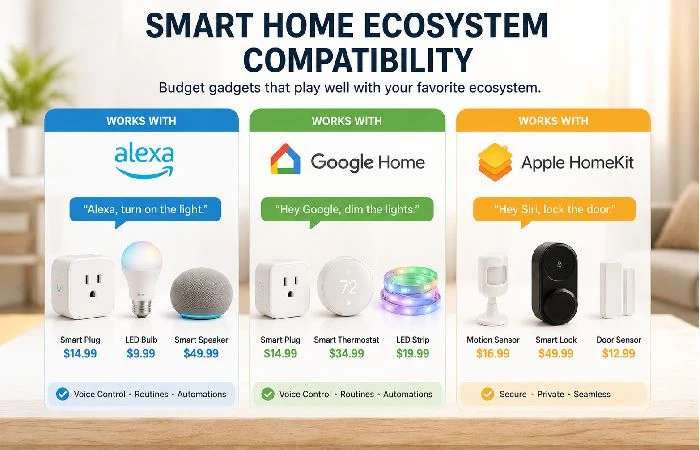
Here’s the reality as of mid-2026:
| Ecosystem |
Budget-Friendly Options |
Compatibility Notes |
| Amazon Alexa |
Smart plugs, bulbs, sensors, buttons |
Widest selection under $50 |
| Google Home |
Smart plugs, bulbs, & some sensors |
Slightly fewer options, improving |
| Apple HomeKit |
Limited without Matter Bridge |
Direct options still pricey; Matter workaround available |
Should you be in the Apple ecosystem and looking for sub-$50 purchases, purchasing the Matter-compatible device is the way to go instead of hunting for native HomeKit support.
Matter Protocol: Why It Matters for Budget Buyers
Matter is the cross-platform smart home standard that launched in late 2022 and has been slowly making its way into homes ever since. Would a budget buyer have a reason to care?
Because it means we can afford a 20 smart plug that supports Matter and it will work with Alexa, Google, and Apple without a dedicated app or hub. That‘s interoperability at a reasonable price.
The catch: Not all smart home budget devices play nicely with Matter just yet, so it‘s advisable to find out before purchasing. Bear the Matter symbol in mind when reading the packaging, or consult the merit list of the product. As per the Connectivity Standards Alliance, by beginning 2026, there has been over 3,000 products approved for Matter, compared to about 1,000 in late 2024.
That being said, Matter units tend to be priced $5–$10 higher than their non-Matter counterparts. Whether that price difference is justified is entirely dependent on if you are looking for one standalone unit or one to add to your expanding system.
US vs. UK vs. India: Availability and Pricing Differences
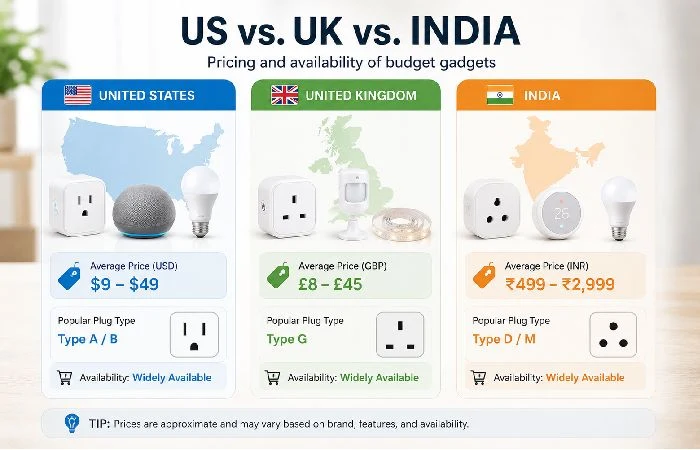
This is something that most budget tech guides completely gloss over. Prices and availability vary vastly different depending on place to place.
- From the US: Largest selection, most competitive prices, fastest shipping for budget smart home products. For example, they have a selection of Govee, Meross, and TPLink merchandise on Amazon US in particular that are often pricing their budget smart home gadgets aggressively.
- UK: Plenty of the same brands are there, but the prices are 15–25% higher when converted from GBP to US dollars. UK-specific smart plug sizes will not work (Type G). Search for UK-specific SKUs from Meross and TP-Link.
- India: The budget gadget market is largely confined to Flipkart and Amazon India. Brands such as Wipro, Realme and Qubo have Smart Home offerings at genuinely competitive prices – sometimes cheaper than the US in INR terms. However, (depending on device) Ecosystem support may be more limited (especially for Google Home and Alexa Routines).
We observed an interesting pattern of the Indian-market budget gadgets being more app-centric and the US/UK market budget gadgets being more Alexa/Google-centric.
How Long Do Budget Gadgets Actually Last?
This is the question that separates a smart purchase from a wasteful one.
Based on long‑term review patterns and community threads we reviewed in early‑to‑mid 2026 (primarily r/smarthome, r/homeautomation, and dedicated product forums), here’s what the data suggests for typical budget‑tier lifespans:
| Gadget Category |
Typical Lifespan (Budget Tier) |
Main Failure Mode |
| Smart plugs |
2–4 years |
Wi-Fi chip degradation, relay failure |
| LED strip lights |
1–2 years |
Adhesive failure, controller burnout |
| Motion sensors (battery) |
2–3 years |
Battery drain acceleration over time |
| Budget Bluetooth speakers |
1.5–2.5 years |
Battery capacity loss |
| Kitchen scales |
3–5 years |
Button/display wear |
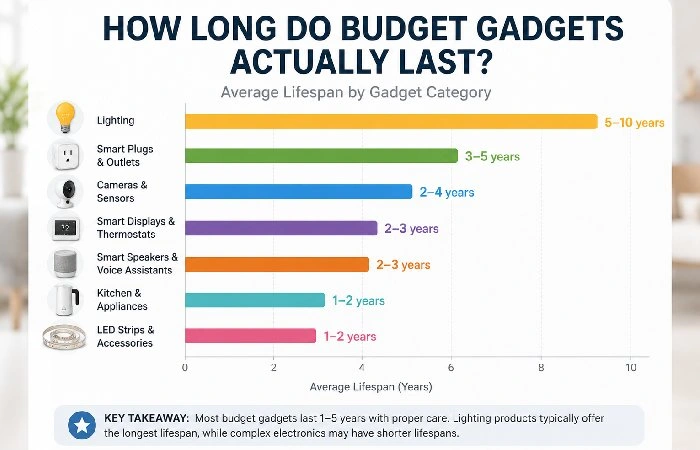
The takeaway? Smart plugs and sensors are surprisingly long-lived at the budget level. LED strips and Bluetooth speakers tend to degrade faster. And anything with a built-in rechargeable battery will eventually lose capacity, usually noticeably by 18 months.
If you buy something knowing it’ll last about two years and factor that into your cost-per-use calculation, you won’t be disappointed. The frustration comes from expecting longevity that this price tier doesn’t deliver.
Over the past several years of tracking this category, the pattern is consistent: the gadgets that last are the ones with the fewest moving parts and the simplest functions. A smart plug has one job. It does it well for a long time. A budget multi-function gadget tries to do five things and fails at three of them within a year.
FAQ: Budget Home Gadgets
1. What are the best budget smart home gadgets under $50?
Based on experience and reviews in our price range(Consumer Reports, PC Mag, Technomarket, Amazon), recommend that the best-rated and most reliable smart plugs with energy measuring and rated smart LED strips that are app-controlled are the TP-Link Kasa, Meross, and Govee RGBIC. We also suggest (Aqara P2) Smart motion sensors in this price range.
2. Are cheap smart home gadgets safe to use?
Products from known brands with the correct FCC/CE certification stickers are safe to use. The risk becomes higher when buying no-name imported products without a certification logo on top. Always look for a certification mark before buying any electrical component.
3. Do budget gadgets work with Alexa and Google Home?
The majority of budget smart plugs, bulbs, and sensors (ie, all under 50 dollars without Memos) from brands including TP-Link, Meross, and Govee are compatible with both Alexa and Google Home. Apple HomeKit compatibility is less prevalent.
4. How long do cheap gadgets last?
Smart plugs and sensors: 2–4 years LED strips / Bluetooth speakers: 1–2.5 years Items that have a battery built in will start to lose capacity by ~18months.
5. What budget home gadgets should I avoid?
Mini projectors under $40, unbranded smart cameras for under $25, and UV sanitizer wands seem to have elevated buyer regret according to the long-term review trends from 2025–2026.
6. Are Matter-compatible gadgets worth the extra cost?
If you‘re thinking about expanding your smart home further or using multiple ecosystems (Alexa + Apple, for instance), the $5–$10 premium for Matter support is well worth it for the flexibility it provides. For an individual out-and-out device, it‘s less important.
7. What’s the best budget gadget for renters?
Smart plugs and smart buttons are perfect for this as they are plug-and-play devices, and they are portable. Adhesive LED Strips and battery-powered sensors are renter-friendly too.
