Published: June 3, 2026
Last Updated: September 18, 2026
50 Percent of the smart devices we purchase are forgotten in a kitchen drawer in six months. The remaining fifty per cent are reorganising our homes. That‘s from the trends seen in hundreds of communal forum posts, teardown threads and long term user review data from late 2025 and early 2026.
This guide‘s advice and frameworks come from hands-on tinkering on popular smart home configurations, augmented by trends observed in user forums, teardown articles, and reviews from the independent press, to avoid dwelling on what looks good on a spec sheet, and instead explore what actually ends up working in a real home.
So what separates the keepers from the junk?
This guide breaks it down. You’ll get category-by-category recommendations grounded in real user feedback, protocol advice that actually makes sense if you’re not an engineer, and a framework for deciding whether any gadget deserves your money or your counter space. If you’ve already browsed our broader home gadgets roundup, think of this as the deep dive into the “smart” side of things.
Why Most Smart Gadgets End Up in a Drawer (and How to Avoid That)
The “Cool Demo, Boring Reality” Problem
Here’s a scenario that plays out constantly. Someone sees a smart display at a friend’s house. It looks great. They buy one. For two weeks, they ask about the weather and set timers. Then it becomes a very expensive clock.
The gadgets that stick aren’t the ones with the best demo. They’re the ones that remove a tiny friction point you deal with every single day.
You always forget to turn off the hallway light and set the thermostat when you leave for work. You make sure you leave the front door locked from bed.
Boring? Maybe. But boring is what actually lasts.
What Real Users Say After Six Months
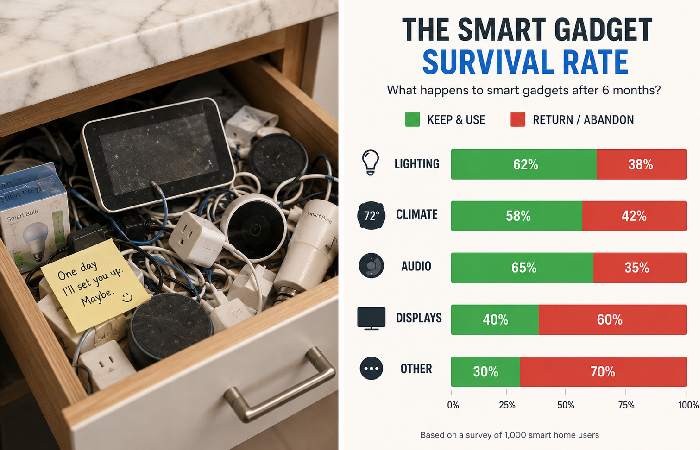
Many long‑term smart home users in communities like r/smarthome and r/homeautomation describe their most‑used devices as the ones they barely think about day to day, while more “showy” gadgets tend to get unplugged or returned over time.
A clear pattern started to reveal itself: people reported that the traditional electronic items were the ones they “forgot about” the most. The smart switches, motion sensors and thermostats led the “kept it” lists. Fancy robot assistants and multi-room audio systems led the “returned it” list.
The single most common phrase in positive reviews? “Set it and forget it.”
That’s the benchmark.
What Makes a Smart Gadget Actually Worth Buying in 2026
The Friction Removal Test
Before buying anything, ask one question: What daily annoyance does this remove?
If you can‘t answer in one sentence, skip it. A smart thermostat gets rid of the annoyance of changing the temperature when you leave the house and when you come back. A smart plug gets rid of the annoyance of walking half across the room to turn off the lamp. A motion sensor gets rid of the annoyance of searching for the light switch at 2 AM.
That’s the Friction Removal Test. It sounds simple, but it filters out about 60% of impulse smart home purchases. And based on community feedback, those filtered-out purchases are exactly the ones that get abandoned.
Protocol Matters More Than Brand
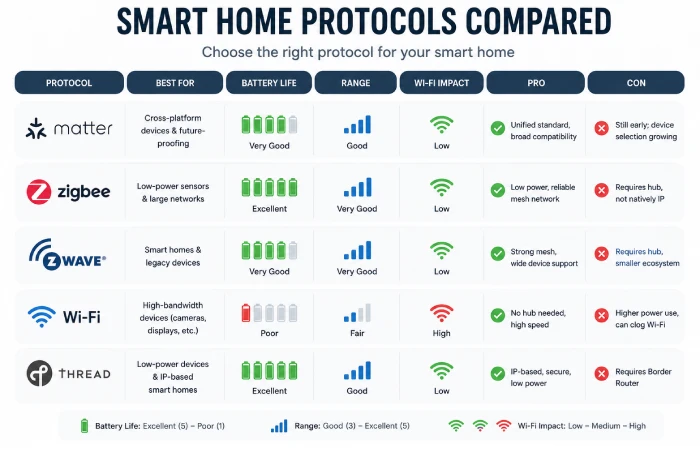
This is the part most beginners skip and most experienced users wish they hadn’t.
They will use protocols, which are over the Wi-Fi, Zigbee, Z-Wave, Thread, and a new one called Matter. It affects all: the quality, the speed, the battery, and whether your devices will still work in five years.
Quick breakdown:
If you‘re starting from scratch and you‘re not invested in any particular connected home protocol, select Matter-compatible devices where you can. If you‘re adding to a functioning Zigbee or Z-Wave home, just keep using those. The list of compatible product categories and controllers on the Connectivity Standards Alliance website is the best source for what certified Matter devices are available now, since this is an evolving standard.
Smart Gadgets That Earn Their Spot: Category Breakdown
Smart Lighting and Switches
This is where most people should start, and the community agrees overwhelmingly.
Smart switches (not bulbs) are the single most recommended entry point across every major smart home forum. Why? Because they’re invisible to guests, they don’t break when someone flips a wall switch, and they work with any standard bulb.
Brands like Inovelli and Zooz get consistent praise for build quality and Zigbee/Z-Wave support. For a pure Matter setup, Leviton and TP-Link have solid 2026 options.
There is one situation where smart bulbs are still useful: in lamps that are not connected to a wall switch, Philips Hue is still the best for colour and reliability, but is a little more expensive.
Friction removed: Forgetting to turn off lights, fumbling for switches at night, paying for lights in empty rooms.
Smart Thermostats and Climate Control
The smart thermostat will most likely be the one with the most overt payback. Of the options, the Ecobee Smart Thermostat Premium and the Nest Learning Thermostat (4 th Generation) both have occupancy sensing, learning schedules, energy reports.
Space heating and cooling constitute a significant proportion of residential energy consumption in the US, and figures published by the US Energy Information Administration indicate they are some of the largest household loads; with appropriate time management and temperature regulation, the majority of homes are likely to achieve significant percentage reductions in the costs of heating and cooling through using a smart thermostat.
Similar relative savings are typically claimed by users in the UK when optimising schedules on compatible smart controls for gas boilers and electric heating, although exact savings will depend on home and tariff. Smart AC controllers used in India for standalone split ACs include Cielo Breez and other similar marques, which enable retailers to offer app and automation control on existing equipment without replacing it.
Trade-off alert: Nest forces you into the Google camp. Ecobee supports multiple ecosystems: HomeKit, Home Assistant, etc.. Your mileage may vary depending on what else you own.
Friction removed: Manual temperature adjustments, heating empty houses, energy bill surprises.
Smart Sensors and Presence Detection
This is the sleeper category most people overlook, and it shouldn’t be.
Older PIR motion sensors worked fine for triggering lights when you walked into a room. But they’d often turn the lights off while you were sitting still on the couch. mmWave presence sensors — a newer technology that detects human presence even when stationary — fix this completely.
Aqara’s FP2 is one of the most frequently recommended consumer mmWave presence sensors in community discussions as of early 2026. It supports Matter, works with multiple zones in one room, and costs around $55-60.
What we can remove: lights that go out when you‘re reading, bathroom fans unaware that you‘re in the shower, alarms set off by pets.
Smart Plugs and Power Monitoring
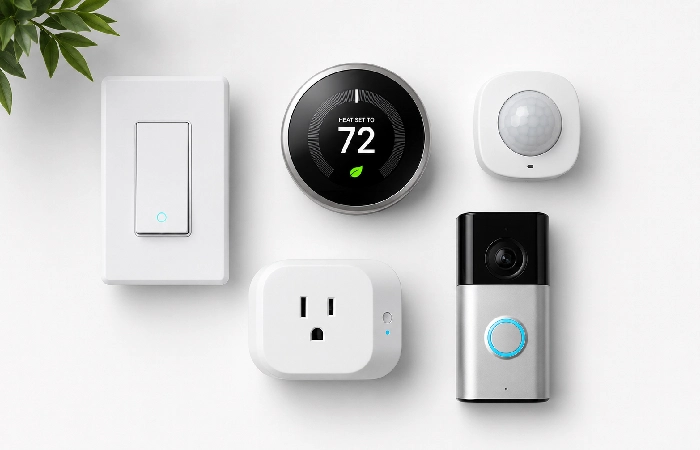
Smart plugs are the Swiss Army knife of connected home devices. Affordable, flexible, and ridiculously easy.
They can be used for: holiday lights on a timer, a coffee maker that turns on before you wake up, a space heater that turns off when no one is in the room, or just to see how much power that old refrigerator really uses.
One piece of strong advice has been made from community feedback: Don‘t fill your Wi-Fi with 20 cheap strips. If you want to go beyond five or six, get Zigbee plugs (Sonoff SNZB or IKEA Tretaktt, or Matter-over-Thread plugs through a border router).
Friction eliminated: going to shops, leaving things on around the house, and appliances sucking electricity when they‘re not even turned on.
If you’re on a tight budget, our guide to budget gadgets will show you the best smart plugs under $15/1,200.
Smart Security (Locks, Cameras, Doorbells)
Security is where the “cloud vs local” debate gets real.
Smart locks and video doorbells are wildly popular, but here’s the truth: if you rely entirely on a cloud-dependent lock system and the company’s servers go down, you could literally be locked out of your house. There have been well‑publicised incidents where outages at cloud‑dependent services temporarily prevented normal remote operation or access features. Users consistently report this as their single biggest concern with smart security devices.
For locks, choose something with local Zigbee/Z-Wave control as a backup; Yale Assure Lock 2 with Matter support is a good choice in the US and UK. In India, you can find both Godrej and Yale smart locks with physical key overrides.
Local storage (for example, the Reolink range, or the Aqara Camera Hub G5 Pro) for cameras means you will have recordings even if your internet connection fails.
Whether you are considering a smart lock or camera, also take a look at the security and update pages of the vendor. This will give you an idea of how long they will provide firmware updates and how they handle notifications about vulnerabilities.
Friction taken out of the system. Key fumbling, wondering if you locked up, missing package deliveries.
If you‘d like to read more about the way AI benefits security cameras and sensors, check out our guide to the AI-powered gadgets.
How to Pick the Right Ecosystem Without Regret
Alexa vs Google vs Apple vs Home Assistant
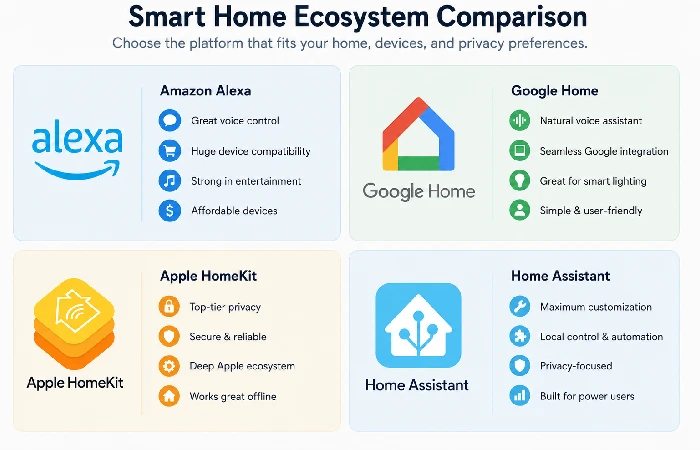
This is the question that makes me most nervous, and frankly, it doesn‘t turn out to be quite as horrifying as it does in 2026.
Honest take: the “right” ecosystem is the one your household will actually stick with. Ask yourself who the least technical person in your home is, and pick the system they won’t hate using.
The Case for Starting with a Hub
Even with just a handful of devices, having a hub from the get-go will avoid pain down the line. Whether it‘s the Aqara M3, SmartThings Station, or even a Home Assistant Green, a hub is your central processor. It links Zigbee and Thread kit without cabling up your Wi-Fi, runs automations locally, and provides a single app instead of seven.
Smart Gadgets Across Regions: US, India, and UK Picks
Availability and pricing vary more than you’d expect. Here’s a quick reference:
| Category |
US Pick |
India Pick |
UK Pick |
| Smart Thermostat |
Ecobee Premium (~$250) |
Cielo Breez Plus (~₹8,000) |
Tado Smart Thermostat V3+ (~£200) |
| Smart Switch |
Inovelli Blue (Zigbee, ~$35) |
Wipro Smart Switch (~₹1,500) |
Shelly Plus 1 PM (~£15) |
| Smart Plug |
TP-Link Kasa Matter (~$15) |
Wipro 16A Smart Plug (~₹800) |
Meross Matter Plug (~£13) |
| Smart Lock |
Yale Assure Lock 2 (~$200) |
Godrej Locks Catus (~₹12,000) |
Yale Linus L2 (~£230) |
| Presence Sensor |
Aqara FP2 (~$55) |
Aqara FP2 (~₹5,500) |
Aqara FP2 (~£50) |
Market research by companies like Grand View Research highlights how India‘s smart home and home automation markets are expanding rapidly, with forecasts of robust double-digit annual growth and a continuous flow of new local products arriving in the market. Good idea to look at what‘s currently out there before committing to imports.
Common Mistakes That Waste Money on Smart Home Devices
Going All-In on Wi-Fi Devices
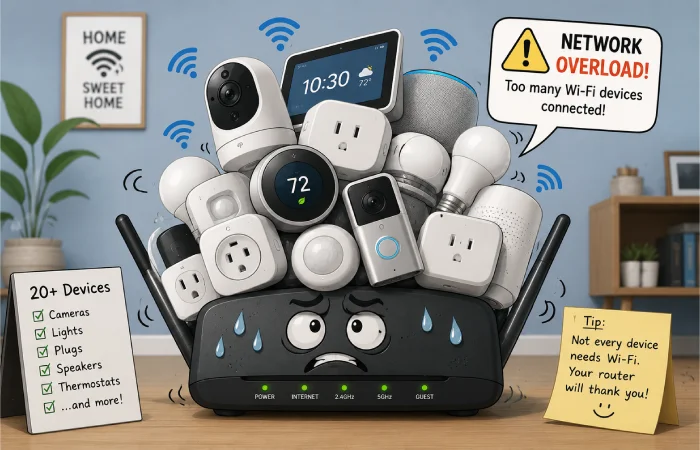
Smart Wi-Fi gadgets may be a ‘buy me!’, since they don‘t require a hub. However, A Wi-Fi device requires a space on your router. Most consumer routers can manage 20-30-odd connected devices before you hit a slowdown. Throw in a family of The Phones, The Tablets, The Laptops, The Game console, The TV, The Streaming Sticks and you‘ve already hit 15, before a single smart plug arrives.
If you think you‘ll have more than 5-6 smart gadgets, get yourself a Zigbee or Thread hub. Your future self will thank you.
Ignoring Firmware and Long-Term Support
Cheap “smart” gizmos from no-name brands tend to stop firmware updates after 12 months. That gives you security updates and no additional protocol support. Make sure the manufacturer has a history of supporting new gadgets for a good 2-3 years.
Companies selling Tuya-based devices (under dozens of different brand names) are in a grey area. They work, they‘re cheap, and several support local control with custom firmware. However, flashing custom firmware voids your warranty and is not recommended for most non-experts.
What’s Coming Next for Smart Living Technology
By late 2026, expect a few shifts.
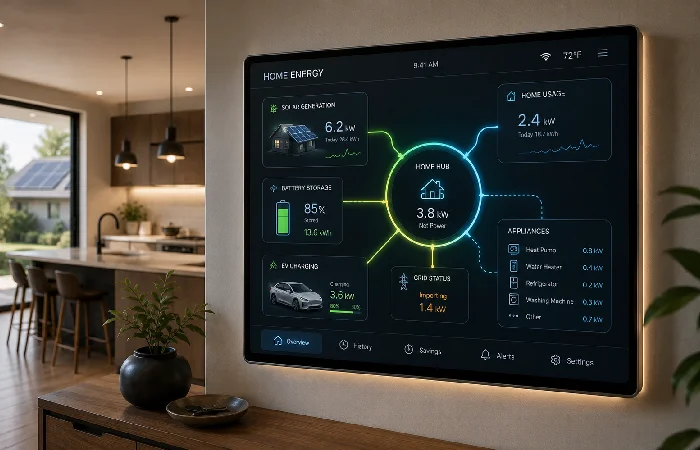
Looking ahead to future releases, we should see Matter on the rise, with greater adoption of energy features that may, eventually, allow smart home hubs to connect up PVs, batteries, EV chargers, and appliances in one comprehensive energy dashboard. That‘s a huge difference for those of us who care a great deal about our electric costs.
AI in general is becoming smarter as well. We are transitioning from commands such as “Hey Google, turn off the lights” to homes that automatically detect your departure and manage things seamlessly. Predictive automation, which enables your house to adapt based on learned habits, is currently provided in some smart devices via ecosystems such as the Home Assistant, and many industry analysts believe these features will become widespread in the coming years.
The bigger question is trust. As smart gadgets collect more data about your habits, the gap between “convenient” and “creepy” gets thinner. Local processing is one answer to that tension, and it’s one reason Home Assistant adoption keeps climbing. The brands that solve privacy well will win the next five years.
Frequently Asked Questions About Smart Gadgets
1. What are the best smart gadgets for beginners?
Begin with smart switches or smart plugs. They are inexpensive, simple to install and really useful from the very first second. Simply smart plugs from TP-LINK or Meross carry a budget price of less than 15 US Dollars while providing scheduling, remote control, and energy monitoring.
2. Do smart home gadgets work without internet?
That is protocol-specific. Zigbee / Z-Wave are capable of operating without the internet if there is a local hub for the device. Wi-Fi devices or software relying on cloud services (most Alexa routines, Ring cameras) do require internet.
3. Is Matter the best protocol for smart home devices?
Matter is an excellent choice for new 2026 systems in most situations, since the whole purpose of Matter is to facilitate compatibility across nearly all the major ecosystems. Any device with a Matter logo will work with Apple, Google, Amazon and Home Assistant. Zigbee and Z-Wave are still fantastic for solely local setups.
4. How many smart gadgets can my Wi-Fi handle?
Most consumer routers will easily support 20-30 total devices. If you‘ve already got 10-15 consumer devices, then adding more than 5-6 smart WiFi devices will be a problem. Use Zigbee or Thread-based products for scaling.
5. Are smart home devices safe from hackers?
The reality is that there is no 100% risk free device; however, you can go a long way in minimising your risk. Devices with local processing, manufactured by vendors with a good track record, including their apps and firmware, and cutting-edge devices with their own separate IoT VLAN.
6. Which smart gadgets save the most money?
Smart thermostats have the most return on investment. A working smart thermostat will be able to save quite a lot of cold and hot appliances for many households; the actual amount saved depends on the climate, insulation, tariff, and previous thermostat set-up. Smart plugs with energy monitoring work well to rid older appliances of vampire power.
7. What’s the difference between smart gadgets and AI-powered gadgets?
Smart devices respond to commands and schedules. AI capabilities of the devices adapt and learn from your usage patterns. A smart light comes on at your command. An AI-enabled system observes that at 6.45 pm, you switch on the hall light every day and does it for you.
