Published: July 22, 2026
Last Updated: September 18, 2026
You already know the phone has stabilization. That’s right in the spec sheet. OIS, EIS, Action Mode, Super Steady. And those still do the job when you keep the camera still or make slow panning motions. Walk around, and your footage shows you a different page. The frame shakes along with your footsteps, the camera moves in on itself, warping the edges with EIS, and the results can’t be masterfully edited out.
That’s exactly the niche a smartphone gimbal stabilizer can step into. Three motors, three axes to keep steady, and your video remains smooth instead of jerky. This article discusses the models that are presently being shipped in the year 2026 along with a complete list of prices accumulated from US and Indian retail while also offering insight into something that almost every single review ignores. Do the claimed features function similarly on both Android and iPhone operating systems?
Below are five picks, then a frank look at when a mobile camera is not the right choice, then the spec-sheet gotchas nobody puts on the box. For a complete mobile creator package beyond gimbals, we cover mics, tripods, and more in our best mobile accessories guide.
A brief answer before you scroll: for most creators, the DJI Osmo Mobile 8 ($89–$149 / 6,000–10,000) will be sufficient. Simple stabilization is often more than enough; excellent tracking has both modes. For solo vloggers needing a device that shoots well in a compact form factor, the Insta360 Flow 2 Pro ($159.99 / 15,990) folds flat and doubles as a selfie mirror.
What a 3-Axis Smartphone Gimbal Stabilizer Actually Does
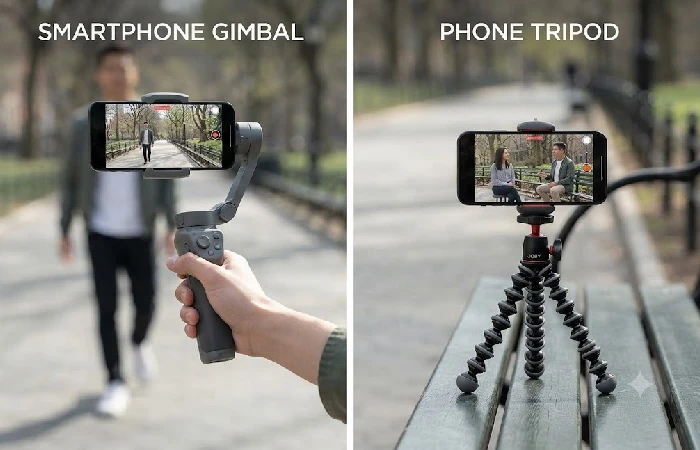
A smartphone gimbal stabilizer is a portable 3-axis motorized mount that negates tilt, pan and roll movement while shooting. Today, for 2026, the DJI Osmo Mobile 8 ($89 149) provides the best stability, follow-along, tracking, and app functionalities for iPhone and Android.
Tilt corrects the up-and-down nod. Pan corrects left-and-right swivel. Roll maintains a level horizon as your wrist rotates. Your phone’s OIS deals with micro-jitters at the lens, suitable for stills, average for stopped-down video. A gimbal corrects your whole arm. That’s the difference that makes walking shots cinematic instead of seasick.
Not a selfie stick with motors. A motorized mount.
The 5 Picks Worth Your Money in 2026
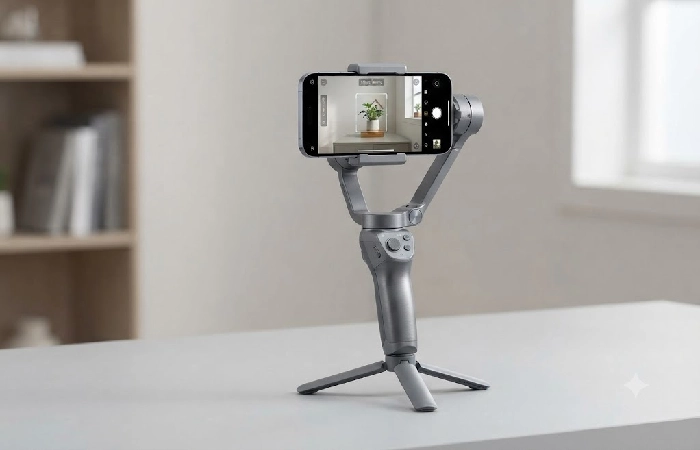
DJI Osmo Mobile 8
Standard choice for a reason, and we’re not going to deny it. DJI’s newest stabilization engine, 360° rotation, built-in extension rod, tripod legs, 10-hour battery. The basic version satisfies certain shooting conditions.
The 8P is where it starts to get fascinating. It brings in a removable FrameTap remote with a tiny OLED display, allowing you to frame shots, set the gimbal and begin recording from as far as 50m away. ActiveTrack 8.0 on the 8P is outdoing absolutely everything else we‘ve put through the paces on a phone gimbal, locking on to subjects in busy scenes. Not just faces, pets, things. Apple support for DockKit arrives by default on both.
Approximately 89$ for the base, 149$ for the 8P, in the States. 6000 to 10000+ depending on where you buy in India.
Only pay the 8P premium if you will be doing frequent self-filming with no one else to operate the camera. This will be managed by the baseline OM8 otherwise.
DJI Osmo Mobile 7P
Same DJI stabilization core as the OM8, but no 360-degree rotation; no newer ActiveTrack 8.0. Still running ActiveTrack 7.0. Has an extra side wheel, bringing manual zoom/focus control, unavailable on the OM8 base model. Supports phone weight from 170g–300g, 10-hour battery, Bluetooth 5.3, charges your phone over USB-C while recording. At $89 / 6,000–7,100, it‘s a good discount for what it offers over the OM8; the tracking is behind by ½ a generation.
Insta360 Flow 2 Pro
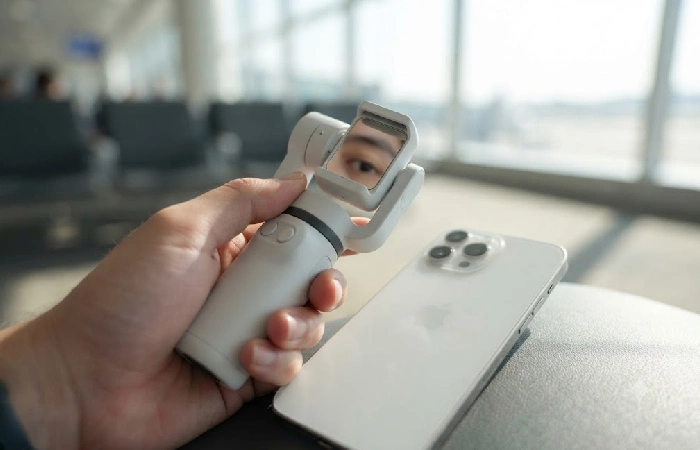
Flow 2 Pro weighing 357g with a selfie mirror integrated in the clamp would be a camera for a single individual standing in front of it. Solo vlogs. Travelers who leave their crew at home.
Deep Track 4.0 is capable of multi-subject framing and pet tracking. DockKit support on iPhone means tracking works seamlessly in the stock Camera app, FaceTime, and over 200 other iOS apps. The all-metal tripod base feels much more robust than the DJI kit that comes with their gimbals. And Free-Tilt Mode makes it possible to swing the entire setup crane-style for low-angle sweeps that would otherwise call for an additional rig.
- US $159.99. India 15,990–19,990.
More expensive than OM8 base. If you‘re shooting yourself all the time, and want the mirror and tilt modes, it‘s worth it. Not so much on Android, where tracking feature releases usually lag iOS by several weeks.
Hohem iSteady M7
If you have set up your phone to be north of 200g with a case and external lens attached, this is the conclusion. The iSteady M7 is the only one of the gimbals on this list that is designed for boatloads of accessories on your phone rig.
The detachable AI tracking module is designed to function separately from the Hohem app as well, allowing you to not get stuck with their camera app.
Small 1.4″ touchscreen Remote displays camera share. On the handle is an RGB/CCT fill light that ranges from 2700K-6500K. Battery endurance of 12 hours idle.8 hours with tracking.3–4 hours with tracking and max fill light. That‘s a huge swing and it makes a complete difference if you shoot outside for long.
3x the gimbal you‘re gonna need if you‘re riding your phone at arms reach, but bang on if your main production cam has the filters, lenses, and TikTok rep on the side.
Zhiyun Smooth Q4
Launched in 2022 and still going strong with very affordable prices in Indian Shops (add favorite online shop here) the stabilisation works on 3 axes, fill magnetic light, extension rod 215mm, battery time on paper (closer to 10 in real life). Payload tops out at 280g. The ZY Cami app does what it is supposed to do, but Zhiyun has not released an important update for over a year.
₹9,000–15,000 in India (the prices are all over the place depending on who you buy from) is good value if you find a discount. At full price, spend that money on a DJI OM7P and get newer tracking, a better (more actively maintained) app ecosystem.
When You Don‘t Need a Gimbal at All
Here‘s the problem. If you are mostly shooting glass (camera on tripod and/or set up to shoot still pictures), a gimbal is just money in the bank.
Wrong. Not wrong on the usefulness of gimbals. Wrong on assuming every creator needs one.
OIS combined with EIS on 2025 and 2026 flagships has become genuinely functional. Apple’s own specs put Action Mode’s crop in a similar range on recent iPhones, and it stabilizes walking footage well enough for Reels and Stories. Samsung’s Super Steady on recent Galaxy Ultra models manages comparable performance on the Android front. For very short, very long-form content shot at unwieldy proximity, these integrated systems work. Not perfectly. But acceptably.
The gimbal is worth the purchase in three situations.1. Walkthrough shots where the bounciness of the image is not desired, as no software can still the image like the mechanical stabilization of the gimbal can.2. AI subject tracking, where the gimbal motors move the camera to follow you when moving through a room or city street.3. Long shoots exceeding 30 minutes where fatigue causes the entire image to gently oscillate.
The gimbal-or-tripod dilemma is easier than anyone seems to think. Tripods hold your phone still. Gimbals hold it steady while you move around. If you do interviews, time-lapses, or talking-head videos, buy a tripod. If you walk while you shoot, buy a gimbal. A lot of gimbals are starting to come with small tripod legs for “set it down on the table” ease, but those were never a real tripod replacement.
We would argue more strongly than other reviews: if the sound quality is poor, then improve that first. A wireless lavalier microphone can move up production quality in a lesser way than the addition of 20 fps of stabilization. Viewers are willing to accept marginal shake, but not if the audio sounds like it was recorded in a tin can.
Fact.MR estimated the smartphone gimbals market was worth about $0.52 billion in 2024, with a projected 18.7% CAGR growth for AI-tracking gimbals to 2034. And that growth says a lot. It’s fueled by creators filming as they walk. Creators working at a desk are not buying gimbals and they shouldn’t be.
Free tip: learn the ninja walk. Slightly bent knees, heel-to-toe steps, arms tucked close. Improves footage quality whether you use a gimbal or not.
What the Spec Sheet Won‘t Tell You
Let‘s start with payload capacity, which is the first figure that should be considered and most commonly overlooked by buyers. Your smartphone alone is likely to weigh in at 200g. The case adds a little more, 240g. The magnetic lens is 280g. Each gimbal has a published maximum weight capacity, and exceeding it not only reduces video quality but also places strain on the motors. The Hohem iSteady M7 can support the heaviest rigs of the bunch. The Zhiyun Smooth Q4 maxes out at 280g.
The claims for the batteries are also questionable. Every manufacturer tests the battery with the gimbal sitting on a desk, balanced. Nobody uses their gimbal sitting on a desk. Switch on AI tracking, and the motors try to work, requiring more power. Add fill light and the rated battery is down 30–60%. The Hohem M7 is rated at 12 hours, with lighting it‘s closer to 3–4, in real time. The DJI OM8 handles the drop better, rated at 10 hours, with active tracking closer to 7.
Again. The Android app story. DJI Mimo, the Insta360 app, Hohem Joy. All three are iOS-centric. Tracking, multi-lens, firmware updates, arrive first on iPhone. Often weeks later on Android. Sometimes months. Apple’s DockKit framework allows native camera tracking within iOS without an app, and Android has nothing similar. If you‘re purchasing for an Android phone. head to the Play Store page for the companion app and see what the reviews have to say and if it‘s features match what you need. Not the features that are listed on the gimbal’s marketing page. That’s what iPhone users get.
First-time setup takes about 5–15 minutes: this is when you set the phone on the clamp, calibrate the motors, pair the Bluetooth, etc. It only takes a minute or two, but unlike a phone clip or a selfie stick, its not 30 seconds to set up the gimbal and go. Another thing that causes almost all new users trouble: a gimbal firmware upgrade can wipe out your saved Motor calibration values. If your video suddenly begins to drift or tilt on its own, run your balance calibration before blaming the gimbal.
Frequently Asked Questions
1. Is a smartphone gimbal stabilizer worth it in 2026?
It all depends on how you shoot. If you shoot on the move, yes. However, for stationary shooters, it might be preferable to purchase a tripod and a good microphone.
2. What’s the difference between a gimbal and a tripod for phone video?
The tripod is for steadying your phone. The gimbal is for steadying your phone as you walk around. These are totally different problems and these days nearly all gimbals have small built-in tripod feet for instant setup on your desk.
3. Does AI tracking work on Android phones?
Yes, with a caveat. Both DJI ActiveTrack and Insta360 Deep Track run on Android. The native camera tracking offered by Apple DockKit is only available on iOS: it does not open up a companion app. Confirm what Android features are available in the companion app before purchase. Worth noting: a tip which I’d recommend before making a purchase: search in Play Store reviews for” [gimbal model] Android”. The brand marketing pages will not tell you which tracking features are iOS-only.
4. Can I use a gimbal with a heavy phone case or external lens?
Check payload limits. Most gimbals max out at around 280 to 300 grams. Phone + case + lens hits that barrier sooner than you think.
5. How long does a phone gimbal battery actually last?
Less than the spec sheet says. Spec numbers assume a balanced, stationary gimbal. Acting as a the fill light with the tracking head off, max runtime is reduced by 30–60 percent. The DJI OM8 drops from 10 rated hours down to around 7, and the Hohem M7 drops from 12 to 3 or 4 under full load. Time your shoots accordingly.
6. Which is better for vlogging: DJI or Insta360?
Solo vlogging, Insta360 Flow 2 Pro. Selfie mirror and Free-Tilt Mode are designed precisely for that application. General vlogging where someone else could hold the camera, DJI OM8. Improve lock on subject in a busy environment.
Bottom line: Gimbals are getting smaller, smarter, stronger every year. DJI’s OM8 led the way for 2026, Insta360 raises the benchmark for portable gimbals, and Hohem dominates the pro-creator market. Native OS integration is the area to focus on, with Apple‘s DockKit already proving the concept, and likely Android by 2027.
What you buy depends on what you’re building. One gimbal is a tool. A full mobile kit is a workflow.
