Published: May 27, 2026
Last Updated: October 1, 2026
The smart switch selection is not as easy as we think; it involves numerous technical considerations apart from the product listings mentioned. Its hard fact that some might be great and a few find terrible and might be harmful.
Here is the fact: choosing the best smart switches for your home automation is not as easy as it seems, simply going through the product listings. It’s very important to consider wiring and protocols to take into account, most essential, without ignoring compatibility issues that nobody thinks of until you hold a screwdriver and a switch that won’t match at all.
The main goal of this guide is to cover what actually matters, according to the expert recommendations, product comparisons, and buying advice for India, the US, and the UK, based on publicly available information, and most importantly, professionals’ review sites, including manufacturers’ specifications. If you are looking for a wider look at smart home automation, see our complete smart switch setup guide.
Methodology: This guide is prepared as per the reviews of available information as of May 2026, and also includes product listings of manufacturers’ specifications alongside reviews of experts published by well-known technology outlets such as Tom’s Guide, CNET, Wirecutter, and PCWorld, as well as user feedback from main platforms. The main goal is to integrate this valuable information to furnish handy buying advice. It’s essential that we do recommend making sure the current pricing, compatibility, and features on official product pages before making any purchase choice.
What Is a Smart Switch and Why Bother?
A smart switch replaces your regular wall switch. Flip it like normal, or control it from your phone, voice assistant, or automation routine. The switch itself thinks. Your existing bulbs, fans, and fixtures stay the same.
That last part matters more than people realise. You don’t need to buy smart bulbs for every socket. Just swap the switch, and everything connected to it becomes “smart.”
Why go this route? Three reasons that actually hold up.
- Cost. One smart switch manages several bulbs on the same circuit. Ok, that‘s one thing, but then consider a single smart bulb for 12.15 each. For instance, a one25 switch replaces four of $15 bulbs each.
- Reliability. Smart bulbs may go out on you if someone flips the wall switch off. Smart switches do not have this issue. The switch IS the smart appliance.
- Simplicity. Guests and kids can still use the physical switch. No app required for basic on/off.
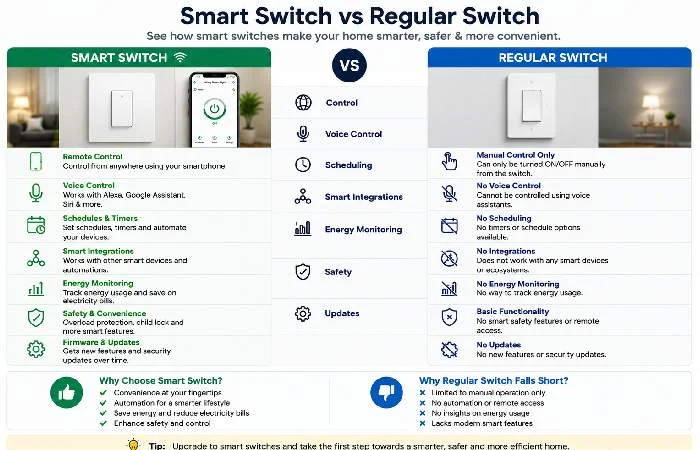
Smart Switch vs Smart Bulb — Which Makes More Sense?
My general rule: you want them to be color-changing or to control each bulb (like a desk lamp), then buy some smart bulbs. If you don‘t care and want it over your head, in your bathroom, in your hallway, and so on, a smart switch is the way to go.
And honestly? Most people need smart switches for about 80% of their home, and smart bulbs for maybe 20%.
WiFi vs Zigbee vs Z-Wave vs Matter — Quick Protocol Guide
This is where most buyers get confused. Four protocols, a bunch of marketing terms, and no one tells you which one to actually pick.
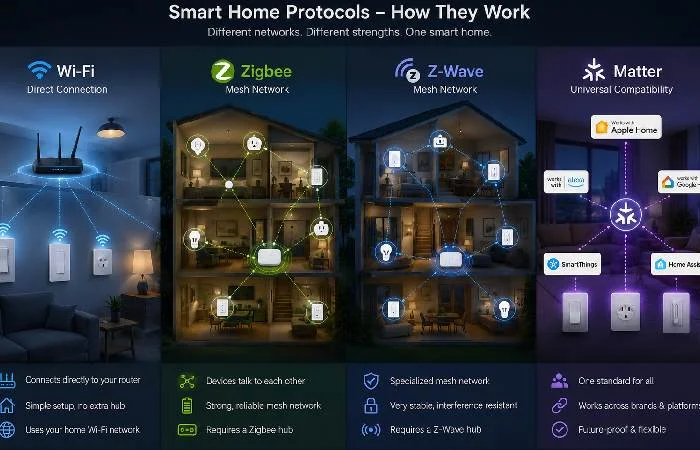
Let me simplify it.
| Protocol |
Needs a Hub? |
Speed |
Range |
Best For |
| WiFi |
No |
Fast |
Good |
Simple setups, budget buyers |
| Zigbee |
Yes |
Fast |
Great (mesh) |
Large homes, 15+ devices |
| Z-Wave |
Yes |
Medium |
Great (mesh) |
Reliability-focused setups |
| Matter |
No* |
Fast |
Great |
Future-proofing, cross-brand |
*Matter runs over WiFi or Thread. Some Thread devices need a Thread border router (which newer HomePods and Nest Hubs already have).
Which Protocol Should You Pick?
Under 10 devices? Go WiFi. It’s simple, no hub needed, and WiFi switches have improved in reliability compared to earlier generations.
10-30 devices? Zigbee with a SmartThings or Hubitat hub. WiFi gets congested with lots of devices. Zigbee doesn’t.
Starting fresh in 2026? Go Matter if possible. It’s still maturing, but it’s the only protocol that guarantees cross-brand compatibility going forward. According to the Connectivity Standards Alliance, over 1,000 Matter-certified devices are now available globally, though smart switch options remain more limited than WiFi or Zigbee alternatives as manufacturers gradually adopt the standard.
Quick note, though. Matter switches are still limited in variety. And if you just want something specific (like a fan speed controller or a no-neutral dimmer), you‘ll be lucky to get a WiFi or Zigbee one.
Quick decision guide:
- Just 1-5 switches? → WiFi (simplest, no hub)
- 10+ switches + want reliability? → Zigbee with SmartThings hub
- Already have Home Assistant? → Zigbee or Z-Wave
- Want future-proof + multi-brand? → Matter (if available for your use case)
- Older home, no neutral wire? → Lutron Caseta or Aqara H2
The Neutral Wire Problem (And How to Deal With It)
I can imagine what you‘re thinking. “What exactly is the neutral wire and what does it do?”
Good question. Most smart switches require a neutral wire (white wire in the US) in the switch box so that they can remain powered when the light is off. This is necessary in order to keep WiFi or Zigbee connectivity.
Here’s the catch. Homes built before the 1980s in the US (and many UK and Indian homes) often don’t have a neutral wire at the switch box. It’s there in the circuit, just not pulled to the switch location.
Check how: flip off the breaker, take out the smart switch you already have, lift the cover plate and take a look inside. If there is a white wire attached by a wire nut (but not the smart switch), then you have a neutral. If no white wire is there, then you will require a neutral smart switch.
No-neutral options that actually work:
- Lutron Caseta (any model) — doesn’t need neutral, but needs their bridge
- Aqara H2 — Zigbee, no neutral required
- Inovelli Blue Series — Zigbee, Matter-ready
Don’t ignore this step. This is one of the most frequent installation errors and causes major troubleshooting time for first-time installers.
Quick Pre-Purchase Checklist
Before buying any smart switch, verify these five things:
- Availability of neutral wire. See switch box (first turn breaker off)
- Switch type required: Single pole (single switch controlled light) / 3 way (twin switch controlled light)
- Load compatibility: resistive (lights) or inductive (fans)
- Make sure the switch is rated for both. Match with ecosystem: verify. Alexa, support Google Home, Apple HomeKit, or Matter
- Hub requirements: (WiFi switches need not have a hub, while Zigbee and Z-Wave need to have a suitable hub)
Best Smart Switches for Home — Our Top Picks
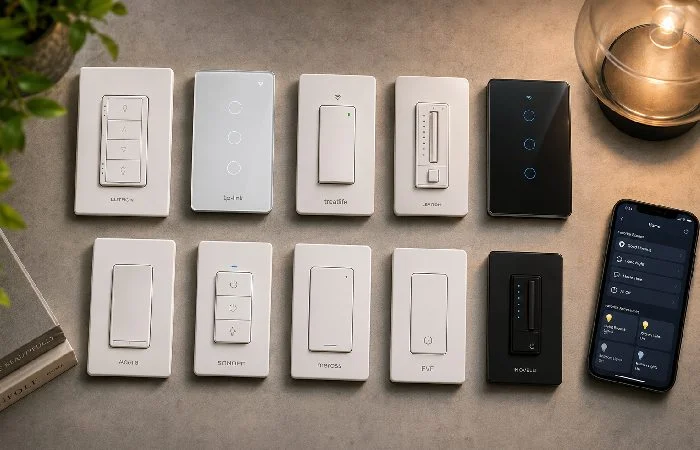
From the list of experts’ reviews, manufacturers’ specs, and validated consumer ratings, these are the top smart switch picks for 2026.
Best Overall: Lutron Caseta Diva (~$60 + bridge)
Lutron has been producing light controls since the 1960‘s. The Caseta line is known to be one of the most trustworthy smart switch systems there is.
No neutral wire needed. Works with Alexa, Google, Apple HomeKit, and Sonos. The proprietary Clear Connect protocol means zero WiFi congestion. And the physical switch feel is genuinely premium.
The downside? You need their Smart Bridge (80forthestarterkit,whichincludesaswitch+bridge+remote).Afterthat,eachswitchisabout55-60. Not cheap.
Professional reviews from sites such as Wirecutter and Tom‘s Guide consistently mention the reliability of Caseta and lack of disconnection problems. This is rare amongst inexpensive WiFi switches according to comparative reviews.
Best Budget: Treatlife SS01S (~$15)
This WiFi switch is overpowered for the price — it only costs fifteen bucks, Compatible with SmartThings and Google Home. Requires a neutral wire.
The app is basic, and it doesn’t support Matter. But for straightforward on/off control at this price? Hard to complain.
My advice would be to purchase 1 to test in your setup before ordering 10.
Best for Matter: TP-Link Tapo S505 (~$20)
TP-Link got the jump on Matter with the Tapo S505, and so far, it’s their best. Supports WiFi + Matter, works with Google, Apple Home, and Alexa. Needs a neutral wire.
User reviews report quick setup through the Apple Home app, typically within a few minutes. Response time is snappy, maybe half a second. For a $20 Matter switch, that’s impressive.
Best Dimmer: Lutron Diva Smart Dimmer (~$65 + bridge)
If you want dimming, Lutron again. The Diva dimmer has a slider on the side that feels great to use manually. And the dimming is flicker-free, even with cheap LED bulbs.
Most budget WiFi dimmers flicker at low states of brightness, as many professional reviews point out. But Lutron does not.
Best No-Neutral: Aqara H2 Smart Switch (~$30)
Zigbee; no neutral wire needed, and very small. Has to have an Aqara hub or Zigbee hub compatible with SmartThings.
One thing to know. It doesn’t support WiFi directly. You’re committing to the Zigbee ecosystem with this one. If you own an older house and there are no neutral wires, then this is one of the best options on the market to choose today.
Prices as of May 2026; does not include installation costs if hiring an electrician.
| Home Size |
Switch Count |
WiFi Setup [Treatlife] |
Lutron Caseta |
Zigbee [SmartThings] |
| Small (1 to 2 Bedroom) |
8 to10 switches |
$120 to 150 |
$600 to 700 (inclusive, bridge) |
$300 to 400 (including hub) |
| Medium (3 Bedroom) |
15 to18 switches |
$225 to 270 |
$950 to 1,150 |
$500 to 650 |
| Large (4 plus Bedroom) |
25 to 30 switches |
$375 to 450 |
$1,500 to 1,850 |
$850 to1,100 |
Regional Wiring Standards: Important Differences
Smart switches are not universally compatible across regions due to voltage, wiring standards, and physical mounting differences:
Always confirm the switch you bought is rated for your country. Mounting and voltage standards vary throughout the world. Use a 120-volt-rated switch for a 220-volt system, and you‘re asking for a serious fire and shock hazard.
Best Smart Switches for India. Prices as of May 2026; does not include installation costs if hiring an electrician.
The Indian market is completely different. Standard switch plates are modular (not the single-gang US style), voltage is 220V, and the availability of international brands is limited.
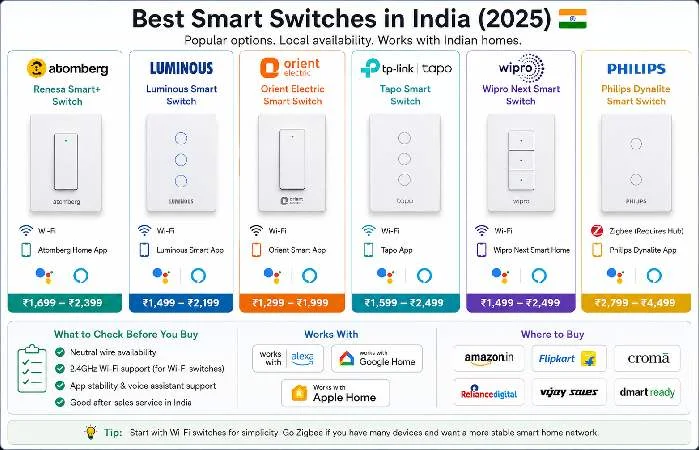
Wipro Next Smart Switch (~₹2,500)
Wipro is one of the few Indian brands doing WiFi smart switches right. Works with Alexa and Google Home. Fits standard Indian modular plates (Anchor Roma compatible).
Based on verified user reviews on Amazon India and other platforms, buyers report that. The consensus: reliable for on/off, but the dimming isn’t great. Fair tradeoff at this price.
Sonoff T5 WiFi Switch (~₹1,200)
Budget pick for India. Sonoff’s T5 comes in 1-gang, 2-gang, and 3-gang variants. Touch-based glass panel. Works with the eWeLink app and supports Alexa/Google.
Kind of a no-brainer if you’re starting and don’t want to spend much. Just make sure your wiring has a neutral.
Best Smart Switches for UK Homes
UK switches are physically quite different from US ones (their plates are bigger, they mount differently). You are working with 230Volts, ring circuits, and UK standards.
Top picks for the UK market:
- Hive Active Light Switch (~£40) — Made specifically for UK wiring. No neutral required. Works with Alexa and Google.
- Lightwave Smart Series (~£50) — Supports Apple HomeKit. Premium build quality. Needs the Lightwave hub.
- Sonoff TX T5 UK (~£15) — Budget option. Needs a neutral wire. Glass touch panel.
As of May 2026, the UK smart switch market offers fewer product options than the US market, though major brands like TP-Link, Hive, and Lightwave provide solid coverage for most use cases.. But these three cover most scenarios.
Smart Switches for Ceiling Fans — What You Need to Know
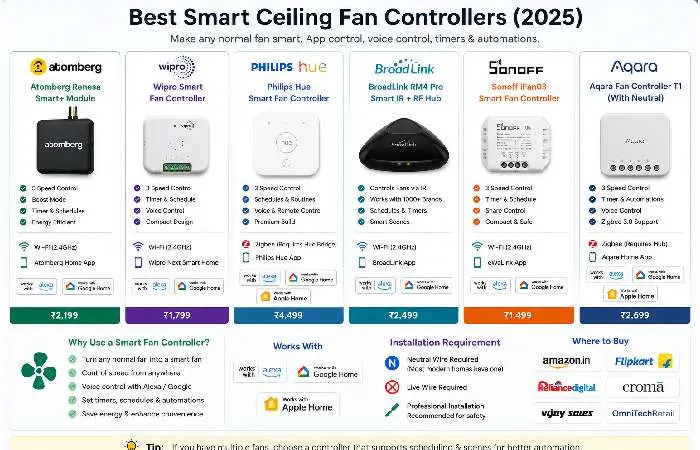
Not every smart switch works with ceiling fans. That’s a detail most guides skip.
Regular smart switches are rated for resistive loads (lights). Ceiling fans are inductive loads. Using the wrong switch can cause humming, overheating, or early failure.
What to look for:
- Check the switch’s motor/fan load rating (separate from the light wattage rating)
- Look for switches specifically listed as “fan compatible” or “motor rated.”
- Don’t use a standard smart dimmer on a fan. You need a fan speed controller
Best fan switch: The Lutron Caseta Fan Speed Control (~$60) is capable of controlling a fan motor as high as 3.5A, and provides 4 varying speeds. The U.S.DOE states that you can save roughly 10% in AC use thanks to smart controls when ceiling fan use in warmer months.
Common Mistakes People Make with Smart Switches
After helping a few friends set up their switches (and making some of these mistakes myself), here’s what trips people up.
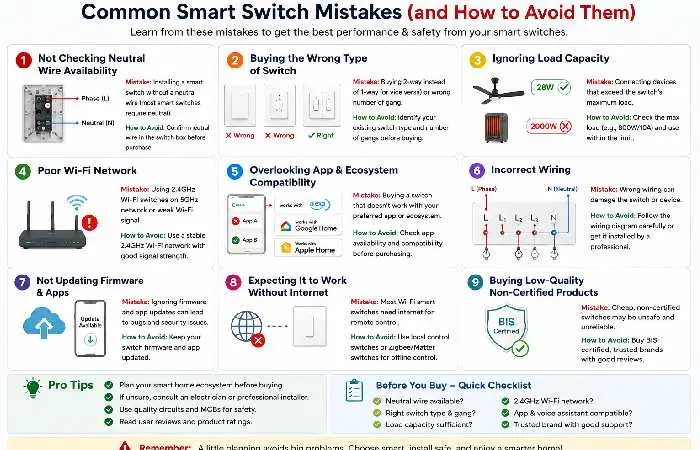
- Not checking for a neutral wire first. This is number one for a reason. Buy the switch, rip open the wall, no neutral. Now you’re returning it.
- Overloading the switch. All switches have a maximum wattage, so a 600W dimmer switch on a circuit with 800 W of lights? There‘s a risk of fire. Always check.
-
To dismiss the hub requirement. Both Zigbee and Z-Wave switches require a hub. This costs you an extra $50-100 you may not have to spare.
- No more of this 3-way switch business. If your light is switched from two locations (such as top and bottom of a stairway) you‘ll need a 3-way compatible switch and a companion switch at the other location. Ordinary smart switches (e.g., Lutron, GE) will not work on existing 3-way switches without modification.
-
Purchasing WiFi switches for a big house. Twenty WiFi switches all communicating to your router in unison. Your whole network slow. Done that.
How to Install a Smart Switch (Without Calling an Electrician)
Brief disclaimer: if you don‘t like working with electrical wiring, you should hire a professional. At a minimum. But if you‘ve replaced a standard switch, this one isn‘t too much more of a problem.
Note: working on house wiring can be shocking or even cause a fire. Call a licensed electrician if you‘re not sure of anything. Most installations can be done in 15-30 minutes for $50-$150 per switch.
This type of method saves the installer time, especially when used in multi-gang boxes, older homes with strange wiring, or any aluminium wiring system.
What you need: A screwdriver, a voltage tester, wire nuts, and about 15 minutes.
The basic process:
- Turn off the breaker. Test with a voltage tester. Don’t skip this.
- Remove the old switch. Take a photo of the wiring first (trust me on this).
- Identify your wires. Hot (usually black), load (to the light), neutral (white, if present), ground (green or bare copper).
- Connect the smart switch following the included wiring diagram. Every brand is slightly different.
- Then carefully fold the wires back into the box. Whichever switch you will be using is thick (compared to normal) so it requires a little bit of patience.
- Screw in the switch, apply the wall plate and switch the breaker on.
-
Combine it with your application and voice commands.
A good installer will usually get it down to 10-15 minutes per switch. The first one is more like 40. Normally.
If you‘re looking for more smart device alternatives to a switch, browse our smart device AI-powered home gadgets that operate with your smart switch.
FAQs
What is the best smart switch for home use in 2026?
The Lutron Caseta Diva is the most reliable smart switch you can buy. It doesn’t need a neutral wire, works with every major voice assistant, and has an excellent track record for long-term reliability. For budget buyers, the Treatlife SS01S at $15 is a solid WiFi option.
Do smart switches need a neutral wire?
Most WiFi smart switches need to have a neutral wire. There are a select few that do not require a neutral including Lutron Caseta, Aqara H2, and Inovelli Blue Series, so be sure to check before buying.
Are WiFi smart switches better than Zigbee?
WiFi switches are easier to install (no hub required). Zigbee is best for larger homes with many devices. WiFi networks may slow down your router if there are more than 15 devices connected. Zigbee uses its own mesh network, meaning your WiFi speed won‘t decrease.
Can I use a smart switch with a ceiling fan?
If you‘re just using routine smart light switches to control fans, check that they are rated for individual motor loads. Regular smart light switches are not rated for fans and could overheat. Use a dedicated fan speed controller such as the Lutron Caseta Fan Control.
Do smart switches work with Alexa and Google Home?
Yes, with most 2026 smart switches, you will be able to control your lights with both Alexa and Google Home (look at the listing of the product). All Matter-certified switches will work with all smart home assistant platforms (including Apple HomeKit).
What’s the best smart switch for an older home without a neutral wire?
Lutron Caseta is proven to be the safest. It has its own protocol (Clear Connect) and also requires no neutral. The Aqara H2 is a cheaper Zigbee alternative.
How much does it cost to make an entire home smart with switches?
In a standard 3-bedroom US house with approximately 15-20 switches, you are looking at spending $300- 600 on WiFi switches (such as Trebelife) or $800-1,200 on a Lutron Caseta system, including the bridge. Zigbee kits with a hub are also in this range.
