Published: June 16, 2026
Last Updated: June 16, 2026
If you’ve ever turned off your bedroom light, shuffled across the room in the dark, and thought, “Why am I still doing this in 2026?”, you’re exactly who WiFi smart switches are for. They turn the basic switches already on your walls into smart controls you can tap in an app, automate for your routine, or trigger with your voice through a smart speaker.
Imagine it as a series of quick navigation lines through which you progress from “wow that‘s complicated” to ” I want to buy this switch and how come you said it‘s easy to wire up”.
Key Takeaways
WiFi smart switches are an easy way to control all of your existing lights and appliances from your phone, Alexa or Google, no need to change out each bulb. The best picks in 2026 will be Matter-compatible, have decent apps and be compatible with your home‘s wiring (neutral or no neutral). To boil it down, pick a reputable brand that is compatible with your home wiring (neutral or no neutral), voice assistant, with WiFi and power monitoring if interested in saving energy.
Why WiFi smart switches are worth it in 2026
You’ve probably already tried smart bulbs, a smart plug or two, and maybe even a hub that’s now gathering dust. WiFi smart switches solve a different problem: they let you keep your existing fixtures and bulbs, but move the “smart” part to the wall where everyone in the house can use it.
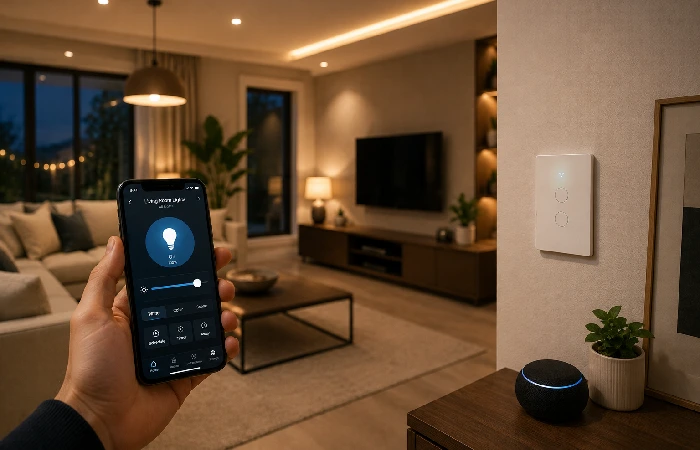
They’re especially useful when:
- You want your family to keep using the wall switch as usual, even if they never open the app.
- You’re done with guests flipping a physical switch and cutting power to your expensive smart bulbs.
- You want scheduled on/off times or “I’m away” lighting without leaving lamps on all night.
In 2026, the best WiFi smart switches aren’t the ones with the fanciest spec sheet; they’re the ones that balance four boring but important things: safe wiring, reliable WiFi, good software, and support for newer standards like Matter. A switch with 10 extra features doesn’t help if it keeps dropping off your network or isn’t rated for your wiring.
What is a WiFi smart switch and how does it work?
A WiFi smart switch is a standard wall switch that connects to your home WiFi network. It‘s installed on the same circuit as a standard mechanical switch. A smart switch, in contrast to a simple mechanical switch, puts a tiny computer onboard. This tiny computer takes instructions received from your phone, voice assistant or automation.
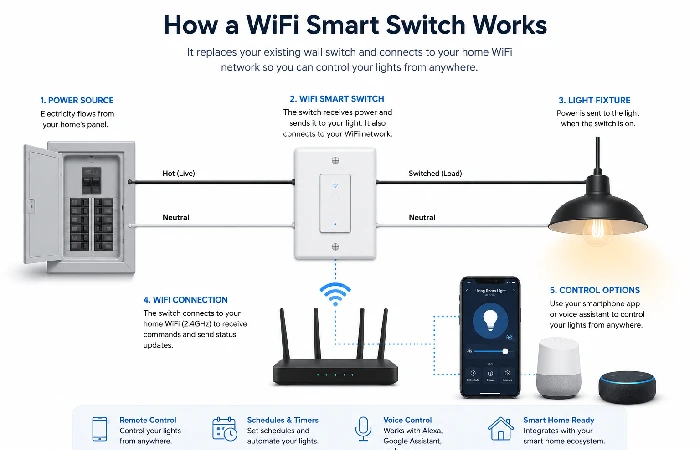
Most models follow the same basic flow:
- Power comes from your mains wiring into the switch.
- Now the switch links to your 2.4 GHz WiFi.
- Otherwise, a smart home platform/app will communicate instructions via your router to the switch.
-
The switch on and off the load, which can be a light, fan, outlet or booster. If the switch is a dimmer, it would increase or decrease brightness.
WiFi vs other protocols
You’ll also see Zigbee, Z‑Wave, or Thread, which usually need a hub; WiFi switches skip that and talk straight to your router, making them easy to add but harder on weaker routers if you install many.
A quick rule of thumb:
- If you’re just starting with three or four switches, WiFi is usually the least painful option.
- If you’re planning a 50‑device “everything in the house is smart now” setup, you’ll probably mix in Zigbee/Thread devices later, which the broader best smart switches for home roundup covers in more detail.
Benefits of WiFi Smart Switches
Remote control is the obvious one. You can lie in bed, open the app, and switch off the lights.
Some WiFi switches also include energy monitoring, so you can see how much power a circuit is using and spot waste more easily. According to the U.S. Department of Energy, lighting can make up a noticeable share of a home’s electricity use, so pairing energy monitoring with simple schedules helps cut down “phantom” usage, like hallway or kitchen lights that nobody remembers to turn off.
No Hub Required
This is the bit most first‑time buyers actually care about. You don’t need a Samsung SmartThings hub, a Philips Hue Bridge, or any extra box dangling from your router. If you’ve got a 2.4 GHz WiFi network and a smartphone, you’re in business.
One catch: if your router forces everything onto 5 GHz (some newer mesh systems do this by default), pairing can be frustrating until you split out a 2.4 GHz network or create a separate SSID. We’ll get into that in the setup section.
Types of WiFi smart switches (and who they’re for)
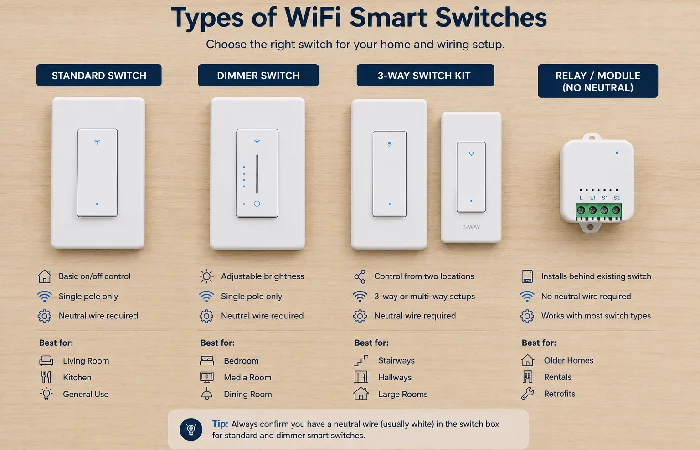
Not every WiFi switch is alike. Choosing the wrong one can quickly lead to flicker or buzzing.
- Standard on/off WiFi switches
These are simple to use for basic lighting circuits where you only want on/off control, great for hallways, cupboards, balconies and most bedrooms.
These are built for dimmable LED or incandescent bulbs and work well in living rooms and bedrooms, but you’ll need to double‑check bulb compatibility to avoid flicker.
- 3‑way and multi‑way WiFi switches
Here you go, these are used anywhere you operate the same lights from multiple locations (stairwells, long hallways, etc.). Most “opposing” units are marketed by the same manufacturers, but most trouble is caused when someone, instead of the usual 3-way mechanical switch “gets smart and mixes an electronic switch.
- No‑neutral and retrofit options
Older homes (especially outside North America) often don’t have a neutral wire in the switch box. Some WiFi switches are designed to work around that, within limits.
These sit behind your existing switch plate or in a junction box. That five‑minute check can save you from ordering the wrong product.
Best WiFi smart switch options in 2026 (by use case)
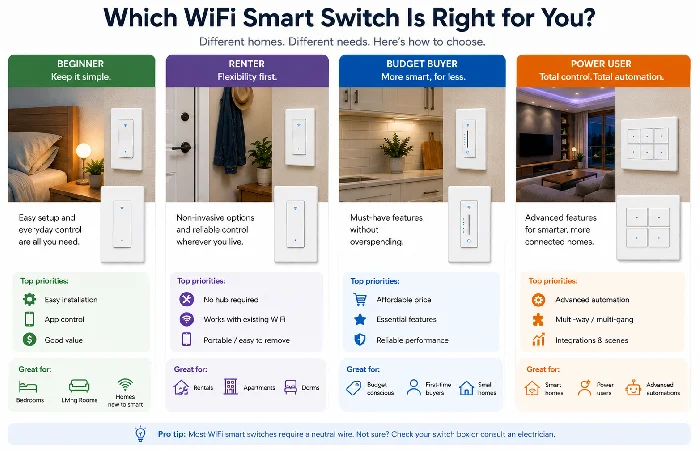
Instead of chasing a single “number one” pick, it’s more honest to talk about the best fit. Here’s how that breaks down.
Best for beginners
If you just want something that works with Alexa or Google Assistant without drama, focus on:
- A well‑known brand with plenty of recent reviews and firmware updates.
- Simple 2.4 GHz WiFi pairing through a well‑rated app.
- Clear labels for line, load, and neutral on the back of the switch.
Best for renters
Renters have to think about reversibility and landlord rules:
- Use smart plugs or smart bulbs if you’re not allowed to touch wiring at all.
- When you can swap switches, pick WiFi smart switches that match the same faceplate style so you can put the old one back before you move out.
- For pure savings, your site’s budget WiFi smart switches roundup helps you filter out options that lock you into expensive ecosystems.
Best for budget‑focused buyers
If you’re price‑sensitive, you’ll usually:
- Accept that the app isn’t perfect as long as the hardware is safe.
- Be fine with WiFi‑only devices and no hub.
The main trap is ultra‑cheap, no‑name switches with weak safety markings and apps that haven’t been updated in years.
Best for advanced automators and power users
- Local control, so things keep working if the company’s cloud has a bad day.
- Matter support and clean integration with platforms like Home Assistant or Apple Home.
- Detailed energy monitoring and flexible scene control.
Features to compare before you buy
When the two switches appear identical on the product page, it is these specifications that differentiate a good purchase from a future headache.
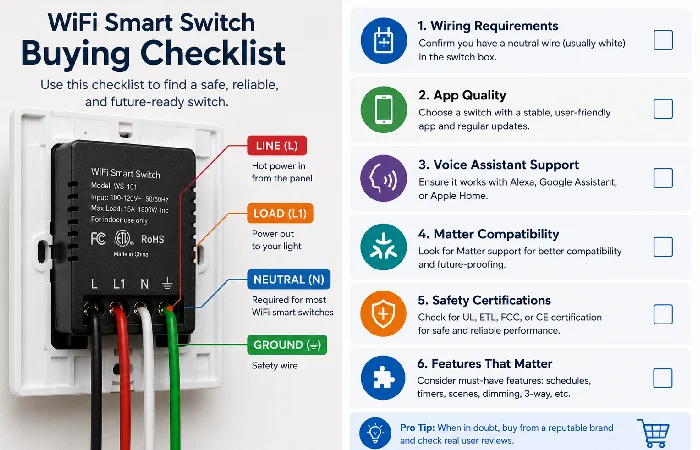
Wiring compatibility
- Check if your box has a neutral wire, and choose a switch that matches.
- Confirm voltage and frequency for your region.
App quality and automations
A good app makes a bigger difference than people expect. Look for:
- Reliable pairing,
- Easy schedule setup,
- Sunrise/sunset timers, and
- Vacation‑mode randomisation.
Voice assistants, Matter, and local control
- Work with at least one major voice platform you already use.
- Either support Matter today or have a clear public roadmap to add it.
- Offer some form of local control so a cloud outage doesn’t leave your lights frozen.
Safety and long‑term support
Look for proper safety markings and a history of firmware updates.
Installation and setup tips
Safety comes first
If you’re not confident identifying line, load, neutral, and ground, or your home’s wiring looks “creative,” hiring an electrician is the safer choice.
National electrical codes, such as those from the National Fire Protection Association, set strict rules for wire size, load ratings, and overcurrent protection and often require licensed professionals for more complex permanent wiring work.
High‑level install steps
- Make sure no electricity is passing by turning the power off at the breaker, and test the circuit with a tester for dead.
- Unplug the old switch and photograph the wiring before disconnecting.
- Find line, load, neutral and ground. Attach to the corresponding labelled terminals on the WiFi switch.
- Gently nest the wires into the box and replace the switch faceplate.
- Switch back on the power, and using the app, tell it to connect to both WiFi and your smart home platform.
Common mistakes and how to avoid them
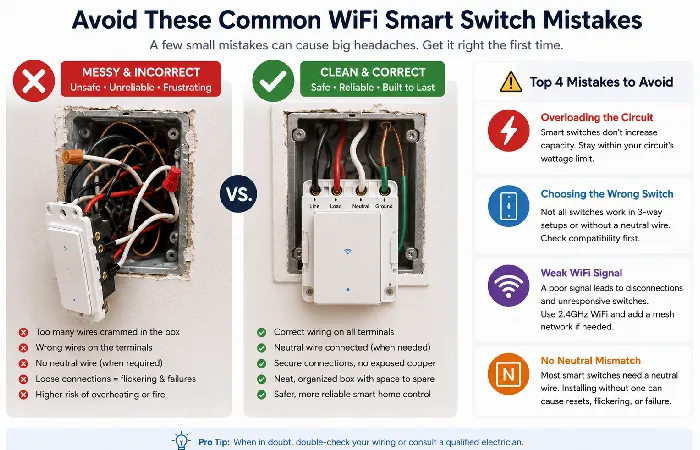
The same avoidable problems show up again and again:
- Installing a standard WiFi switch on a dimmer‑only circuit, or the other way round.
- Mixing a smart 3‑way switch with a random mechanical switch instead of using the manufacturer’s recommended kit.
- Overloading a single switch with too many high‑wattage bulbs or a powerful fan.
- Buying a WiFi switch that doesn’t match your region’s voltage or back‑box type.
Troubleshooting WiFi smart switch problems
Even good switches misbehave sometimes. Here’s a quick way to narrow things down.
- No power at all: Is there power to the switch? Check the breaker (see your wiring diagram). If the other switches sharing the same circuit are working then you probably wired your switch incorrectly.
- Multiple offline errors: Verify the WiFi signal is strong where the switch is, update the App and the Firmware and confirm the router isn‘t overburdened with more than 2.4 GHz devices on the one band.
- Flickering or humming light up: Usually means the bulb isn‘t compatible or the dim level is preset too low. Try using dimmable light bulbs; try turning down the app‘s set minimum dim level (if available on your switch).
- Switch feels hot: A bit of warmth is normal under load, but if it feels too hot to keep your hand on, reduce the load and consider a professional inspection.
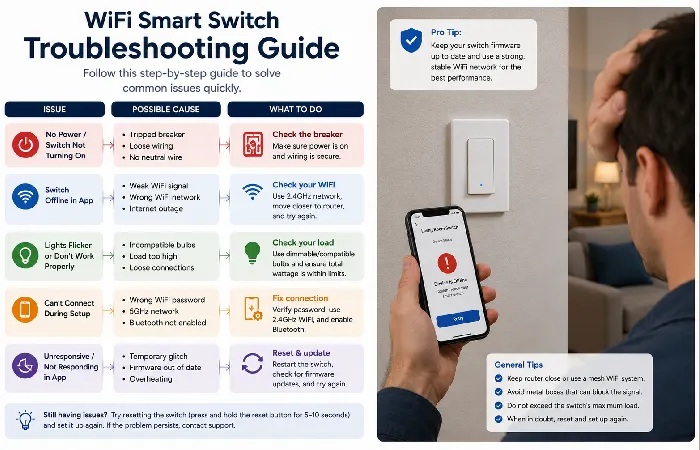
If you’re constantly rebooting the router to keep lights online, upgrade your router or cut down on WiFi‑only devices.
FAQ: Best WiFi Smart Switches in 2026
1. Are WiFi smart switches safe?
They are safe if correctly matched to your wiring, voltages, load ratings and safety marks. Using unknown makes, estimating wiring or overloading circuits is not as safe.
2. Can I install a WiFi smart switch myself?
Yes, if you’re comfortable with breakers and wiring diagrams; otherwise, hire an electrician.
3. Do I need a hub for WiFi smart switches?
Most WiFi switches have no requirement for a hub as they connect directly to your router.
4. Will WiFi switches work if the internet is down?
Yes, the physical buttons still work. App control and automations may or may not work, depending on whether your switch supports local control or relies on the cloud.
5. Are WiFi switches better than smart bulbs?
It depends: WiFi switches suit shared wall controls and existing fixtures; smart bulbs suit colours, scenes, and room‑by‑room experiments.
