Published: June 6, 2026
Last Updated: June 6, 2026
It‘s not that most teams are slow because their people are slow. They‘re slow because the flow is getting stuck that email reply is taking too long, that document is sitting untouched in an overflowing shared folder, that approval step is taking two days longer than it should.
Cloud automation addresses this at the infrastructure level. IT can automatically move information between tools without manual intervention-the action can be triggered by rules that your team sets once and seldom has to revisit.
This guide explains the real, practical impacts of cloud-based office automation: what‘s different, how much it costs and where it doesn‘t work. By the end of it, you‘ll know whether it‘s the solution for your company.
Summary
The cloud-hosted office automation, which is moved on the internet for the team members, puts repetitive work, eg approval, time management, forwarding documents, into a place that every member can reach wherever they are. It is usually cheaper to implement, it is automatically up to date, and it can be fully scaled and managed without much IT commitment, when compared with the on premise solution. The main advantage is less legwork between the task and the end output.
What Is Cloud-Based Office Automation?
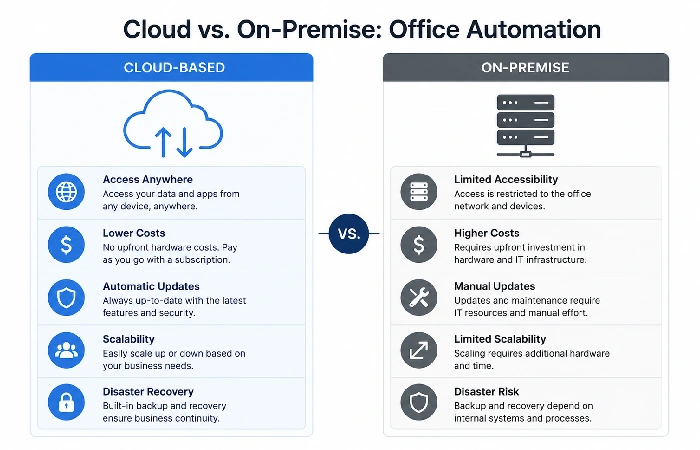
Cloud office automation is hosted on remote servers that the user can access via a web browser or app and manages boring admin processes without having to do anything. Examples include document routing, form filling, approval processes, data entry, scheduling, reportings.
The difference from traditional automation is where the software lives.
How It Differs from On-Premise Automation
On-premise systems are hosted and maintained by the hardware on your company‘s own servers. Your IT department is responsible for updates, patches, and fixing hardware failures. Cloud systems exist on a vendor‘s infrastructure, which is accessed over the internet, and set up and maintained by the vendor.
That’s not a minor distinction. For most small and mid-size businesses, on-premise automation means a significant upfront capital expenditure and an ongoing dependency on internal IT capacity. Cloud automation shifts that model to a monthly or annual subscription with far lower startup costs.
Key Components of a Cloud Automation System
A typical cloud-based office automation setup includes:
- A workflow-builder in the form of either drag and drop of rules.
- Document management and e-signature tools.
- An integrations layer native API connections (CRM or tickets integrations, for instance), or a middleware such as Zapier or Make.
- Reporting and audit trail functions
- Role-based access controls (RBAC)
Microsoft 365, Google Workspace, Zoho One, and Monday.com are examples of the platforms that integrate them. Some (like Kissflow, Process Street, or Nintex) are just workflow automation focused and integrate with your existing tools with an API.
Cloud Storage vs. Cloud Automation — The Difference That Matters
| Aspect |
Cloud Storage |
Cloud Automation |
| Primary function |
Store and retrieve files |
Execute multi-step workflows |
| Manual effort required |
High — humans still route, approve, notify |
Low — rules and triggers handle routing |
| Integration depth |
Shallow (file sync) |
Deep (connects CRM, HR, finance, comms) |
| Example |
Google Drive, Dropbox |
Zapier + Google Workspace, Microsoft Power Automate, Monday.com |
| ROI trigger |
Backup and access |
Time savings and error reduction |
If your team still manually routes documents for approval via email, you’re using cloud storage, not cloud automation. The distinction matters because the benefits in this article apply to the automation layer.
Cloud Office Automation in Practice: What It Actually Looks Like
Theory is useful. Specifics are better.
Here‘s how the three most-used cloud office suites handle automation as of mid-2026:
| Feature |
Microsoft 365 + Power Automate |
Google Workspace + AppSheet |
Zoho Workplace + Zoho Flow |
| Best for |
Enterprises, regulated industries |
Startups, real-time collaboration teams |
SMBs, budget-conscious businesses |
| Built-in automation |
Power Automate (800 plus connectors) |
AppSheet (no-code app builder) |
Zoho Flow + Zia AI assistant |
| AI copilot |
Microsoft Copilot |
Google Gemini |
Zoho Zia |
| Pricing (per user/mo) |
12.50–57 (US) |
7.20–25.30 |
3–9 |
| Regional fit (India/UK) |
Strong enterprise presence in all three |
Popular with startups in India, strong in UK |
Very popular with Indian SMBs |
Why Businesses Are Switching to Cloud Office Tools
The adoption has been growing at a continuous pace over the last 10 years in the industry. Most of the industry analysts predict that the adoption of public cloud and SaaS is going to continue its growth within the upcoming years. Gartner predicts that total public cloud spend in 2025 will be $723 billion globally, compared to 595 billion in 2014, most of it driven by SaaS tools for business operations, but not only raw infrastructure.
Market Adoption and What the Numbers Say
The shift isn’t confined to large enterprises. Small and mid-size businesses now represent a growing share of cloud SaaS adoption — partly because vendor pricing has become far more accessible than it was five years ago, and partly because remote work has made on-premise tools genuinely impractical for distributed teams.
The question most operations teams are asking is no longer “should we go cloud?” It’s “which tools, and when?”
Cost Advantages of Cloud-Based Office Automation
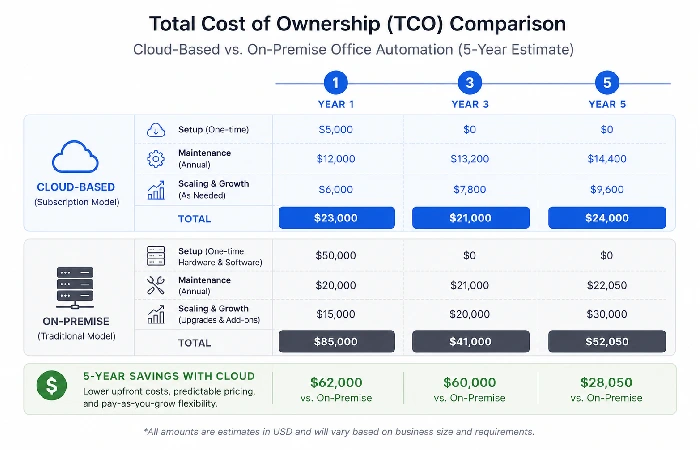
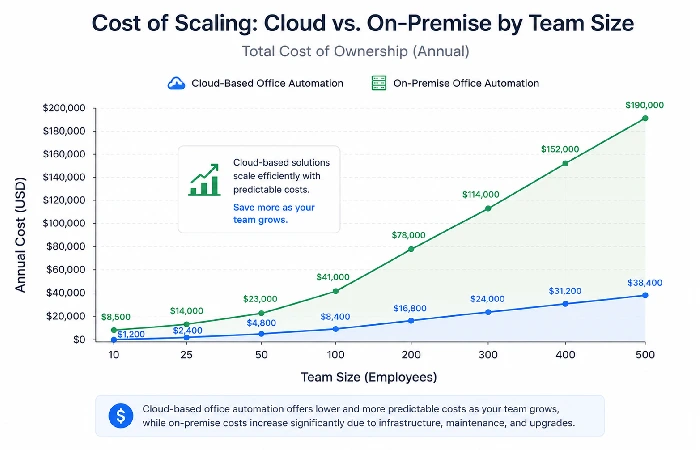
Cost is typically the first concern and often the first misconception. Cloud automation isn‘t always less expensive per year once you have a certain number of people on your team. The overall cost of ownership for most organizations with fewer than about 500 employees is often better for the cloud, once you factor in infrastructure, maintenance, and upgrade costs, though that point of breakeven varies by company.
Lower Setup Costs vs. On-Premise Systems
Automation on-site generally can cost you hardware, software licences, installation labour and, most often, a consultant or systems integrator to get everything up and running. That‘s five-six figures worth of capital expenditure before you‘ve automated one workflow.
Cloud tools turn that on its head. All of the products I looked at have affordable tiered plans, most under $20 per user per month, with self-service setup and onboarding, sometimes with an extra boost from an implementation team.
Point of reference: cloud and SaaS expenditures now make up the biggest segment of enterprise software budgets the bottom part of the chart, according to Statista‘s 2025 public cloud market forecast. The reason for this is that it‘s much cheaper to set up than traditional on-premise infrastructure: when comparing the total cost of doing this, at least.
For instance, a midsized logistics company shifting from a traditional on-premise BPM system to a cloud-based workflow application could take a matter of months to migrate, depending on the sophistication of the application and internal resourcing. In several of the case studies made available, organizations state that cloud implementations require a significant cost saving compared to the upkeep of equivalent on-premise technology (over a multi-year horizon, even accounting for hardware refresh cycles).
Predictable Subscription Pricing
The other great, although usually unrecognized, perk of SaaS pricing: budgeting is much clearer. When you‘re on infrastructure, costs come in as not only a lump sum, but a range of possible amounts. With SaaS, those expenses are predetermined, often in monthly or yearly increments.
Nowadays, some vendors (by the middle of 2026) also have hybrid prices or a pay-as-you-go model. Therefore, you should examine not only per-user prices and compare all limits on automation tasks, storage and integrations.
That said, the price can skyrocket if you‘re not careful. If your automation hits a certain volume, tools that charge per-action or per-automation-run (which tend to be found at the lower-tier plans) can create a big bill at month‘s end if the automation volume exceeds expectations. What is the pricing structure not just the headline figure?
If you want a detailed breakdown of individual platforms and the real costs at various team sizes, the comprehensive guide to office automation software covers the top contenders and their compromises.
Remote Access and Collaboration Benefits
This is where cloud office automation is most visibly transforming the daily work of today‘s teams. Instead of residing on servers behind the firewall,’ on-premise solutions require network connections to those servers often via VPN, which increases latency and requires extra administration; otherwise, they can‘t be accessed at all.
Cloud tools don’t have that problem.
Most industry polls show that companies that have adopted solid digital collaboration and workflow tools to a significant degree experience documented productivity gains for the organization, especially in dispersed teams, although the percentage gains differ by industry and company size.
How Cloud Automation Supports Hybrid Teams
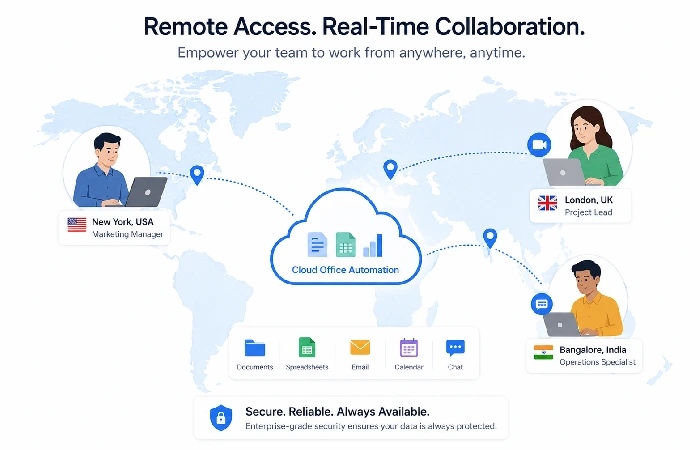
An employee in Mumbai can issue a purchase request that, if approved by a manager in London, automatically calls up a Chicago vendor. None of the participants is on the same network, and all are sleeping at the same time.
According to McKinsey‘s 2023 State of Organizations report, “similarly, organizations with well-integrated digital collaboration tools had clearly higher team productivity scores than those relying on in-person coordination and manual handoffs.” You can see a clear example of this: cloud automation.
For hybrid teams specifically, cloud automation removes the bottleneck of geography. Approvals, notifications, file routing, and data capture all happen in the background — regardless of where each team member is working that day.
Scalability — Growing Without Replacing Your Stack
One of the more pragmatic points for a cloud automation system is that sometimes they are implemented for reasons that are not exclusively technology based; for example, when your team expands. Moving from in-house infrastructure to cloud is done with one click as opposed to capital investment, extension of server power, renegotiation of heavyweight licence terms, etc.
Scaling Up and Down Without IT Overhead
Cloud platforms scale on a user-seat or usage model. Adding five new employees to a workflow tool takes minutes, not weeks. Cutting back during a slow period — or after a restructure — is equally straightforward. You’re not sitting on sunk hardware costs either way.
That flexibility can be very advantageous during growth periods or restructuring, where headcount and process volume can swing wildly. A team that doubles in 18 months can continue using the same automation platform and scale it out, instead of starting from zero.
Most cloud platforms also offer API access and webhook support, meaning your automations can expand to connect with new tools as your stack evolves — without needing a developer on retainer for routine changes.
Security and Compliance in Cloud Automation Systems
Security is the objection that comes up most often in cloud automation conversations — and it’s a legitimate one. Moving business data to a third-party server feels riskier than keeping it in-house. In practice, the security posture of major cloud vendors often exceeds what most small and mid-size businesses can build internally.
What to Look for in a Vendor’s Security Posture
SOC 2 Type II reports are recognized in the industry as the basic standard for assessing the controls that a business SaaS provider has in place for security, availability, processing integrity, confidentiality and privacy, and most organizations currently demand at least this level of assurance before doing business. The AICPA which produces the SOC 2 standard offers comprehensive guidance on questions to be answered before entering into a contractual agreement.
Other signals to check:
- ISO 27001 certification – (International standard for information security);” Specifies the requirements for establishing, implementing, maintaining, and improving an information security management system” (www.iso27001certification.org)
- Data residency options (which are especially critical for UK and EU companies needing to comply with the GDPR)
- Support for role-based access control and single sign-on
- Audit logs and activity monitoring
- Encryption at rest and in transit
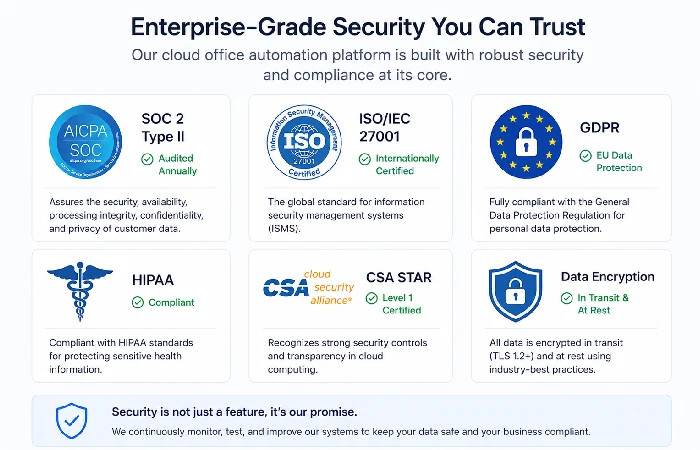
One honest observation: cloud vendors have dedicated security teams whose entire job is protecting their infrastructure. Most SMB IT departments don’t have that depth. That doesn’t mean cloud is risk-free — but the risk comparison isn’t as one-sided as it initially appears.
Faster Implementation and Automatic Updates
On-premise software updates are an ongoing pain. IT has to test patches in a staging environment, plan for downtime, inform all your users, and deal with anything that breaks. Thanks to cloud automation tools, this process is automated and takes place out of your way.
No-Code and Low-Code Configuration
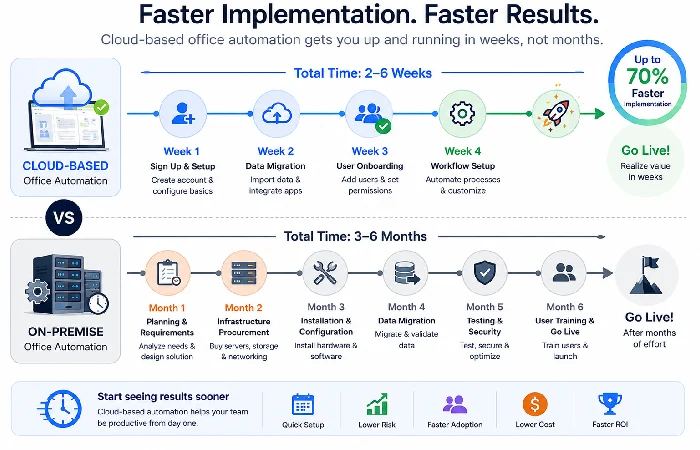
The other implementation advantage is how much less technical skill modern cloud automation tools require. Platforms such as Kissflow, Zapier, and monday.com have built drag and drop workflow builders that any operations managers or team leads can utilize to set up automations without writing a single line of code.
That lowers the dependency on IT or development resources for routine automation tasks. It also means non-technical staff can adapt workflows as business processes change — without waiting weeks for a developer to have capacity.
However, there‘s a ceiling. Most “complex integrations” between systems that don‘t have great available APIs (e.g., CRM/ERP+automation), automations that require (heaven forbid) logic that is built out across 5+ inputs, require a developer or more advanced platform. The types of automations most office workers would want, such as approvals, notifications, document routing, and data entry are no problem to a no-code platform.
For teams curious about where artificial intelligence fits into this picture, the guide to AI in office automation explores what’s genuinely useful now versus what’s still vendor marketing.
Common Limitations to Know Before You Switch
No technology category has zero downsides. Cloud automation has real limitations that some evaluations gloss over — and knowing them beforehand prevents regret after signing a contract.
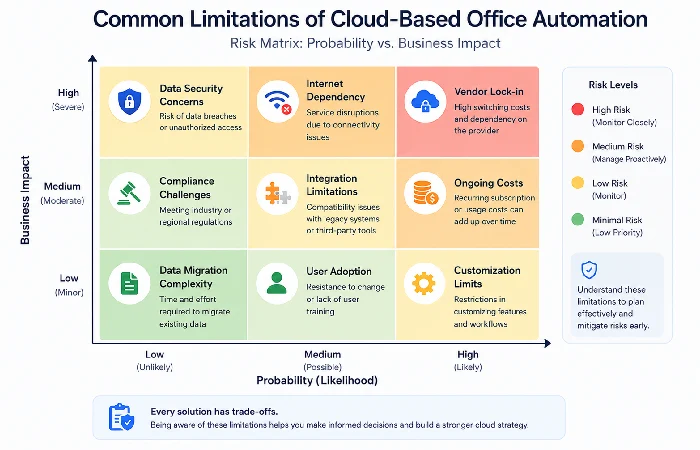
Internet Dependency and Downtime Risk
Cloud tools require internet access. That sounds obvious, but the implication is real: if your connection goes down, your automated workflows stop. For most modern offices with reliable broadband, this is a minor risk. For businesses operating in regions where connectivity can be intermittent – or even teams conducting work in locations with a lack of native mobile data access – this isn‘t just a theoretical issue.
The vast majority of cloud vendors promote uptime service level agreements (SLAs) exceeding 99.9%. Certainly, if these SLAs were achieved, we‘re talking about only a few hours of unscheduled downtime in a year, although there‘s some variation across vendors and whatever service plan is selected. For many non-critical business processes, this is fine. Mission-critical processes, such as payroll, instant inventory control or production scheduling, may be better served by a combination or support fallback.
Integration Complexity
Most of the cloud automation tools favor the promotion of a refined native integration with your current application. But in reality, this native integration is only a one way synchronization of your data and is far from being a true two ways integration. Make sure to test the native integration of the core application(s) your team has been using regularly.
While we can use Zapier and Make to overcome gaps between incompatible systems, they do come at a cost and an additional point of dependency. With each connector in a chain, there are more points where something can silently fail and go unnoticed until the subsequent impact has occurred.
The guide to workflow automation tools covers which platforms handle complex integrations best — a useful read before you finalize any shortlist.
How to Know If Your Business Is Ready for Cloud Automation
While budget/ability is part of the story to a certain extent, the real teams that leverage cloud automation the most commonly have two things in place first: documented processes and ownership.
If you can‘t even document the steps in a process, what gets done, who does what, in what order and under what circumstances, automation will only speed up your existing mess. The failure mode of automation is not technical; it is automating a broken process and not expecting it to spit out the same broken mess faster.
Identify five of your biggest time-wasters and specify, in each case, the common inputs and the common outputs. That‘s what you want to automate first, then use your tool to automate it, then extend that to other tasks.
All successful cloud automation teams to date have started small, with 3-4 easily codified workflows, asked for feedback from the engineers involved in handling the day-to-day tasks, and improved them before expanding to others.
For those teams on the early stages of their automation path, the detailed manual of office automation systems directly caters to the strategic framework of ‘where to start?’, ‘What to do first?’, and ‘how to present a persuasive business case’ to rally leadership support.
Unprepared teams that race straight to choosing tools often become frustrated, not because the tools are poor, but because the process in front of them is not ready to be automated. That is a process issue.
FAQs About Cloud-Based Office Automation
1. What are the main benefits of cloud-based office automation?
The major benefits are lower. up front costs compared to On-premise, ability to enable Remote worker access to distributed team, Automatic updating of software, Ability to add capacity without additional capital equipment. Furthermore, most groups see faster approval cycles, and a reduction of 80% in errors when doing high-volume, repetitive work.
2. Is cloud office automation secure?
Most enterprise cloud providers have already obtained a third-party audit, whether they are ISO 27001 or CSA STAR certified. For most SMBs, even the most robust security architecture can be beaten by the ‘enterprise-grade’ security measures implemented by external providers. For SMBs concerned about regulation, ensure data residency options are available.
3. How much does cloud-based office automation cost?
Some common tools of general and project management software, as Zenkit, Flow, Smartsheet, Zoho, Monday.com or Kissflow can provide subscription plans for $10-$25/per user/month; Prices may vary according to service, discounts and locations. More complete plans optimized in integrations, vendor support and compliance may have a higher average ($50–$150+/per user/month).
4. Can small businesses benefit from cloud office automation?
Yes – since smaller teams most likely to have the biggest headroom (high ratio of manual process time to value added time) they are most likely to be fastest to see ROI. For instance, a single five person team spending 3 hours a week on manual invoice routing and approvals can realize very significant immediate time savings within an easy to use, straightforward cloud workflow application.
5. What’s the difference between cloud automation and on-premise automation?
The automation in the cloud is performed on servers that are owned by the vendor, accessed via the Internet with upgrades, security and management of the infrastructure performed by the vendor. On-premise automation is carried out on a server owned by the providing organization. The cloud implementation is faster and cheaper initially.
6. Which cloud office automation tools are most widely used?
Tools like Microsoft 365 (with Power Automate), Google Workspace, Zoho One, Monday.com, Kissflow, and integration services like Zapier are talked about and in use by a broad range of businesses (though the “most used” will vary from country to country and industry to industry) and will suit different businesses depending on their tech stack, number of team members and automation requirements.
7. What tasks are best suited to cloud-based office automation?
Good candidates for rule based automation are: document routing, expense approval, workflow step in employee on-boarding process, form submission, scheduling notification and moving data from one system to another. Context requirement (additional data for parent/child relationship, etc.) not so good.
