Published: June 2, 2026
Last Updated: October 1, 2026
Most teams don’t have a productivity problem. They have a repetition problem.
The same data gets copied into three different systems. Approval requests sit in someone’s inbox for two days. New client info lands in a spreadsheet and gets manually pasted into the CRM. Nobody planned it this way — it just accumulated over time.
Workflow automation tools exist to fix exactly that. This guide focuses on the strongest options available in 2026 for typical office teams, broken down by use case, team size, and budget, with honest notes on what free tiers actually give you and which tools tend to work well for teams in the US, UK, and India based on publicly available reviews and documentation.
What Workflow Automation Actually Does (And What It Doesn’t)
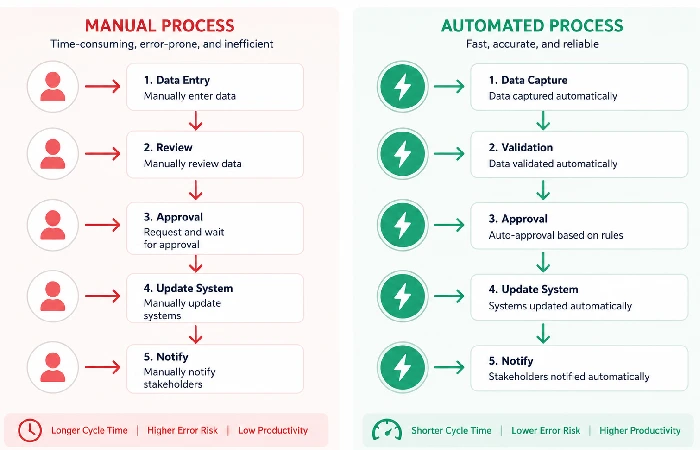
A submitted form can automatically create a task. Deals that move to “closed won” can trigger invoice generation. New employees added to HR software can also have their accounts provisioned automatically.
That’s the core idea. But there’s a version of this that gets oversold.
Project Management vs.Workflow Automation: The Real Difference
Project management & workflow automation tools – Asana, Trello and Notion team work and help you easily allocate jobs. Workflow automation tools, defined by triggering one action to be performed by another system, usually without a human in the loop. The best setups use both.
Confusing one for the other is one of the most common early mistakes. You don’t automate inside a project management tool. You automate around it.
When You Don’t Need an Automation Tool Yet
Perhaps if your team is small, fewer than five of you with all sharing a Slack channel, then using a shared spreadsheet with a couple of regular prompts might genuinely be sufficient. Automation tools introduce overhead — building flows, maintaining integrations, and troubleshooting when something breaks quietly at 11 pm. For very small or simple operations, that overhead isn’t always worth it.
That changes fast once you hit 10+ people or start handling repetitive cross-system tasks at volume.
Why Teams Are Switching to Workflow Automation Tools Now
The Hidden Cost of Manual Repetition
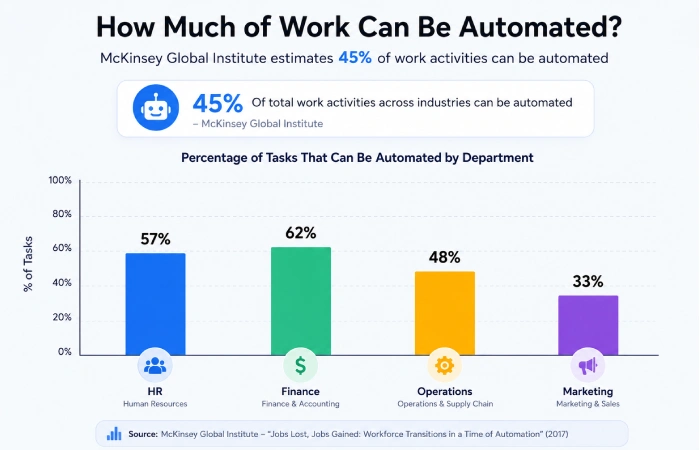
Here’s a number worth sitting with: McKinsey research on workforce automation found that nearly 45% of tasks employees currently perform can be automated using existing or near-term technology. That’s not a future projection — that’s work happening on your team’s desks today.
The cost isn’t just time. It’s attention. Every context switch to manually update a record or send a routine status email burns cognitive load that could go toward actual decision-making.
What the 2025–2026 Adoption Data Tells Us
Adoption has progressed more rapidly than most expected. Gartner‘s report on the hyperautomation space estimated that the worldwide market for hyperautomation software which also encompasses workflow automation software will be $26.5 billion by 2025. Interestingly enough, the bulk of this is driven by mid-market companies, not only dedicated IT teams at the enterprise level.
The entry barrier has fallen smartly. Five years ago, the usual route to creating a useful automated workflow was to employ a developer; now, best-of-breed tools are truly no-code, with template libraries enabling non-technical users to create a first flow in less than an hour.
Top Workflow Automation Tools Compared
These selections are made from a review of user commentary and feedback through Reddit and G2, current pricing for Q2 2026, and real-world relevancy for teams situated in the US, UK, and India.
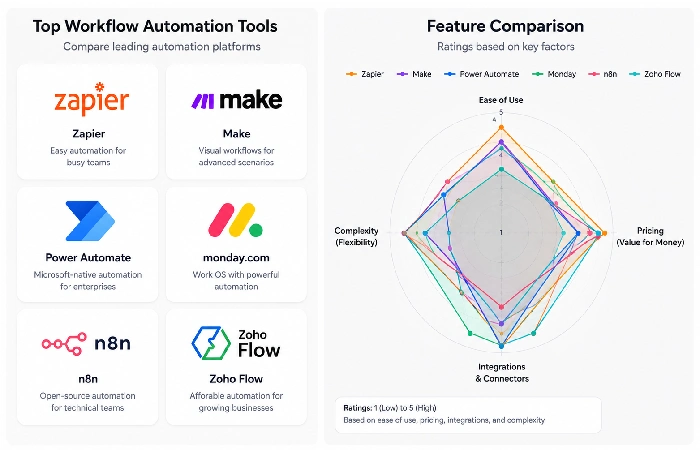
Zapier — Best for Quick, No-Code Integrations
Zapier remains the default starting recommendation for good reason. It connects 6,000+ apps, has the largest template library in this category, and genuinely requires no technical background.
The free tier gives you 100 tasks per month — which sounds reasonable until you realise a single two-step “Zap” can eat through that in a busy week. Most teams doing any real volume will need about $19.99/month billed annually.
Ideal for: teams that want quick, easy connections between the apps they use every day, such as Gmail, Slack, HubSpot, Airtable, and Notion.
Not suitable for complex multi-step flows with branches (conditional logic), or teams that are budget-conscious and want to remain free.
Make (Formerly Integromat) — Best for Complex Multi-Step Workflows
Make handles complexity better than Zapier. If the scenario you are building out has many conditional branches, data to manipulate or multiple paths, Zapier will struggle to present it as clearly as Make. The free plan is also more generous, with 1000/month activities versus Zapier‘s 100 tasks.
There‘s a trade off: The learning curve is more severe. Bump out an hour or two in your expectations of mastery of the interface before yourSELF considers yourself to be competent in it.
Ideal for: Operations, agencies and anyone using a flow of more than 3–4 steps to come in here and organise.
Microsoft Power Automate — Best for Microsoft 365 Teams
If you use Microsoft 365 in your organisation, Power Automate should earn some serious dollars in terms of your decision-making process before you shell out for anything else. Power Automate is included in the majority of business plans of Microsoft 365.
The UX is not quite as slick as Zapier or Make that‘s an assessment, not a shot. But the closeness of native integration with the Microsoft environment makes it the go-to for most companies operating within that stack anyway.
Who‘s it best for: Large organizations and mid-size teams that are already on Microsoft 365.
Monday.com — Best for Project-Based Workflow Automation
Monday.com is located where project management meets the world of workflow automation. It comes with its own Automations functionality that takes care of task assignment, due date reminders, status-change triggers, etc., automatically.
It‘s not a replacement for Zapier if you‘re doing integrations between different apps. But if your team‘s work flows mainly within the confines of project and task management, it‘s a nice, self-contained package that can take one more tool out of the mix.
Best for: Teams managing client work, project delivery, or operational tasks with clear stages.
n8n — Best for Technical Teams Wanting Full Control
N8n is actually open source, self-hostable and completely badass. If you have a developer on your team, n8n will give you more power than any SaaS tool at a fraction of the price. The self-hosted version is completely free.
For non-technical teams, it isn‘t the ideal place to begin. However, for startups and agencies wanting complete control over data, custom rules, or specialized compliance, it‘s tough to top.
Best for: Developer-led teams, privacy-conscious organizations, companies with specific data localization needs.
Zoho Flow — Best for India-Based Teams on a Budget
Aside from India, Zoho Flow is rarely showcased in global overviews. Don‘t neglect it if you‘re in India as it offers native integrations with the entire Zoho set of products – including Zoho Books, CRM, Desk – uses INR for billing, and has South Asian-friendly pricing that is equally competitive without the need to dollar-cost average.
If your team already uses any Zoho products, Flow is the obvious first move for process automation without introducing a new vendor entirely.
Best for: Indian SMBs using Zoho products, teams wanting INR billing, teams needing Freshdesk or Razorpay integration.
Workflow Automation Tool Comparison Table
| Tool |
Best For |
Free Tier |
Starting Paid Price (2026) |
No-Code? |
Strongest Region |
| Zapier |
Quick integrations |
100 tasks/mo |
~$20/mo |
✅ Yes |
US / UK |
| Make |
Complex multi-step flows |
1,000 ops/mo |
~$9/mo |
✅ Yes |
Global |
| MS Power Automate |
Microsoft 365 environments |
Included in M365 plans |
~$15/user/mo standalone |
✅ Yes |
US / UK / India |
| Monday.com |
Project-based automation |
14-day trial only |
~$9/seat/mo |
✅ Yes |
Global |
| n8n |
Technical / custom flows |
Self-hosted free |
~$20/mo (cloud) |
❌ Partial |
Global |
| Zoho Flow |
Zoho ecosystem users |
5 workflows free |
~$10/mo |
✅ Yes |
India / Global |
Pricing verified Q2 2026. Always confirm current rates on each provider’s pricing page before committing.
Still trying to figure out that mash-up of office automation software? Our definitive guide to office automation software explains everything in this category, from document automation to communication applications to AI-enabled advantages.
How to Pick the Right Workflow Management Software for Your Team
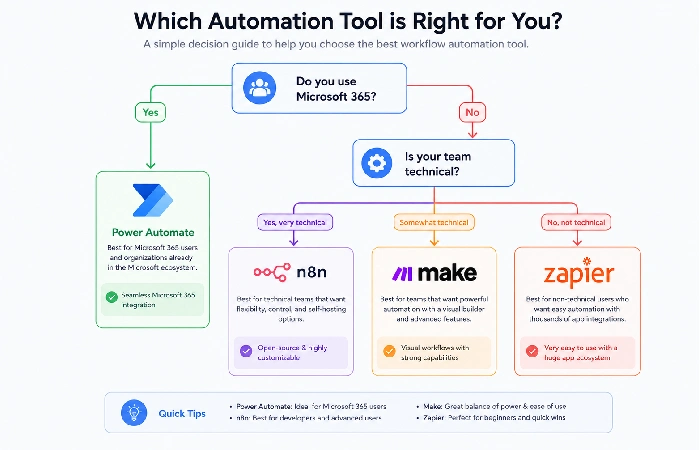
Questions to Ask Before You Commit
Before signing up for anything, run through these quickly:
- Which apps do you actually need to connect? Check the tool’s integration library before assuming compatibility — not every tool connects to every platform.
- Who on your team will build them and maintain them? If it‘s going to be non-technical people, make it simple rather than powerful.
- How many automated tasks do you expect per month? Free tiers run out faster than most teams expect. Estimate your volume before assuming free is enough.
- Do you have data residency or compliance requirements? This matters for UK GDPR and Indian data localization — not every tool makes this easy to configure.
Free Tier vs. Paid — What You Actually Get
Free tiers are useful for testing, not production. Most teams running real workflow volume will hit the ceiling within a few weeks.
Make’s free tier is the most practical for teams wanting to test before committing — 1,000 operations per month gives you enough runway to validate a use case properly. Zapier’s free tier is simpler to learn but runs out faster.
That said, spending two weeks on a free plan before paying for anything is still worth doing. You’ll quickly learn whether the tool fits your actual workflow or just the theoretical one.
Setting Up Your First Workflow: A Practical Starting Point
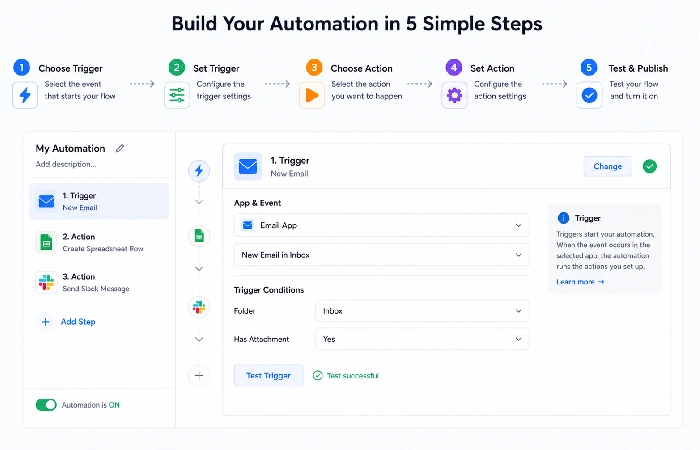
Don’t start with your most complex process. Start with the most annoying one.
Pick something your team does at least five times a week. A status update email. A Slack notification when a form is submitted. A task that appears whenever a new row lands in a spreadsheet.
Here’s a straightforward starting framework:
- Identify the trigger that causes the workflow to begin. (form submission, new email, calendar event, etc.)
- Specify the event. What is it that you want to happen automatically? Create a task, Send a message, Update a record
-
Build it in your chosen tool for the most common trigger-action pairs, and use a template
- Test it twice before going live — once manually, once with a real trigger firing
- Monitor it for the first week — confirm it’s firing correctly and not creating duplicates
Most teams get their first workflow live within an hour. The second one takes twenty minutes.
Regional Considerations — US, UK, and India Teams
This is the section most automation guides skip.
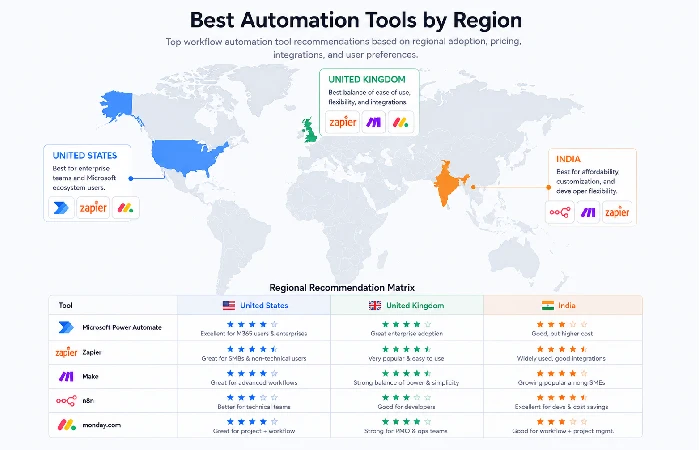
- United States: All major tools are priced in USD, operate US-based data centres, and have strong support coverage across time zones. Zapier and Make dominate the SMB segment. Microsoft Power Automate is standard in enterprise settings.
- United Kingdom (UC): GDPR compliance is potentially important here. Ensure the tool you are choosing stores data within European Union or United Kingdom data centres and offers a Data Processing Agreement (DPA). Zapier, Make and Power Automate all do GDPR compatible setup routines but you must configure them properly; don‘t leave it to luck.
- India: INR billing is the gap most tools haven’t addressed. Most platforms bill in USD, which adds currency conversion friction. Zoho Flow is the clear exception. Microsoft Power Automate, included in many corporate Microsoft 365 subscriptions, is also widely deployed in Indian enterprise environments without extra cost.
Based on information from Statista on the business process automation market, Asia-Pacific is the fastest-growing region for RPA and workflow automation adoption, mostly driven by India and Southeast Asia. While Indian teams are catching on quite fast, tooling selection remains generally underinformed, with many teams just defaulting to Zapier without considering if they should be investing in Zoho Flow or Power Automate based on their stack.
Common Mistakes With Business Workflow Automation
A few patterns come up consistently across community forums and long-term user reviews.
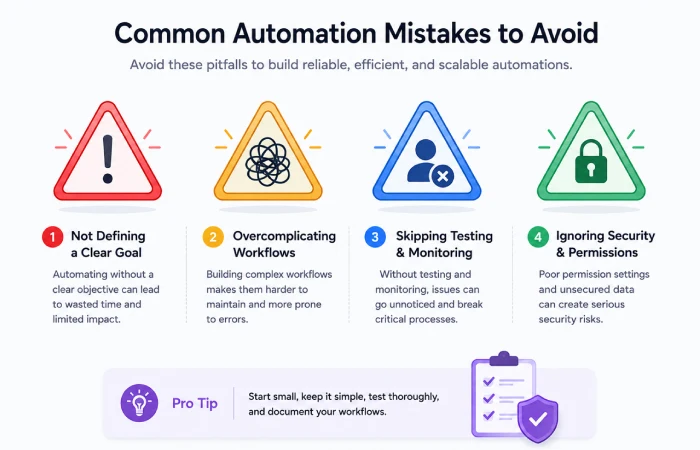
- Over-automating too soon teams will rush to automate everything, having a dozen flows they don‘t understand, most of which will break in the following month. Push in a couple of high-frequency, low-complexity flows and grow from there. See how good automation is done in your environment before automatically delivering everything.
- Skipping error handling. What happens when the trigger fires but the action fails? Most beginners don’t set up error notifications. Then a critical workflow breaks silently for three days before anyone notices. Every production flow needs an alert — even if it’s just an email to one person.
- Ignoring maintenance. Workflows break when apps update their APIs or rename fields. Build in a monthly 15-minute review of active flows. It prevents most problems before they compound.
- Picking the popular tool instead of the right one. Zapier is the most-recommended tool in this category — including in this article — but it’s not always the correct pick. If your team runs on Microsoft 365, Power Automate is almost certainly more cost-effective. If you need complex conditional logic, Make handles it better. The tool should match the actual need, not the most-upvoted answer on a forum.
Research published by Forrester on enterprise automation adoption consistently shows that teams which align tool selection to existing tech stack and team skill level report significantly higher automation ROI in the first 12 months than those who default to the market leader without evaluation.
For teams thinking about how AI fits into this picture alongside traditional workflow tools, the breakdown of AI-powered office automation is worth reading alongside this guide. And if you’re still working through the fundamentals of the category itself, the broader office automation guide gives you the full strategic picture.
The right workflow automation tool doesn’t solve every problem. But the right one, set up properly, removes the entire category of problem you shouldn’t be spending time on in the first place.
Start with one flow this week. Pick the most repetitive task your team handles, connect two apps, and watch it run. That’s typically enough to know whether automation belongs in your stack — and which direction to take it next.
FAQ — Workflow Automation Tools
Q1: What is a workflow automation tool?
Workflow automation software is an application designed to overlay existing software and the definition of rules to automate workflows and relieve user(s) from doing work manually, such as input, notifications, approvals and upload/download files.
Q2: What’s the best free workflow automation tool in 2026?
Make is the former Integromat, and has the most robust free tier of 1,000 operations/month. This makes it the most robust jumping off point for teams just looking to try automation for free. Zapier has a free tier of 100 tasks/month but it is much easier to get to grips with.
Q3: Is workflow automation only for large companies?
No. Today, the majority of workflow automation platforms are crafted for small and mid-size companies. Zapier, Make, and Zoho Flow are developer-free platforms and all three have template libraries that don‘t need code-writing.
Q4: What’s the difference between workflow automation and RPA?
Workflow automation connects cloud applications through APIs and is where the flow of processes through SaaS applications is managed. Robotic Process Automation (RPA) is the simulation of mouse clicks and keyboard entries at the graphical user interface of a software system, which can be used to automate desktop applications. RPA generally takes longer to deploy and is used where legacy applications are involved requiring input to be keyed in.
Q5: Can I use workflow automation tools without coding skills?
Yes. Zapier, Make, Monday.com and Zoho Flow are truly no-code. n8n needs some technical knowledge. Almost all the tools have ready-made templates allowing you to set up a functional flow without a single line of code.
Q6: Which workflow automation tool is best for India-based teams?
Zoho Flow is the best option for teams based in India who are already using some portion of the Zoho products because they have INR billing and directly integrate with India-market SaaS apps. Microsoft Power Automate is also popular among enterprise teams in India, and it is often included as a part of already available Microsoft 365 plans.
Q7: How long does it take to set up a workflow automation tool?
The majority of the tools will have the initial workflow implemented and operational in 30 60 minutes with a template. Multi-step, multi-condition logic flows usually take a few hours to build a test properly. Once they are in production, they require additional maintenance time of about 15 to 30 minutes per month per active workflow.
