Published: June 3, 2026
Last Updated: October 1, 2026
Your office may have a thermostat, Wi-Fi, and a few conference-room screens. But the true promise of smart-office systems lies in how they bring all these components together to link sensors, AI-powered decision engines, and workplace platforms into a system that adjusts itself to the way your team prefers to work rather than the way a given space was intended to be used.
How Smart Office Technology is defined today
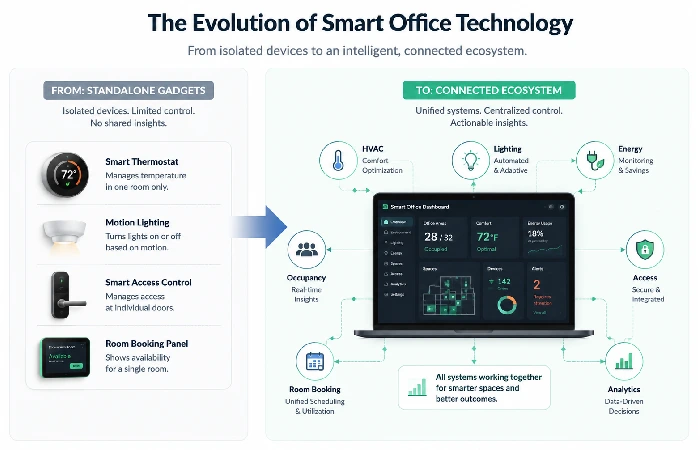
Five years ago, when we talked about “smart office,” we imagined our reception area with a voice assistant or infrared-activated lighting. Those days are gone.
Smart office technology refers to an interconnected system of Internet of Things (IoT) sensors, AI-driven software, and associated hardware that automates building systems, lighting, temperature, space management, security, and connectivity according to current activity levels and popular behavior trends. The defining feature of this is the intelligence of the system: hardware components process data and apply the results to changes occurring concurrently.
Basically, smart office technology will analyze data from your building in real-time to automatically change the lighting, environment, space utilization, and communication systems rather than having them set according to predefined schedules or manually controlled.
Standalone Gadgets to Connected Ecosystems
In 2026, the most significant shift is not one device but rather platform operating systems or the implications of vendor-neutral software environments that can sit on top of and have control over everything from HVAC, access control, desk sensors, meeting room panels, etc., through one dashboard.
Here‘s an analogy: a smart thermostat is a device. The same system, “we know 40 percent of our workforce works remotely on Fridays, so let‘s turn down the climate zones on that floor, turn off some light schedules that we don‘t need, move some bookable desks,” that’s office automation at the entire enterprise level.
This distinction is important because companies that purchase equipment on a piece-by-piece basis tend to be saddled with incompatible systems and duplicate data silos. The real benefit comes from those systems communicating with each other.
Here are the Top 7 Smart Office Technology Trends Shaping 2026 Workplaces
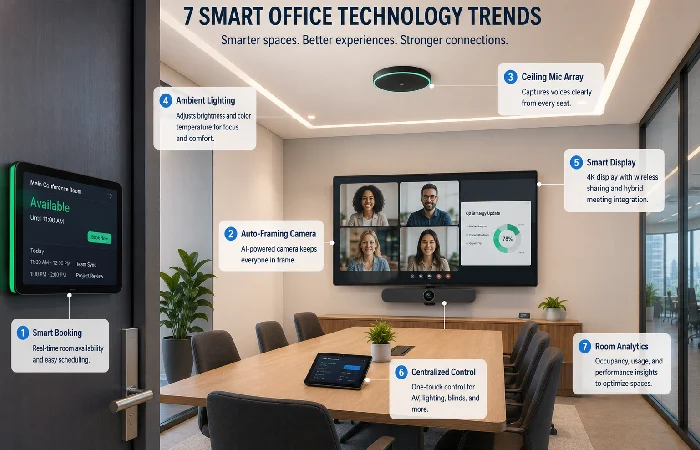
Not all these trends will impact your business. However, these seven are where the money is going and where you‘ll see the quick and measurable results.
AI-Powered Space and Desk Management
Hot-desking was a pandemic-era experiment. Today, it‘s evolving into AI-powered space allocation, where systems, through understanding employee super schedules, working groups, and prime-time needs, have proposed (or simply auto-assigned) spaces and neighborhoods.
Numerous real-world deployments have documented benefits in space utilization on the order of 20–30%, but actual savings can vary greatly based on check-in procedure and the culture of an office. The system is most effective in a hybrid model with varying daily attendance.
IoT Sensor Networks for Real-Time Occupancy Data
Occupancy sensors have evolved far beyond just PIR motion detection devices. Today‘s installations usually include a mixture of:
The data feeds everything else: HVAC, lighting, cleaning schedules, and even catering orders. None of the other “smart” features can function accurately without it.
Predictive HVAC and Lighting Automation
The energy savings are likely enough on their own to justify the investment in a smart building for mid-size and larger offices. Using the International Energy Agency reference, buildings are responsible for some 30% of the world’s final energy used, and both lighting and HVAC are among the biggest operational loads in commercial buildings.
Predictive Systems use weather forecasts, calendar information, and historical occupancy patterns for pre-conditioning zones rather than reacting once people are in the space. The result is comfort without waste.
Unified Communication Platforms With Ambient Intelligence
Conference rooms that can identify both who‘s joining and in-room participants, auto-correct the framing of the camera views, transcribe at the moment of speech, and deliver action items to the projectors. This is where AI in office automation becomes a reality.
Microsoft, Cisco, and Zoom all have ambient intelligence features embedded into the room hardware in 2025 and 2026. The distinction between vendors is getting thinner; however, the degree to which they work with your existing calendar and project tools often proves more important than the sheer volume of features.
Smart Meeting Rooms That Self-Configure
A subset of the above, but worth calling out separately. Self-configuring rooms adjust:
- Display layouts based on meeting type (presentation vs. brainstorm vs. video call)
- Audio zones for hybrid participants
- Lighting color temperature based on time of day
- Automatic booking release if no one shows within 10 minutes
The “no-show release” feature alone could reclaim 15–25% of meeting room availability in busy offices, based on aggregated facility management reports.
Digital Twins for Facility Planning
Digital twins—virtual replicas of your physical office that update with live sensor data—are moving from enterprise-only deployments into mid-market tools. They let facilities teams simulate “what if” scenarios: What happens if we consolidate two floors? How does air quality change if we add 30 desks to Zone B?
So it‘s a little early for companies below 500 employees, they have made a large cut in costs since 2024.
Processing data locally with edge computing
Privacy laws (most notably in the EU and India) are encouraging organizations to perform local processing on sensor and camera data instead of transmitting everything to the cloud. Edge computing nodes located in server closets are performing occupancy analytics, facial recognition opt-in services, and building environment monitoring without any raw data ever leaving the buildings.
According to a Statista analysis of the global edge computing market, enterprise edge deployments are projected to grow strongly through 2027, with smart building and industrial automation among the key growth areas.
Who Benefits Most — A Decision Matrix for Smart Office Investment
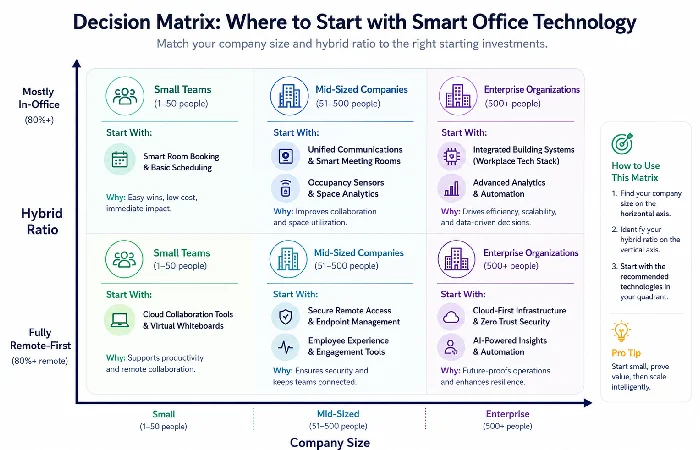
This is the section most “smart office” articles skip entirely. They list cool technology, but never help you figure out whether it’s relevant to your situation. Below is a simple decision matrix that will allow you to begin narrowing down your profile to a more realistic starting point.
The 3 pillars of the right smart office tech investment will vary (according to: 1. Your company size’s structural complexity; 2. And your budget band ‘what gets you grounded first, sensors or fully fledged platforms?’; and 3. Your remote-hybrid ratio ‘optimising space first or communicating digitally first?’). Be sure to [stick to 3 separate tiers, and you‘ll likely] default to sensors & smart controls first, then connect them to booking & workplace apps, and then layer on more advanced tools, including ‘AI-driven optimisation and digital twins’.
Decision Matrix: Company Size × Budget × Remote-Hybrid Mix
| Company Profile |
Highest-Impact Starting Point |
Why |
| Small (10–50 people), mostly in-office |
Smart climate + lighting automation |
Low complexity, immediate energy savings, minimal change management |
| Small (10–50), hybrid |
Smart meeting room tech + booking system |
Solves the daily friction of “who’s in, which room is free” |
| Mid-size (50–500), hybrid |
Desk management platform + Occupancy sensor network |
Making data-based analytical decisions regarding your real estate expenditures is already a pre-paid investment |
| Mid-size (50–500), fully remote-first with HQ |
Digital signage + bookable spaces + visitor management |
The office transformed into an “event space” must be smooth-flowing for the one-time visitor |
| Enterprise (500+), multi-site |
Building an operating system + digital twin |
Share visibility across sites. Reporting to the executive level on utilisation and sustainability KPIs |
Risk and Compatibility Checklist Before You Buy
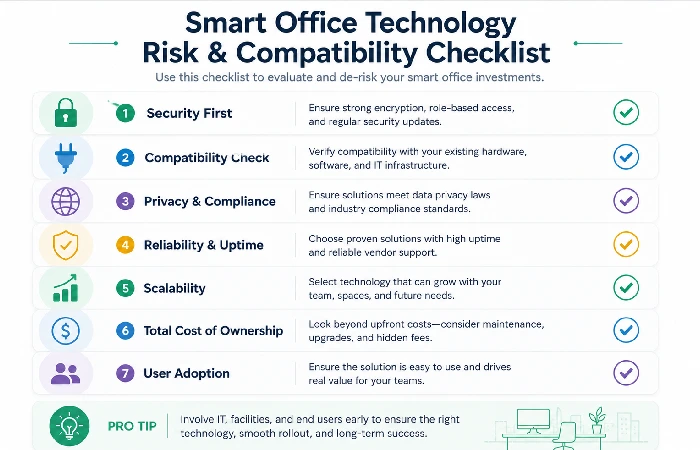
Before signing any vendor contract for connected office technology, run through these:
- Compatibility with existing system (Intelligent BMS): Will the system work with an existing BMS or must it be completely replaced?
- Ownership of data: Who has sole ownership of behavior and occupancy data? Is it easily able to be taken away?
- Vendor lock-in: Consider whether sensors are proprietary or open protocols (BACnet, MQTT, Zigbee)?
- Privacy compliance: Will the solution comply with GDPR, India‘s DPDP Act, local employee monitoring laws etc?
- IT burden: Does the platform have a separate admin or is it in SaaS form?
- Scalability: Can you begin on 1 floor and add without repurchasing hardware?
- Employee experience: How likely is the employee to actually make use of the app/interface or will they just continue to ignore the new feature and use Slack?
Most rollouts miss this, but the number one reason a successful, intelligent office rollout fails is in the adoption by the people. If the interface creates drag in an employee’s morning, then they will work around it in 2 weeks. Budget your change management, not your hardware.
Real User Friction Points With Connected Office Technology
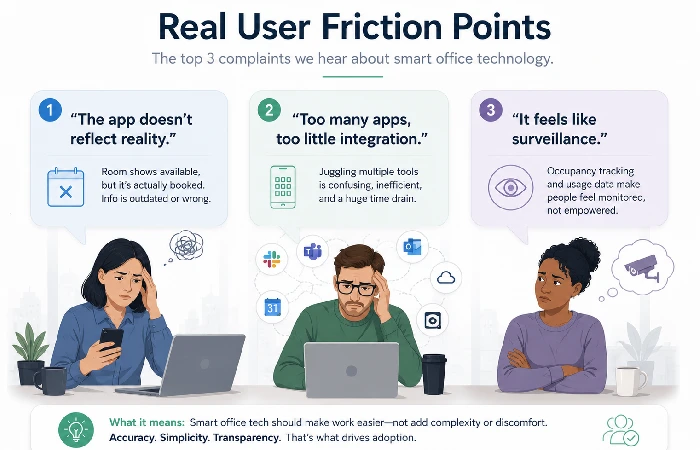
What Employees and IT Teams Actually Complain About
Looking at what we have observed in facility management forums, Reddit threads (r/sysadmin, r/facilities), and review sites, these are the kinds of complaints that seem to keep recurring.
- The app doesn‘t match up to real life. The desk booking systems offer a desk for free when a person’s bag is on it. Without enforcement or the correct sensor validation, they quickly lose confidence.
- Too many apps. When smart lighting has one app, desk booking another, meeting rooms a third, and HVAC requests a fourth—people abandon all of them.
-
It‘s like being watched. Tracking building occupancy, especially when cameras are involved, tends to cause a backlash unless companies are extremely forthcoming about what data they collect and what they don‘t.
- Nothing works when Wi-Fi drops. IoT-heavy offices are deeply dependent on network reliability. A switch failure can disable booking, climate, and access systems simultaneously.
-
We bought sensors that effectively went unused.” One company installs occupancy sensors and records the data for six months without actually reviewing it because no one can afford to free a facilities team member to analyse the dashboards.
The Future of Work research by JLL illustrates a significant gap between the smart workplace technologies employees most value and those organisations widely adopt. Environment control and room booking rank highest in employee satisfaction, whereas sophisticated analytics tools rank lowest.
How Smart Workplace Solutions Differ by Region (US, UK, India)
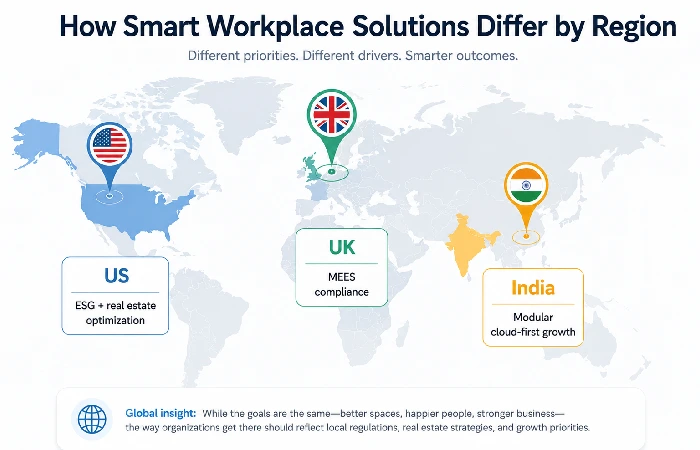
Smart office adoption doesn’t look the same everywhere. A few differences worth noting:
- United States the biggest market for these integrations, and this is mainly because of the requirement of ESG reporting and the optimization of commercial real estate in the high-cost metros in the country, such as NYC, SF, Austin, etc. The use seems to be concentrated on energy efficiency and a hybrid workforce.
- United Kingdom: heavy regulatory pressure through MEES on commercial buildings. UK firms are increasingly implementing smart HVAC and lighting upgrades, as rented buildings cannot be leased if not in compliance. EPC requirements after 2025 lead to increasing retrofit.
- India: fast expansion of smart office roll-outs across Tier 1 locations (Bengaluru, Hyderabad, Mumbai), predominantly in new-build IT parks and coworking facilities. Regional trends are identified based on observable uptake in corporate commercial districts and industry literature as of 2026, but site profiles and buildings are highly variable. – Budget-sensitive clients favour modular cloud-managed software architecture in preference to costly on-site infrastructure. India‘s DPDP Act (Digital Personal Data Protection) introduces factors affecting occupancy measurement.
The technology itself is uniformly similar, but what motivates the purchase and the level of barriers to compliance you‘ll face is often very different.
Connecting Smart Office Tech to Your Broader Automation Stack
Smart office technology doesn‘t stop at the front door, and it doesn‘t happen in a vacuum. Smart office technology defines the content of the physical environment sensors, devices, and building systems, while office automation handles the digital content, documents, approvals, routing, etc. When put to use, the greatest benefits are realised when the physical layer and workflow layer are designed to communicate.
Its real value goes through the roof when you, of course, use it to power your wider workflow automation tools, causing things to happen in your project management stacks, HR stacks, and building maintenance stacks.
For example:
- Occupancy data causes your HVAC to automatically adjust and update your cleaning schedule in your FM platform.
- Upload a text file of transcription of the session will automatically add task items in Asana or Monday.com
- Desk booking data integrated into HR attendance dashboards
Most benefited companies by intelligent workplace systems are those converting data from physical space to digital processes. If your
office automation software can’t ingest sensor data or trigger actions from building events, you’re leaving value on the table.
For a broader view of the tools side, explore our Office Automation hub to see how smart office technology fits into a complete, end‑to‑end automation strategy.
What to Expect Next — And One Thing Most Guides Get Wrong
Here’s the contrarian take: most “future of smart offices” content focuses on flashy new hardware—holographic displays, robot assistants, ambient computing surfaces. That makes for good headlines but bad purchasing decisions.
The real next wave isn’t new devices. It’s a better integration of existing ones. The companies that will outperform competitors in workspace efficiency over the next two years are the ones investing in middleware, API connectivity, and unified data layers—not the ones buying the newest sensor.
The most impactful smart office technology investment for most companies in 2026 is not new hardware. It‘s a building operating system or integrated platform that collates existing sensors/HVAC/lights/desk booking/communication instruments into a common data layer with automated decision-making software.
If you‘re comparing smart office solutions, begin with one question: What systems already exist in the office that are not communicating? This tip can often lead you directly to the first, highest-ROI project.
FAQs About Smart Office Technology
1. What is smart office technology?
Smart office is: “a combination of hardware (sensors, controls, displays) and software (AI-enabled servers, OS) which runs a workplace dynamically in response to real-time information input (rather than on set schedules).
2. How much does smart office technology cost?
Costs vary. A small office floor could cost from $5,000–$15,000 for a basic occupancy and light system; a midsize commercial building could cost $50,000–$200,000+ for a building-wide operating system, depending on size, hardware density, and number and difficulty of integrations. Cloud-managed services can also be billed on a monthly per-seat or per-sensor basis.
3. What are the best IoT office devices for small businesses?
For a small office, the IoT items with visible high-value impact (immediately) include smart thermostats with occupancy detection, connected lighting (Philips Hue Pro or like), a meeting room booking display panel, and comprehensive Wi-Fi with device management. All offer immediate benefit for the occupants over and above the general office quality of life.
4. Is smart office technology secure?
Security relies on the implementation of major risks, such as lousy IoT on flat networks, lack of encryption of sensor data in transit, and (poor) cloud platform access controls. Recommended: use network segmentation for IoT, encrypt sensor data, in transit and at rest, up to date Firmware.
5. What’s the difference between smart office technology and building automation?
Building automation/BAS BMS (used mainly for mechanical systems such as HVAC, fire suppression, lifts) and legacy protocols. Smart Office (adding occupancy knowledge, front-end apps, AI optimisation, and integration with workplace apps, calendars, scheduling, communications). Many deployment today is really a smart office platform on top of the BMS.
