Published: June 10, 2026
Last Updated: October 1, 2026
A single misconfigured Zapier connection stole 14,000 customer records from a mid-sized logistics firm in early 2025. They weren‘t compromised. No one hacked into them. Someone simply connected a project management tool to their CRM with full read/write access, and when the third-party tool was compromised, the customer data disappeared.
That‘s the world of 2026 office automation security. The enemy isn‘t some secret hacker hacking your firewall. The enemy is the dozens of integrations, shared drives, workflows, and AIs that your team uses on a daily basis that could leak your information.
This paper provides you with the structure for auditing, strengthening, and perpetually monitoring your automation infrastructure. You‘ll find detailed how-to steps, geography-relevant compliance recommendations and a checklist to run this week. If you are creating or managing an office automation environment, this is the security component that binds it.
Office automation security summary (2026)
Office automation security is concerned with the protection of business data through a single security umbrella covering email, documents in the cloud, collaboration applications, workflow automation and access control systems.
However, office automation security connects the dots between the everyday productivity applications and your data with unified access control, SaaS governance, and insider threat protection. Insider-driven breaches cost an average of $13.1 million, and 95 per cent of breaches involve human error. It‘s no longer optional to secure your office automation stack. Here‘s everything you need to know to get started, from zero-trust application architecture to compliance automation to hands-on hardening for each office application category.
How your office automation stack is a security surface (and not only a productivity tool)
Most companies go wrong here. They often perceive office automation as a choice of efficiency and security as a question of IT. However, additional applications increase your attack service; each add-on means extra avenues for data to flow otherwise.
The Three Domains of Office Automation Security
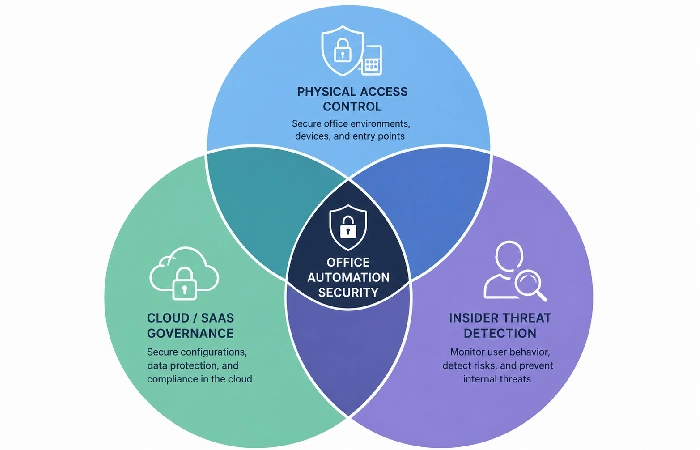
Office automation security is not one problem. It‘s three historically separate areas that have now imploded into a single problem:
- Physical and access control who can access your workspace, devices and on-premise systems. Consider points of entry such as badge access, biometric locks, and device management.
- Cloud and SaaS governance: who can access what data within your cloud-enabled office applications (Google Workspace, Microsoft 365, Slack, Notion and everything integrated with it using API).
- Insider threat detection and compliance detection of anomalous behaviors, enforcement of information handling policies, and audit trails which could meet regulators’ requirements.
Most companies run them through three different teams (or more likely, no one looks after the middle one at all). The space between them is where the breaches will occur.
What a Single Misconfigured Integration Actually Costs
As per Mimecast’s State of Human Risk 2026 report (2200 IT leaders across the world), each company reports on average 6 insider remediation security incidents a month that cost each company $13.1m annually. That‘s a staggering amount on an annual basis.
In 2026, the average global price of a data breach stood at $4.88M (according to IBM’s latest yearly Cost of a Data Breach study). But here‘s what‘s important for office automation: most of these are not complex attacks. They‘re access permissions mis-set, shared too much info on the wrong folder, API links not monitored, and employees feeding documents into AI tools the company didn‘t authorize.
You don‘t have to have a nation-state adversary to lose data. You just need one team member who hooked the wrong tool to the wrong folder.
The 2026 Office Threat Landscape: What’s Changed
The threat environment for office workers now appears substantially different from even two years ago. Three changes shape it.
AI-Powered Phishing Targeting Office Workers
From a 2026 CDC Report by the ORDR, 80% of all phishing attempts now involve computer-crafted messaging. The “Nigerian Prince” scam emails circulating on your teams’ spam inboxes have been replaced by exact imitations of your CEO’s written language, with background sourced from open data about your company.
And this is where office automation makes matters worse. Once your email, calendar, project management tool, and CRM are linked up, a compromised email account isn‘t just a matter of getting access to your inbox (or worse), but your whole operational machine: the who, the when, the what, the where.
The GenAI Data Leak Problem
This one keeps CISOs awake. Same Mimecast 2026 report shows: 80% of security executives worried about leakage of sensitive data via GenAI tools, and 60% say they are not prepared to stop it.
Your employees are dumping customer data into ChatGPT to compose emails. They‘re throwing company strategy documents into AI summarization engines. They‘re feeding proprietary code into AI coding helpers. All of these actions expose your data to third-party model training, and most office automation security policies haven‘t yet.
Insider Threats in Automated Environments
And here‘s where it gets uncomfortable. Most industry studies show that people are involved in over 90% of data loss incidents. Not because they‘re out to get us (although some are), but because ‘automated’ office environments open up new opportunities for honest people to make honest mistakes.
A marketing manager gives a freelancer access to a Google Drive folder. That folder has sub-folders that they never look into. That subfolder has financial projections. The hacker gets into the freelancer‘s account three months down the road.
There were no laborious mistakes for anyone when following the regular procedure. But the flow of sharing automation, the prevailing open access rights, led to the discoverability chain that would not have resulted from sending files over the network manually.
Zero-Trust Framework for Office Automation
Zero Trust isn‘t just some industry slogan (“we‘ve got to adopt Zero Trust in our security strategy to differentiate ourselves from our competition”) (though they sure do try). It‘s a workable concept for office automation: Don‘t trust anyone, not a user, not a desktop, not a connection, simply because it‘s “inside” your enterprise.
According to industry analyst estimates, the Zero Trust security market will be valued at approximately 48.43 billion dollars in 2026, with projections of nearly 102 billion dollars in 2031, estimated from 2026 market research that references NIST‘s zero-trust architecture guidelines and other industry reports. That expansion underscores the pace at which its use among organisations has actually caught up with the discussion.
Identity Verification and Least-Privilege Access
The provisioning: ensuring that every user and automated process receives just the right level of access to everything and nothing more. Easy to say. Hard to implement. In practice, it involves auditing every single integration, shared folder, and automation rule in your environment.
Start here:
- Must demand MFA for ANY Office tool, not just the email. For example, for project management, file sharing, HR systems, etc., if there‘s an API that‘s being used to access your data.
- Allow people outside your team to access your files based on time. For a two-week project, a freelancer shouldn‘t always have access to your design files.
- Check your API permissions on a quarterly basis. Your Zapier integration 1974, what data are they actually able to read?
Conditional Access Policies in Practice
Envision a mid‑size accounting company that adopts conditional access only when a contractor‘s personal machine compromised by an electronic virus and logs in to its client portal from an urban coffee shop, for instance. If one client‘s information compromised, the same vulnerability could have taken down the entire environment.
Conditional access: Your systems determine the context before authorizing access (What machine is this? Managed or not? Which network are they on? What‘s the current time? What‘s the person‘s normal usage pattern?
Both Microsoft 365 and Google Workspace have native conditional access. If you are not using it, you are ignoring your best free security feature.
Micro-Segmentation for Office Tools
Ensure your HRMS doesn‘t transfer data to your marketing systems and vice versa without documented and approved justification. Make sure your CRM doesn‘t export data to your project systems unless fields are mapped.
Most office automation is implemented incrementally. Someone plugs in Tool A with Tool B because it gives fifteen minutes back to his or her day. No one ever ponders if Tool A should have access to Tool B‘s data. For three years, you have had a spaghetti architecture where a breach in one place is a breach everywhere.
If you‘re trying to decide which Office automation software to use or upgrade to, it should be at the forefront of your selection criteria and not an afterthought.
Securing Your Core Office Automation Tools
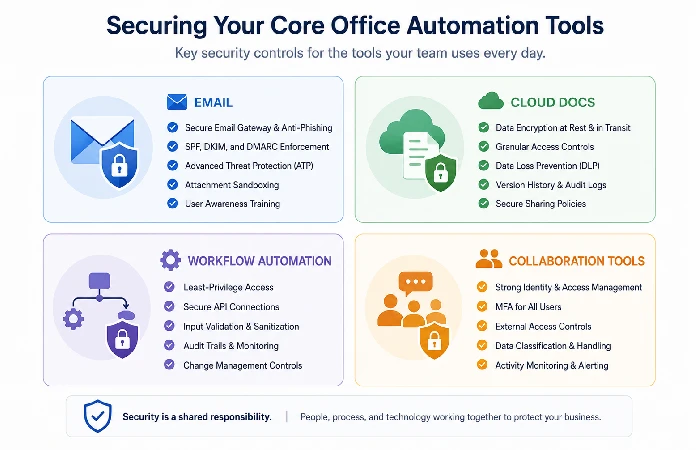
Let‘s be more specific. Almost all offices operate some mix of these four areas, and each has its own needs.
Email and Communication Platforms
Email is still the number-one attack vector used in the office environment. Your security baseline must include:
- Deeper threat protection (ATP) with real-time link scan and attachment sandboxing
- DMARC, DKIM, and SPF records are correctly set up (only around 40% of companies have this in place, surprisingly)
- Automated rule-based quarantine for messages with sensitive data patterns (credit cards, SSNs, medical records)
- Outgoing DLP scanning to prevent users from unwittingly transmitting sensitive files to their own personal e-mail may also be an issue.
A quick word: If your company uses AI for office automation, such as Anulo AI to help with email drafts or Summariz.it for summaries, be sure those AIs are not given access to your whole mailbox forever. Only give per-session access to them.
Cloud Document and File Sharing
Google Drive, SharePoint, Dropbox, Notion. This is where your actual business knowledge exists and, in fact, is often the most unsecured layer.
Critical controls:
- Manager approval should be needed for outside sharing (anything except view only).
- Share-link settings should be predetermined as restricted (not anyone with the link).
- Automated categorization labels for documents that contain financial, legal, or personal information
- Periodic access reviews: who has access to what? Should run this monthly, not yearly.
Workflow Automation and Integration Security
This is where many businesses’ blind spot is. Workflow automation tools such as Zapier, Make, Power Automate, and n8n integrate your systems in a manner that sidesteps your security controls.
Every “zap” or “flow” is essentially an API credential with persistent access. Your audit checklist:
- List for each active automation, then identify all the data each one manipulates
- Delete the automations that were created by the former employee.
- Make sure that no automation has higher permissions than it needs to perform its specific function.
- Record each automated data transfer for audits.
Collaboration Tools (Slack, Teams, Asana)
The informal aspect of chat tools is comforting, but can also be misleading. Credentials are sent over DMs. API Keys are pasted in the open in channels. People upload sensitive documents to channels that are not private, as they think the guests can‘t see it.
Controls that work without killing collaboration:
- Automated scanning for credential formats in messages (Both Slack Enterprise and Teams Premium have this)
- Restrictions on guest access: external collaborators should have default access to all channels/projects
- Retention policies that automatically delete messages after a certain period (reduces your liability surface)
- Attaching files to public channels for certain sensitive types of documents.
Data Loss Prevention for Office Environments
DLP has a bad rap because traditional implementations are overkill. They get in the way of real work, making staff miserable, while triggering an avalanche of false alarms that security staff tune out. However, contemporary DLP for office automation can be nimble and still be safe.
Classifying Your Office Data
You need to know what data you have and where it is stored before protecting it and using it. However, most businesses will jump straight into buying DLP tools, a mistake.
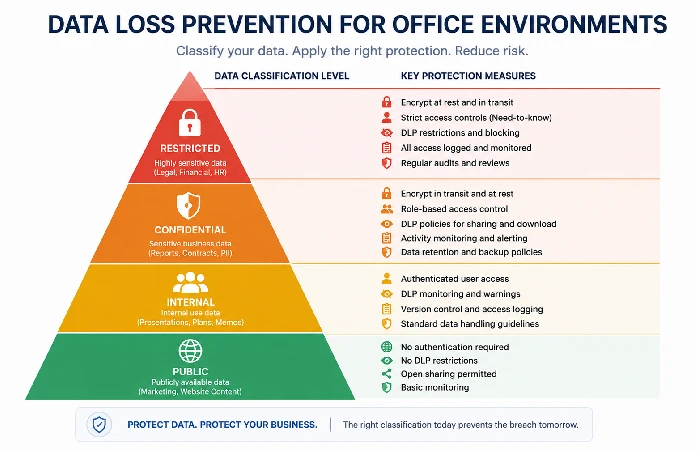
A practical classification framework:
| Classification Level |
Examples |
Protection Required |
| Public |
Marketing collateral articles, published blogs |
None |
| Internal |
Meeting notes, project plans, internal comms. |
Basic access control |
| Confidential |
Financial accounts, Customer listings, Contractual writings |
Encryption + access logging |
| Restricted |
PII, Health records, Payment data, Trade secrets [In relation to the management of data within the company, the following are also relevant: PII, data relating to health, records of payments, files of trade secrets.] |
Encryption + DLP + audit trail + restriction on access |
Begin to organize your most often used 50 documents and shared folders first. Don‘t attempt to organize everything in the beginning. It is an endless project.
DLP Policies That Don’t Kill Productivity
The objective is not to constrain everything. It‘s about designing intelligent guardrails that will flag real mistakes, but without impeding regular work.
Effective policies for office environments:
- Warn, don‘t block (initially): If a user attempts to send a folder/ document outside, give a warning and only block if they go ahead with the action; Don‘t bombard users but raise awareness.
- Context-aware rules: It‘s okay to share financial information with your accountant. It‘s not okay to share it with a personal Gmail account. Build rules that recognize the relationships between files.
- Graduated responses: 1st offense-Notification, 2nd offense-Manager alert, 3rd offense- Blocked. This system deals with adults and security.
Monitoring Without Surveillance Creep
Heads up, there is an ethical line that a lot of companies cross. Having employee activity monitored under the security pretext is fine. Watching every keystroke, every screenshot, bathroom break, under the label “security” is spying and will kill trust quicker than a data breach.
Focus monitoring on:
- Movement of the data (file migration/departure)
- Access pattern abnormalities (a user relaxing their normal behaviour and here accessing specific data that they did not normally see)
- Integration behavior (automated cross-browser tools that push more data than normal)
- Connexion events (failed logons; impossible travel; new device registrations)
Don’t monitor:
- Individual productivity metrics
- Personal communication content
- Time-tracking on a keystroke-by-keystroke basis
Compliance Automation: GDPR, HIPAA, SOX, and Beyond
If you are running office automation of any kind – which you almost certainly are – compliance is a necessity. The silver lining is that most compliance issues are directly related to sound security practices. You are already most of the way there if you are following the other recommendations of this guide.
US Compliance Requirements
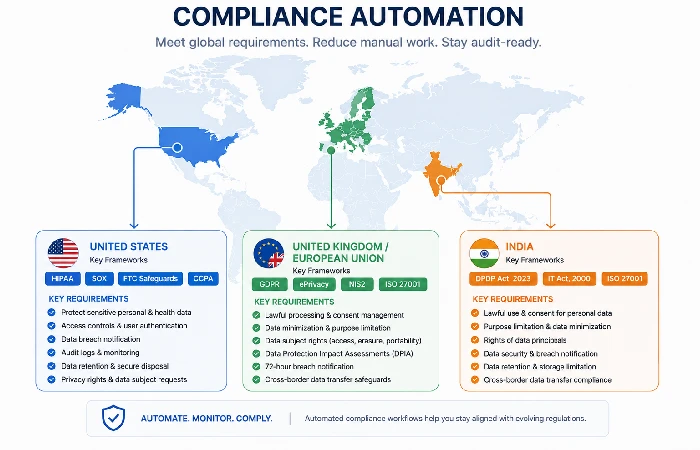
The US is a fractured landscape. One of the biggest barriers to a unified private sector privacy law has been the lack of a federal law (yet). Instead, individual states and industries have created varying rules:
- HIPAA (healthcare): If your business stores or transmits any patient information, even if you just schedule appointments, you will need encryption, access logs, and a security officer.
- SOX (publicly traded companies): Financial data workflows require segregation of duties, audit trails, and access controls such that a single individual cannot both create and approve financial transactions.
- CCPA/CPRA (California, but in practice nationwide): If you process data of Californian residents, you must have data mapping, one-click deletion, and opt-out capabilities.
- State Privacy Laws (Colorado, VA, CT, et alia): Slight variations in requirements. Your office automation system needs to be capable of more fine-grained data management.
UK and EU Frameworks
No standard can beat GDPR, and no regulator pushes the envelope like this. With 1.2 billion euros in fines calculated for GDPR through 2025 and enforcement intensifying, in a world where much of the UK and EU business is global, the cost of non-compliance cannot be seen as just a tick-up.
Key GDPR requirements for office automation:
- Processing records of data (Ad 30), you are supposed to keep records of all automated processing that involves personal data
- New Automation Tools: Data Protection Impact Assessments
- Right to erasure, can your automation tools actually identify and eliminate that person‘s precise data between all connected tools?
- 72-hour data breach notification, which translates into automated detection.
While the UK post-Brexit data protection framework mostly follows the GDPR, there have been some changes. The Online Safety Act of the UK introduces some further content moderation requirements for services that could impact platforms used for office communications.
India’s Cybersecurity Mandates
India‘s Digital Personal Data Protection Act ( DPDPA ) 2023 (rules for which are still to be finalized by 2026), introduces the following consent-based data processing requirements akin to GDPR but with India-specific nuances:
- New data localization requirements for certain categories (still being defined)
- Consent managers as obligatory intermediaries
- A notepad is also at hand, filed away in your refrigerator’s door, if you’re worried about the consumerist wife who lives with you, and as the “specter of the liberal state” can be a substantial fine.
- The CERT-In requirement to report incidents within 6 hours (one of the shortest in the world)
For any company with operations in all three geographies, the security leadership of your office automation must meet the highest standard in each of the three areas.
Building Automated Audit Trails
Manual compliance documentation is a lost cause. One quarter of the flows you just documented are gone before you finish.
Automated compliance evidence works like this:
- For each access, record the time, user, data accessed, and any changes
- Logs are an unalterable (tamper-proof) storage
- Automated Reporting on a schedule (regular) automates the process to generate compliance proof.
- Detecting anomalies identifies violations that would not yet be reportable.
Microsoft Purview, audit logs from the Google Workspace, and third-party solutions (Vanta, Drata, Secureframe) can automate much (80%) of the collection of compliance evidence for office-based environments.
The 7-Step Office Automation Security Audit
You are able to carry out this audit this week. Do not need costly consultants. Allocate three hours and work through it in a structured manner.
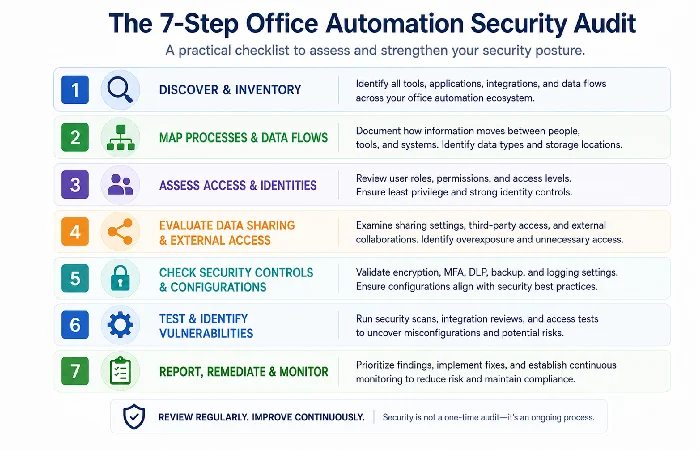
- Inventory all the connected tools and integrations. Log in to the admin console for Microsoft 365 or Google Workspace, Slack or an automation platform, and export a list of all third-party apps, OAuth grants, and API integrations. Probably, there are quite a few that no one remembers authorizing.
- Maps the flow of data between tools. For each integration document: what data is transferred, in what direction, at what intervals, and by whom is authorization granted? Represent all of this visually. It will be clear which connections aren‘t needed.
- Audit all your user permissions back to the existing roles. Pull your user access list for each tool. Cross-check with your current org chart. Remove everyone who is no longer with the company. Revoke permissions where needed.
- Check for external sharing exposure. In your admin console, browse through all externally shared folders and files. Evaluate each one. Ask yourself: Is the access still necessary? Is the scope correct? Should some of these ‘public’ folders actually be private?
- Check MFA coverage. Make sure every user on every tool has MFA turned on. Not just email. Every tool. Credit card & customer information: first. Admin accounts: second.
- Review automated workflow permissions. For each Zapier/Make/Power Automate workflow, check what permissions it has, whether they can be reduced, and is it run on behalf of a former employee.
- Record your findings and establish a recurring schedule. For example, make a simple spreadsheet that keeps track of what you have found, fixed, and still need to follow up on. Remember to set a reminder on your calendar to repeat this audit quarterly.
That‘s all. No glamour? Organizations that conduct this quarterly catch issues before they turn into incidents.
Common Office Automation Security Mistakes (and How to Fix Them)
After seeing all the patterns over dozens of incident reports and forum discussions, these mistakes are appearing again and again. They are incredibly basic for most of them.
- Error 1: Giving every app that asks for a full-access OAuth token. When a tool signs up asking for “access to all your Google Drive files,” most people will blindly just click “Allow”. Solution: Require admin approval of all new OAuth grants. Use Google‘s OAuth app verification or Microsoft‘s app consent policies.
- Mistake 2. Do not remove access for ex-employees and contractors. On average, a company takes 23 days to fully deprovision a departing employee, a period during which they still have access to all of your systems. Solution: Use offboarding checklists for all SaaS applications, not just email, and build access and ensure deprovisioning is initiated as part of your HR offboarding process.
- Error 3: Relying on personal accounts to run business automation. If automation is built using a personal account as the connector (such as a Gmail account), then there is no visibility or control. When the employee leaves, the automation either fails or, worse, runs on an employee‘s personal account. Solution: Use service accounts for all automation workflows.
- Error 4: Consider “internal” channels safe. Slack channels, groups on Teams, and shared drives seem intimate. They are not. When you invite guests, add integrations, and utilize linked bots with access to read. Solution: Assume every internal channel can be found out. Never share login credentials, API keys, or confidential information on chat.
- Error 5. Forgetting to secure your automation platform. You‘ve tightened up your email, files, and chat. But your Zapier/Make account, which is linking them all, has a weak password and no MFA? If that falls, it‘s game over. Solution: Your automation platform gets treated with maximum security.
ROI of Office Automation Security: Making the Business Case
Here‘s your business case in numbers if you are trying to persuade the leadership to push for investing on office automation security.
According to recent industry predictions, the average global cost of a data breach in 2026 will be around $4.88M, while insider‑led attacks can cost an organization an average of $13.1M per incident for large organizations. Industry research referenced in ORDR‘s 2026 report suggests organizations with AI‑enabled security solutions saved $2.2 Million per year on average over organizations without.
But prevention ROI is even more compelling when you frame it specifically for office automation:
| Security Investment |
Typical Annual Cost (SMB) |
Potential Loss Prevented |
ROI Multiple |
| MFA across all tools |
$3-8/user/month |
Single credential breach: $200K-$500K |
25-60x |
| Cloud DLP solution |
$15-30K/year |
Data leak incident: $1M-$4.8M |
33-160x |
| Quarterly access audit (internal) |
~40 hours staff time |
Insider threat: $500K-$13.1M |
Enormous |
| Security awareness training |
$20-50/user/year |
Phishing breach: $500K-$2M |
40-100x |
| Compliance automation platform |
$10-30K/year |
GDPR fine: $100K-$20M+ |
3-667x |
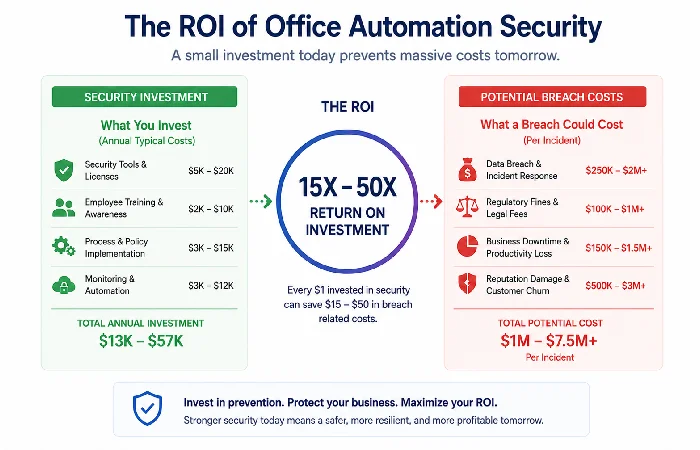
The numbers simply don‘t add up. By spending a dollar on security for office automation, a company saves between 25x and 160x, depending on the attack. And that is not even considering the potential damage to their brand, loss of customers, and regulations.
Note: This ROI is for illustration purposes only and should not be taken as financial advice, but rather serves as a starting point for conducting your own internal cost-benefit analysis. (Figures were calculated from average breach costs in the Q4 2025 report and typical SMB tooling costs in the Q4 2026 report and will vary by industry, region, and security maturity.
What’s Coming Next: Office Security Trends Through 2027
If we look at the current direction we are headed in and the trends emerging in early 2026, this is the direction office automation security is headed.
- AI-vs-AI defense will probably be effectively mandatory. With survey data indicating that roughly 97% of firms have experienced some form of GenAI-related security concern, you‘ll increasingly need AI-driven defenses merely to keep up with AI-driven offense. Human-only security teams cannot even comprehend the scale of these attacks, targeting office personnel. Look for AI-powered email screening, event analysis, and automated incident response to be de rigeur by mid-2027.
- Identity is the only perimeter that counts. Physical office networks will become more and more irrelevant as a security perimeter. Your identity layer (who you are, what you have access to, from what location, on what device) will be your entire security perimeter. Passwordless authentication and constant identity validation will substitute for yearly password rotations.
- Regulation will mandate automation. With the blinding speed in which GDPR is being enforced, the rollout of India‘s DPDPA, and the emerging American patchwork of state privacy laws, manual compliance will soon be physically impossible for any company with region-spanning operations. Automated compliance monitoring will be a “must-have”.
- Office AI governance will evolve into its own discipline. The issue isn‘t whether your team members are using AI tools. They are. The issue is whether you‘re aware of what‘s being used and if there‘s governance in place. Look for ‘AI Usage Policies’ to be as ubiquitous as ‘acceptable use policies’ in the workplace by 2027. If you‘ve already set up smart office technology that incorporates AI assistants, you‘re a few steps ahead.
It will be those organizations that view office automation security as a priority (not just a one-time ‘project’) that will not be that cautionary tale for next quarter.
All of the information is sourced from publicly published reports and best‑practice recommendations as of early 2026. As tooling, regulations, and attack patterns change rapidly, be sure to crosscheck critical decisions against current vendor documentation and regulatory guidelines for your region.
FAQ
1. What is office automation security?
Office automation security is the comprehensive safeguarding of information that flows through all of the workplace productivity tools like email tools, cloud-based documents, collaborative tools, automated workflows, and their interfaces.
2. How do I secure my Google Workspace or Microsoft 365 environment?
Begin with enabling MFA across the board, setting conditional access policies, auditing permissions for apps you allow third-party access to, requiring external sharing defaults to be set to limited, and turning DLP scanning for sensitive data patterns and auditing access quarterly. Both have a security center native to their platform with configuration instructions included.
3. What‘s the biggest security risk in office automation?
Automations with excessive permissions and human mistakes. If your automation tools link to several systems that have wide-open access to data, then one account can be taken over or one inaccurate automation can put your whole environment at risk. The ISC2 2025 Cybersecurity Workforce Study states that approximately 59% of organizations report acute shortages of security staff, which suggests that not enough companies have the right skills available to sufficiently control these dangers.
4. Do I need zero-trust architecture for a small office?
Yes, we can scale the implementation for your size. For small business, ZeroTrust start with three basics,– Everywhere multifactor authentication, – Least-privilege access to every user and tool, and – frequent review of permissions.
5. What compliance frameworks apply to office automation?
It varies depending on your industry and location. US companies might need to adhere to several regulations, such as HIPAA (healthcare), SAXX(financial),state-specific privacy laws (CCPA/CPRA), and UK and EU companies are subject to the GDPR. Indian companies need to adhere to the DPDPA 2023 and refer to CERT-In‘s reporting obligations. Many office automation tools have framework-specific compliance configurations.
6. How often should I audit my office automation security?
Perform a broad audit every 3 months on a quarterly basis and filter on a continuous basis. Use critical events (loss of an employee/partner, addition of a new tool, malicious/abusive security event) to run an instant mini audit on the concerned system(s).
7. Can AI tools help with office automation security?
Yes. According to the “An AI-Enabled security architecture” market report, AI security tools lower breach costs by an average of $2.2M/year and excel in areas such as: Email-based threat detection, behavior anomaly detection, and automating compliance checks. On the other hand, AI security tools need governance as well, concerning the data they can access.
