Published: June 3, 2026
Last Updated: June 15, 2026
If you’ve ever stood in a hardware aisle with a smart switch box in your hand, thinking, “Will this even work for both my Echo AND my Nest speaker?” Well, you‘re not the only one. This is one of the primary pain points in the smart home industry, and product listings don‘t make it any easier.
What‘s that included? The top smart switches for Alexa and Google Home in 2026, an honest review of protocols, and a solution for outdated homes that don‘t have neutral wiring. If you‘re upgrading multiple switches or doing other installs too, you‘ll want to review our smart switches for home guide for the full rundown.
What “Alexa & Google Home Compatible” Actually Means
A switch also doesn‘t require extra hardware to work with either Alexa or Google Home; it just needs to have a cloud API that both platforms can speak to or even better, in 2026, a Matter certification, so that it can talk to any other compatible ecosystem natively.
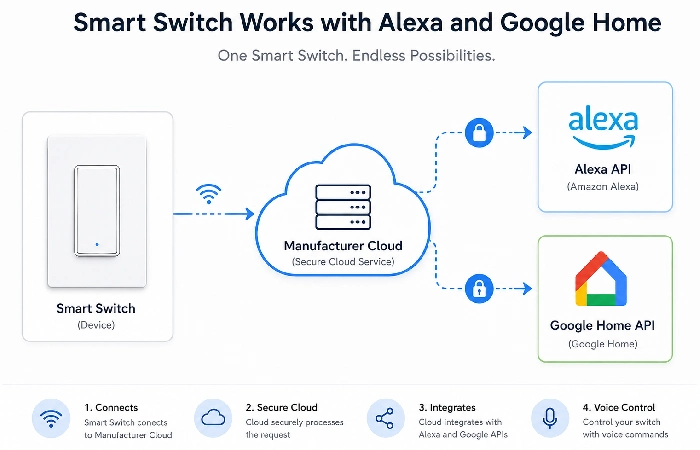
In practical terms, this means most mid-range smart switches (typically from Kasa, Meross, and Treatlife) can be set up for both ecosystems straight away. You just install and name the switch in the manufacturer‘s app, then integrate that app with Alexa and Google Home. The two smart platforms will then recognise the switch as something you can turn on and off.
Why Most Switches Support Both — And a Few That Don’t
The exception is likely to be proprietary ecosystems. Lutron Caseta, for instance, utilises a closed radio protocol (Clear Connect RF) and requires a dedicated Caseta hub. While it does support Alexa and Google Home, you are essentially adding a point of dependency. Leviton‘s older Wi-Fi switches have, in the past, resulted in Google Home pairing problems, according to a 2025 community forum thread.
The shortlist: Look for the “Works with Alexa” and “Works with Google Assistant” badges both listed on the item page. If just one is available, don‘t presume the other works.
The Role of the Matter Protocol in 2026
Matter is the Apple, Amazon, Google, and Samsung-supported enterprise standard for smart-home compatibility. Devices certified for Matter, starting in the second quarter of 2026, will be directly available on each of the Amazon Alexa app, the Google Home app, the Apple Home, or the Samsung SmartThings without the need for an additional proprietary app. A game-changer for homes where both Alexa and Google tell you the weather!
The practical upside: Matter switches don’t rely on cloud servers. If the manufacturer shuts down their app — an issue that has affected some smaller smart‑home brands in recent years — your switch still works. That’s real future-proofing, not marketing language.
Top Alexa & Google Home Smart Switches in 2026
A quick framing note before the picks: “best” is really dependent on your wiring, your location, and how many switches you‘re replacing. The chart below covers the big categories; the detail sections go into the compromises that are not explained in a product‘s listing.
| Switch |
Alexa |
Google Home |
Neutral Required |
Hub Required |
Region |
| Kasa Smart KS230 (TP-Link) |
✓ |
✓ |
Yes |
No |
US |
| Treatlife SS01S |
✓ |
✓ |
Yes |
No |
US |
| Wipro Smart Switch 10A |
✓ |
✓ |
Yes |
No |
India |
| Tapo S220 (UK) |
✓ |
✓ |
Yes |
No |
UK |
| Lutron Caseta PD-5ANS |
✓ |
✓ |
No |
Yes (Caseta Hub) |
US |
| Eve Light Switch (Matter) |
✓ |
✓ |
Yes |
No (Thread border router) |
US/UK |
| Meross MSS550X |
✓ |
✓ |
Yes |
No |
US/UK |
Best Overall (US): Kasa Smart KS230
The Kasa KS230 has been quite a recommended model for years now, and in the beginning of 2026, recent customer reviews mention its reliability and simple interface. Reliable wifi and a clean app experience, and a couple of minutes pairing with Alexa and Google Home were noted time and again. The 3-way (KS230) has the capacity to manage multilocation setups without the use of an add-on switch, which differentiates it from many competitors within a similar price range.
That said, it does require a neutral wire. In homes built before the mid-1980s — common across rural US and most pre-2000 UK builds — that’s a dealbreaker. If that’s your situation, skip to the Lutron section below.
Best Budget Pick: Treatlife SS01S
Treatlife‘s switches are surprisingly decent performers at that price (~$12–$15 each). The evidence is anecdotal rather than through rigorous lab testing, but it helps paint a picture of how they actually perform in a home with many other WiFi networks present. Usually, the fix was simple (changing Wi-Fi channels on your router), so it‘s good to know in advance.
For a budget setup — one or two switches in a small apartment — Treatlife is often a strong option based on user reviews and community feedback.
Best for India: Wipro Smart Switch 10A
India’s 230V, 50Hz mains supply and wiring standards rule out most US‑market 120V smart switches. Wipro’s smart switch line is certified for BIS compliance and handles the Indian electrical standard natively. Both Alexa and Google Home pairing work through the Wipro Smart Home app. According to recent customer reviews as of early 2026, setup typically takes only a few minutes, and voice control responsiveness is broadly comparable to many global brands. Anchor by Panasonic also offers a solid 16A variant if you’re switching outlets running higher-load appliances.
Best for UK: Tapo S220 (UK Version)
TP-Link’s Tapo line handles the UK 230V standard and comes in a standard UK gang plate format. The S220 is a 2-gang smart switch — two switches on one plate — which is useful for UK homes where double-gang switches are common. Both Alexa and Google Home use the Tapo app. It‘s worth mentioning that in early 2026, TPLinks’ Tapo ecosystem started to introduce Matter support to certain products through firmware updates, making them easier for future compatibility.
Best No-Neutral Option: Lutron Caseta PD-5ANS
This is the honest answer for older homes without a neutral wire. The Caseta system uses Lutron’s Clear Connect RF technology, which works independently of Wi-Fi and communicates through a small hub that plugs into your router. The hub itself runs under $80 and supports up to 75 devices — so if you’re replacing several switches, the cost per device drops significantly.
But the reliability record of Caseta has always been outstanding, and Lutron has published independent performance data indicating Clear Connect RF can hold up to walls and interference better than 2.4 GHz Wi-Fi. If this is a non-neutral situation, there simply isn‘t a more reliable product on the market at this price point.
Best Matter-Certified Pick: Eve Light Switch
Eve’s Matter-over-Thread light switch is the strongest argument for future-proofing your setup in 2026. It requires a Thread border router (built into Apple TV 4K, Google Nest Hub 2nd Gen, or the Echo 4th Gen). If you have any of those already, you’re set. Thread’s mesh networking means the more Eve devices you add, the stronger and more resilient your network becomes — the kind of benefit that takes a few months to appreciate.
Wi-Fi V/s Zigbee V/s Z-Wave: Which Protocol Actually Counts?
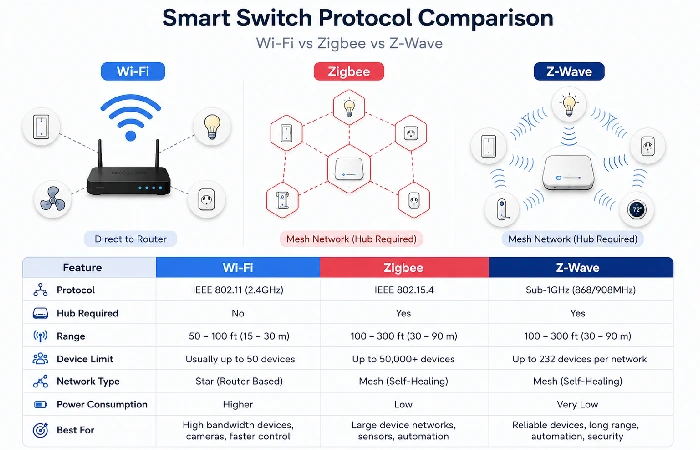
The three legacy protocols that many smart switches are currently running are WiFi, Zigbee, and Z-Wave, while Matter is increasingly being added on as the new interoperability standard. Here‘s the shortened version.
Hub-Free (Wi-Fi) — The Default Choice
Wi-Fi smart switches (Kasa, Treatlife, Tapo, Wipro, Meross) connect directly to your home network. No hub needed. Setup is the simplest: scan a QR code in the app, join your 2.4 GHz network, and you’re done. The downside is that every Wi-Fi switch adds one more device to your network — in a home with 10+ smart devices, congestion can become real.
For most households, replacing two to six switches with Wi-Fi is completely fine.
When Zigbee or Z-Wave Makes Sense
If you‘re deploying more than 15+ smart devices, then Zigbee or Z-Wave makes a lot more sense. They‘re both low-power mesh radios (each device boosts the network) and don‘t eat into your Wi-Fi. The downside is that you‘ll need a compatible hub (SmartThings, Hubitat, or an Echo device with integrated Zigbee (i.e., Echo 4th Gen).
There are now more than 4,000 products on the market using Zigbee certification (according to the Zigbee Alliance 2025 device ecosystem report), representing a growth rate of approximately 40% from 2023. To avid house automation fans, that may be significant.
Matter: Should You Buy Into It Now?
Short answer: yes, if the switch costs a similar amount to a non-Matter equivalent. Matter‑certified switches are designed to work across every major ecosystem with a single setup, and many implementations support local control that can keep basic on/off functions working during internet outages, while the overall ecosystem continues to grow.
For an in-depth protocol breakdown, our Wi-Fi smart switches guide covers the Wi-Fi side in more detail.
Single-Pole vs 3-Way Switches — Get This Right First
This is the pitfall most first-time buyers fall into, and it will soon end in a big pit of frustration. Make the wrong purchase, and you‘ll be returning the carton boxes all afternoon.
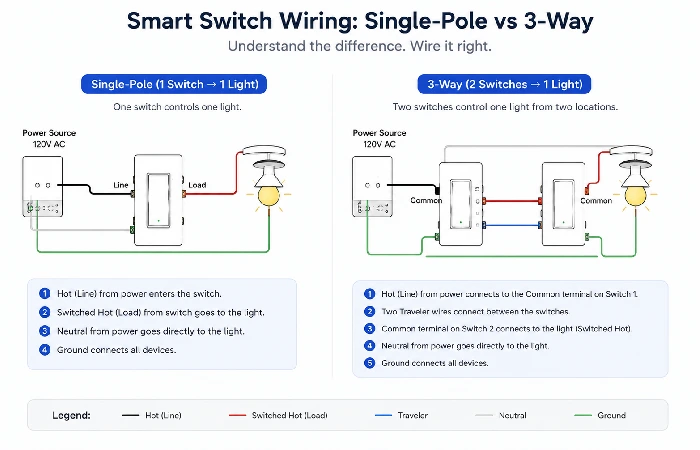
- One switch controls one light from one location; that‘s most of the light switches in your bedroom and kitchen.
- A 3-way switch allows you to control one light from two locations, such as at both the top and bottom of the stairwell, two ends of a hallway, or the entrance to your living room. If flipping your switch doesn‘t always turn the light on or off, you may have one.
What Is a 3-Way Smart Switch?
In a smart switch system, a true 3-way switch generally must be (a) two smart switches (the same brand and type of smart switch that can connect) or (b) one smart switch and one remote or accessory smart switch. The Kasa KS230 handles this natively. The GE Enbrighten Z-Wave 3-way kit is a popular alternative for hub-based setups.
Never attempt to use two single-pole smart switches in a 3-way circuit. It won‘t work and could short out.
The Neutral Wire Problem (And How to Solve It)
There’s a wire — thin, usually white, called the neutral wire. Modern smart switches need it to stay powered even when the light circuit is off. Many homes, particularly those built before the mid-1990s in the US and most pre-2000 builds in India and the UK, don’t have it in the switch box.
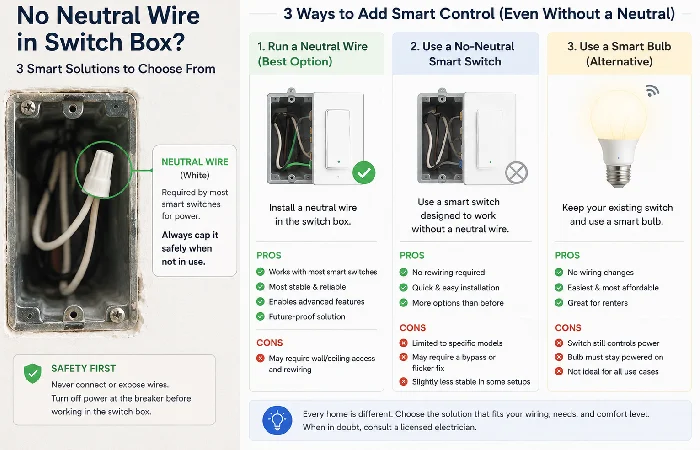
You have three real options:
- Run a neutral wire. Time to bring in a professional or if you‘re competent with electrical work, this is the fix.
- Use a neutral smart switch. Lutron Caseta’s line is widely regarded as one of the most reliable options for this type of wiring. Leviton and a handful of others offer capacitor-driven options that work without neutral, though dimmer performance with LED bulbs can be inconsistent.
- Use a smart bulb instead. When in doubt, it‘s sometimes best to opt out of the switch altogether and leave a smart bulb in the fixture permanently turned on.
Following U. S. Department of Energy recommendations, newer building codes in most U. S. jurisdictions do require neutral wires in new switch boxes, although practices and enforcement can vary by jurisdiction and construction date.
Setting Up Your Smart Switch with Google Home or Alexa
The installation itself is covered step-by-step in our smart switch installation guide. Here, we’re focused on the software side — linking to your voice assistant after the switch is physically wired.
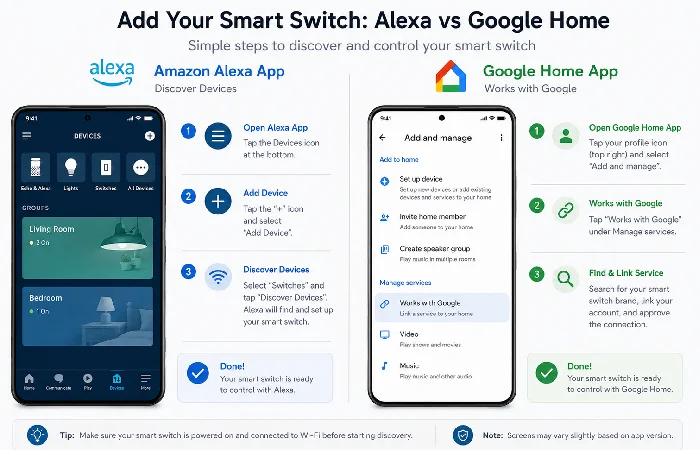
Alexa Setup in 3 Steps
- Open the Alexa app → Devices → “+” → Add Device → Light Switch. Follow the in-app pairing flow for your brand.
-
Alternatively, add the manufacturer‘s skill in the Alexa app (Skills & Games -> search brand name -> Enable), and log in with your brand account.
- Say “Alexa, discover devices.” Your switch should appear within 20–30 seconds.
Google Home Setup in 3 Steps
- Open the Google Home app → “+” → Set up device → Works with Google.
- Search for your switch brand and link the account.
- Assign the device to a room. Google Home then controls it via voice or the app.
Running Both Simultaneously
This is the part guides skip: yes, you can link the same switch to both Alexa and Google Home at the same time. Each platform sees it independently. Turn it on with Alexa, turn it off with Google Home — it all works through the same manufacturer cloud. Just link your brand account to both apps separately.
Smart Switch Buying Checklist (Before You Order)
Before placing an order, confirm:
There you go; six questions. It weeds out 95% of options you wouldn‘t want to buy before you even see a product listing.
Common Problems and How to Fix Them
Switch Shows Offline in the App
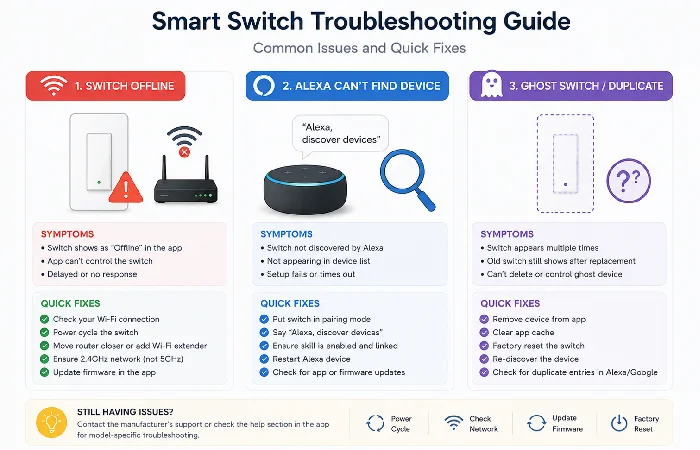
Most of the time, it‘s a WiFi problem and not hardware. Is your 2.4 GHz network still online? (Many routers virtually merge the 2.4 and 5 GHz bands and will turn off the 2.4 when 5 is active. Try changing the channel to one that isn‘t busy (1, 6 and 11 are best in North America). Restart the switch by turning the circuit breaker off/on for 10 seconds and see if that helps!
Alexa Can’t Find the Switch
Usually, a skill-linking issue. Go to the Alexa app → Skills & Games → Your Skills → confirm the manufacturer’s skill is enabled and the account is linked. Then: “Alexa, discover devices.” If it still fails, unlink and relink the skill.
Switch Turns On/Off by Itself
This is often called “ghost switching,” a behaviour that users frequently report when schedules or automations are misconfigured. The most likely culprits are a corrupt schedule, an old IFTTT automation or a firmware bug that has been introduced by an auto-update. Start by investigating your switch‘s schedule in the brand app. If there is nothing set, you will want to look for third-party automation that could be causing the ghost switch. Some brands have pushed out firmware updates to rectify ghostswitching bugs on specific smartswitch models, so check your switch‘s firmware release notes if ghostswitch persists.
Frequently Asked Questions
1Q: Will one smart switch work on both Amazon Alexa and Google Home?
A: Yes. The majority of Wi-Fi smart switches from the popular brands Kasa, Meross, Treatlife and Tapo work with both ecosystems at once. Just link the app account that controls your switch to both Alexa and Google Home, but do so separately.
2Q: Do smart switches need a hub to work?
A: Wi-Fi smart switches will connect directly to your home Wi-Fi router. Zigbee and Z-Wave switches will require a separate hub that works with the protocol you‘re using (for example, Amazon Echo 4th Gen, Zigbee, or SmartThings for Z-Wave). The Caseta switches use their own unique hub, called the Caseta Smart Bridge.
3Q: What smart switches work without a neutral wire?
A: The Lutron Caseta line is the most dependable non-neutral line. Certain no-neutral versions of Leviton and GE Enbrighten are also available, but their neutral performance with LED loads can be inconsistent. Be sure to verify load compatibility before purchasing.
4Q: Are smart switches compatible with Indian 230V wiring?
A: US-market smart switches (meant for 120V) will not work with Indian 230V mains. You need to find switches rated for 230V/50Hz switches from Wipro, Anchor by Panasonic, and Philips Hue India edition, which should work just fine with Alexa and Google Home.
5Q: What is the Matter protocol, and do I need it?
Q: Matter is a universal smart home standard that allows devices to be compatible on all interfaces (Alexa, Google Home, Apple Home, Samsung SmartThings) even if you don‘t use the appliance brand apps. You don‘t need it but have a Matter switch it gives you better futureproofing and local control (they will still function if the WiFi drops). Buy it if the same price as a non-Matter switch.
6Q: Can I use a smart switch if I already have smart bulbs?
A: Deadly combo hitting off on the wall switch kills power to the smart bulb and makes it impossible to reach. Pick one or the other per fixture. Smart switches tend to be a good solution for multi-bulb fixtures (ceiling lights with 4–6 total bulbs) since a switch replacement is cheaper than a smart bulb replacement.
7Q: How many smart switches can I connect to Alexa or Google Home?
A: No hard published limits from either Amazon or Google. In reality, accounts with 200+ smart devices can be found in community forum reports. Response time may slow down a little at very large scales shouldn‘t be an issue for most homes (5–30 switches).
This manual is compiled from whatever exists for this product in the public domain (manufacturers, consumers etc.) as of June 2026. Confirm before buying,, as specifications may have changed, and product range varies from country to country.
Would this breakdown have helped you to whittle down your options? You‘d be wise to also read our wider home gadgets guide, which will help you structure the remaining elements of your smart home.
