Published: June 17, 2026
Last Updated: September 18, 2026
If you pick the right smart home automation devices, your home quietly takes over a bunch of small jobs you’d normally do yourself—without turning into a full‑time tech project. The point isn’t to cram your place with gadgets; it’s to shave friction off the way you already live. Start with your daily routines — the habits, the annoyances, the things you keep meaning to fix — and work out from there which devices are actually worth buying. The list is short and sticks to options that work well together across the US, UK, and India.
If you want to see how these fit alongside other tools, our Home Gadgets guide maps out the broader home tech options in one place.
What Is Home Automation?
Home automation is basically your devices following rules you set on their own, so you’re not constantly pressing buttons or remembering to do things. Tapping a smart bulb on your phone every night isn’t automation; telling it once to switch on at sunset every day is.
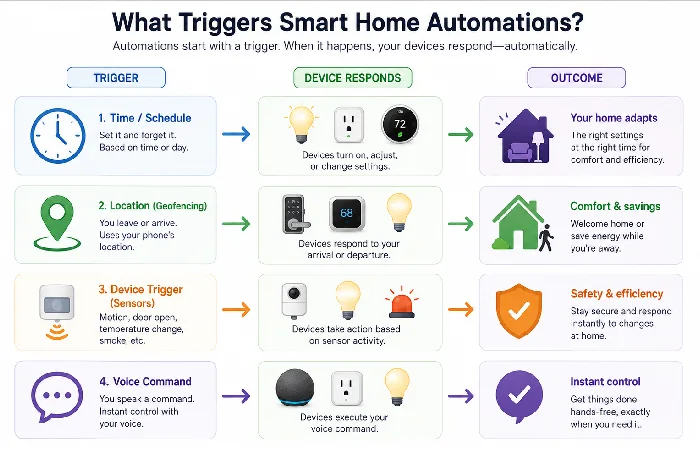
Common automation triggers include:
- Time of day (sunrise, 7:00 a.m., sunset)
- Your location (arriving home, leaving home)
- Another device (a sensor detects motion, a door opens, a lock engages)
- Voice commands (“Good night”, “I’m home”)
Once you’ve seen a light switch itself off in an empty room or the AC ease back when you leave, it’s hard to go back.
Essential Smart Home Automation Devices for Daily Tasks
You can automate a surprising amount of your day with a small set of device types. Think in roles—lighting, power, comfort, access—rather than chasing every new brand name.
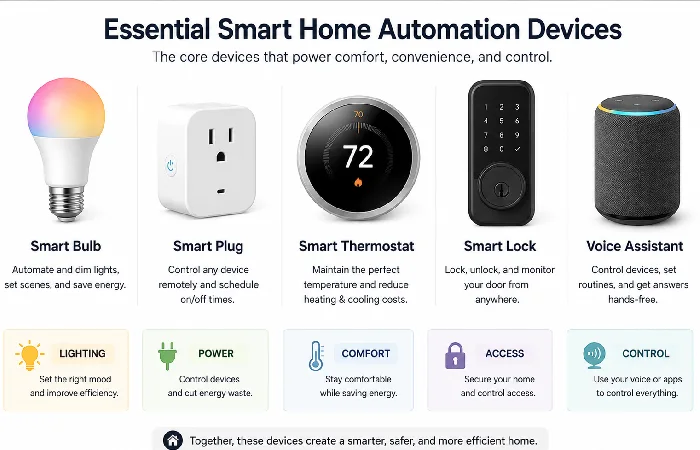
Smart Lighting (Bulbs, Switches, Strips)
Smart lighting is usually the most visible (and satisfying) starting point. You can:
- Lights can go on a schedule — brightness included, not just on and off.
- Color temperature is worth setting by time of day too; most people run cooler light for mornings and gradually warmer through the evening without thinking about it much.
- Group lights by room or by what you’re doing — one tap for work mode, another for watching TV or reading.
Bulbs are easier for renters, while smart wall switches (or relays in many Indian and UK homes) make more sense if you want every bulb on a circuit to behave the same way. If you’ve ever done a “light sweep” before bed, you’ll feel the difference immediately.
Smart Plugs and Power Strips
Smart plugs turn “dumb” devices into ones you can actually automate. They’re great for lamps, fans or space heaters with physical switches, coffee makers or kettles, and those mosquito repellents or air purifiers you always forget to switch off. Because a smart plug sits between the wall and the device, it’ll work across regions as long as you pick the right plug type and voltage rating for the US, UK, or India.
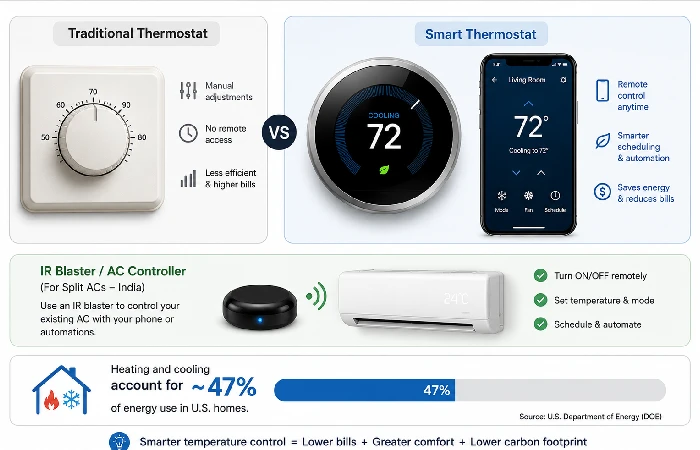
Smart Thermostats and AC Controllers
Smart thermostats and AC controllers pick up on your schedule pretty fast and ease off when nobody’s home — and yeah, you can just bump the temp from your phone instead of dragging yourself out of bed to fix it at the wall. Heating and cooling account for nearly half of a typical home’s energy use, according to the U.S. Department of Energy — so this is genuinely where the biggest savings are hiding. However, where you live changes what that setup actually looks like. In the US and UK, it’s mostly a full smart thermostat swapped in for the old dial. In India, though, with split ACs everywhere, an IR controller bolted onto the unit you already own tends to make more sense than tearing it out altogether.
Smart Locks and Video Doorbells
Smart locks and video doorbells live right at that overlap between convenience and security. Locks let you skip the key entirely—punch in a code, tap your phone, or use a fingerprint—while doorbells let you see, and record, whoever’s standing at your door before you even open it. That matters more than it sounds: a temporary code you text to a dog walker or a delivery driver means you’re not handing out a spare key you’ll forget to ask for back. Renters get an easy win here too. If you’re renting, a battery-powered lock is usually the smarter call — pick one that fits over your existing deadbolt or goes on without drilling. No landlord disputes, and nothing to patch when you eventually move out.
Voice Assistants and Smart Hubs
Voice assistants (Alexa, Google Assistant, Siri) and smart home hubs act as the brains that tie devices together. They:
- Let you control devices by voice.
- Offer a single app for routines and scenes.
- Often integrate with streaming, calendars, and newer Matter‑ready devices so different brands work together.
If everyone in the house knows “Good night” turns off lights and locks the door, you’ve already removed a chunk of daily friction.
Optional Extras: Sensors That Unlock Better Routines
Motion sensors, contact sensors (doors and windows), and ambient sensors (light levels, temperature) can make those automations a lot smarter:
- Lights come on when someone walks in — and switch off on their own once the room’s been empty for a few minutes.
- Get an alert if a door or window has been left open, whether that’s the back door at night or a window when rain’s coming.
- Trigger fans or AC based on room temperature, not just time.
You can start without sensors, but they’re often what make a home feel responsive instead of “just full of smart bulbs.”
Automating Everyday Tasks: Routines to Copy
You don’t need dozens of routines. A few well‑chosen ones can clear a lot of mental clutter.
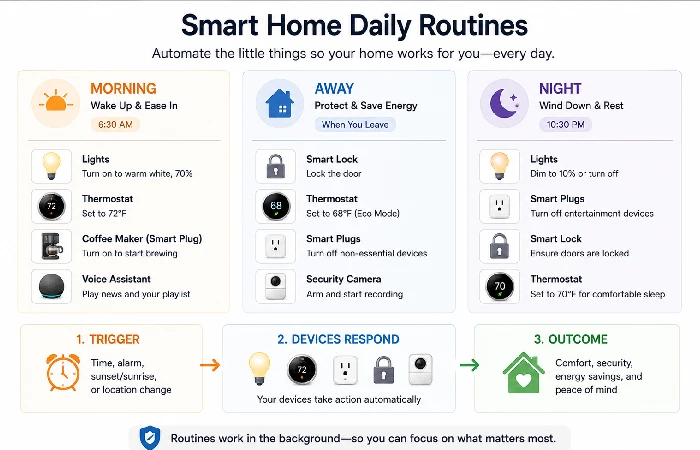
Morning Routine (Wake‑Up, School/Work Prep)
Goal: start the day smoothly, with the house doing some prep for you.
- Bedroom lights fade up gradually.
- A smart plug turns on the kettle or coffee machine.
- The thermostat nudges the temperature up slightly.
You can trigger this by time or by your phone’s alarm, so the house starts waking up with you instead of you stumbling around in the dark.
Night and Wind-Down Routine (Comfort + Safety)
Goal: encourage a calmer evening and lock things down without paranoia.
- Living room lights dim or switch to warmer colors.
- Bedroom lights shift to low brightness.
- Door locks check and lock; risky plugs (irons, space heaters) turn off.
Integrating Devices into One Ecosystem
If you’re not careful, you end up with four apps for five devices, and nobody in the house knows what controls what. The fix is choosing one primary ecosystem and building around it on purpose.
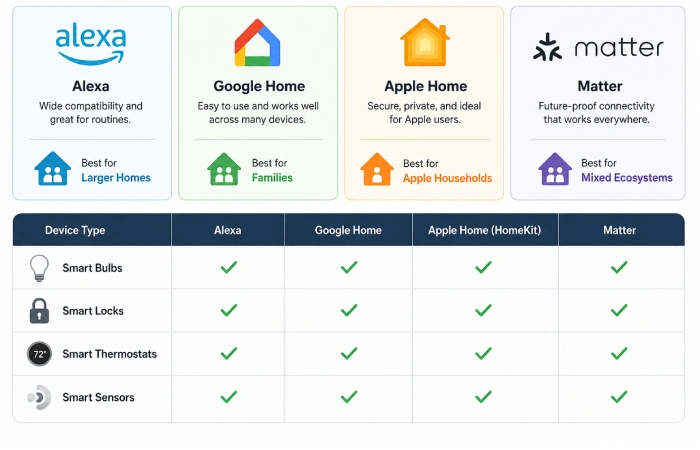
Choosing Your Main Platform (Alexa, Google, Apple, Matter)
Alexa wins on device support and has the widest compatibility, with Echo hardware at almost every price point. Google Home handles voice recognition better than its rivals and slots naturally into Android households. Apple Home trades flexibility for privacy, and really only makes sense if your house already runs on Apple devices. Matter is the cross-brand fix — devices from different ecosystems finally talking to each other without a workaround.
Avoiding Compatibility Headaches and App Overload
- Before buying, check that the device explicitly supports your main ecosystem.
- Prefer devices that can be added to your ecosystem’s app first, manufacturer app second.
- Limit yourself to one lighting brand and one main plug brand for your starter setup, then explore more experimental devices in the AI‑powered gadgets guide.
Privacy, Security, and Reliability Basics.
Smart home devices are small computers on your network. The Cybersecurity and Infrastructure Security Agency (CISA) recommends strong unique passwords, WPA3 encryption, and multi-factor authentication as the baseline for any connected home network — and those basics stop most home IoT breaches before they start.
Securing Wi‑Fi and Accounts
At minimum:
- Use a strong, unique password for your Wi‑Fi.
- Turn on WPA3 or at least WPA2 encryption if your router supports it.
- Use unique passwords and, where available, two‑factor authentication for device accounts.
- Consider a guest network for visitors so they’re not on the same network as your devices.
How to Choose the Right Smart Home Automation Devices for Your Home
Here’s a simple way to avoid decision fatigue and random impulse buys.
Step-by-Step Buying Checklist
- Write down three daily annoyances — something like “kids leave every light on” or “the AC’s been running for two hours and nobody’s home.”
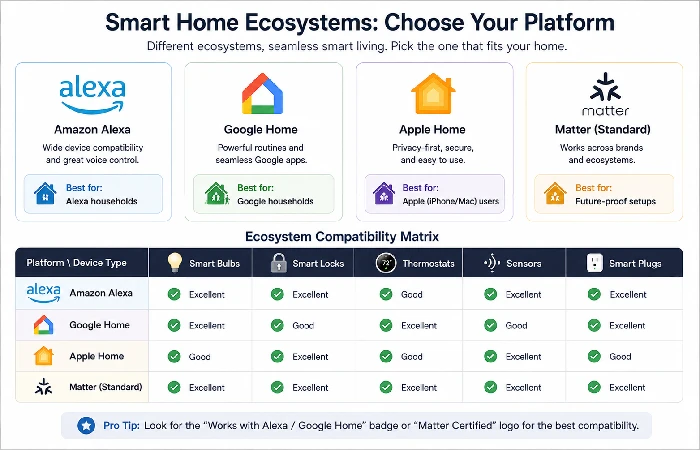
- Pick your ecosystem based on what’s already in the house — Alexa if you’re in an Amazon household, Google Home if Android phones dominate, Apple Home if everyone’s on iPhone.
- Match each annoyance to a device type. Lights point you toward bulbs or switches. Door worries usually mean a lock and a doorbell. Energy waste is where smart plugs and thermostats earn their keep.
- Check voltage and plug type for your region first, then confirm the device actually supports your ecosystem where you live — some products list compatibility but quietly exclude certain markets.
- Start with one room, get it working reliably, then expand from there.
- Plan clear device names and groups before adding them to your app.
Starter Bundles at Different Budgets
- Lean starter (2–3 devices): A couple of smart bulbs and one or two plugs — run it all from your phone or a speaker you already own.
- Balanced starter (5–7 devices): Three or four bulbs or switches, a few smart plugs, one door lock or video doorbell, and a voice assistant speaker to tie it together.
- Expanded starter (8–10 devices): Everything in the balanced kit, plus a thermostat or AC controller and two or three motion and door sensors. If you’re adding Zigbee devices, this is the point where a hub starts making sense.
For each tier, you can cross‑check options in our budget gadgets guide so you don’t overspend on brand names that don’t add meaningful value.
