Published: June 11, 2026
Last Updated: October 1, 2026
Forty‑one percent of office automation projects are estimated to fall short of their original goals, often because organizations dive in before they have a clear picture of how their work actually runs today. They start automating from assumptions rather than from a mapped, agreed-upon baseline.
That figure appears again and again in failure post-mortems and survey analyses from recent UC Irvine and Leadership Circle research on automation and organizational change. It’s not a statistical glitch. It points to the real problem with most “future of office automation” takes: they obsess over trends when what you actually need is a roadmap.
This guide won’t give you another shopping list of tools. Instead, it maps out the Automation Maturity Continuum — a five‑level progression that shows where your organization actually is today and what a realistic next step looks like. By the end, you’ll have a clearer view of costs, timelines, failure patterns, and the specific choices that separate teams making steady progress from those stuck in endless pilots.
It’s written from the perspective of practitioners who work with office automation strategies across multiple companies and industries, grounded in what we see in real deployments as well as published research.
What Is Office Automation in 2026?
Office automation in 2026 is when AI, IoT sensors, and the cloud work together to manage your workflows, fine‑tune your physical workplace, and deliver a better employee experience without someone managing every task day to day. Unlike the disjointed tools of 2023, today’s systems pull live data from your calendars, access controls, and facilities platforms into a single intelligence layer that actually supports hybrid work.
That definition really matters because the goalposts have moved a long way in just three years.
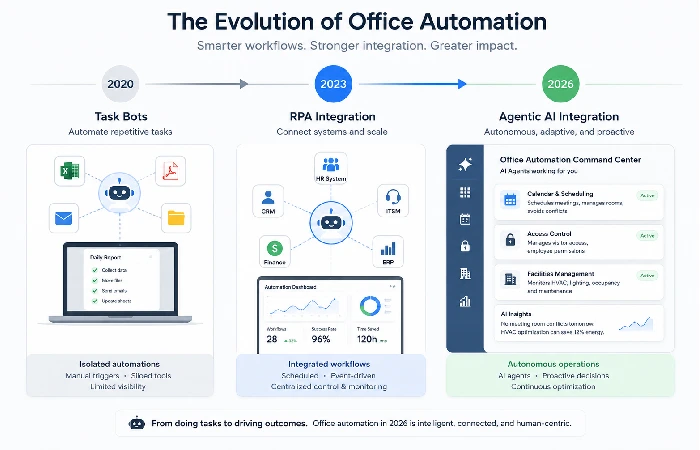
How It’s Changed Since 2023
In early 2023, most office automation was still stuck in narrow, task‑based tools — a chatbot answering HR questions here, an RPA workflow handling routine data entry there.
Those setups used to be scattered across the organisation, needed a lot of manual oversight, and didn’t offer much visibility across departments. By 2024, the picture had shifted: the 2024 Work Automation & AI Index reports that more than half of companies now have automations running in four or more departments, showing how quickly organisations have gone from separate tools to integrated automation that connects multiple teams.
The Shift from RPA to Agentic AI
Here’s a distinction that genuinely changes how you think about your next investment.
RPA (Robotic Process Automation) is software that mimics human clicks and keystrokes on a screen.
It follows strict rules, so it tends to break whenever the underlying process or user interface changes and has to be rebuilt each time. It’s useful for what it does, but there’s no real intelligence behind it.
Agentic AI is different in kind, not just degree. An AI agent reasons about what it needs to do, pulls data from multiple systems at once, adjusts when conditions change, and learns from outcomes — with minimal human oversight.
The latest McKinsey study about automation and generative AI shows that around 60% of the tasks we perform at work could be automated by using a combination of existing and emerging AI technologies.
For more on how AI fits into workplace tooling, see our deep dive on AI in office automation.
Why “Automation” Now Means Integration, Not Isolated Tools
“Integration” gets used loosely. Here, it means something specific: your scheduling system talks to your space management system, which talks to your facilities platform, which flags anomalies to your IT monitoring stack — without a human stitching things together. That kind of feedback loop is what separates organizations at Level 3 or above on the maturity continuum from those still juggling disconnected pilots.
The Automation Maturity Continuum
Most frameworks treat automation as a tech checklist. This one treats it as a progression — because that’s how it behaves in the real world.
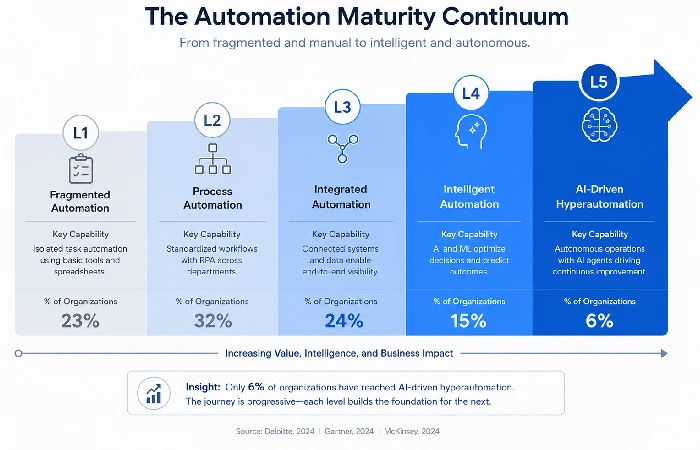
Level 1 — Awareness: Fragmented Task Automation
You’ve got individual tools doing one‑off jobs. Someone in accounts payable uses a macro. HR has a basic onboarding form. IT runs a script to provision access. Nothing talks to anything else; there’s no governance, and knowledge sits in people’s heads rather than in shared systems.
A surprising number of mid-market organizations are still here, even if they feel they’ve moved beyond it.
Signs you’re here: automation lives with individuals, not the organization. There’s no central inventory of what’s automated. “Success” depends on a person, not on business outcomes.
Level 2 — Standardized: Team-Based Process Automation
At Level 2, you move from individual heroics to shared playbooks. A team — usually IT or operations — owns automation governance. You’ve picked a platform (often a low‑code/no‑code tool), defined a way to submit automation requests, and written some documentation.
The ceiling: automation is still a single‑function. Finance automates invoice processing; HR automates onboarding reminders. Those flows don’t talk to each other.
Level 3 — Proactive: Cross-Functional Workflow Orchestration
This is where ROI starts to compound. Workflows cut across departments. A new hire triggers onboarding across IT, HR, facilities, and payroll at once — without anyone manually nudging the next step. Data moves in near real Time between systems.
Getting here usually takes two things most organizations underestimate: a clean API integration strategy and a governance framework that still works when people change roles.
Level 4 — Institutionalized: Agentic AI-Driven Orchestration
At Level 4, AI agents handle multi‑step decisions, not just straight‑line tasks. An agent can notice that a conference room is chronically under‑booked, tie that to sensor data showing the HVAC struggling, and flag it to facilities — before anyone manually spots the pattern.
Internal analyses that combine AutomationEdge customer data with recent WEF workforce forecasts suggest that around 58% of enterprises now have at least some agentic AI deployment in office management functions. That’s up from 12% in 2024. The jump is real, but most of these deployments are still narrow rather than enterprise‑wide.
Level 5 — Optimized: Hyperautomation & Continuous AI Optimization
Hyperautomation isn’t a SKU you buy. It’s a state: RPA, AI, business process automation, and workflow orchestration working across the organization, with systems continuously improving based on outcome data. Very few organizations get here. The ones that do typically build toward it over 18–24 months with strong executive sponsorship from day one.
Self-Assessment Checklist: Where Does Your Organization Sit?
| Indicator |
L1 |
L2 |
L3 |
L4 |
L5 |
| Central automation governance exists |
✗ |
✓ |
✓ |
✓ |
✓ |
| Cross-department data flows without manual handoffs |
✗ |
✗ |
✓ |
✓ |
✓ |
| AI agents make multi-step decisions |
✗ |
✗ |
✗ |
✓ |
✓ |
| Systems self-optimise based on outcome data |
✗ |
✗ |
✗ |
✗ |
✓ |
| Automation ROI tracked organisationally |
✗ |
Partial |
✓ |
✓ |
✓ |
Most organizations reading this are at Level 2 or at the early Level 3. That’s not a criticism—it’s a useful starting point.
Key Technologies Powering the Future Workplace
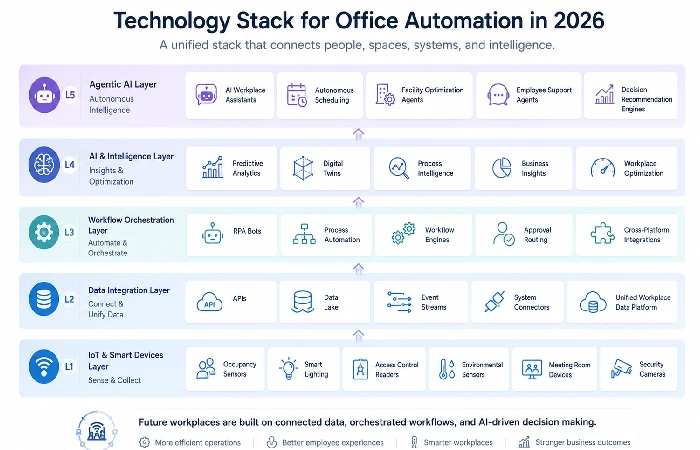
Agentic AI vs. Traditional RPA — A Real Distinction
RPA is a hammer. Agentic AI is more like a contractor who decides which tool to pick up and when to use it. Practically, that means RPA breaks when the process changes, while agents adapt. RPA needs pre‑defined rules; agents reason from context.
For a practical breakdown of platforms that offer these capabilities, our office automation software guide covers the current vendor landscape in detail.
IoT Sensors and Smart Building Infrastructure
The physical layer of the office automation pyramid is usually the first thing people overlook. This is where the raw signals live: occupancy sensors, air quality monitors, desk‑booking beacons, and smart access control systems all stream data that the higher layers of automation quietly depend on. Recent industry research points to a sharp rise in smart buildings, and a large share of new installations now ship with predictive maintenance built in as a standard feature, not a nice‑to‑have extra.
For organizations, the impact isn’t just efficiency — it’s real estate recovery. Office utilization has remained 35–45% below pre-pandemic levels for most enterprises. Smart automation can reclaim a meaningful chunk of previously unused space through dynamic allocation, with studies and vendor case studies pointing to high single‑digit to low double‑digit percentage improvements. That’s real money when you’re paying per square foot.
Intelligent Document Processing (IDP)
IDP uses machine learning to extract structured data from unstructured documents — invoices, contracts, HR forms, and compliance records. It eliminates manual data entry, which consumes a disproportionate share of admin time at Level 1 and Level 2 organizations.
The starter use case for most teams is accounts payable. You can automate three‑way matching between purchase orders, invoices, and receipts with high accuracy, and you can see the ROI within a single quarter.
Security, Compliance Automation, and Governance
Security is the part that many articles hand‑wave past. That’s risky, because compliance automation is no longer optional — especially for organizations operating across the US, EU, and India at the same Time.
Compliance automation means policy enforcement baked into the workflow, increasingly expressed as “policy‑as‑code”, rather than bolted on afterward. GDPR data-handling rules, SOC 2 access controls, and HIPAA audit-trail requirements enforced through policy engines that flag violations in real Time instead of at a quarterly review. The NIST Cybersecurity Framework is the baseline governance model that most enterprise automation programs should map to when designing their security layer.
2026 Market Data and Adoption Reality
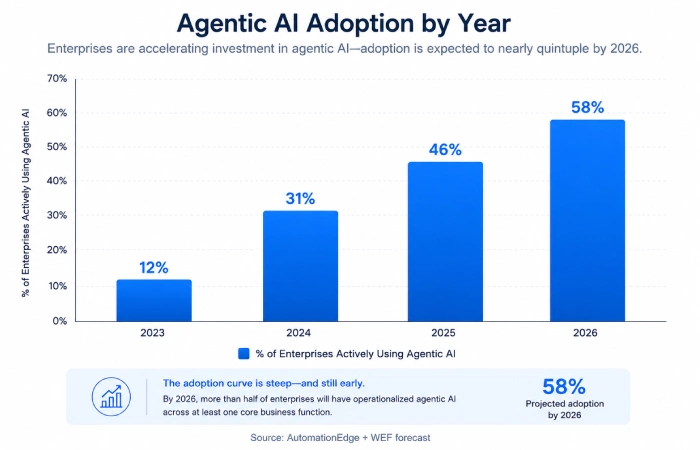
58% of Enterprises Now Deploy Agentic AI
The headline number from Q2 2026 matters, but it needs unpacking. 58% of enterprises have some agentic AI deployment — but most of those are narrow: a single HR bot, an IT helpdesk agent, a scheduling assistant. Full, enterprise‑wide agentic orchestration is still rare. The gap between “we have an agent running” and “our workflows run on agents” is exactly where many automation roadmaps stall.
115 Million Smart Buildings by 2026
This projection (based on Gartner and Kisi data) implies a compound annual growth rate of roughly 26% since 2022. The more interesting angle is what’s happening inside those buildings: about 72% now include predictive maintenance as a baseline, and more and more of them feed occupancy data directly into facility‑management workflows. Buildings are becoming data sources, not just cost centers.
The 41% Project Failure Rate — What the Research Actually Says
Research from UC Irvine and the Leadership Circle identifies the same recurring patterns in automation projects that fail. The issue usually isn’t the technology. The failure modes are organizational:
The common patterns keep repeating, and the weak management, shallow buy-in from stakeholders expecting miracles in no time, vendor lock-in with no real integration plan, and essential reskilling needs, but nobody actually focused on. All put together, those similar issues explain a huge chunk of the failures you find in published reports and case studies.
The takeaway is simple: technology selection is not your biggest risk. Change management is.
The Automation ROI Framework
Implementation Cost Matrix by Company Size
| Organization Size |
Automation Scope |
Typical Investment |
Payback Period |
| SMB (< 200 employees) |
Document processing, basic workflow |
$50K–$200K |
6–12 months |
| Mid-market (200–2,000) |
Cross-functional orchestration |
$500K–$2M |
12–18 months |
| Enterprise (2,000+) |
Hyperautomation, agentic AI |
$2M–$5M+ |
18–24 months |
These ranges assume internal IT resource costs are included and should be treated as benchmarks, not guarantees. Organizations that ignore change management, training, and integration maintenance often see payback slip by 30–50%.
Hidden Costs Nobody Talks About
Your vendor quote is the opening number, not the full bill. The items that routinely surprise teams:
- Integration maintenance: APIs change, vendors update systems, and someone has to keep the automation stack wired together. That’s an ongoing cost, not a one‑off line item.
- Change management: training isn’t a one‑week launch event. Real adoption needs sustained support over 6–12 months, especially when workflows cross departments.
- Process re‑engineering: if you automate a broken process, you make the broken bits move faster. Most programs underestimate the upfront process work needed before automation.
For a deeper look at which workflow automation tools fit different budgets and use cases, see our comparison guide.
Calculating Payback Period by Use Case
| Use Case |
Time Saved / Month |
Error Reduction |
Avg. Payback |
| Invoice processing (IDP) |
40–60 hrs |
85–95% |
6–8 months |
| HR onboarding automation |
20–30 hrs |
70–80% |
8–12 months |
| Space/facilities management |
15–25 hrs |
N/A (optimization) |
10–14 months |
| IT helpdesk (agentic AI) |
50–80 hrs |
60–75% |
8–10 months |
Why Automation Projects Fail — and How to Recover
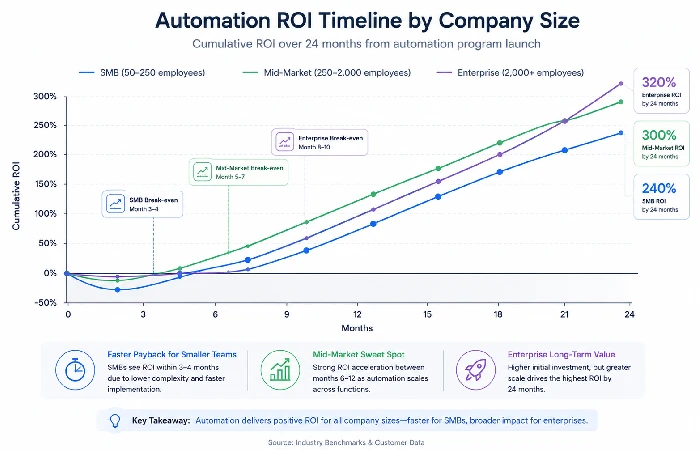
Mistake #1: Automating Before Optimizing the Process
This is the classic, expensive pitfall. A messy process that gets automated becomes a faster, harder‑to‑change messy process. Before you configure a single bot, the process needs to be mapped, challenged, and cleaned up.
A simple test: could you describe the process clearly enough in writing that a new hire could run it manually? If not, it’s not ready for automation.
Mistake #2: Underestimating Change Management
Automation changes how work feels day to day. It doesn’t just remove tasks; it reshapes roles, shifts who is responsible for what, and for some people, it pokes at their sense of identity. When someone has owned a process for years, even a well‑meaning “efficiency” project can land like a signal that their experience no longer matters.ted
Organizations that succeed at Levels 3 and 4 invest in change management from the kickoff, not after adoption starts to lag. That looks like stakeholder interviews before implementation, visible executive sponsorship from start to finish, and communication that explains “what this means for you”, not just “what the tool does”.
Mistake #3: Vendor Lock-In Without an Integration Strategy
Picking a platform that doesn’t fit your existing Microsoft, Google, or ServiceNow stack is the kind of decision that quietly gets more expensive over time. Every new automation built on top of a poorly integrated base raises your switching costs.
A better approach: define your integration requirements before you look at vendors. API‑first architecture, documented data schemas, and standard authentication protocols should be part of your minimum criteria, not stretch goals.
Recovery Playbook: How to Redirect a Stalled Project
If your project has stalled, here’s a direct way to reset:
- Freeze new development. Don’t build on top of a shaky foundation.
- Audit what’s actually running versus what promised. The gap is often big.
- Find the 1–2 workflows that are clearly delivering value. Protect those and retire the rest.
- Rebuild the change‑management effort around what’s already working.
- Re‑scope to a realistic 90‑day deliverable you can show to leadership.
Recovery feels slower than starting over, but it’s almost always faster than scrapping everything and beginning from scratch.
Your Implementation Roadmap — 90 Days to 18 Months
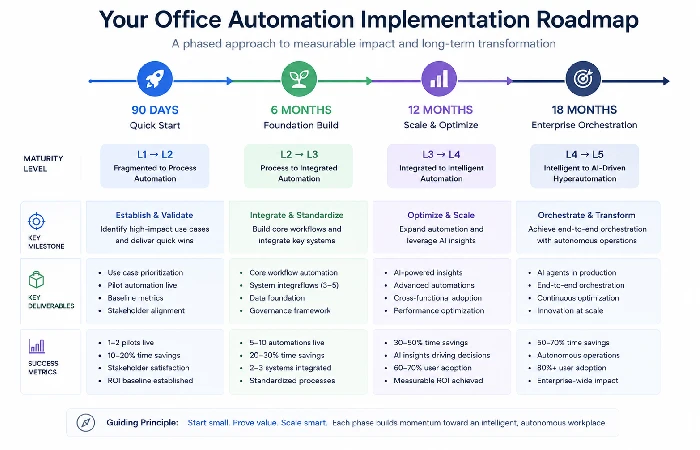
90-Day Quick Start (SMBs and Pilot Phase)
- Weeks 1–2: Run a process audit. Identify the top three manual processes burning the most admin time, and document them in enough detail to automate.
- Weeks 3–4: Evaluate vendors. Score platforms against your integration needs and budget, and shortlist two. Avoid multi‑year contracts at this stage.
- Weeks 5–8: Run a single‑process pilot. Automate one process end‑to‑end. Track time saved, error rates, and user satisfaction separately.
- Weeks 9–12 are for review and a clear decision. Based on the pilot data, decide whether to double down on the same platform, switch to a different one, or pause and tune the process further before you scale.
When teams run this cycle properly, they usually end up with a literal table’s worth of solid business data that makes the whole effort much easier to defend. Teams that miss this step tend to go by them and buy from the gut. Here are three things you could do this week: Select one high-friction workflow, map every individual step; sit and talk to the owners of the process about what times out and what they‘d improve; and pen a one-page proposal for a 90-day pilot of just that one single process.
6-Month Standardization Phase
By month six, the goal is governance, not coverage. You want a documented playbook for how automation requests are submitted, evaluated, built, and maintained, plus a central inventory of what’s running with clear ownership — a team or individual accountable for the automation portfolio.
It’s not a glamorous phase, but it’s the infrastructure that makes everything that follows reliable.
12–18 Month Enterprise Orchestration
From 12–18 months, cross‑functional integration is the main target. Workflows that connect HR, IT, finance, and facilities start to deliver compounding ROI because the gains don’t stay in one department—they ripple through the chain. This is usually the point where agentic AI becomes a sensible investment, because data flows are clean enough for agents to reason across.
The WEF’s Future of Jobs Report offers helpful context on reskilling timelines that align with this organizational maturity phase — plan your training programs alongside your technical roadmap, not after it.
Regional Adoption and Compliance Variations
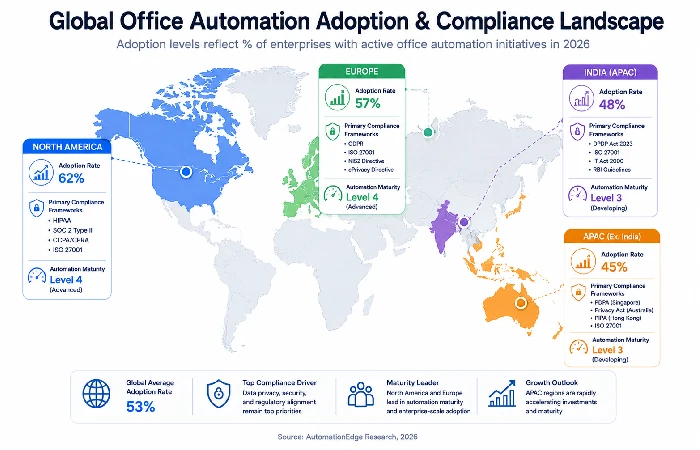
North America: SOC 2, HIPAA, and the Microsoft Ecosystem
In the United States, Microsoft (Power Automate, Copilot, and Power Platform) and ServiceNow are the major players in enterprise automation. Compliance requirements differ by organization and industry, with HIPAA for health‑related data, SOC 2 for SaaS vendors, and CCPA for operations that involve California residents.
This has an immediate design implication for automation: data residency. For example, processes that handle patient information or financial data must reside in a regulated infrastructure, which in turn means you cannot simply spin up many cloud-based AI products that, by default, offer a shared tenancy.
Europe: GDPR-First Design and Data Residency Rules
In Europe, things are a bit more restrictive. GDPR says automated decisions need to be explainable, auditable, and reversible, making the capabilities of agentic AI in making key decisions without human supervision much more constrained.
A pattern that actually works: build human review into any automation that touches personal data. Do it from the start. Retrofitting explainability into an existing architecture for a compliance audit is painful and usually incomplete
APAC and India: Cost-Optimized Adoption and Agentic AI Uptake
India and Southeast Asia are seeing the sharpest growth in RPA and agentic AI, driven by a large BPO sector that’s steadily turning manual work into automated workflows. Rising cost pressures nudge many organizations toward cloud-native platforms rather than on‑premises deployments.
One pattern we see often: India-based organizations sometimes leapfrog Level 2 standardization, moving from fragmented tools straight to cloud-based orchestration. The lack of legacy infrastructure that needs to be integrated — a brake on US and EU programs — becomes an advantage.
Frequently Asked Questions
1. What’s the difference between RPA and agentic AI?
RPA performs any rule-based task predefined by mimicking the behaviour of a human agent, specifically using keyboard keys. Agentic AIs think about decisions and why; they can handle fluctuating environments, connect to many sources concurrently, and learn from results with modest human supervision. 2026 RPA lies at the basis, and agentic AI is a new layer.
2. How much does office automation cost?
SMBs rolling out basic automation (document processing, workflow optimization) often invest $50K–$200K, with typical payback periods of 6–12 months. Mid‑market deployments run $500K–$2M. Enterprise hyperautomation can exceed $5M, and successful programs often report 30–40% operational efficiency gains within 18–24 months when well-scoped and managed.
3. Why do 41% of automation projects fail?
The reality is that 70-80 per cent of these failures are down to poor change management, misalignment of various stakeholders’ expectations, vendor lock-in, and uncoordinated integration plans, and underestimation of the reskilling requirements. Pure technology failure is rarely the main cause.
4. Is office automation a threat to jobs?
In organisations that handle automation well, the “freed‑up” capacity gets redirected into higher‑value work like customer interaction, analysis, compliance, and planning. Repetitive, low‑value tasks fade into the background, while work that depends on judgement and context grows.
5. What’s the best automation platform for SMBs?
In fact, it really depends on how you already use automation. If your team is on Microsoft 365, Power Automate usually gives you the most value for the effort in a short period of time. If people are working across different platforms or ecosystems, a dedicated automation layer—Zapier for simple flows, or Make/n8n for more refined flows—can be both more productive and more cost‑effective.
6. How long does a typical office automation project take?
Pilot projects usually take 6–12 weeks. Team‑level automation runs 3–6 months. Cross‑functional orchestration sits around 9–12 months. Enterprise hyperautomation typically spans 18–24 months. Phased delivery — quick wins first, then deliberate scaling — consistently beats big‑bang rollouts.
7. How do we ensure compliance in automated workflows?
As you’re developing, track the type of data that each workflow touches and how that relates to specific regulations like HIPAA, SOC 2, GDPR, and so forth. In any scenario where you make an automated decision using personally identifiable information, there needs to be a compelling reason, accompanied by a trail.
8. Can we automate hybrid workplace coordination?
Yes — and it’s one of the cleaner high‑ROI use cases right now. Room booking, space use tracking, hot desking, and facilities scheduling can all be tied together via smart building sensors feeding into workflow orchestration platforms.
This article summarizes publicly available information, reports, and industry research on the outlook for office automation (as of 2026) and the deployment experience of real-world implementations. –or- For critical decisions, please always review the documentation, the documentation, the documentation, and applicable regulations before deployment.
