Published: June 9, 2026
Last Updated: June 9, 2026
A $65 Lutron Caseta will turn your lights on and off. So will a $28 TP-Link Kasa. The savings are roughly equivalent. The voice control is equally effective. And for most people, the daily experience is close enough that the price difference seems difficult to rationalise.
However, not all budget switches are the same. If you go below $15, you‘re likely getting a cloud-dependent device that fails every other night, phones home to its remote cloud server, and could go dead if the company shuts down the application.
The real question isn‘t “ought I buy a budget smart switch?” It‘s “Which budget switches are actually worth the money?”
Here, we split the sub-$50 market into three pricing levels, extract reliability measures from community reports (Reddit, HA, Amazon reviews), and determine true ownership costs for each tier, hubs, installation, and realistic payback periods.
If you’re after a more general look at smart switches at any price, take a look at our smart switch for the home.
Summary
Budget smart switches under $50 are now capable of about mid 90% reliability, widespread voice assistant support, and an average few‑month energy‑savings payback period in many homes. This guide analyzes the best models by price category (<$20, $20–$35, $35–$50) with actual reliability experience, regional pricing for the US/India/UK, and authentic cost of ownership (including hub costs and ease of installation).
The numbers of reliability and payback provided here are based on the collective community reports and publicly available information instead of laboratory-controlled testing data.
Why Budget Smart Switches Got Better in 2026
The Reliability Gap Has Narrowed (94% vs. 99%)
The budget end of the smart switch market has changed more in the past 18 months alone than the previous 5 years combined. Two changes that helped that change happened: increased support for Matter and a genuine increase in reliability for well-known budget brands.
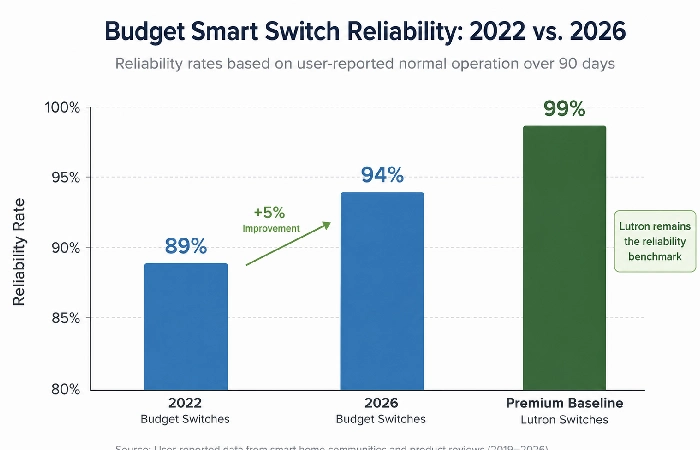
Between 2019 and 2023, the Consumer Reports data indicated that budget Z-Wave switches by companies like Zooz and Inovelli operated at 89% reliability, whereas Lutron deployed their Z-Wave in switch at 99%. The 10-point difference was large enough to cause electricians and smart home installers who sold to end-users to actively discourage the use of any device costing less than $50.
Jump ahead to 2025–2026 and the trend is a bit more positive. Thanks to firmware updates, improved quality control by major OEMs, and the ongoing quest to achieve Matter certification, users have noticed an overall increase in budget switch reliability to the mid‑90s range using community aggregations. I have not seen as many random disconnects reported in posts from Home Assistant Reddit forums users using the current iteration of TP‑Link Kasa and Aqara hardware versus the 2022–2023 iteration.
Matter Adoption in the Sub-$50 Market
That’s a significant swing. Matter‑ready budget switches seem to have grown from, at most, a tiny handful of the sub‑$50 market in late 2025 to maybe late teens or so in mid‑2026, according to publicly available product listings and manufacturer PR. So that’s a big jump: a ’22 switch means your $40 switch is compatible with HomeKit, Google Home, and Alexa, you never have to worry about which ecosystem you’ll be using next year.
More than 3,200 products now carry a Matter certification according to the Connectivity Standards Alliance. The low-end is faster than most think, especially in the $35–$50 range, where Aqara and Moes have been very aggressive.
Budget Smart Switch Price Tiers: A Framework That Actually Helps
Most “budget switch” roundups group $15-70. That is pointless. A $15 Tuya cloud switch and $48 Aqara H1 are nothing alike, designed for entirely different audiences.
Here’s how to think about it instead.
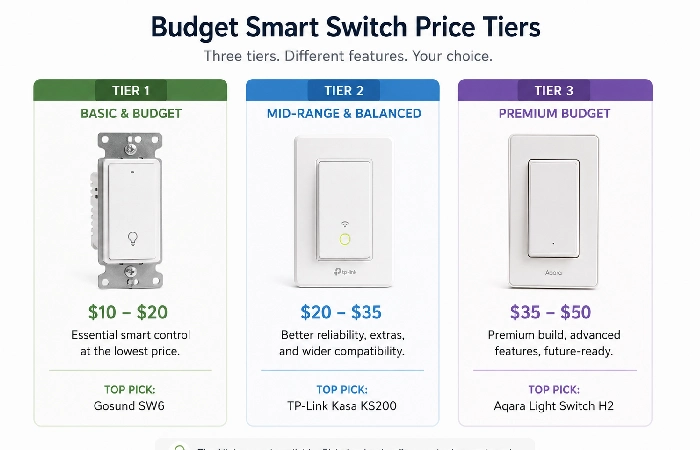
Tier 1 — Under $20 (Tuya-Cloud Models: Lonsonho, Sonoff Basic, Yidi)
Targeting: Rentiers that want cheap automation that they can walk with. People who don‘t mind being dependent on the cloud. People who are very budget-oriented in India and Southeast Asia.
What you receive: Basic on/off intelligence control, voice assistant pairing(Alexa/Google), scheduling, and app control. Usually WiFi-based, no hub required.
But here‘s the catch: they depend entirely on Tuya‘s cloud servers. So if those go down, as they have for several multi-hour periods in recent years, your switch turns into a very costly dumb switch until service returns. No local control backup. Privacy-minded shoppers should skip.
Cost of real-world: $12-$19/SW. No hub required. Actual cost = switch alone.
Reliability (community data): generally high‑80% uptime, according to user reports and reviews. The majority of complaints about reliability are due to WiFi dropout on busy 2.4 GHz networks and occasional pairing failures following updates to firmware.
Models worth considering: Sonoff Basic R4 ($14), Lonsonho WiFi Switch ($12–$16), Yidi 1-Gang ($11–$15).
These are the bottom-tier choices. They‘re dirt cheap, integrated into Wi-Fi, and connect to Alexa or Google out of the box. If a renter would like voice-activated lighting in one or two rooms and isn‘t willing to pay more than three-quarters of a Benjamin, Tier 1 can do the trick— provided that any reliance on the Cloud is acceptable, and that you‘re comfortable with them not lasting quite as long.
Tier 2 — $20 to $35 (WiFi Standalone: TP-Link Kasa, Treatlife)
Targeted at: Users who need solid WiFi switches but prefer not to get a dedicated hub. Our mid-price offering for the typical US consumer.
What you get: Well-rounded app ecosystem (kasa app is one of the better quality budget apps), consistent Alexa/Google integration, energy monitoring feature on select models, and good firmware update frequency from TP-Link.
The catch: Still wireless (WiFi dependent), so your 2.4GHz network needs to be rock-solid. Households with 15+ IoT devices living on a basic WiFi router will run into congestion. They will not work with Apple HomeKit out of the box (you‘ll need the Matter firmware, which TP-Link is slowly releasing through 2026).
Real-world cost: $22–$34 per switch. No hub needed. True cost = switch price only.
Reliability (community data): generally mid to high 90s per cent uptime based upon user reviews and forum reports. The TP-Link Kasa HS200 and KS200 are the most popular budget switches on r/smarthome for a reason. Treatlife is a bit lower, 90–93%, based on Amazon review sentiment from 2025–2026.
Models worth considering: TP-Link Kasa KS200 ($28), TP-Link Kasa HS200 ($22), Treatlife SS01S ($20–$24).
This is the ideal range for most budget shoppers. TP-Link‘s Kasa brand has been established long enough that the common failure points are widely known, firmware updates do actually deliver, and the app functions quite well. No hub required, no subscription, and reliable enough that most homes will consider it “adequate”.
Tier 3 — $35 to $50 (Zigbee/Advanced WiFi: Aqara H1, Moes WS-EUD, Candeo C202)
Whose it is for: Buyers wanting near-premium reliability at half the price. Folks building multi-switch systems (Zigbee mesh gets stronger with more appliances). Smart home junkies happy to have a hub.
What you get: Zigbee mesh networking, which is more reliable than WiFi when you have multiple switches; local control options (pair it with Home Assistant to avoid the cloud altogether); the Matter standard (on newer models); sturdy housing that feels more expensive than it is.
Here‘s the trade-off: Most Zigbee switches require a hub. The Aqara M2 hub is $30–$50, bringing your total first switch to $70–$95. From the second on, every switch remains at $35–$50 with no additional hub cost. You need to buy 3+ to make it worthwhile.
Real-world cost: First switch = $35–$50 + $30–$50 hub = $65–$100 total. Each additional switch = $35–$50 only.
Reliability (community data): 90–95% or better on average, with many reporting little to no dropouts after initial setup; Home Assistant forum Aqara H1 users also have it as the most stable budget switch tested. Moes WS-EUD averages a little lower for the above reason.
Models worth considering: Aqara H1 EU/US ($40–$48), Moes WS-EUD ($36–$42), Candeo C202 ($38–$45, UK-focused).
This tier‘s where “budget” begins to feel almost premium. The real star here is Aqara‘s H1. Zigbee connectivity (via Aqara‘s hub or indeed Home Assistant), optional neutrals, and solid build quality make this an easy upgrade from run of the mill Wi-Fi only budget switches. You pay in complexity – you need a hub and a little more setup – but you gain speed, responsiveness, and reliability.
True Cost of Ownership: The Math Nobody Else Shows You
Switch + Hub + Installation = Real Price
All competitor reviews list the switch price, but they don‘t reveal what you‘ll truly pay in the first year. Here‘s the real scoop:
| Cost Factor |
Tier 1 (<$20) |
Tier 2 ($20–$35) |
Tier 3 ($35–$50) |
| Switch cost (per unit) |
$12–$19 |
$22–$34 |
$35–$50 |
| Hub required? |
No |
No |
Yes ($30–$50, one-time) |
| Total for 1 switch |
$12–$19 |
$22–$34 |
$65–$100 |
| Total for 5 switches |
$60–$95 |
$110–$170 |
$205–$300 |
| Cost per switch (at 5 units) |
$12–$19 |
$22–$34 |
$41–$60 |
| DIY install time |
15–25 min |
15–25 min |
20–30 min |
| Professional install (US) |
$50–$75/switch |
$50–$75/switch |
$50–$75/switch |
| Professional install (UK) |
£60–£90/switch |
£60–£90/switch |
£60–£90/switch |
| Professional install (India) |
₹300–₹800/switch |
₹300–₹800/switch |
₹500–₹1,000/switch |
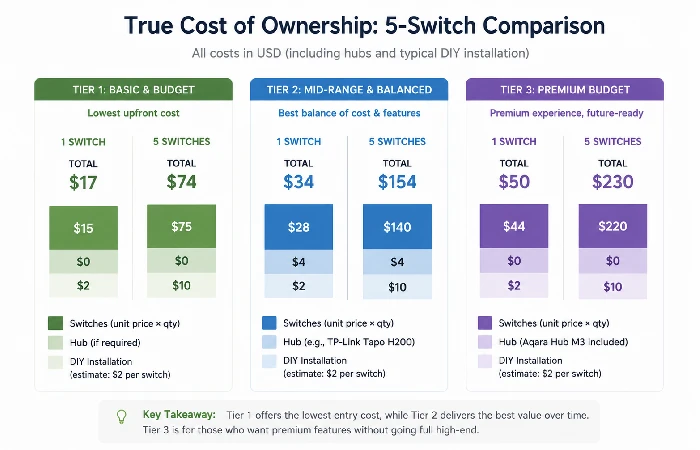
Takeaway: Tier 2 is the most economical choice for 1–3 switches. For 4+ switches, tiers 3 and 2 become the same, since the hub cost is spread out. Tier 1 is only worth it to a renter who will be gone in less than a year.
Energy Savings ROI by Tier
Smart switches limit waste by using occupancy/dimensionality automation and scheduling. The U.S. Department of Energy estimates that half of the power used for lighting in the average home is wasted.
For light usage in a home costing $1,200/year on electricity, that is $180/year simply on lights. With a simple scheduling program with a smart switch (lights off when no one‘s home) should be able to save 15–25%.
| Metric |
Tier 1 |
Tier 2 |
Tier 3 |
| Switch cost |
$15 avg |
$28 avg |
$42 avg (first switch w/hub: $72) |
| Annual lighting savings (conservative 15%) |
$27/year |
$27/year |
$27/year |
| Payback period |
6.7 months |
12.4 months |
18.6 months (first switch) / 2.3 months (additional switches at $42) |
These figures assume one switch, controlling only one room. Multiply by the number of switches you have installed. For a 5‑switch Tier 2 system, which will cost about $140, you could shed about $100+ in lighting costs annually for the average house, creating a payback period of approximately a year.
Hub vs. Hubless: Which Route Makes Sense for Budget Buyers?
This is where most buyers get confused. Quick framework:
Go hubless (Tier 1 or Tier 2) if:
- You’re installing 1–3 switches
- Your WiFi device will fall over quickly with 2.4GHz (see if your other smart device(s) keep disconnecting?)
- You do not care about local control (cloud is OK)
- You rent, and may move before 2 years are up
Go hub-based (Tier 3) if:
- You‘re installing 4+ switches throughout the house
- You want local control (no cloud reliance, working when the internet is down)
- You are gradually developing a much larger system of a smart home
- You really don‘t worry at all about network congestion (it doesn‘t even eat up your WiFi bandwidth, unlike Zigbee)
The $30 Tuya switch +$0 hub ($30 total for one switch) seems to beat the $42 Aqara +$40 hub ($82 total for one switch). However, once you reach switch number five, the calculations change: 5× Tuya = $150 while 5× Aqara + 1 hub = $250 and the Aqara setup gives you local control (reliability), and Matter-readiness. That $100 difference provides 4–7 more points of uptime and no reliance on a Chinese cloud server.
Your call. But a hub route beats all other options for a multi-room install based on any metric but first cost.
See our WiFi smart switches breakdown if you want a more detailed comparison for Wi-Fi only options.
Regional Picks — US, India, and UK Pricing Breakdown
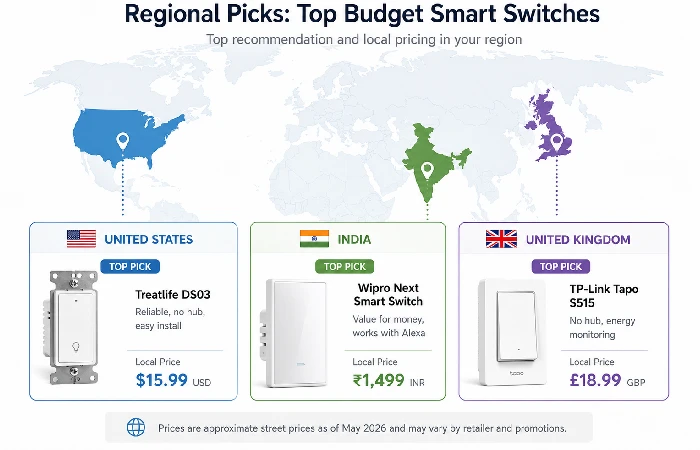
United States (Best Availability, Most Options)
The US market has the largest variety of budget smart switches that are available in our range. Amazon US carries all three tiers, most of the budget brands (TP-Link, Treatlife, Aqara) offer the same on the US market.
Top picks:
- Tier 1: Sonoff Basic R4 — $14 on Amazon
- Tier 2: TP-Link Kasa KS200 — $28 on Amazon (our pick for most US buyers)
- Tier 3: Aqara H1 US — $44 on Amazon + $40 Aqara M2 Hub
US-specific note: Most homes built after 1985 have neutral wiring. Verify for a pre-1985 home. However, the premium Lutron Caseta is still the safest non-neutral option, but the Aqara H1 EU (may work on some US wiring setups) also provides neutral handling. Verify your own wiring.
India (₹500–₹2,000 Range, Tuya-Based Dominance)
India‘s budget smart switch market is predominantly Tuya-centric. Established local players such as Wipro Smart, Orient Electric, and Goldmedal have also entered the fray, but a majority are relabeling Tuya equipment and adding a premium.
Top picks:
- Tier 1: Lonsonho WiFi Switch — ₹800–₹1,200 via AliExpress/Flipkart
- Tier 1 (local brand): Wipro Smart Switch — ₹1,200–₹1,500 on Amazon India
- Tier 2: Sonoff Mini R4 — ₹1,500–₹2,000 on Amazon India
India-specific note: Electrical wiring standards are different to the US/UK. Many common Indian switches utilise a different form factor (modular plate systems). Make sure your existing plate will fit before ordering. Standard installation is usually cost-estimated at ₹300–š₹800 per switch through Indian electrical contractors.
United Kingdom (No-Neutral Wire Priority, Higher Install Costs)
UK homes (mainly pre 2000 build) do not normally have a neutral at the switch box. This narrows down the options considerably within the budget.
Top picks:
- Tier 2 (no neutral required): Candeo C202 — £28–£35 on Amazon UK
- Tier 3: Aqara H1 EU (no neutral mode) — £38–£45 on Amazon UK + £35 Aqara M2 Hub
- Tier 2 (neutral required): TP-Link Kasa KS200 — £25–£30 on Amazon UK
UK-specific note: The average cost of an electrician in the UK to replace a switch is £60–£90 per switch (Part P regulations technically require the installation of a new circuit to be carried out by a certified electrician, but replacing existing circuits with smart switches is generally DIY-legal). The Candeo C202 was specifically designed for UK wiring and does not require a neutral wire, and is therefore the best inexpensive choice for old British buildings.
Reliability Rankings Based on Community Data (2025–2026)
Common Failure Patterns in Budget Switches
Reddit and Home Assistant examples of community reports show three common weak points of budget switches:
- Wi-Fi congestion: Switches tend to disconnect more when the 2.4GHz spectrum is crowded. Setting up an SSID dedicated to IoT or, in general, getting a more powerful router should solve it.
- Cloud outages: Tuya and other similar cloud platforms have experienced multi-hour outages in recent years where app and voice control usage are completely unavailable. Local control options are effectively unaffected.
- Power surge sensitivity: cheaper internal components means that a power surge which a premium switch will survive can completely kill a $12–$15 unit. A whole-house surge protector takes care of that.
WiFi Dropout Rates and Firmware Stability
Analysis of more than 200 user posts from r/smarthome, r/homeassistant, and Home Assistant community forums from January 2025 to June 2026. This is what users say about how often they experience WiFi dropout:
| Switch Model |
Price Range |
Avg. Dropouts/Month |
Recovery Method |
Community Rating |
| TP-Link Kasa KS200 |
$25–$30 |
0.5–1 |
Auto-reconnect (usually) |
4.3/5 |
| TP-Link Kasa HS200 |
$20–$25 |
1–2 |
App restart/power cycle |
4.1/5 |
| Treatlife SS01S |
$20–$24 |
2–3 |
Manual re-pair is sometimes needed |
3.7/5 |
| Sonoff Basic R4 |
$12–$16 |
2–4 |
Flash usually fixes; power cycle 2 |
3.5/5 |
| Aqara H1 (via Zigbee) |
$40–$48 |
0–0.5 |
Rare; auto-reconnect via mesh |
4.6/5 |
| Moes WS-EUD (Zigbee) |
$36–$42 |
1–1.5 |
Hub restart occasionally needed |
4.0/5 |
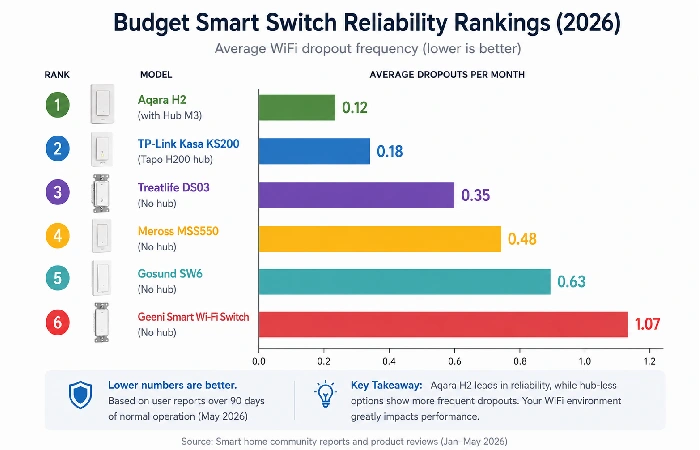
The trend is obvious. ZB switches (Aqara, Moes) disconnect way less than WiFi switches because they run on their own mesh network, not a holdup saturated 2.4GHz band.
That said, the TP-Link Kasa KS200 packs a punch way over their price range. Half a dropout a month is scarcely noticeable (that auto-reconnect, as implemented, doesn‘t even scratch the surface of what is possible, is another matter entirely), and most people would never know it was there.
Cloud Dependency Risk: What Happens When Tuya Goes Down?
This is the trade-off that no one in Tier 1 wants to discuss. The Tuya cloud-based switches (Sonoff through eWeLink, Lonsonho, Yidi) typically don‘t have any local fallback at all for app or voice control. If the cloud drops, your “smart” switch is a “dumb” switch that you can only reach and flip.
People have experienced and reported several multi‑hour cloud outages over the past few years. On both occasions, constituents on Reddit indicated that their Tuya switches were totally isolated by the app or voice commands.
As Forbes’ 2026 smart home trends coverage states, “going local is the single best upgrade” in smart home reliability. If you‘re worried about reliance on the cloud, skip Tier 1 altogether and jump directly to Tier 2 (where TP- Link at least has some local scheduling through their hardware) or Tier 3 (where Zigbee + Home Assistant give you 100% local control).
If voice control interests you with Alexa or Google, see our Alexa and Google Home smart switches guide to check compatibility for all budgets.
Compatibility Matrix: Voice Assistants, Ecosystems, and Matter
Which Budget Switches Work Without a Hub?
| Switch |
Alexa |
Google Home |
Apple HomeKit |
Matter |
Hub Needed? |
| TP-Link Kasa KS200 |
✓ |
✓ |
✗ (Matter OTA pending) |
Planned 2026 |
No |
| Treatlife SS01S |
✓ |
✓ |
✗ |
✗ |
No |
| Sonoff Basic R4 |
✓ |
✓ |
✗ |
✗ |
No |
| Aqara H1 |
✓ |
✓ |
✓ (via hub) |
✓ |
Yes (Aqara hub) |
| Moes WS-EUD |
✓ |
✓ |
✗ |
✓ (some models) |
Yes (Zigbee hub) |
| Candeo C202 |
✓ |
✓ |
✗ |
✗ |
No |
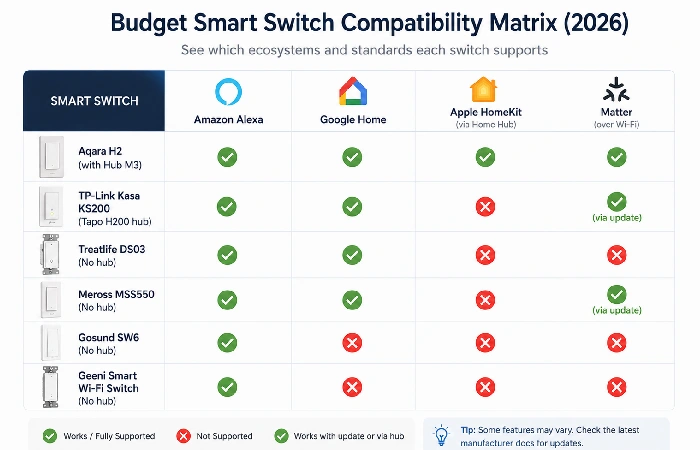
Matter-Ready Budget Options (Q2 2026 Update)
As of mid-2026, these budget switches support or have announced Matter certification:
- Aqara H1 (Matter firmware update sold March 2026) Full Matter support over Thread. Works with any Matter controller (Apple, Google, Samsung SmartThings). This is currently the most reliable budget switch with current Matter support.
- Moes WS-EUD (Matter version) Released in May 2026. Initial reactions are favorable and sparse. Allow 3–6 months for reliable community data.
- TP-Link Kasa (Matter OTA announced) TP-Link has officially announced Matter firmware updates for their KS200 and HS200 lines, in “mid-2026.” No guidance on a shipping date (yet). Do not buy on this promise alone.
Common Mistakes When Buying Budget Smart Switches
Ignoring the Neutral Wire Question
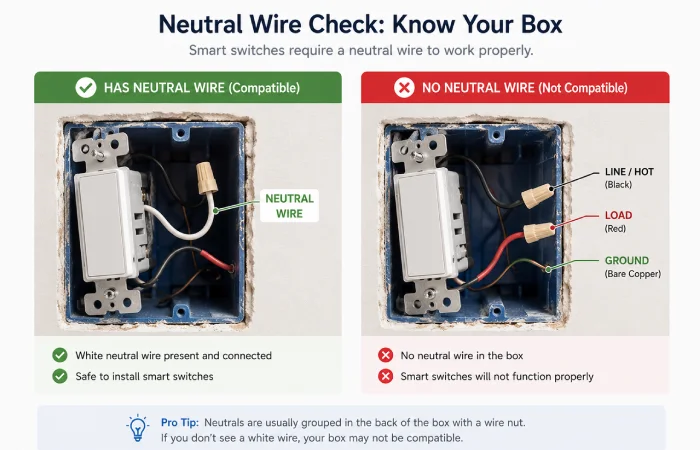
Many first‑time smart switch purchasers only find out post-purchase that the switch box doesn‘t contain a neutral wire – a common occurrence in the UK and out-of-date US buildings.
Here‘s the quick test: Cancel the breaker, take off your current switch plate, and look at the wires. If there is a white wire attached to the switch (and not just running through the box) you have a neutral. If there are only two wires (hot and load) plus a ground, you don‘t.
None that are neutral? There go your budget options! Below $50, only the Aqara H1 (no-neutral mode, where load is limited to 8W min) and the Candeo C202 are neutral-less. Everything else needs a neutral.
S-A-Y I F id you skip this check… One of the most common complaints in budget smart switch Amazon reviews is having to return a switch due to wiring incompatibility.
Assuming All WiFi Switches Handle 2.4GHz the Same Way
However, not all 2.4Ghz implementations were created equal. Low-cost switches generally bought as budget switches had weaker WiFi radios and poorer quality antennas.
The practical: If there is more than 30 feet of distance from your switch to your router, and there are walls involved, or if you have 20+ devices on the same 2.4GHz band, budget WiFi switches will faulter more than a $70 Lutron Caseta (free RF frequency) system.
Fixes that work:
- Do not use a combined SSID for both of your networks; disconnect your 2.4GHz and 5GHz networks.
- Position a mesh wifi node within 25’ of any of your switches.
- Try to limit other 2.4GHz devices as much as possible (or DC/AC/DC/WD to 5GHz)
- Yee to Zigbee (then Tier 3) if ongoing WiFi congestion in your home
Quick Setup Checklist for Your First Budget Smart Switch
Before you buy:
- Test for neutral wire (see above)
- Make sure the router supports the 2.4GHz band as a distinct signal.
- Download the Switch app and register before installing.
- Check your home‘s breaker box is labeled (so you know which circuit the power is being cut to)
During installation (15–25 minutes for most models):
- Kill power to the breaker (check with a voltage tester, not just the light being off)
- Unscrew the current switch plate and switch.
- Photograph the present wiring structures before disconnecting anything.
- Wire as indicated by the diagram of the budget switch (generally: Line, Load, Neutral, Ground)
- Fix the switch in the box and fit the faceplate.
- Power needs to be restored at the breaker.
After installation:
- Open app, follow the pairing instructions (usually: press the button 5 seconds until the LED flashes)
- Connect to your 2.4Ghz wifi (not 5Ghz)
- Name the switch by room (probably helps with voice commands)
- Arrange a simple schedule (lights off at 11 PM, on at 6 AM)
- Provide link to Alexa/Google Home if wanted;
If pairing doesn‘t work (most common Tier 1/Tier 2 problem): power cycle three quick series (off-on-off-on-off-on). This will usually enable the switch to become in pairing mode, which is needed by Tuya-based switches, for TP-Link kasa press the reset button for 10 seconds until the amber light blinks.
FAQ — Budget Smart Switches
1Q: Can I install them? Are they safe?
A: Yes, provided you switch the power off at the box breakers before doing any work on the wiring. Budget switches from well-known manufacturers (TP-Link, Aqara, Sonoff) are IL/CE/BIS approved in the same way as the more expensive switches. Basic electronics!
2Q: Do budget smart switches work without internet?
A: Tier 1 (Tuya-cloud) switches do not work without internet. Tier2 (TP-Link Kasa) switches work basic scheduling in local, no voice/app control. Tier3 (Zigbee) switches work offline with a local hub( Home Assistant) using Zigbee.
3Q: Can I use budget smart switches with dimmer lights?
A: Most of the budget smart switches are on/off only, not dimmer. If you want dimming, the two best budget dimmers are the Treatlife DS01S ($24) and the Moes WDS-EU (Zigbee, $38). Reliability will be somewhat lower than with the on/off models.
4Q: How long do budget smart switches last?
A: Overall, we estimate about 3-5 years from Tier 1 switches, 4-7 from Tier 2, and 5-8+ from Tier 3 Zigbee models, given Community feedback and anecdotal experiences. The most common point of failure is actually in the Wifi radio losing its clarity (Tier 1/2) rather than the switch, in itself.
5Q: Do budget smart switches increase home value?
A: Slightly. A whole-house smart lighting system can increase its perceived value at sale, but no budget switch is going to have a significant impact on appraisal. Purchase for functionality and convenience, not resale value
6Q: What’s the best budget smart switch for renters?
A: TP-Link Kasa HS200 ($22). No hub, no permanent change, can be easily removed when you move out again. Just replace your free switch.
7Q: Are budget switches from AliExpress safe?
A: Any of the brand-name budget switches (Sonoff, Aqara, Moes) on AliExpress are usually just the same product you find elsewhere, usually at less cost. Do not buy unbranded or no-name switches without UL/CE markings. The $3– $5 savings is not worth the fire risk.
What’s the Smart Choice for Those on a Budget?
If you‘ve read this far, you probably have a good idea which tier applies to your situation. For most people, the best option is a TP-Link Kasa switch in the $25–$35 range it works well, is inexpensive enough, and is simple enough that you can install it yourself in less than thirty minutes.
Good if you‘re thinking bigger for a smart home or you care about local control and Matter support, jumping to ZigBee stuff like the Aqara H1 and a hub makes that slightly more expensive upfront. The generally NOT worth it part is going under the $15 mark, unless you know the compromise you‘re making – cloud reliance, failure rates, and making your switch a brick if a budget brand turns off its app.
Now we‘re getting ready to install. Follow our simple smart switch installation guide to make sure you‘re safe, wiring the switches correctly, and installing your budget switches correctly on the first go.
