Published: June 6, 2026
Last Updated: September 18, 2026
Changing a light switch sounds like the simplest home upgrade possible. It isn’t — not anymore.
A traditional rocker switch does one thing well: it turns a light on or off. A smart switch does that too, but it also connects to your phone, responds to your voice, schedules itself, and sometimes tells you how much electricity you’re wasting. That extra capability comes at a cost — both financial and technical.
This is a relatively comprehensive rundown of the key distinctions between intelligent switches and old-school switches in terms of cost, wiring needs, dependability and usage in daily life. By the time you‘ve read through, you‘ll be able to determine which makes sense for your house and have an idea of how to go about upgrading.
Summary
Smart switches bring the ability to control lights remotely or by voice, and track energy use, while regular switches are more affordable and faster to install. Which is best in 2026 comes down to a range of factors as a consumer budget, age of the house, compatibility with existing wiring, and whether automation fits into your daily life, all of which weigh in. Here we outline the key tradeoffs so you can start to figure out what direction makes sense for your house and where to go if you’re looking to upgrade.
What’s the Actual Difference?
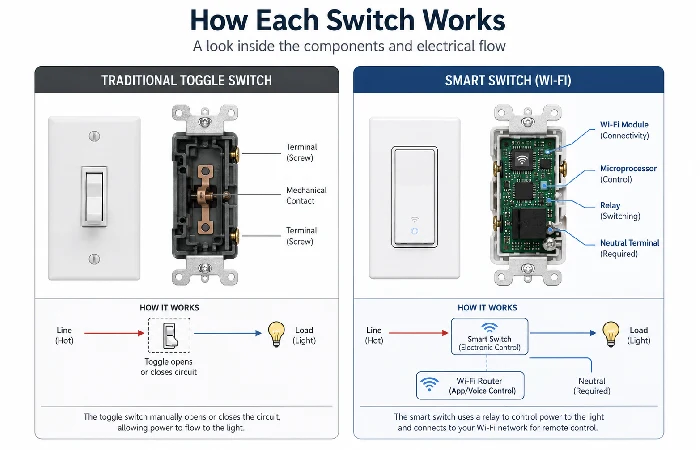
How a traditional switch works
A conventional switch is a mechanically straightforward piece of equipment. When you flip or press one, a hard-wired lever or rocker either completes or interrupts an electrical circuit, delivering power to a downstream light or receptacle. That‘s all. No software, no networking, no configuration.
The most common types of switches used in homes in all three countries, US, UK, and India, can be classified as either standard toggle, the old-style double-ended switch traditionally used in outlets and a water tap, rocker switches, which are generally more modern and are flush, single wire buttons, or old round rotary switches which are still widely used in some parts of India and Europe. They all operate in the same way electrically.
They require two wires a line (power coming in) and a load (power going out to the light). One wiring configuration sometimes has a ground wire. These varieties have been wired this way successfully for more than 100 years in many different countries and are therefore compatible with most residential systems worldwide.
How a smart switch works
A smart switch is a like-for-like replacement for a traditional switch, fitting in the same wall box; but it also incorporates a wireless radio (on Wi-Fi, Zigbee, or Z-Wave) that links the switch to your home network or to a hub. That connection makes it “smart” because it can be activated from an app, a voice-controlled virtual assistant, or an automation rule rather than in the traditional manner by human interaction.
The majority of smart switches used to require a third wire, a neutral wire. The neutral wire supplies the return current to run the switch‘s internal electronic parts (even when the light is off). Without the neutral, the switch will not be able to stay connected to your network. Home built before the 90s usually do not have a neutral wire in the switch boxes. While not the only reason, this is the top reason smart switch installs don‘t work.
A handful of modern smart switches, including the Lutron Caseta line and a handful of Leviton models, are designed not to require a neutral line. They do this by consuming very little power through the filament or LED driver of the light bulb, so they stay powered. They may be suitable for older wiring but often come at a premium.
The core technology gap in plain language
A conventional switch is a piece of hardware. A smart switch is hardware, plus software, plus connectivity. With that extra bit of software and connectivity come definite advantages but also definite constraints: on your Wi-Fi; on the manufacturer‘s app; and on a power source for the switch‘s electronics, even when the lights are off.
Cost Comparison: Upfront Price vs. Long-Term Value
What traditional switches cost
A single-pole, traditional switch is $2–10, in relation to style and brand. Decorator style rocker switches from Leviton or Lutron are about $4–8 each. A 3-way switch (at both ends of a staircase or hallway) is a few dollars more. A three-bedroom house with 20–30 switches would cost between $60–200 for hardware.
Labour, if you’re hiring an electrician, runs $50–$100 per hour in the US. A full home re-switch with a traditional setup takes about 2–3 hours.
What smart switches cost (and why)
Smart switches are much more expensive. Most low-cost switches from “name” brands (Kasa/TP-Link, Sonoff, etc) are around $15–$20. Mid-range switches from “name” brands (Leviton, GE/Enbrighten, Wyze, etc) run $25–$45. Higher-end switches like Lutron Caseta which, when I ask people in the know, that‘s the system that people tend to say is “also very reliable (for residential purposes)” are $45–$65 per switch, and there is a hub (which is optional and not quite as necessary as I would have expected) that is in the $70–$80 range.
Cost of hardware for a whole-home smart switch installation in 20–30 locations (which could be less if installing just a handful or as many as hundreds) ranges from $400 to in excess of $1,500, depending on brand. Note this is before labour.
Does the investment pay off?
Lighting and controls U. S. Department of Energy studies indicate that smart lighting configurations, such as occupancy sensors and scheduling, can reduce lighting energy consumption by large amounts, but the exact amount varies widely depending on household usage habits.
Most people would say: for the average household, the quickest return on investment is in, say, high-traffic rooms (living room, hallways, kitchens) where the automation has a big impact on behaviour, and the slowest is in rooms where you have just been OK pressing a button (as with, say, air conditioning).
Installation Difficulty: What They Don’t Tell You
Installing a traditional switch
A simple traditional switch swap takes me 10-15 minutes and is trivial for anyone comfortable with a screwdriver and basic electrical safety (turn off breaker, check circuit with non-contact voltage tester). Unscrew the old switch, record wiring positions, wire the new switch in the same manner and replace the faceplate.
While three-way switch replacements are a bit more complicated, they are manageable with a wiring diagram. No apps, no accounts, no wireless to set up.
Installing a smart switch — the neutral wire problem
Any switch is installed in the same way: power off the circuit (by turning off the main breaker), and remove the switch. Troubles can come later: you must decide whether or not a neutral electrical wire is present in the switch box. In the US a neutral is generally a ‘triplet’ of white wires at the back of the box (screw-nut), not leading to the previous switch.
When you don‘t have a neutral wire, you can either opt for a no-neutral smart switch (Lutron Caseta, Leviton DSL06), pull back a neutral wire from the fixture (you will need an electrician in most cases) or use a smart switch hub at the fixture end (a workaround which is fiddly and not worth the hassle).
Even after wiring it up, you still have to: download the manufacturer’s app, connect the switch to your Wi-Fi (some need a hub setup first), call the device something, and then optionally connect it to Google Home, Alexa or Apple HomeKit. For the homeowner who is pretty handy with technology, this will be 20-40 minutes per switch. For the first-time home installer, it will be longer.
For detailed step-by-step wiring guidance, the smart switch installation guide covers every wire type, hub configuration, and common fault.
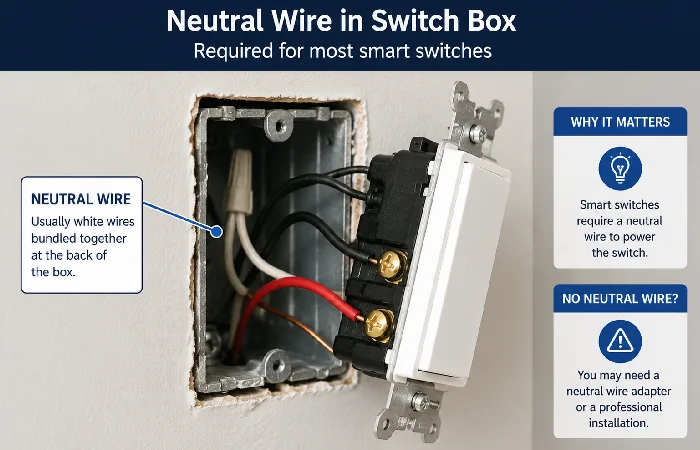
Older homes vs. newer wiring (US, UK, India)
- US: If the house was built before about 1985, the switch may not have a neutral wire. Building techniques changed after about 1985; it‘s not always a certainty, so be sure to check before you buy!
- UK Wiring conventions differ from those of the US. In UK homes built before the 70s, two-core-plus earth with no neutral at the switch (as in American homes) is common. For UK wiring (240V, neutral present or absent) smart switches available include those manufactured by MK, Hive and Lightwave. IET Wiring Regulations (BS 7671) allow for varying provisions in UK domestic applications.
- India. The majority of residential switches in India are of the 5A/6A modular switch type, mounted in an 86x86mm box. The smart-switch products for the Indian market (Wipro, Legrand, Havells, Nodon, etc.) are made for this form factor and 230V supply. Neutral wiring in Indian houses is totally dependent on the era of construction.
Smart Switch Features Worth Paying For (and Ones That Aren’t)
Remote access and app control
Turning a light on or off from anywhere really just pays for itself in a handful of cases: making sure lights aren‘t left on when you head out the door, remotely allowing someone into a room, or making it seem like you‘re home when you‘re not. I‘ve seen stories all over smart home forums that remote access is much more useful in day-to-day scenarios than voice control, specifically turning lights off and watching your house when you‘re away.
Scheduling and automation
Scheduling it‘s probably the most overlooked feature for a smart switch. Automated dusk-till-bedtime lighting removes “was that the porch light on” guilt. Automating exterior lighting based on sun/moon rise and fall clocks requires no effort at all once set up.
This is where smart switches genuinely beat any traditional setup. No timer plug, no extra hardware — just a rule in the app.
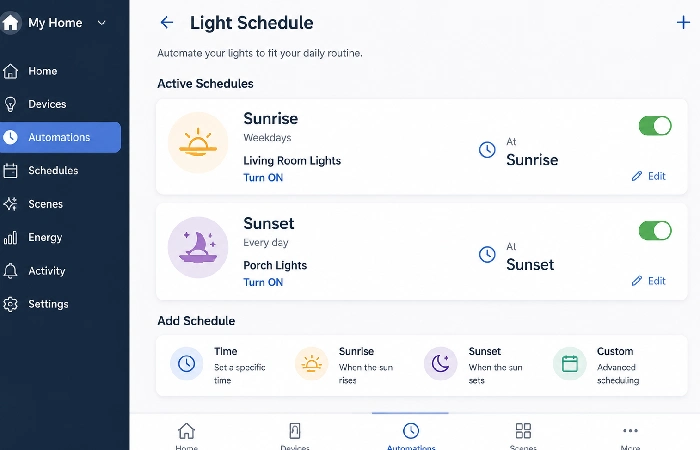
Energy monitoring
Some smart switches (particularly Kasa EP25 and select Leviton models) include per-switch energy monitoring, showing real-time and historical wattage for connected devices. According to verified user reviews from 2025–2026 on major retail platforms, most homeowners who use this feature do so primarily for lighting circuits and find the data useful for identifying inefficient bulbs rather than for dramatic energy savings.
Features that sound useful but rarely get used
Voice control is the most heavily marketed smart switch feature, but according to many user reviews and community forums, it is also the least used after it has worn off its novelty. Saying ‘Hey Alexa, turn off the kitchen lights’ will take more time than walking over to flick the switch when you‘re already in the kitchen.
Geofencing (lights come on when you near home with the phone) is really useful when working, but more often than not, it triggers false alarms with bad GPS.
Reliability: What Happens When the Wi-Fi Goes Down?
Traditional switch reliability
A quality traditional switch is typically designed to last for many years and often remains in service for decades in normal residential use. There is no software to update, no server to go offline, no connectivity to lose. It works every single time you touch it, regardless of internet outages, router failures, or power company disruptions (once power is restored). Many experienced electricians report that a quality traditional switch can effectively last as long as the house when installed correctly and used within its ratings.
Smart switch reliability — offline modes explained
Smart switch reliability is more nuanced. Most Wi-Fi smart switches continue to function as physical switches — you can still press them manually — even when your network is down. The app control and voice control stop working, but the light still turns on and off from the wall. This is important: smart switches are not fragile in the way many people fear.
The real differences in reliability come in automation: any schedule or routine that relies on a cloud connection (which most Wi-Fi switches have) will not trigger during an outage. Zigbee and Z-Wave switches that are working through a local hub (such as SmartThings, Home Assistant, or Hubitat) are more reliable automations that run locally and don‘t rely on a network connection.
Long term support reports from user communities indicate that the lifeblood of a smart switch is whether or not the firmware updates break features or whether or not the apps from the manufactures which go out of business continue to work. IEEE‘s published summary of the security and lifespan of smart home devices puts device orphaning, what happens if the maker goes out of business and the cloud service disappears, as a valid long-term concern for homeowners.
Smart Switches vs Traditional Switches: Side-by-Side Comparison
| Feature |
Traditional Switch |
Smart Switch |
| Unit cost |
$2–$10 |
$15–$80 |
| Whole-home cost (20 switches) |
$60–$200 |
$400–$1,500+ |
| Installation time (per switch) |
10–15 min |
20–45 min |
| Requires neutral wire |
No |
Usually yes (exceptions: Lutron Caseta, some Leviton) |
| Works without internet |
Yes |
Yes (manual only — app/voice disabled) |
| Voice control |
No |
Yes (Alexa, Google, Siri) |
| App/remote control |
No |
Yes |
| Scheduling |
No |
Yes |
| Energy monitoring |
No |
Some models |
| Dimming support |
With a dimmer model |
With a compatible dimmer model |
| Lifespan |
20–30+ years |
Often shorter than traditional switches, since both hardware wear and software/support lifecycles can limit long‑term use |
| Works with 3-way circuits |
Yes |
Yes (with compatible add-on switch) |
| Best for |
Any home, any age |
Newer wiring, tech-comfortable users |
| US voltage compatibility |
120V |
120V |
| India/UK compatibility |
230V native |
Requires a country-specific model |
Which Rooms Actually Benefit from Smart Switches?
Rooms where smart switches add real value
- Entryway/front porch: great value for scheduling and motion-based automation. For example, outdoor lighting of sunset and sunrise is hands-free.
- Living room: The multi-scene lighting, bright for cleaning, dim for watching movies, is really handy, being easily turned on/off from the couch or Alexa.
- Children‘s bedrooms: No more nightly “turn off your lights” argument now that schedules are timed.
- Kitchen: Morning routines or LED undercabinet lights with remote scheduling.
- Hallway/staircase: When motion sensors often cause lights to be on all the time. Motion detection smart switches can reduce this energy use, and are one of the more effective categories of smart switches for reduction in day-to-day usage.
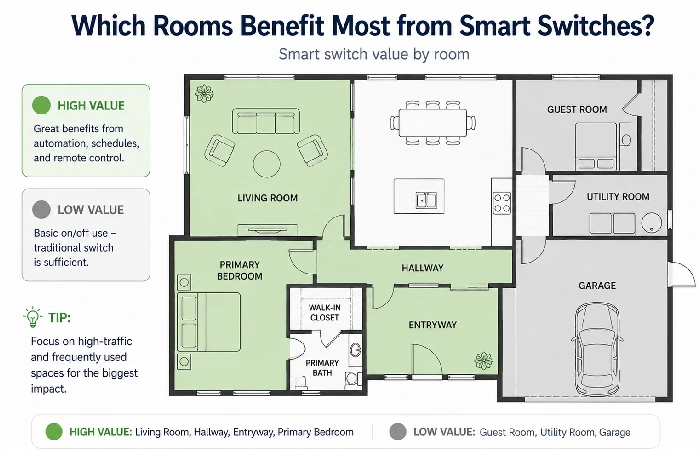
Rooms where traditional switches are perfectly fine
- Utility room and garage: Light used for a while with a manual switch, little automation value.
- Guest bedroom: Practicalities for the occasional visitor seldom used.
- In small toilet rooms, with high frequency of short duration use in this situation, a traditional motion sensing or occupancy sensor switch is more appropriate and less expensive than a full smart switch.
The Real-World Reliability Score: A Decision Framework
Before buying any smart switch, run your home through this four-factor check.
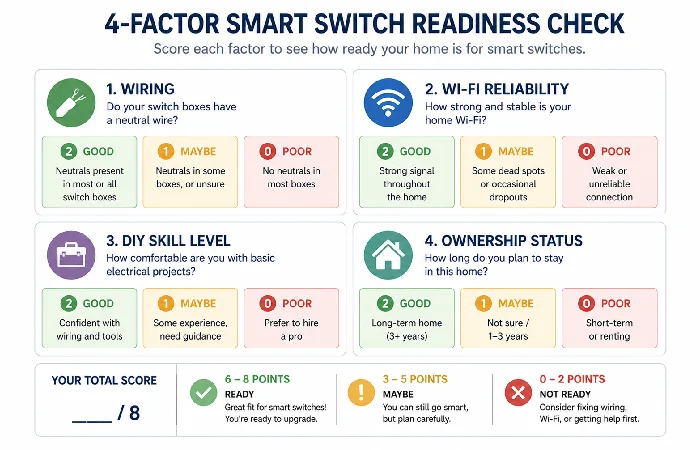
Factor 1 — Wiring compatibility
Grab a switch from the room you‘re working in. Count the number of wires going to the switch (not those bundled together at the back). If there are only two wires on the switch terminals (line & load), you probably don‘t have a neutral wire. If there are three (line, load and neutral), you‘re in a pretty comfortable position for most smart switches.
Score: Neutral wire present = full switch range available. No neutral = limit your choices to Lutron Caseta or equivalent no-neutral models.
Factor 2 — Wi-Fi dependency
If your house Wi-Fi drops more than once a month (ISP troubles, hardware on your router, dead zones) a cloud-dependent Wi-Fi smart switch will do exactly that to your blood pressure. Think Zigbee or Z-Wave switches instead with a local hub (like Hubitat, Home Assistant).
Score: Stable Wi-Fi = any brand works fine. Unreliable internet = invest in local hub ecosystem.
Factor 3 — Installation difficulty
If you can shut off the breaker and replace the switch, the DIY install is manageable for single-pole smart switches. Three-way is more involved. If you have aluminium wiring in your home (more common in some US homes built between 1965 and 1973), please consult an electrician before working on any switches.
Score: Comfortable with DIY = install yourself. Uncertain = budget $75–$150 per switch for professional installation.
Factor 4 — Resale and rental impact
Smart switches add a perceived ‘value’ element to some home listings, especially in the US, if they are an integrated part of a well documented ‘smart home’ ecosystem. But renters generally can‘t install smart switches without landlord approval, and landlord removal of switches on changeover causes unnecessary friction.
Score: Owned home=smart upgrade may increase the existing value of the home. Rented home = alternative is smart plugs (no permanent installation).
Myths vs. Facts About Smart Switches
- Myth: Smart switches save enormous amounts of energy all by themselves. Fact: The switch itself doesn‘t save any energy; the automated behaviors it brings about do. It is the ability to reliably schedule lights off and incorporate motion sensors that is responsible for a reduction in waste, not the hardware.
- Myth: No smart switches need a hub:, Fact, it is true that a few (Lutron Caseta and Zigbee through SmartThings) do, but most Wi-Fi (Kasa, Wyze, Meross) smart switches work right with your Wi-Fi router.
- Myth: Installing a smart switch is difficult. Reality: Installing a standard single-pole (single light switch) in a home with a neutral wire (required) is a 20–30-minute job with common hand tools. The pain point is not wiring but the app installation, which has become much easier in 2025–2026 models.
- Myth: If the internet goes out, you can‘t turn your lights on. Fact: The physical switch function still works; you just won‘t have app control or voice commands during an outage.
- Myth: Everything dims with smart switches. Fact: Smart dimmer switches need LED lights labelled “dimmable” and which are suitable for the specific switch‘s dimming protocol. If not the correct compatible dimmable LED, the LEDs will flicker and hum or not dim at all. Always check specifications or the manufacturer‘s compatibility lists when purchasing.
FAQ — Smart Switches vs Traditional Switches
1Q: What is the main difference between a smart switch and a traditional switch?
A: A traditional switch simply just mechanically toggles an electrical circuit to switch a light off or on. A smart switch performs the same function but has a wireless radio (Wi-Fi, Zigbee or Z-Wave), to enable a remote control using an app or a voice-activated assistant along with scheduling and energy monitoring. Smart switches are generally priced at $15–$80 while traditional switches cost $2–$10.
2Q: Do smart switches work without a neutral wire?
A: Most smart switches need neutral wiring to operate the internal circuitry. However, a few models…including the Lutron Caseta as well as some Leviton no-neutral (a bit of current is drawn through the bulb itself to power the electronics) switches are designed for homes that lack neutral wiring.
3Q: Are smart switches worth the extra cost?
A: High traffic rooms (living room, entryway, hallways) where automation and remote control truly enhance performance are where many homeowners value this upgrade. In low use rooms, it doesn‘t pay to spend the money. Partial installation providing smart switches in 5 8 central spots is the middle way.
4Q: What happens to a smart switch when the Wi-Fi goes down?
A: Physical toggle or button on the switch still operates normally, and lights turn on and off manually. App control, voice commands and any cloud-reliant schedules will not work until reconnected. Schedules in the local hub (Hubitat, Home Assistant, etc.) system will still fire.
5Q: Can I install a smart switch myself?
A: Yes, single-pole switches in single-phase wiring are simple for most homes. Turn off the circuit, ensure power is off using a multi-meter, wire according to the manufacturer‘s diagram, and finish the setup of the app. Three-way, or multi-way circuits, are more complex. If you have aluminium wiring, hire a licensed Electrician.
6Q: Do smart switches work in India and the UK?
A: Yes, but you will require your own country-specific model. Conditions here (India) are 230V supply, and the 5A/6A modular switch format that you see here (check for Wipro, Havells or Legrand), while those in the UK (also) live on 230V but wiring standards are different (check those of Hive, Lightwave).
7Q: Which smart switch brand is most reliable?
A: From community long-term test reports and verified user reviews (2025–2026), the most reliable residential smart switch system in the US is by far Lutron Caseta, which uses a dedicated RF protocol (Clear Connect), not Wi-Fi. Reasonably low-cost options that have proven reliable at the lower end are the Kasa EP25 and EP15 range from TP-Link. See the best smart switches on the home page for a full comparison.
Method: This document is based on publicly available data on the whole range of smart and traditional switches as of June 2026. Product brands, application support and pricing information may change so verify the information given here from the manufacturer‘s website or by speaking with a qualified electrician prior to purchasing or undertaking any electrical work.
