Published: June 10, 2026
Last Updated: August 31, 2026
The majority of the people who work from home have purchased at least one product that they now regret. A ring light that ended up in the corner. A mechanical keyboard they sent back after two weeks. A standing desk that cost a fortune, and became a coat rack.
The gadgets weren‘t wrong necessarily. It was the order.
This guide walks through the top home office gear coming in 2026 – yet goes further by highlighting what matters most at the start, plus the reasons behind each pick. If working remotely full-time or balancing hours across two spaces, one aim stays clear: build a system that flows more easily, supports your health, while staying within limits. Still, choices pile fast when screens blink and boxes stack near desks.
These recommendations are derived from recognised ergonomic advice, typical remote-work scenarios, and trusted third-party resources rather than trial and error on every item.
Summary
The best home office tech choices for 2026 can be grouped into three categories: preparedness, introducing AI technology into conversations and writing; ergonomic equipment, such as configurable work tables and eye-level monitors; and portable equipment to make life easier for hybrid workers. Search for items designed to reduce your distractions, protect your posture, and connect to familiar apps.
The guide is built upon general principles of ergonomics, generally shared remote work practices, and frequently mentioned gear patterns, more so than on laboratory testing or confidential research. As hardware price points, models, and configurations constantly move rapidly, please verify current specifications on the official product pages before purchasing.
Why Most Home Office Setups Underperform (And What Actually Fixes It)
Here‘s a theme that recurs time and again on remote work discussion sites. $200 in the hole for a webcam before having the microphone fixed. Looks good in the video now, you‘re the person spitting out, “Sorry, can you repeat that?” to everyone.
Audio before video. Posture before aesthetics. Basic tools before accessories.
The real problem isn’t the gadgets — it’s the order you buy them
The traditional upgrade path for the home office is very much like this: laptop, headset, mouse, possibly a monitor, some sort of desk lamp–that is fine, but it‘s determined by what‘s available and what we can afford, not what makes a difference.
Here‘s a more logical order: a) First lower physical discomfort(level of armchair, screen height, input method);b) Second optimize meeting quality(audio, light);c) Third, add speed focus using the second screen or mouse/kb upgrade;d) Fourth, add AI support tools.
Most people give up on that order over halfway through. (If that happens, it‘s usually stage three, not the last bit.) It turns out that the third bit doesn‘t matter as much as it looks.
Core Home Office Gadgets You Actually Need in 2026
Not flashy choices, these. Yet they shift things more than any others.
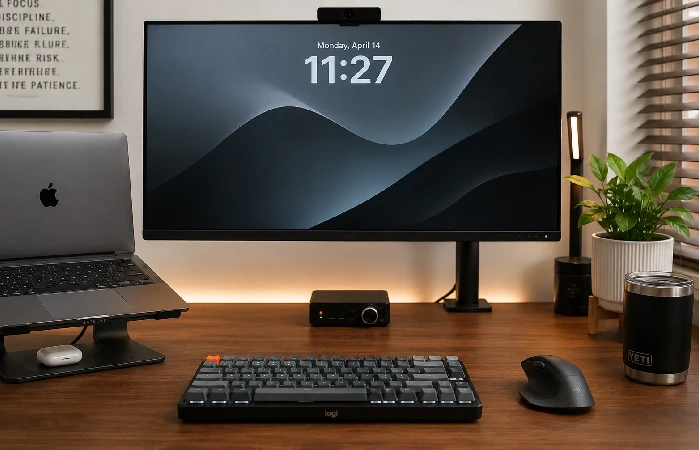
External Monitors — The Single Biggest Productivity Upgrade
The ultimate fix if you are still staring at a laptop screen.
In a study published by Jon Peddie Research, the use of multiple monitors was linked with increased productivity for task which require working with reference material, communication tools, or code alongside what you’re working on. The exact increase in productivity is task-dependent, but all confirm that the increased screen real estate results in decreased context switching.
Most 2026 home-office setups will have a 27in, 1440p, IPS display that balances price, screen quality, and desk space. If you‘re presiding over video calls and colour-critical work, pick a panel with 99 per cent sRGB coverage; if you‘re just hammering away on the keyboard or the cursor all day, a panel‘s refresh rate is less important than eye-belts-2-eyepads features (flicker-free, low blue-light-lamp mode).
One trend I‘d like to elaborate on across communities such as r/homeoffice and r/pcmasterrace is that the lower-end monitors are more likely to be replaced earlier than mid-range, particularly during daily long-term use. Mid-range models from LG, Dell, or BenQ tend to perform better across the long haul of daily use.
Ergonomic Keyboards and Mice — Less Strain, Fewer Breaks
And this isn‘t just market noise– it‘s a real change. When people work at home, they have a furniture problem.
A small TKL keyboard with a wrist rest, which you position so your elbows remain around 90°, will significantly decrease the likelihood of developing tension headaches and shoulder fatigue in just a few weeks. This neutral position for the elbows and wrists corresponds to the recommendations on neutral postures for joints used throughout computer work from ergonomics and health and safety organisations.
Vertical mice are divisive (some use them exclusively, other users will hate the transition period), but a regular ergonomic mouse with programmable buttons is more likely to be comfortable to most users.
Fair warning: the transition period for ergonomic input devices is real. Expect 2-4 weeks before it is natural.
Webcams and Desk Lighting — First Impressions on Every Call
The built-in webcam on your laptop is likely to be utterly useless.
Not due to the resolution, it‘s to do with the angle. Laptop cameras shoot up at you. So this is unflattering and also subconsciously tells your colleagues (or not) that you‘re not quite as ready to go.
An external webcam in the mid-range (say 1080p at 60fps, or a 4 K quality) if you are speaking to larger audiences regularly and placed to eye level, will immediately fix this. With a good key light, or even a half-decent LED desk lamp placed a little behind your monitor, you can now erase the “cave lighting” effect prevalent in most home calls.
It‘s more about the combination than huge spend, either.
The Three Home Office Gadget Stacks (Starter, Pro, Manager)
Here is where most guides stop. Individual recommendations are great, but stacks of well-thought-out systems where each item solves a specific problem are better.
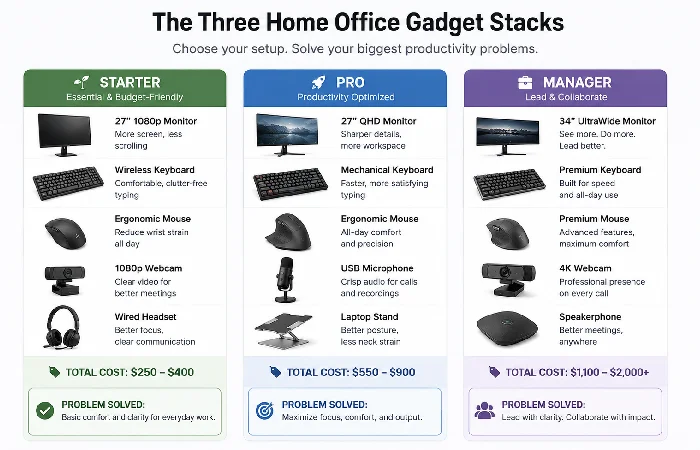
Starter Stack (~$150–$300 / £120–£250 / ₹12,000–₹25,000)
What it solves: How to upgrade from a bare laptop-on-a-table set up without breaking the bank.
| Item |
Budget Pick |
Why It Matters |
| External monitor |
24″ FHD IPS (1080p) |
Doubles your working screen in an instant |
| Laptop stand +USB hub |
Any aluminium stand with USB-A/C ports |
Eye-level screen Less cable muddles |
| Wired headset |
Logitech H390 or similar |
Lean call quality and no battery management. |
| Basic desk lamp |
LED with colour temp control |
The lights.1 Lighting alleviates eye fatigue after long days |
This stack doesn‘t look impressive in a photograph, but it does make a difference in how long you are comfortable working and how you present yourself to meetings.
Pro Stack (~$500–$900 / £400–£750 / ₹40,000–₹75,000)
The solution it provides is affordable and achieves quality work, deep work, and minimises audio/video complaints from your team.
| Item |
Mid-Range Pick |
Why It Matters |
| 27″ QHD monitor |
LG 27UK850, Dell S2722QC |
Sharp, comfortable all-day |
| External webcam |
Logitech C920x or Razer Kiyo Pro |
Eye level, a lot better than the laptop cam |
| USB condenser mic |
Blue Yeti Nano or Rode NT-USB Mini |
Reliable step‑up in call clarity as compared to usual laptop microphones |
| Ergonomic chair |
Mid-range mesh (HAG Capisco or affordable alternative) |
Long-term rewarding posture investments. |
| Key light |
Elgato Key Light Air |
Professional lighting that can be adjusted at the desk |
Of course, the connection to an AI tool becomes useful at this level. Having a dedicated USB mic with a low noise floor means using AI meeting transcription tools ( Otter.ai, Fireflies, or the built-in transcription tools on Zoom/Teams) produces MUCH cleaner transcripts. That can save you a lot of time if you‘re on more than 2 calls a day.
Manager/Creator Stack ($1,200+ / £1,000+ / ₹1,00,000+)
The need it fulfils: Multi-device workflows, premium audio/video for outside presentations, and easy shift between private at home and public at the office.
| Item |
Premium Pick |
Why It Matters |
| Dual 27” monitors or ultrawidescreen |
LG 34WN80C or a dual Dell setup |
Workflows with multiple applications that do not require toggling between. |
| 4K webcam |
Logitech Brio 4K |
Highest quality for big presentations |
| USB-C docking station |
CalDigit TS4 or OWC Thunderbolt |
A single cable to link everything together. |
| Active noise-cancellation headset |
Sony WH-1000XM5 or Jabra Evolve2 |
Deep work when there is noise in the surrounding environment |
| Standing desk |
FlexiSpot E7 or UPLIFT V2 |
Reduces sedentary time significantly |
The docking station in this scenario is what buys. From my specs video, there‘s a single cable that transforms your setup from a laptop to a desktop. If you commute a couple of days a week, this is one of the more tangible upgrades you can have for daily friction reduction.
AI-Ready Gadgets for Meetings and Deep Work
This is the part most gadget guides omit, but this is where a 2026 setup really diverges from a 2023 one.
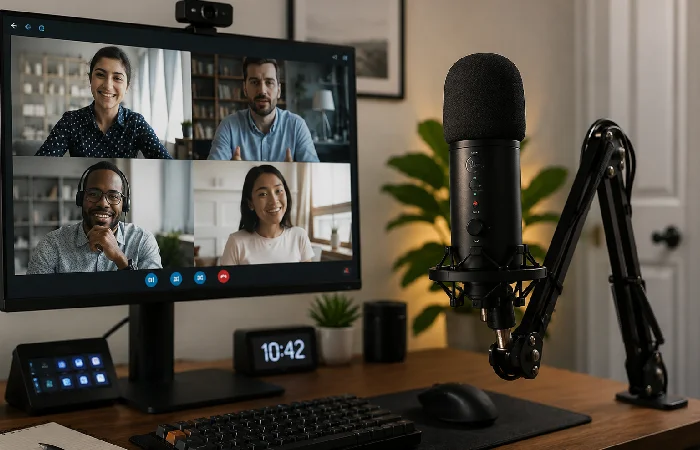
Which Hardware Actually Supports AI Meeting Tools
The AI meeting assistant category, Otter.ai, Fireflies, Fathom, and the native integrations built into Zoom and Microsoft Teams, is now mature enough that hardware quality directly impacts output quality.
Mishaps with the microphone or acoustic room effects create a long, messy transcript. A directional USB condenser microphone in a treated room (minimal drapery and furniture does the job) creates a clean transcript that requires minimal correction. That‘s the hardware to AI link most folks haven‘t yet made.
If you‘re regularly using any sort of AI writing or dictation software, a good microphone is more important than a good camera. Make sure you have that sorted.
Noise-Cancelling Microphones — What the Data Says
Summing up the user reviews (across Amazon, Reddit, and B&H Photo) from 2025–2026, the single largest negative comment people have about budget USB microphones is background bleed noise during calls (air conditioning, street noise, sound in the room). This is worse on omnidirectional mics and better on mid-range directional microphones (cardioid, supercardioid).
It‘s not sounding like a podcast host; it‘s not making your team work so hard to hear you.
Have a look at the broader roundup in our guide to AI-powered gadgets to see how all the hardware and AI tools fit together across your whole home.
Focus Gadgets Worth Considering in 2026
There‘s a genuine market for “focus devices” such as smart clocks and room sound generators. To be blunt, many of them are wholly discretionary. But, there are two devices which do prove to be consistently helpful from what I‘ve seen in forum/comment thread tips and user anecdotes:
- A physical timer. Something like a Time Timer or a simple cube timer will keep Pomodoro-style work honest without the need for looking at a screen.
- Smart lighting with automation: lighting systems like Philips Hue or others that would automatically turn (and/or become warmer) toward the end of the day, really may facilitate end-of-day wind down, which then can have an impact on the following day.
The rest, “focus headbands,” biometric attention trackers, aren‘t tested for regular remote workers. Don‘t bother with those at the Starter and Pro levels.
Portable Home Office Gadgets for Hybrid Workers
If you divide your week between home and a communal office, there is a particular sub-problem you need to solve: how to have a reasonably good setup no matter where you are, without lugging around an 8kg bag.
The Five Items Worth Carrying on Office Days
- Portable laptop stand Nexstand (or similar aluminium stand you can collapse). Very light, saves your neck when working at hot desks.
- Wireless keyboard/mouse combo Logitech MX Keys Mini + MX Anywhere 3. The duo is compact, reliable, and can switch among three devices.
- USB-C hub (pocket-sized) A fairly good 7-in-1 hub turns any monitor or display at a shared office usable.
- Over-ear noise-isolation headphones can also act as a “don‘t disturb me” indicator in open-space offices.
- Portable 15” monitor. As of now, this is optional, but getting more affordable each day. The ASUS ZenScreen or another similar model costs about $150–180 and turns every desktop into a dual-screen.
Our wider guiding principles of smart home office devices delve more into automating your surroundings when you move from one place to another.
USB-C Hubs and Docking Stations — What to Look For
There‘s a huge disparity between a $25 USB-C hub and a $200 docking station– and it‘s not only ports.
Lower-end hubs tend to limit bandwidth when many devices are connected, resulting in external monitor drops or choppy video. For the portable case, a mid-range Anker/Belkin/Satechi $50–$90 hub is generally capable of outputting multiple displays and file transfers at the same time. For a permanent desk setup, go with a Thunderbolt 4 dock if your laptop has it.
How to Know If Your Home Office Gadgets Are Actually Working
Many people buy a device, get some instant improvement, then forget whether it made a difference or not. Here‘s a simple way to measure it.
A Simple Three-Week Measurement Framework
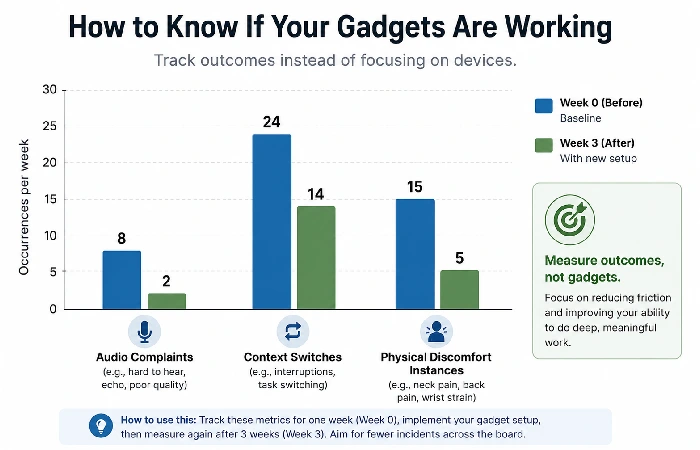
Before you buy, spend one week logging:
- Like, how many times has it happened to you that you brain-farted due to a bodily disturbance? ( eye discomfort, pain in the back, strain in the neck )
- How many calls had at least one of the audio/video complaints by anyone else?
- How many taps have you performed to open a reference document (which serves as a proxy for the amount of screen space)
You keep the same logs for 3 weeks with a new instrument, then see if the figures change. If they don‘t, then the instrument might not have been the fix.
This is a simple, self-tracking exercise, not a controlled experiment, but it will start to give you a much clearer feel for whether something you‘re paying for is actually making enough difference to merit the expense.
As Microsoft‘s 2024 Work Trend Index shows, the average information worker is interrupted, and all of that friction, a lot of it is environmental and tech friction, not just how much you‘re communicating. Therefore, home office hardware can be a legitimate productivity lever, but only if you‘re solving a real, measured problem.
This sort of before/after thinking also applies to arguing a home office equipment cost to your employer, a steadily growing scenario as firms standardise hybrid working reclaims.
If you are optimising any of these stacks for price, you can compare inexpensive alternatives in our budget gadgets roundup.
Eco-Friendly and Long-Term Value Gadgets
This isn‘t a topic that gets much airtime in the gadget guides, but it does matter particularly if you‘re about to make a relatively expensive purchase.
Buy repairability (precision-fix parts, spec maintenance, etc.), not just parameters. A stand desk with a common engine (iFixit-compatible, cheap replacement bits) beats a cheap desk with a proprietary control for five years of use. A screen maker with a three-year or more warranty, customer service (dead pixel rules) costs nought, internal, but spares you from a replacement buy. Warranty requirements and service policies may alter, and you should check each manufacturer‘s warranty information before considering that to be an issue.
For most of us in the UK or India, especially, certified‑refurbished equipment from brands and marketplaces like Dell Outlet or Back Market can give close‑to‑new quality at a significant saving on the price of new, satisfying the financial and environmental concerns involved.
If this is a big factor for your purchasing decision, we‘d recommend exploring our comprehensive guide to our eco-friendly gadgets.
All of these answers reflect generic ergonomics advice, typical home‑new‑work solutions, as well as common home‑office use habits and are therefore intended solely as practical suggestions, not as personalised professional recommendations.
Frequently Asked Questions
1. What are the most important home office gadgets for productivity in 2026?
A reasonably good USB mike, an external display, and a good ergonomic chair are probably the best productivity investments for your Bucks/Quid (though this depends). Set up your screen space, sound, and comfort first.
2. What‘s a good home office gadget setup on a tight budget?
A 24inch FHD monitor, a laptop stand with USB hubs, a cheap wired headset and a very respectable light for the desk can all be bought for about $150–200 / £120–170. 9Fulfills the main productivity gaps without extravagance.
3. Which work-from-home gadgets are worth it for hybrid workers?
The best part about a collapsible laptop stand, wireless mini keyboard and mouse, and pocket USB-C hub is how portable and practical these three are- they’ll help you get up and running at a hot desk setup in two minutes flat or less.
4. Do home office gadgets actually improve productivity?
Yes, when they solve a specific problem. Less physical effort, clearer sound, and more screen space are things that can be quantified. The gadgets that are purchased because they look good and not for a real functional point have less impact.
5. What smart office devices work best with AI tools in 2026?
Another area in which technology has greatly improved productivity is a directional (cardioid pattern) USB condenser microphone when used in the AI meeting transcription process. An additional monitor aids AI writing applications by displaying reference documents for the main editor.
6. Are standing desks worth it for home offices?
For those more than 6 hours/day, yes, if you are leveraging regular user reports and ergonomics studies, a sit/stand desk with a daily motion prompt has been shown to affect a significant decrease in lower back tiredness over a period of several months. Slightly more expensive, mid-range motorised desks from FlexiSpot or UPLIFT fit the bill.
7. What‘s the difference between a USB hub and a docking station?
The reason for a USB hub versus a docking station is a matter of bandwidth sharing. A docking station, especially Thunderbolt 4, allocates dedicated bandwidth to each device, allowing full-resolution external displays and fast file transfer. When a setup is permanent, the premium for a dock is warranted. For a portable setup, a quality hub will suffice.
