Published: June 15, 2026
Last Updated: August 31, 2026
If your lights only do “on” and “off,” they’re wasting energy and barely doing anything for your daily routine. Smart lighting lets those same fixtures bend around how you actually live instead of forcing you to walk to the switch every time.
In this guide, we’ll look at what smart lighting gadgets are, why they’re useful, which bulbs and switches are actually worth paying for, and how to connect everything without turning your home into a science project.
Summary
This new generation of smart lighting devices lets you control lights, switches, strips, and sensors from an app or a voice command while also being energy-efficient and mood-boosting. Here we run through the definition, highlight the real benefits, offer an ideal starting product, and then take you through the steps to a reliable starter pack.
What Are Smart Lighting Gadgets?
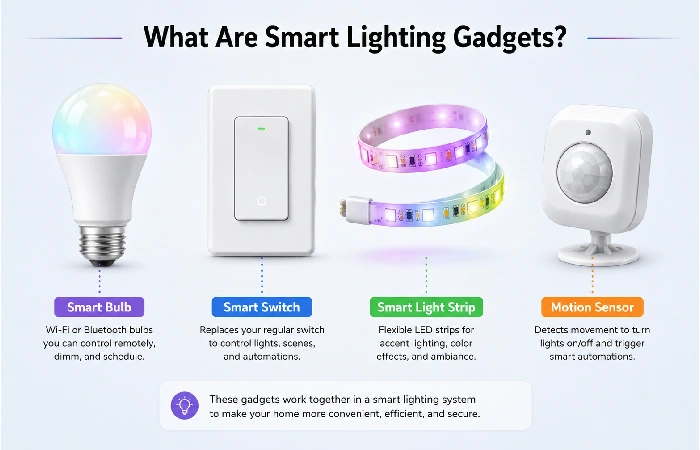
This is a range of smart lighting gadgets that enable a user to switch lights using a mobile phone app, remote or voice assistant. Usually, they can be grouped into four categories:
Behind the scenes, they connect via WiFi, Zigbee, Thread, or Bluetooth, with the newer devices supporting the Matter standard to ensure brands can peacefully be compatible.
Let‘s assume that the tenant in London: installs the colour-changing bulbs into the lounge, wires the LED strip behind the TV, places a motion sensor in the hall (that is a rather tiny device and should be difficult to see), controls all of this from one app, triggered by: “OK Google, movie mode.”
Benefits of Smart Lighting Systems
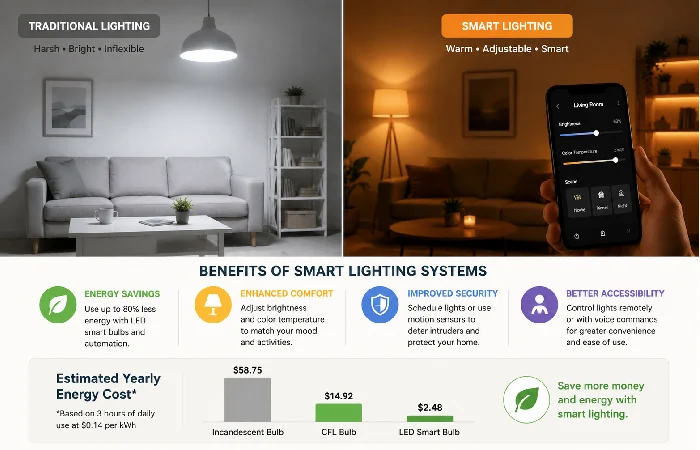
You’re not buying smart lights just to make the room blue for a birthday. When you set them up properly, they quietly solve everyday problems.
Energy savings and LED efficiency
The U.S. Department of Energy points out that modern LED bulbs use far less power and last much longer than old‑school incandescent lamps.
- Dim lights without changing the bulb.
- Set schedules so nothing stays on all night.
- Turn off forgotten lights from your phone when you’ve already left home.
Convenience, comfort, and accessibility
For most people, the “wow” moment isn’t the spec sheet; it’s the tiny daily wins:
- Lights easing on in the bedroom instead of blasting you awake at 6 a.m.
- One “goodnight” command that shuts everything off and locks the front door (if you’ve added a smart lock).
- Older family members use voice instead of stretching for awkward switches.
If smart lighting is your first upgrade, consider how it fits with speakers, plugs, and security gear, which we cover in our Home Gadgets guide.
Security and “someone’s home” presence
Home security advice from outlets like Reuters often includes using timers or smart lights near doors and windows so your home still looks occupied when you’re travelling.
Best Smart Bulbs and Light Switches
Most people start with the same question: smart bulb or smart switch?
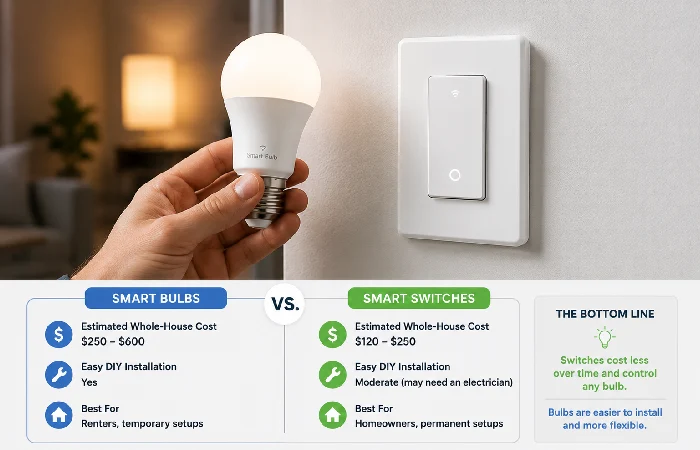
When smart bulbs make more sense
- You rent and can’t touch the wiring.
- You want rich colours or warm‑to‑cool white options.
- You’re focusing on lamps and single‑bulb fixtures.
Testing by third parties like Wirecutter frequently reveals that systems like Philips Hue and Nanoleaf provide smoother dimming, more accurate colours, and more reliable apps than many ultracheap alternatives.
The downside: if someone flicks the wall switch off, the smart bulb loses power and turns “dumb” until that switch goes back on.
When smart switches are the smarter long‑term play
Smart switches come into their own when:
- You own your home and have multi‑bulb ceiling fixtures.
- People in the house still instinctively use wall switches.
One smart switch can control several plain LED bulbs, which often works out cheaper over a whole house than putting smart bulbs in every fitting. And the system still behaves the way you expect.
There is a catch: some smart switches need a neutral wire in the wall box. That’s normal in many newer US homes, but older buildings and some Indian apartments may not have it. “No‑neutral” models exist, but they can be fussier, so checking the wiring or asking an electrician is usually a smart move.
Region notes: US, UK, and India
A few quick regional pointers:
- US: Neutral wires are common, so smart switches are usually straightforward. Echo speakers and Alexa routines are everywhere.
- UK: Two‑way lighting (two switches controlling one light) shows up a lot. Check that your chosen switch supports that setup. Google Assistant and Alexa are both well-established.
- India: Wi‑Fi smart switches that tuck behind existing switchboards are popular because the wiring style differs from US/UK layouts. Smart bulbs are easy wins in rentals, especially in big cities where power cuts and voltage swings still happen.
Voice-Controlled Lighting Solutions
Voice control is the demo everyone shows their friends, but it’s also a big deal for accessibility and comfort.
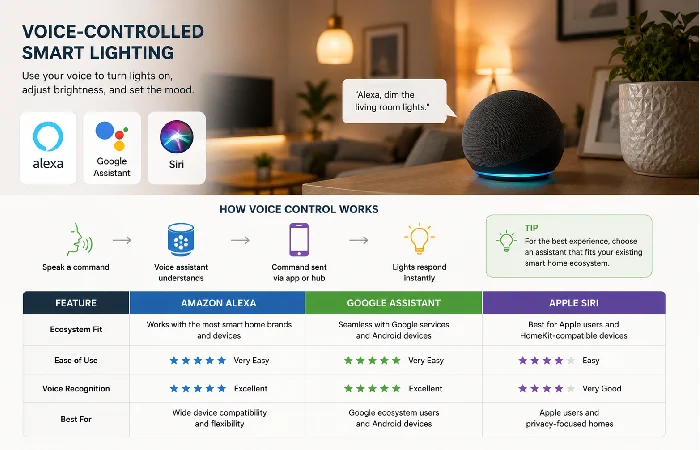
Alexa, Google Assistant, and Siri compared
In day‑to‑day use, three platforms dominate:
-
Amazon Alexa: Typically, the best starting point is the cheaper Echo speakers, easily available in the US, UK, and India, which streamline routines such as “Alexa, I‘m home” and more extensive ones.
- Google Assistant: Strong at understanding natural speech with tight Android integration. It feels natural if you already live in Google’s ecosystem.
- Apple Siri/HomeKit: Best fit if most of your tech is Apple and you care about privacy and more local control.
The best smart bulbs and switches available in the market work with all three, be it through Matter or native integrations. Choose the assistant you already use, then look at products suitable with it.
Your first “lights on” voice command
Begin with one smart light bulb, pair it to the app, coordinate your voice assistant and test out something simple such as ‘turn on the bedroom lights.
How to Build a Smart Lighting Setup
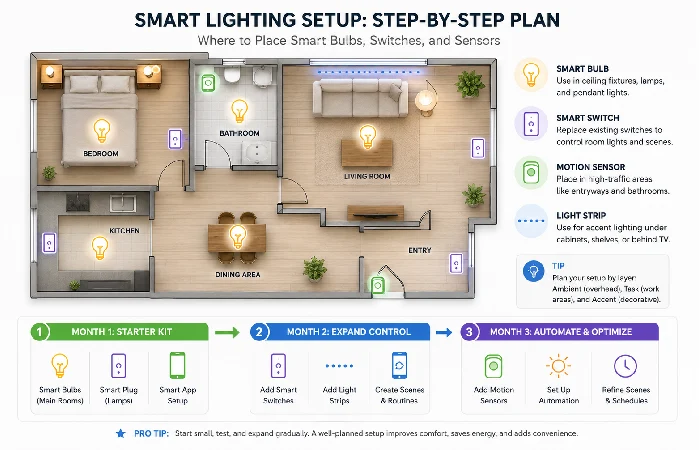
Instead of hoarding random “deal of the day” gadgets, choose a path first.
Step 1: Pick your path
- Path A – Renter‑friendly: Focus on smart bulbs, strips, and a couple of motion sensors. Skip any wiring changes.
- Path B – Homeowner‑focused: Start with a few smart switches in the most used rooms, add dumb LED bulbs, then layer in sensors later.
- Path C – Mixed: Use switches for main ceiling lights and a handful of smart bulbs or strips for ambience in key spots.
Step 2: Starter kit and room‑by‑room plan
Pick one main ecosystem for each layer wherever you can:
- One primary lighting brand (for example, Hue or Kasa).
- One voice assistant.
- One automation app or hub to tie everything together.
Then map it out room by room:
- Living room: 2–4 smart bulbs or a smart switch plus one light strip behind the TV.
- Bedroom: 1–2 bulbs and a “wind down” automation at night.
- Hallway/entry: A motion sensor paired with a smart bulb or switch.
Step 3: Automations, scenes, and basic troubleshooting
Once everything reliably turns on and off, add a few high‑impact automations:
- A “Goodnight” scene that shuts down all common areas and dims bedroom lights.
- A motion‑activated hallway light after sunset.
- An “Away” mode that randomly toggles a few lights in the evening.
When something acts up, the problem is usually one of these:
- The device either is on the wrong WiFi band (many still require 2.4 GHz) or is in a weak signal location.
- You’ve mixed too many apps and ecosystems at once.
Common Mistakes to Avoid with Smart Lighting Gadgets
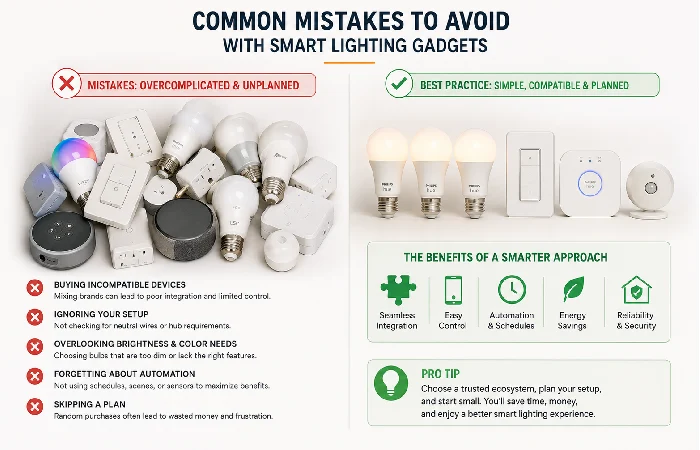
The same issues pop up again and again in reviews and forums:
If you dodge those traps, your smart lighting setup tends to stay solid for years.
FAQs About Smart Lighting Gadgets
1. Do smart lights waste power when they’re turned “off” in the app?
Require very little “standby power” to remain electrically connected (typically less than 1W). They consume less power in the average home than other types due to the efficient LED backlights and more frequent switch-off.
2. Can I use smart bulbs with an existing dimmer switch?
Almost always not a wise move. Most standard dimmers control voltage in a manner that can lead to flickering or premature death for LED smart bulbs. Fit a regular on/off switch and dim using the app or fit a smart dimmer if you want one.
3. Are smart lighting gadgets safe from hacking?
You minimize the small risk by using trustworthy manufacturers, having the latest firmware available and securing the WiFi password. If there is a facility, use two-step authentication, and a number of security-aware people have set up a wireless network separately.
4. How many smart bulbs can my Wi‑Fi handle?
Most home routers are okay with a few WiFi lights. For larger systems, a ZigBee or Matter bridge is usually the safer option and less likely to clog up your main WiFi.
5. Are smart lights worth it in a small apartment?
A one-bedroom flat even just a few smart bulbs, a strip of lights behind the TV and a simple ‘bedtime’ scene to turn everything off at once.
6. Will smart switches work during an internet outage?
The majority of smart switches continue to function as traditional wall switches even if your internet connection is lost. Provided they can operate locally, your app and simple automations will remain operational within your local network.
7. What’s the difference between Matter and Zigbee for lighting?
Zigbee has been established for years now; it‘s virtually guaranteed that almost any smart home hub will talk to it. Beyond that is Matter, the latest hot topic. It‘s basically a common language that means different manufacturer devices can talk to each other more easily, and often runs over your WiFi/Thread connection. Purchasing Matter-ready equipment now should save you hassle later.
