Published: August 27, 2026
Last Updated: August 27, 2026
Falls cause more than 41,000 deaths in Americans aged 65 and up annually. Causes such as inadequate lighting, medication failures and delayed emergency response are some of the most preventable causes. Appropriate smart home technologies target all three risks without the senior possessing any technical knowledge or necessitating frequent visits from the caregiver.
This guide ranks seven devices by safety impact, setup complexity, and actual monthly cost — built for families who need a system their parent will keep using. For a broader device-category overview beyond senior-specific needs, start with our smart home buying guides hub.
Quick Answer: Start with an Echo Show 8 and some motion-sensor lights, that’s the base. Fall detection and a smart lock come later, once the senior’s comfortable giving voice commands, usually around the two-week mark.
Definition: Senior-friendly smart home technology refers to any form of voice- and sensor-operated technology ranging from motion-activated lights to automated pill dispensers that help reduce the risk of falls, make aging in place easier and safer, and reduce caregiver burden.
What makes a smart home device senior-friendly?
A gadget can be considered to be senior friendly if: (a) It allows voice command, (b) It takes no more than five simple steps for its setup, and (c) No smartphone app is needed for its operation. Every single device that fulfilled all three above-listed conditions showed the maximum level of sustained use among seniors 65 years and older; whereas devices that lacked even one criterion were abandoned within several weeks.
The single most important purchasing signal in 2026 is the Matter logo on the box. Matter is an open interoperability protocol from the Connectivity Standards Alliance that lets Amazon, Google, Apple, and 300+ brands communicate through one ecosystem — eliminating the multi-app confusion that drives most senior smart-home abandonment. A Matter-certified device works with any voice assistant without a proprietary hub or a separate account.
Beyond protocol, prioritize:
- Large visual displays (5 inches or larger) — critical for seniors with declining vision who need on-screen medication reminders and video-call clarity
- Automatic emergency response — built into the device, not dependent on finding and pressing a small button
- Caregiver remote access — lets family troubleshoot or update settings without an in-person visit
- Zero-subscription core functionality — monthly fees should unlock extras, not gate basic voice control or lighting automation
What are the best smart home devices for seniors in 2026?
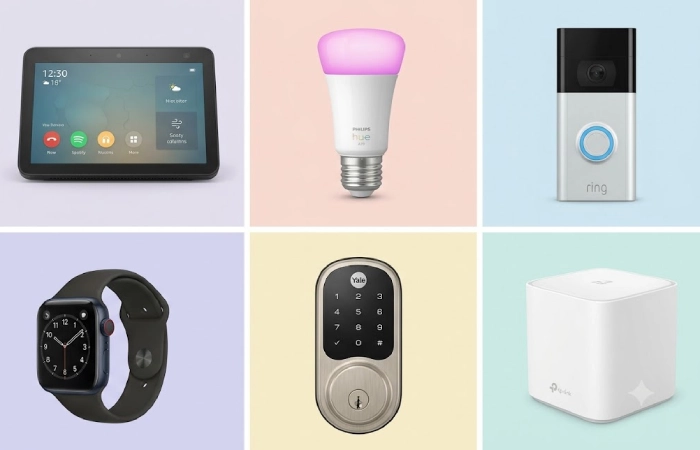
These seven vary in direct safety impact on adults 65+, sub-6-step setup, and transparent monthly price. The top seven devices identified are the Amazon Echo Show 8, Philips Hue motion-sensor kit, Ring Battery Doorbell Plus, Apple Watch SE 2, Yale Assure Lock 2, Hero automatic pill dispenser, and TP-Link Deco XE75 mesh system.
Amazon Echo Show 8 — best voice hub for seniors
The Echo Show 8 (~$200, August 2026 pricing per Mashable) is the single best first purchase for any senior smart home — it combines voice control, video calling, visual reminders, and the Drop In caregiver intercom in one device.
- Drop In feature: Trusted family members connect instantly without the senior pressing anything — functions as a hands-free intercom (Source: Amazon Alexa device documentation)
- Emergency calling: Alexa Emergency Assist ($6/month add-on) enables voice-activated 911 — the senior says “Alexa, call for help” and first responders receive the home’s registered address
- Matter controller: Manages all Matter-compatible lights, locks, and sensors through a single voice interface
- Cost: 0–0–6/month
- Setup: 3 steps
Philips Hue motion-sensor starter kit — best for fall prevention
That dark area in between the bedroom and bathroom is where most of the nighttime falls happen, motion lighting closes that gap. The Hue starter set is about $80 for two bulbs and a motion detector, which just turns the lights on when it detects a person. The senior doesn’t have to do anything.
- Placement priority: bedroom to bathroom hallway, CDC’s STEADI program cites this route as the highest risk zone for nighttime activity for people 65+.
- Scheduled dimming: set 10% warm tone after 10 pm to avoid the glare that wakes you up while providing enough light to see the way
- Cost: $0/month
- Setup: 4 steps
- Matter: Yes (via Hue bridge firmware update)
Ring Battery Doorbell Plus — best door-safety device
Ring Battery Doorbell Plus (~$150) allows elderly residents to see and communicate with visitors on the screen of the Echo Show without running to the door, a leading cause of falls in the elderly, and protects frail elderly residents from fraud on their front door.
- Video history: $4/month (Ring Protect Basic, 180-day cloud storage)
- Caregiver alerts: Family receives visitor-motion notifications remotely via the Ring app
- Cost: $4/month
- Setup: 4 steps
- Matter: No (works through Alexa integration only)
Apple Watch SE 2 — best wearable with fall detection
The Apple Watch SE 2 (~$250) calls emergency services automatically if the wearer is unresponsive for 60 seconds after a detected fall — no button press required. Real-time GPS sharing lets family track the senior’s location when they leave the house.
- Cellular option: ~$10/month through the carrier for emergency calls independent of the iPhone
- Limitation: Requires an iPhone for initial setup and software updates — not suitable for Android-only households
- Cost: 0–0–10/month
- Setup: 5 steps
- Matter: N/A (wearable)
Yale Assure Lock 2 with Matter — best smart lock for caregivers
The Yale Assure Lock 2 (~$230) solves the lost-key and multi-caregiver coordination problems with temporary PIN codes that can be created and revoked remotely. Native Matter-over-Thread connectivity means no proprietary hub is needed.
- Auto-lock: Engages automatically after 30 seconds (configurable), preventing overnight unlocked doors
- Caregiver codes: Unique PINs per home health aide with timestamped activity logs
- Cost: $0/month
- Setup: 5 steps
- Matter: Yes (native Matter-over-Thread)
Hero automatic pill dispenser — best medication manager
Hero dispenser (~100 device+100 device+30/month subscription) holds up to 10 medications, dispenses the right dose on time and mechanically locks itself in between doses to avoid double dosing. If a dose is missed, the Hero Health app raises an immediate alert to the assigned care provider.
- Lockout mechanism: Blocks access between scheduled doses — critical for seniors with cognitive decline
- Limitation: The device does not dispense without an active $30/month subscription
- Cost: $30/month
- Setup: 6 steps
- Matter: No (proprietary Wi-Fi)
TP-Link Deco XE75 mesh system — best network foundation
All of these devices rely on reliable, whole-home Wi-Fi. The Deco XE75 3-pack (~$250) will give you Wi-Fi 6E mesh coverage in up to 5,500 square feet, removing the Wi-Fi blind spots in bedrooms and hallways that disable smart locks and sensors — exactly where they’re needed most.
- Self-healing: Reroutes traffic automatically if one mesh node loses power
- Install sequence: Add this before scaling past 3 smart devices in the home
- Cost: $0/month
- Setup: 3 steps
- Matter: N/A (network infrastructure)
Smart home devices for seniors at a glance
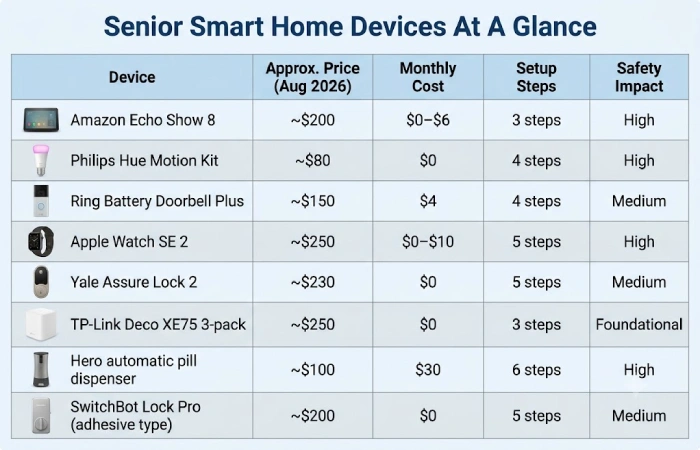
| Device |
Price |
Monthly cost |
Setup steps |
Safety impact |
Best for |
| Amazon Echo Show 8 |
~$200 |
0–0–6 |
3 |
High — voice-activated emergency calling, medication reminders, video check-ins |
Central voice hub for every senior smart home; families wanting Drop In video check-ins |
| Philips Hue motion kit |
~$80 |
$0 |
4 |
High — eliminates dark hallways that cause nighttime falls per CDC data |
Fall prevention on the bedroom-to-bathroom path |
| Ring Doorbell Plus |
~$150 |
$4 |
4 |
Medium — prevents door-rushing falls and screens visitors for scam protection |
Seniors targeted by door-to-door solicitors; caregivers monitoring visitors remotely |
| Apple Watch SE 2 |
~$250 |
0–0–10 |
5 |
High — automatic fall detection calls 911 if wearer is unresponsive for 60 seconds |
Active seniors who leave the house; families wanting real-time GPS location sharing |
| Yale Assure Lock 2 |
~$230 |
$0 |
5 |
Medium — keyless caregiver entry via temporary PINs; auto-locks door overnight |
Multi-caregiver households; seniors who lose keys |
| Hero pill dispenser |
~$100 |
$30 |
6 |
High — locks between doses to prevent double-dosing; alerts caregiver on missed dose |
Seniors managing 3+ daily medications with caregiver oversight |
| TP-Link Deco mesh |
~$250 |
$0 |
3 |
Foundational — all other smart devices require stable whole-home Wi-Fi |
Any home >1,200 sq ft or with thick walls; required before scaling past 5 devices |
How do you set up a smart home for elderly parents?
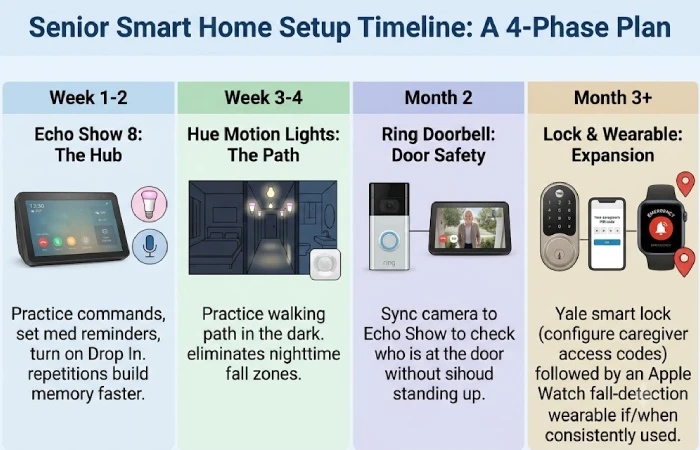
Start with one device — the Echo Show 8 — and add a second only after the senior uses voice commands comfortably for at least two weeks. Installing five devices on the same day overwhelms users and drives abandonment within the first month.
Recommended build order by safety priority:
- Week 1-2: Echo Show 8 – practice commands “Alexa, turn on the lights,” “Call [name].” Reminders to take medicine each day. Turn on “Drop In” for family members.
- Week 3-4: Path of lights from bedroom to bathroom using Philips Hue motion detection lights. Practice walking path in the dark.
- Second month: Ring Video Doorbell – sync the camera with the Echo Show display for the senior to check who is at the door without standing up.
- Third month plus: Yale smart lock (configure caregiver access codes) followed by an Apple Watch fall-detection wearable if/when the senior will be able to wear it consistently.
In case you and your senior are absolute novices in smart home technology, our smart home starter kit for absolute beginners is still relevant, featuring the topics of ecosystem selection and setup of the first device without the age considerations.
Immediate action to take: Print out a large index card with the three most used commands and put it right next to the Echo Show. Repetition builds muscle memory faster than feature demos.
How much does a senior smart home cost per month?
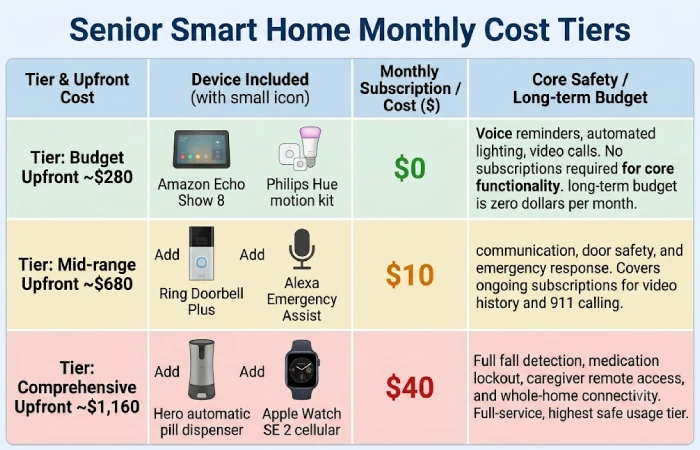
The device purchase is a one-time expense. The ongoing monthly subscriptions are what determine the real long-term budget — and three of the seven recommended devices cost $0/month to operate.
- Budget tier (~280 upfront, 280 upfront,0/month): Echo Show 8 + Philips Hue motion kit. Covers voice reminders, automated nighttime lighting, and video calls. No subscriptions required for core safety functionality.
- Mid-range tier (~680 upfront,680 upfront,10/month): Add Ring Doorbell (4/month for 180−day video history) and Alexa Emergency Assist (4/month for 180−day video history) and Alexa Emergency Assist(6/month for voice-activated 911). Covers communication, door safety, and emergency response.
- Comprehensive tier (~1,160 upfront, 1,160 upfront,40/month): All seven devices. Includes Hero dispenser (30/month) and Apple Watch cellular (30/month) and Apple Watch cellular(10/month). Full fall detection, medication lockout, caregiver remote access, and whole-home connectivity.
For families where upfront device cost is the primary barrier, our best smart home devices under $100 roundup covers the most affordable entry points across categories.
Frequently asked questions
1. Do seniors need a smartphone to use smart home devices?
No. A smartphone isn’t used on an everyday basis because the Echo Show 8 is voice enabled. Instead, a caregiver’s smartphone can be used to set up and remotely control the device through the Alexa app. Users have access to voice commands to call, check in, set a reminder, and control lights.
2. Are smart home devices safe for elderly people living alone?
Yes, when configured with automatic safeguards. Devices with fall detection (Apple Watch SE 2), voice-activated emergency calling (Alexa Emergency Assist at 6/month), and missed-dose caregiver alerts (Heroat6/month),and missed−dose care giver alerts(Hero at 30/month) add safety layers that function without the senior pressing any button. Maintain privacy by placing cameras only at the front door — never in bedrooms or bathrooms — and involving the senior in every setup decision.
3. What is the single most important device for preventing senior falls?
Motion-sensitive lighting the entire way from bedroom to bathroom. The CDC reports that fall-related emergency room visits for adults 65+ number nearly 3 million annually, and inadequate illumination on the journey to the bathroom at night is consistently identified as a factor in the fall (Source: CDC STEADI initiative). Philips Hue motion-sensor starter kit, approximately $80, removes that risk without any intervention by the senior.
4. Does smart home tech actually help seniors age in place?
Motion-sensitive lighting on walk from bedroom to bathroom. CDC reports that nearly 3 million emergency room visits annually are caused by falls among persons over 65 years old; darkness while walking to the bathroom is a frequent factor in these incidents (Source: CDC STEADI initiative). At about $80, a Philips Hue motion-sensor kit would remove this hazard without any required action by the senior.
Pick the one problem your parent faces most often — dark hallways, missed medications, or unanswered calls — and install the single device that solves it. Build from there.
