Published: August 27, 2026
Last Updated: August 27, 2026
For most smart-home buyers, this kind of discovery happens after they’ve already unpacked the item and their return window has long since closed.
A bulb meant to work with the Zigbee protocol won’t connect if your app connects over Wi-Fi. A lock labeled “Works With Alexa” will refuse every command made through HomeKit. It’s common, even normal, under such circumstances. But this isn’t exceptional; it’s the norm once you skip doing the right compatibility test before buying.
This guide replaces vague “do your research” advice with a specific, repeatable 5-point verification process, a clear protocol comparison, and a realistic dollar breakdown of what happens when compatibility goes wrong. Every recommendation below applies to the smart home product landscape as of August 2026.
Quick Answer: Check Matter certification, protocol, hub, local control, and total cost before buying — one compatibility mistake wastes $45–$120.
Definition: “Smart home compatibility is a device’s verified ability to communicate with your chosen ecosystem, protocol, and hub — not just a ‘Works with’ badge on the box.”
What does smart home compatibility actually mean (and why does it break)?
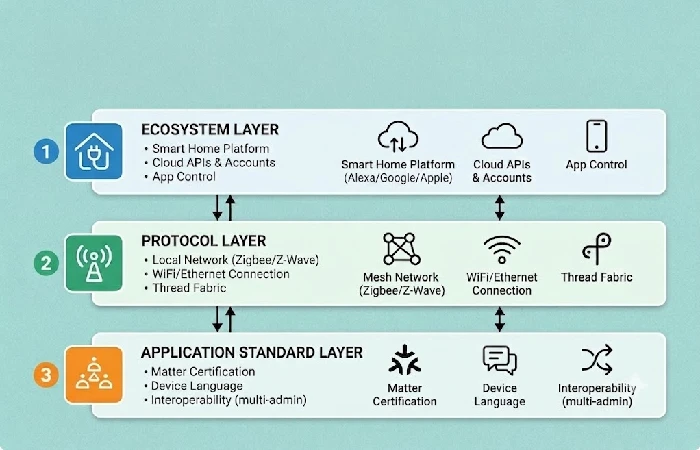
Smart home compatibility is not a single feature — it is alignment across three distinct layers, and a failure at any one layer breaks the entire chain. According to the Connectivity Standards Alliance’s Matter specification overview, Matter itself is an application-layer protocol, not a wireless radio. It runs on top of Thread, Wi-Fi, or Ethernet. This distinction matters because a “Matter-certified” device still requires a compatible transport network to function.
The three layers where compatibility fails:
- Layer of ecosystem: It refers to the ecosystem where you control all your devices (Amazon Alexa / Google Home / Apple Home / Samsung SmartThings). Your device must either have certification for your chosen ecosystem or should have support for Matter so that you can use your product on all these ecosystems.
- Layer of protocol: Each smart home device uses some sort of communication protocol, e.g. Wi-Fi, Zigbee, Z-Wave or Thread. You cannot connect a Zigbee Sensor to a Wi-Fi Only Hub unless there’s a Bridge involved.
- Layer of application: Devices from the same ecosystem can still struggle if they don’t speak each other’s language, this is where Matter comes into play. Although not all device categories are covered by Matter yet.
The persistent mistake across competitor guides is treating “Works with Alexa” as full compatibility. That badge confirms ecosystem-layer support only. No indication is given on whether the device requires a separate hub, operates locally or has a cloud dependency, or provides full feature parity beyond basic on/off control.
What are the 5 things to check before buying any smart home device?
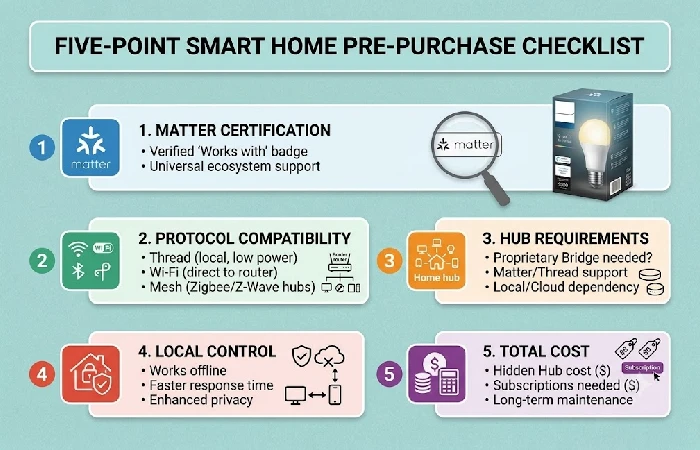
Run these five checks at the product listing — not after unboxing — to eliminate compatibility failures before they cost you money. For the full buying-decision framework beyond compatibility, see the complete smart home buying guides hub.
- Check for the Matter Certification: First, look at the back of your smart device or its packaging for the official Matter certification logo. Alternatively, find the model number in the CSA Product Finder. At this point (Q2 2026), over 3,800 devices have received the Matter certification within the CSA, such as lights, plugs, sensors, locks, and thermostats. If your product is Matter certified and falls into one of these categories, it will be compatible with Alexa, Google Home, and Apple Home at the same time.
- Confirm the Protocol Compatibility: Finally, double-check if the device runs on certain protocol types, e.g., Wi-Fi, Zigbee, Z-Wave, or Thread. As Zigbee or Z-Wave-based devices require hubs that support these technologies, ensure your home network includes the appropriate hub(s). Wi-Fi devices connect directly to your router, while Thread devices need a Thread Border Router – most speakers from the latest generation serve as one, including the HomePod Mini, Nest Hub, and Echo 4th Generation.
- Hub requirement: If there is a mention of “hub required” in the description of the device, it means that it needs a proprietary bridge such as Philips Hue Bridge for all non-Matter Philips Hue bulbs. This adds 40-40-60 to hidden expenses.
- Local control vs. cloud dependency: Find out if the device works even without an internet connection. Cloud dependent devices will stop working during an outage and will be permanently bricked if the manufacturer shuts down its servers. Prefer devices with local command processing.
- Cost: Take into account total cost of ownership for 3 years including not only initial purchase but also all necessary additional purchases like hubs, subscriptions (the average cloud storage of cameras is $3–$3–$10/month), etc. Take into account replacement cost if that device turns out to be incompatible.
Which protocol should you choose: Matter, Zigbee, Z-Wave, or Thread?
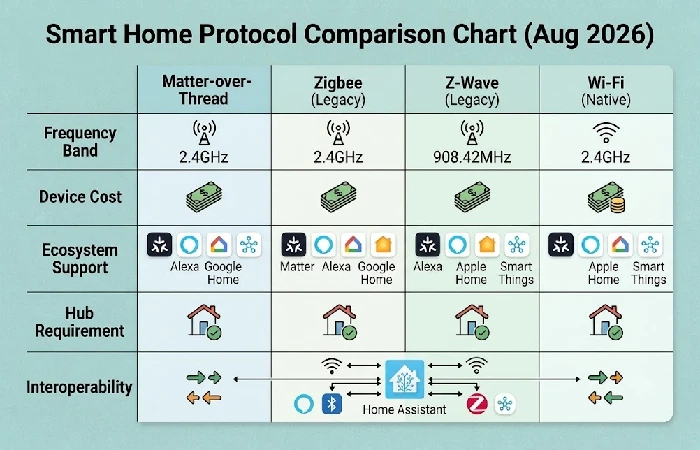
The purchase guideline for the future will be “Matter-over-Thread” for the year 2026 instead of the ecosystem badges while purchasing any new device. With Matter, all the devices it works with (lights, plugs, sensors, locks, thermostats, and blinds) will be interoperable irrespective of the ecosystem and even work locally without the need for the cloud.
However, there are some product categories Matter will not be able to support yet. These include cameras, robot vacuums with similar features, garage door openers with obstacle detection capabilities, and HVAC zoning systems. For these categories, ecosystem-specific certification remains the primary check.
- Zigbee is still the most affordable workhorse for sensors and bulbs at 10–10–35 apiece. The 2.4 GHz technology and the interference from Wi-Fi are drawbacks however, the self-healing mesh compensates for it most of the time.
- Z-Wave is on a dedicated sub-GHz band (908.42 MHz in the US), and is Wi-Fi-proof. It’ll be the best protocol for locks, motion sensors and alarm panels as there can be no margin for error in signal quality. The devices will cost each: 30-30-60 / switch and 100-100-200 / lock.
- Thread will be the protocol that works as the transport for most Matter devices. It will need a Thread Border Router but makes a self-healing local-first network without any cloud dependency.
How do you bridge legacy Zigbee and Z-Wave devices into a Matter setup?
Home Assistant is the only home hub that can reliably connect all four technologies to the Matter fabric — Zigbee, Z-Wave, Thread, and Wi-Fi. In 2025 Samsung SmartThings removed support for Z-Wave radio from the updated version of its hub. The Homey Pro home hub supports both Zigbee and Z-Wave but provides limited Matter bridges for Z-Wave devices.
To bridge legacy devices using Home Assistant’s Matter integration:
- SkyConnect/Zigbee Coordinator: Set up a SkyConnect USB adapter (or any other Zigbee-to-MQTT stick you’ve got) on the Home Assistant machine, then bring your existing Zigbee sensors, bulbs and switches back into Home Assistant.
- Zooz/Aeotec Z-Wave Controller: Zooz 800-series or Aeotec Z-Stick, either works. Set up the Z-Wave locks, dimmers and sensors from there.
- Matter Bridge: Activate Matter Server integration in Home Assistant. Your Zigbee/Z-Wave devices are now exposed as Matter accessories that can be seen through Alexa/Google Home/Apple Home.
For a situation where you don’t have legacy devices and have just started out with building your smart home, use a smart home starter kit of Matter native devices to eliminate bridging complexity entirely.
How much does a compatibility mistake actually cost?
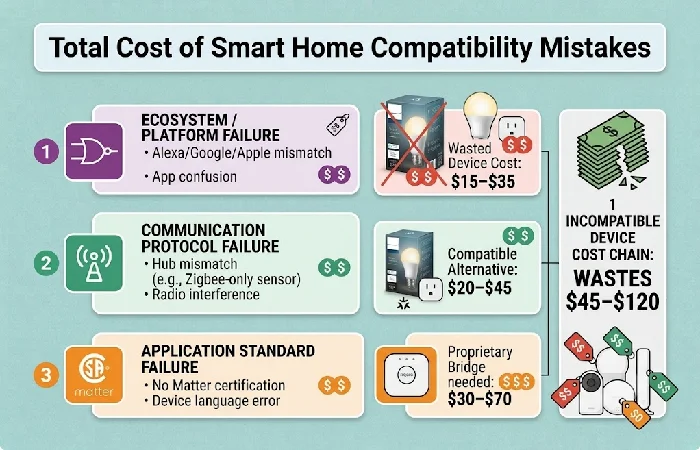
A single incompatible device purchase wastes 45–45–120 when you account for the full chain of costs — not just the device itself. No top-ranking guide quantifies this, which is why “compatibility matters” advice rings hollow without specific numbers.
Breakdown for one incompatible device:
- Wasted device cost (non-returnable smart plug or bulb): 15–15–35
- Replacement compatible alternative: 20–20–45
- Bridge hub required to make the original device work (SmartThings, Aqara hub): 30–30–70 if you don’t already own one
Scaled impact: In a 10-device home where 2–3 devices turn out to be incompatible (a common ratio for first-time buyers mixing ecosystems without a checklist), total waste reaches 90–90–360 over the first year.
Before buying budget devices to save money upfront, check which cheap smart home devices actually carry Matter certification or verified ecosystem support — the cheapest device is the one you don’t have to replace.
What should you do when a firmware update breaks your smart home device?
Firmware updates can unintentionally cause problems because of the cloud-based registration resetting process that causes your hub to treat it as an unknown accessory. It is a rarely mentioned problem in purchasing guides, which is nevertheless applicable to all ecosystems.
4-step recovery checklist:
- Perform power cycling on both device and router. Disconnect your device, disconnect your router. Wait 60 seconds. First plug in the router and let it fully boot up. Plug in your device next. This clears stale handshake data in approximately 70% of post-update failures.
- Delete duplicate entries. In your smart home app, look for two duplicates of the same device; one is offline while the other is online. Remove the orphaned offline one and assign the automations to the working one.
- Re-link the manufacturer’s account. Go into your hub app (Google Home, Alexa, Apple Home) and go to services linked. Link the manufacturer’s account again. This will force resynchronization of the device list.
- Use factory reset as a last resort only. Factory reset will delete all the custom settings and require a complete addition of the device again. Prior to this action, please check the community forum for the manufacturer, a bad firmware version affecting many users often gets a corrective patch within 1-2 weeks.
Frequently asked questions
1. Are all smart home devices compatible with each other?
No. Compatibility is a bit more complex here. It’s multi-dimensional and actually covers 3 different levels: ecosystem level (Alexa, Google Home, Apple Home), protocol level (Wi-Fi, Zigbee, Z-Wave, Thread) and application-level (Matter). A device is compatible if it works with your home at all levels. Devices that are certified Matter devices get closest to achieving true universality; however, Matter is not covering every possible product category as of now, June 2026 – cameras, complex HVAC systems, and robot vacuums with full feature parity remain outside its scope.
2. Do I need a hub to manage smart home devices?
Only if you have some Zigbee, Z-Wave or Thread powered devices. Devices using WiFi for communication connect directly to your home router and are managed by the device manufacturer’s app or by a voice assistant. A hub like Home Assistant or SmartThings makes sense if those standards are being used and the house has more than 10 devices, as Home Assistant and SmartThings take control over them all, allow automation and local processing so devices will still work when other house devices lose access to the Internet.
3. Can I mix different smart home brands in one home?
Yes, provided all devices share a common ecosystem certification or use the Matter standard. A Matter-certified Aqara sensor, a Matter-certified Nanoleaf bulb, and a Matter-certified Yale lock will all appear in Google Home, Alexa, and Apple Home simultaneously — regardless of brand. Without Matter, each device must independently list your primary ecosystem on its packaging, and cross-brand automations may require a third-party hub to bridge them.
4. What happens if a smart home device stops working after an update?
The leading reason behind this is the firmware update causing your device to lose its cloud registration, resulting in your hub perceiving it as a new device. The first thing to do is a power cycle for the device as well as your router, and then check your application for any duplicate devices. Relink your manufacturer’s account to force a device-list refresh. Perform factory reset only when you have ensured that no firmware update is coming soon – check the manufacturer’s community forum first, as fix patches typically ship within 1-2 weeks of a widespread issue.
