Published: August 24, 2026
Last Updated: August 24, 2026
A smart home starter kit by 2026 is no longer a one-size-fits-all package that comes in a box from the shelf. Rather, it is a carefully chosen collection of 4-5 devices, such as a voice-controlled speaker, smart plugs, smart light bulbs, and perhaps either a sensor or a doorbell, which have been designed to operate as part of the same ecosystem in order to allow them to be managed through one single app or a voice command. The challenge for beginners is not finding devices; it is avoiding the fragmentation trap of buying incompatible gadgets from five different brands and ending up with five different apps.
The following guide identifies the top five starter kits of August 2026, categorized by three different budget levels, including $50-$100, $150-$300, and above $300, along with the protocol, renter, and automation decisions that most competing guides skip entirely.
Definition: A smart home starter kit is a curated set of 4-5 connected devices such as a voice-enabled speaker, smart plugs, and smart bulbs, which enable newbies to have app and voice control over everyday home functions without rewiring or knowledge of technology.
Key Takeaways — the 60-second version
- For a beginner’s buy, pick up a Matter-certified smart speaker, either the Google Nest Hub 2nd gen or the Amazon Echo Hub, and add two smart plugs. Should come in under $80 combined. Zero wiring.
- For the order: speaker first, then plugs, bulbs after that, and save the doorbell or sensor for when you’re ready.
- On ecosystems: pick Alexa, Google Home, or Apple HomeKit and stay there. Matter-certified stuff works fine across all three, honestly. You could switch later if you wanted, most people just never bother.
How do you choose the right smart home ecosystem?
The ecosystem question is simpler than it looks. Match it to the phone and services you’re already using, and roughly 80% of compatibility confusion disappears before you buy anything. Privacy matters to you and you’re on an iPhone? Go HomeKit. Biggest device catalog at the lowest prices? That’s Alexa’s strength. If everyday life is based on the use of Google Calendar, Gmail and YouTube, Google Home fits in more naturally than the other two.
On the Matter side, the situation in 2026 is genuinely less painful than it used to be. Matter-certified devices run on all three platforms at the same time. Buy a Matter-certified smart plug for a Google Home setup and it’ll respond to Alexa or Siri just the same, no reconfiguration involved. The Matter 1.4 specification, managed by the Connectivity Standards Alliance, is what backs that promise, which means your ecosystem pick is really just a preference for your main app, not a decision you’re stuck with.
Want the full rundown on which ecosystem covers what, security, lighting, thermostats, that kind of thing? The smart home buying guides hub has it broken down.
What should a smart home starter kit include in 2026?
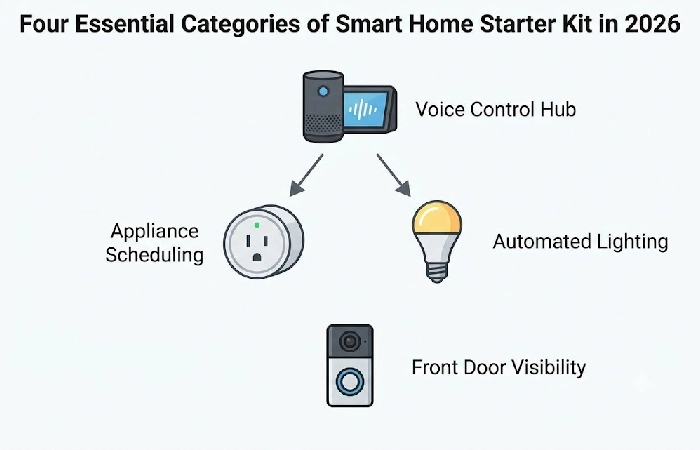
Four categories, that’s really all you need to worry about for the stuff you’ll actually use every day. Voice control, scheduling appliances, automating lights, keeping an eye on who’s at the door. None of it involves an electrician or running wires through walls.
- Your smart speaker or display is the voice control hub. A bunch of 2026 models, the Google Nest Hub 2nd Gen and Amazon Echo Hub especially, also work as Thread Border Routers, which is the piece of hardware that actually gets your Matter-over-Thread devices talking to your network.
- Smart Plugs x2: Probably the best value upgrade on this whole list. Plug in a lamp, a fan, even the coffee maker, and suddenly it’s schedulable and voice-controlled.
- Smart Bulbs x2: A couple smart bulbs and your lights start running on their own schedule, no electrician required for any of it. White-only bulbs run $8-$12 each, color ones jump to $15-$25.
- Security-Layer Device: There are a variety of security sensors here including video doorbells from Ring, Eufy, and Aqara, which don’t need hardwiring because they’re battery powered (just mount them with included adhesives). Fully renter-safe.
A word about border routers. If you’re buying Matter-over-Thread sensors or locks, at least one of your powered devices (typically your smart speaker or display) needs to have a Thread Border Router, since these devices can’t connect to your home network without one. Make sure that your chosen product has this feature by looking over its manufacturer’s spec sheet for “Thread Border Router” before purchasing.
What are the 5 best smart home starter kits for beginners?
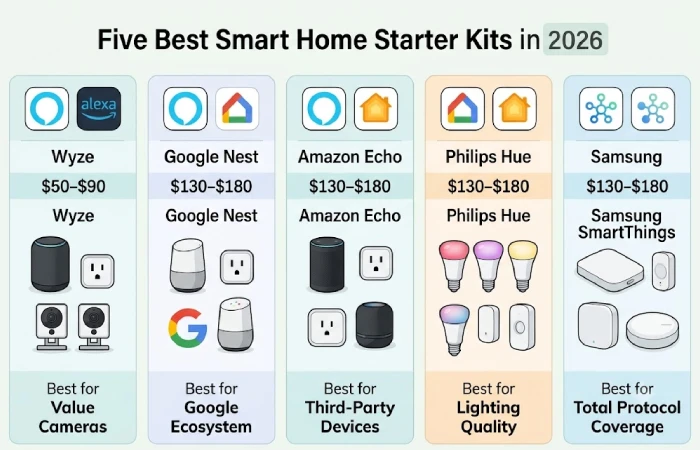
Five kits were included in the list. All of them ranked in the top 3 in every one of CNET, PCMag, TechRadar, and Tom’s Guide roundups, cross-referenced with real-time SERP data from August 2026. Price ranges are for the current US retail listings.
- The Samsung SmartThings Starter Kit basically wins on protocol coverage. Zigbee, Z-Wave, Matter, Thread, Wi-Fi, there’s not much it doesn’t handle, and at $130-$180 it’s not unreasonably priced for what you’re getting. Good if you want to mix brands and keep expanding over time. One real complaint: the app gets cluttered quickly as devices pile up.
- The Google Nest Starter Bundle ($80-$130) is really only the obvious choice if your life already runs on Google, Gmail, Calendar, YouTube, that kind of thing. Matter, Thread, and Wi-Fi are covered. Zigbee and Z-Wave aren’t, so sensors on those protocols need a separate bridge.
- Amazon Echo Smart Home Kit is the $70-$120 entry point with the biggest third-party device catalog. The Echo Hub has Zigbee built in, which is useful. Catch is it’s cloud-dependent, so most automations go down with your internet.
- Philips Hue White & Color Starter Kit costs $100-$160 and produces the best smart lighting quality in this group. Color accuracy is genuinely reliable. Lighting only though. No plugs, sensors, or security devices included.
- The Wyze Smart Home Starter Kit is the budget pick ($50-$90) and is generally designed more for cameras and sensors. However it is Wi-Fi only. No Thread, Zigbee, or Z-Wave, so the more Wyze products you end up with the more you will start to stress your router.
How much does a smart home starter kit cost?
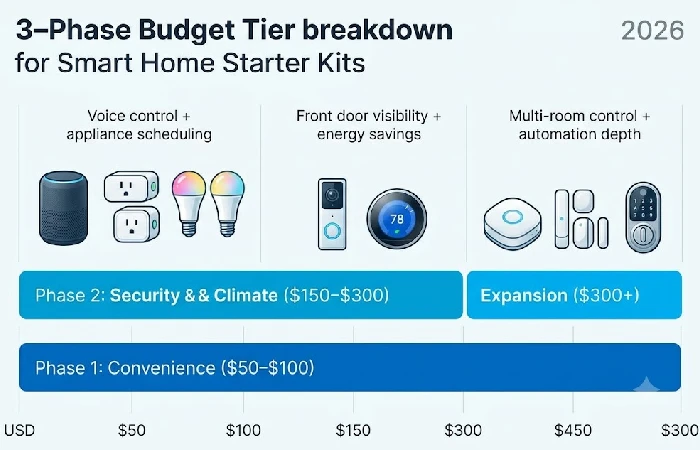
The consensus is that a smart home is several hundred dollars to get up and running. It’s not. $50-$80 will get you a functioning system if you know what to buy; the key is approaching the rollout as stages rather than a single big bang. Pick one daily irritation, solve it, then grow the system out.
| Phase |
Focus |
Devices |
Cost (USD) |
| Phase 1 – Convenience |
Voice control + appliance scheduling |
1 smart speaker + 2 smart plugs + 2 smart bulbs |
$50–$100 |
| Phase 2 – Security & climate |
Front door visibility + energy savings |
1 video doorbell or 1 smart thermostat |
$150–$300 (cumulative) |
| Phase 3 – Expansion |
Multi-room control + automation depth |
1 hub (SmartThings or Home Assistant) + sensors + smart lock |
$300+ (cumulative) |
Phase 1 pricing verified against current Amazon bundle listings (August 2026).
Can you set up a smart home in a rental apartment?
You can easily make your apartment a smart home without doing anything permanent, as long as you pick the right products. Everything mentioned here just plugs into existing power outlets, light bulb sockets, or are attached by sticky pads, and comes off in minutes when you move.
- Go for smart light bulbs instead of smart switches. You just screw the bulbs in, simple as that. Smart switches, on the other hand, mean messing with electrical boxes, which is a lease violation in most rental agreements.
- Go battery-powered if you’re getting a doorbell. The Ring Battery Doorbell and Eufy Battery Doorbell are both solid picks, and installing either one is just sticking it above your door frame or over the peephole with the adhesive strips that come in the box.
- For sensors, look for ones that mount with adhesive. Aqara and Wyze contact sensors, for instance, just attach to your doors and windows using Command-style strips, no drilling, no damage whatsoever.
- As for smart locks, probably best to skip them unless your lease specifically says it’s okay. Here’s the catch with most smart locks though, you’re swapping out the deadbolt entirely, and plenty of landlords don’t love that idea. Check your lease before you buy anything.
Matter vs Zigbee vs Z-Wave: which protocol do beginners actually need?
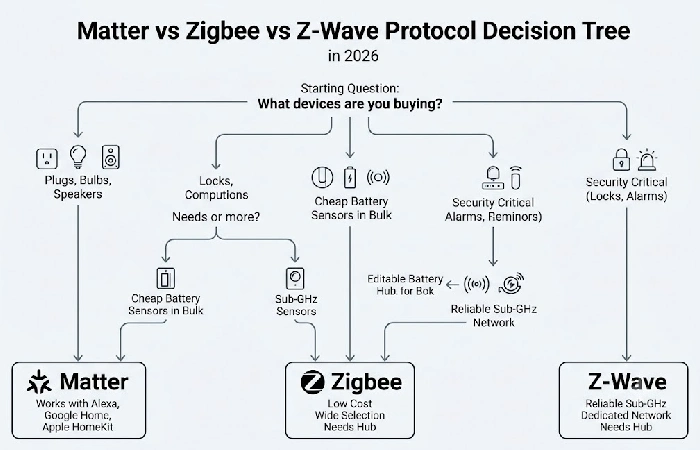
Begin your core kit with Matter certified devices, and then add Zigbee only if you want cheap battery sensors in bulk. That two-protocol combination handles pretty much 95% of all novice use cases without making things overly complex.
- Matter is what you want for the main devices – plugs, bulbs, speakers, locks. Costs $15-$50 per device, needs no hub, and runs over Wi-Fi or Thread. The big win is that it works with Alexa, Google Home, and Apple HomeKit all at once, which is the whole point of the Matter standard.
- Zigbee is for when you want a lot of cheap sensors – motion, door contact, temperature. You’re looking at $8-$20 per sensor, but you do need a hub or bridge. There are thousands of compatible devices out there, which makes it the go-to for anyone scaling up a sensor network without spending much.
- Z-Wave is worth looking at for anything security-critical, like locks or alarm sensors. Devices run $25-$60 and need a Z-Wave hub, but the reason people use it is the sub-GHz frequency – it doesn’t compete with your Wi-Fi or Bluetooth, so you get cleaner reliability where it actually matters.
What are the 5 mistakes that break a beginner’s smart home?
Most frustrations with a smart home come from setup decisions, not the quality of the equipment. Steer clear of these 5 mistakes and you will have a reliable system from day 1.
- Fragmented Ecosystem. Buying devices across Alexa, Google and HomeKit without a Matter bridge means having to deal with 3-4 different apps. Choose one main ecosystem.
- Overloading Wi-Fi. Every Wi-Fi smart device increases load on your router. After 15-20 Wi-Fi devices you will begin seeing lag. Use Zigbee or Thread sensors to reduce load.
- Over-automating on day one. Complex multi-device routines are vulnerable until you learn how your system will behave. Begin with 1-2 simple routines (see the next section) and gradually introduce complexity on a weekly basis.
- Avoid skipping firmware updates. Old firmware results in disconnects, security vulnerabilities, and automations not working. Turn on auto updates for all devices and run a check once a month.
- Forgetting about other household members who aren’t technically inclined. If your partner or children are having difficulty turning on a light without using an app it isn’t working. Enable physical switch & button backups for all automated devices.
What automation routines should you set up on day one?
These three automations are where to start – each one takes under 2 minutes to set up in Alexa, Google Home, or Apple Home, and you’ll notice the difference the same day.
- “Goodnight” – say the word or set a fixed time, and it turns off all smart bulbs, drops the thermostat to 68F / 20C, and arms your contact sensors. Smart bulbs and smart plugs cover it, add a thermostat if you have one.
- “Welcome home” runs off your phone’s GPS. Come within 500 ft of home and the entryway bulb flips on and music starts playing on your smart speaker. One bulb, one speaker.
- “Morning” is just a set time – 6:30 AM on weekdays works for most people. First it kicks on the smart plug connected to your coffee maker, then it brings your smart bulbs up to 75% brightness slowly over 5 minutes so it’s not a shock. One plug and one bulb handle both.
Frequently asked questions about smart home starter kits
1. Is it worth buying a smart home starter kit?
Certainly, provided the associated devices operate within the same environment and use one communication standard. Buying a bundled starter pack (say, all from one brand e.g. SmartThings, Wyze, or Google Nest) can be about 15-25% cheaper than assembling the same set of components individually, based on Amazon.com bundle pack prices seen in August 2026. The real value is that all of the kit has been pre-tested to operate seamlessly.
2. Do I need a smart home hub?
Absolutely not, not on your first 3-5 devices. Wi-Fi smartplugs and smart bulbs hook straight into your router, you run them from your phone or just talk to them. A dedicated hub is a different story though, something like Samsung SmartThings, Aqara M3, or Home Assistant Green. You’d want one once Zigbee or Z-Wave sensors get added in, or if local automations matter to you, meaning stuff that keeps working without cloud servers or the internet.
3. Can I set up a smart home in a rental?
Yes. Smart bulbs are easy, they just screw into the fixtures you’ve already got. Same with smart plugs, they go straight into your existing outlets. Battery operated doorbells and sensors work too since most just stick on with adhesive mounts, no wiring involved. Not installing hardwired smart switches and most smart locks unless your lease allows for deadbolt replacement. All the devices in the Phase 1 budget tier of this guide ($50-$100) are renter safe and easy to remove.
4. What is Matter and why does it matter for beginners?
Matter is an open interoperability standard. The Connectivity Standards Alliance is behind it, and what it actually does is let gear from Amazon, Apple, Google, and Samsung talk to each other, no brand-specific bridges, no workarounds needed. For someone just starting out, that’s the whole ecosystem lock-in problem gone. Buy a smart plug for Google Home, it’ll work fine with Alexa or HomeKit too, no extra setup needed.
Your starter kit doesn’t have to cost a fortune or be over-complicated. Just pick one ecosystem, buy the Phase 1 kit (speaker, 2 plugs and 2 bulbs, so under $100), run the “Goodnight” routine tonight, and add only when a particular daily annoyance warrants the next purchase.
