Published: August 25, 2026
Last Updated: August 25, 2026
46.1 million. That’s roughly how many U.S. households rent instead of own — and renters drove almost 80% of household growth in 2025 (U.S. Census Bureau CPS/HVS, Q2 2026). Here’s the thing most smart home guides get wrong: they assume you can drill into drywall, tear out wiring, walk away from gadgets when you leave. Renters mostly can’t. So three rules only, nothing else: no drilling, no wiring, it all comes with you when the lease is up. Below, every gadget’s got a verified August 2026 price, exactly how it goes in, and whether you’ll need a nod from your landlord first.
Definition: Plugs in. Sticks with tape. Sits on a shelf. That’s it — that’s the whole bar for “renter-friendly.” Nothing drilled, nothing wired, and nobody needs to sign off before you use it.
Key takeaways: Every device here plugs in, sticks on, or sits on a shelf. That’s the whole test. No drilling. No wiring. No landlord drama.
Best no-install smart home devices for renters (2026) — quick-reference matrix
| Category |
Top pick |
Price (Aug 2026) |
Install method |
Why it stands out for renters |
| Smart plug |
Kasa EP10 / Tapo P110M |
$8–$15 per unit |
Plug into existing outlet |
Matter-certified; Tapo P110M adds energy monitoring so renters paying utilities can track consumption (source: TP-Link product page) |
| Smart bulb |
Philips Hue (Matter/Thread) |
$12–$25 per bulb |
Screw into existing socket |
Thread-enabled for low-latency mesh; works across Apple Home, Google Home, and Alexa via Matter multi-admin |
| Voice assistant / hub |
Echo Dot (5th Gen) or Nest Hub (2nd Gen) |
$35–$100 |
Place on shelf or table |
Doubles as a Thread Border Router — no separate hub needed |
| Security camera |
Wyze Cam v4 or Arlo Essential Indoor |
$30–$100 |
Tabletop or magnetic/adhesive mount |
No-drill; local microSD storage option avoids mandatory cloud subscriptions |
| Smart lock |
Level Bolt |
~$199 |
Interior deadbolt retrofit |
Preserves landlord’s master key — exterior keyway untouched |
| Button-pusher / IR blaster |
SwitchBot Bot + Broadlink RM4 |
$20–$35 per device |
3M adhesive (Bot) / tabletop (RM4) |
Automates existing “dumb” switches and IR appliances without replacing hardware |
Methodology: device selection for zero permanent install, full move-out portability, and retail pricing as of August 2026. Matter/Thread certification checked against the Connectivity Standards Alliance device registry.
What makes a smart home device renter-friendly?
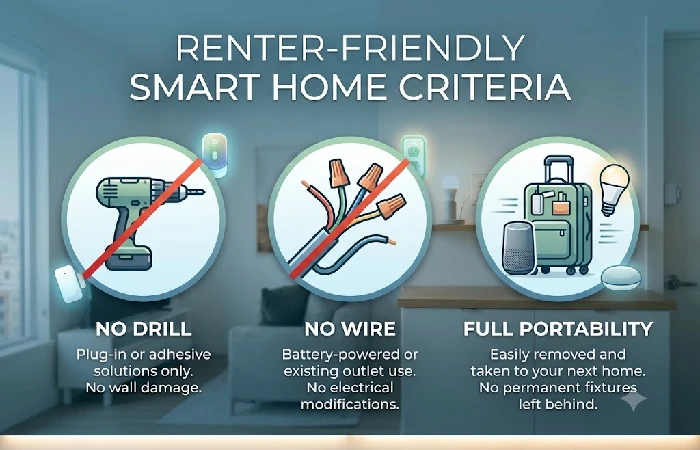
A device is renter-friendly if it leaves no lasting alterations and you are able to bring it along when you return to a new apartment. The following three standards distinguish renter-safe devices from those marketed as “easy install” which still entail use of screws, wire splicing, or fixture replacement:
The no-drill, no-wire rule
- Power source: batteries, or plugged into whatever outlet’s already there. Hardwiring is where things get tricky — a smart light switch that replaces your wall toggle, for instance, fails the renter test unless you’re keeping the original switch to reinstall before you move out.
- Mounting: 3M Command strips, magnetic mounts, suction cups, or just set it on a table or shelf. Aqara and IKEA’s adhesive-mounted sensors come off clean too — hit the pad with a hair dryer for 30 seconds, then slide dental floss behind it, and no residue.
- As for network connection, you’re wireless the whole way through: Wi-Fi, Bluetooth, Zigbee, or Thread. Nothing running through the walls.
For a broader overview of device categories beyond renter-specific picks, see the full smart home buying guides hub.
Why Matter and Thread matter for renters
Matter is an open connectivity standard — version 1.5 as of November 2025, from the Connectivity Standards Alliance — and it lets one device run on Apple Home, Google Home, Amazon Alexa, and Samsung SmartThings all at once. That solves a real problem for renters. Move from a Google Nest setup to an Apple HomePod household, say, and Matter-certified gear just comes with you — no repurchasing.
Thread is the mesh networking protocol that is underneath many Matter devices. Major renter benefits:
- No Wi-Fi congestion: in a high-density apartment building with 20+ networks that is crowded with Wi-Fi signals, the low power mesh between the Thread devices is separated from the crowded 2.4 GHz Wi-Fi band that causes mesh-connected smart bulbs to drop offline.
- No hub needed, most of the time. Thread Border Routers are already built into a lot of gear you might own — Google Nest Hub (2nd Gen), Apple HomePod mini, Apple TV 4K (2nd/3rd Gen), newer Amazon Echo devices. Got one of those already? Your Thread network’s already running.
- Self-healing mesh: If one device stops being powered up, the mesh provides seamless rerouting via the other Thread nodes all without human intervention.
Definite stance: When in doubt, go with Matter-certified devices. Any smart home device that forces you into one app/one ecosystem is a huge pain point when you move every 2–3 years.
Best no-install smart home devices by category
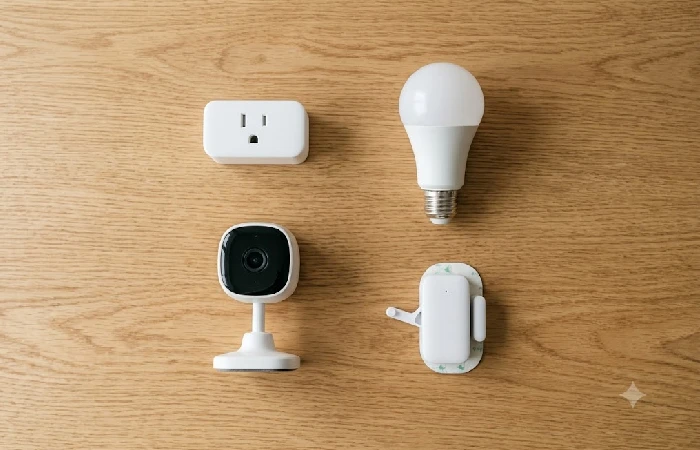
The quick-reference matrix above covers the top picks. Below, the two most under-covered categories across competing guides deserve deeper context.
Smart locks that preserve your landlord’s key
Many renters think smart locks are too much trouble or not allowed, but the Level Bolt (~$199) is mounted inside your door, changing just the interior thumb-turn. The exterior keyway (that allows your property manager’s master key to work) remains untouched. Your property manager may still access with a physical key, but you’re also allowed access via app, activity logs, and auto-locking on a timer.
The SwitchBot Lock Pro takes a different approach: it sticks on top of your existing deadbolt with a 3M adhesive tape, and physically twists the thumb-turn with a motorized arm. No tools, no taking apart your existing lock. When you leave, just peel off the tape and your door is stock again.
Edge case: If your building has a shared access fob on the front door, a smart lock on your unit will not obstruct the building entry system the two are separate.
Button-pushers and IR blasters
This is the least followed up on renter category. The SwitchBot Bot (~$30, switch-bot.com) mechanically nudges or pulls an already installed rocker switch, wall button, or coffee machine toggle. It is mounted with 3M tape, and pairs via Bluetooth (or remotely using a SwitchBot Hub at ~$20–$40).
One affordable (~$25–$35) Broadlink RM4 is placed on a table and it can substitute the need for every infrared remote in your apartment your stock air conditioner, TV and set-top box controllable via your phone or voice assistant. This is interesting if you are a renter and your landlord’s window AC can’t be swapped out for a smart model.
For a greater budget-controlled overview of these and related devices, take a look at the roundup of smart home devices under $100.
Lease-compliance checklist before you buy
Not all kinds of renter friendly equipment need as much careful handling. Below is a three-level classification based on how landlords and property managers typically treat smart device installations.
Devices that never need landlord approval:
- Smart bulbs (screw into current sockets, swap originals back at move-out)
- Smart plugs (plug into existing outlets)
- Voice assistants/ smart speakers (standing freely on a shelf or table)
- Security cameras to be placed on tabletops (not mounted on anything)
- IR blasters (not embedded but stand alone)
Devices that may need written approval:
- Smart locks (even non-invasive types such as the Level Bolt change the inside of the locking mechanism)
- Video doorbells installed outside (building policy may restrict cameras facing shared hallways)
- Adhesive mounted window or door sensors on painted frames (certain leases would consider adhesive as damaging paint)
What to keep for move-out:
- Keep any hardware removed, including the deadbolt thumb-turns, shower heads, light switch covers, and store in labeled bag. Reinstall hardware before final walkthrough.
How to reset and move out without losing your deposit
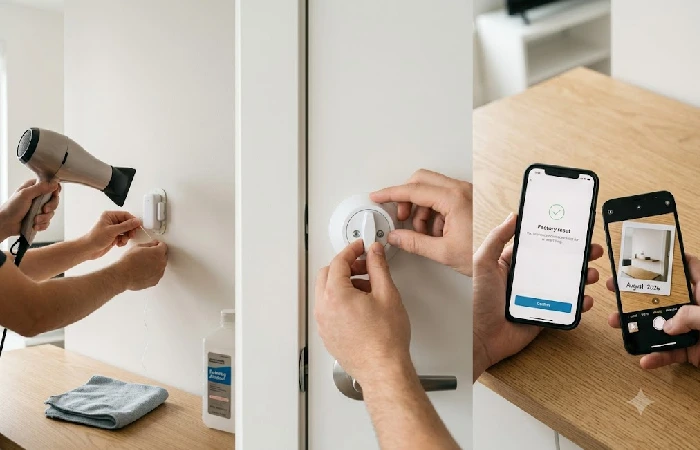
Under an hour — that’s all factory-resetting your gadgets and putting the unit back to normal takes, even for a 1BR. Follow this order and you won’t leave behind smart home footprints that leave your landlord (or the next tenant) scratching their head.
- Perform a factory reset of each device using its smartphone application (Settings → Reset → Remove from account). This will clear your Wi-Fi password, automation recipes and data from the device.
- Remove adhesive mounts. Using a hair dryer at medium heat, warm the adhesive for 30 seconds. Use dental floss or a plastic card to cut the adhesive as you slide behind the mount. Pull off slowly, at a very low angle. Use a microfiber cloth with rubbing alcohol to remove leftover glue without scratching paint.
- Reinstall original hardware. Replace the deadbolt thumb-turn, light switches, or showerheads stored during setup. Undo any changes to fixtures.
- Document the restored condition: photograph every altered door, wall, and fixture, with the date and time stamped on each shot. Get copies to your landlord or property manager before the inspection — that’s what backs you up if the deposit gets contested down the line.
Frequently asked questions
1. Can you have a smart home in a rental apartment?
Absolutely — there is an entire slew of plug-and-play, battery-operated and sticky-smart devices out there for “no-permanence” spaces. A renter smart home only needs one smart plug ($8–$15) and a voice assistant ($35–$50) to be functional, and then expand as time and budget allow. The only real limitation being the need for wireless enabled (Wi-Fi, Thread, Bluetooth) and non-permanent installations.
2. Are smart home devices portable when you move?
Each gadget in this guide is completely portable. Smart bulbs unscrew, smart plugs pull out, cameras lift from magnetic mounts, sensors peel off stickers. The only setup at your new house is connecting gadgets to your new wifi. Matter-certified devices make this even easier: just scan the QR code on your device, and your new ecosystem’s app will take care of onboarding without doing a complete factory reset.
3. What is Matter and do I need it for my apartment?
Matter’s an open standard — the Connectivity Standards Alliance runs it — that lets a single device work across Apple Home, Google Home, Amazon Alexa, and Samsung SmartThings, all at the same time. Nobody’s forcing you to use it for a renter smart home. But if you do go Matter-certified, your gear keeps working even after you swap ecosystems or move somewhere with a different setup. Version 1.5 landed in November 2025, adding camera streaming support.
4. Do smart locks work in rental apartments?
They can, with the proper model. The Level Bolt (~$199) upgrades only the interior deadbolt mechanism; the exterior keyway remains unchanged, and your landlord’s master key will still work. The SwitchBot Lock Pro installs over the existing thumb-turn, no removal necessary. They both come off easily at move-out. And regardless of how reversible the change is, get your landlord’s approval in writing before installing anything that touches the locking mechanism — worth doing even when you’re sure it’s harmless.
