Published: June 28, 2026
Last Updated: August 31, 2026
Most desk setups don’t have one big problem. They have twelve small ones that quietly eat an hour before lunch and leave no trace. This guide sorts the gadgets that actually fix them — by the problem they solve, not by how good they look in an unboxing video.
Key takeaways: Office desk gadgets are small devices and accessories that cut the daily friction of working at a desk, from cable clutter and glare to poor posture and lost focus. The ones worth buying solve a problem you hit every week and leave the desk cleaner than they found it; the rest are novelties you’ll quietly abandon. This guide sorts the best office desk gadgets for 2026 by the problem each one solves and hands you four ready-to-build setups by work style.
Pricing shifts, specs get quietly updated, and manufacturers have a habit of refreshing products without making much noise about it. Everything here draws on publicly available information about office desk gadgets as of June 2026, so worth a quick check on the manufacturer or retailer’s site before you buy anything.
Quick reference table:
Match your desk problem to the first gadget to fix it, then scroll to the full section if you need details.
| Problem |
Gadget type to start with |
Best for |
When to skip |
| Cable chaos |
Cable clips + under-desk cable tray |
Laptop, desktop, or dual-monitor setups with visible cables |
If your cables are already routed and hidden neatly |
| Eye strain |
Monitor light bar |
People working in the evening or low-light rooms |
If your workspace gets consistent natural daylight throughout the day |
| Poor posture |
Monitor riser or monitor arm + ergonomic wrist rest |
Anyone leaning forward or looking down at their screen |
If your monitor is already at eye level and your workstation is ergonomically adjusted |
| Hybrid/hot-desk |
Foldable Qi2 wireless charger + portable laptop riser/dock |
People moving between home, office, or shared desks |
If you work at one permanent desk and rarely move your setup or devices. |
What Counts as an “Office Desk Gadget” (and What Doesn’t)
A desk gadget isn’t a computer or a chair. It’s the smaller stuff sitting around them: the lamp angled at your keyboard, the charging pad you stopped thinking about, the wrist rest, the cable clip that keeps three cords from becoming one problem. Lighting, ergonomic supports, cable organizers, focus tools, charging hardware. Things that change something specific about how you actually sit and work, not the work itself.. Cable clips, monitor light bars, wrist rests, charging docks, programmable keypads, even a little CO2 monitor that tells you the room’s gone stuffy.
What doesn’t count? The desk and the chair. Those are furniture, the foundation everything else sits on, and they deserve their own buying decision. The edge has gotten blurry lately, mind you. Smart desks now track your sit-stand time and remember height presets, which makes them feel gadget-adjacent. For this guide I’m drawing the line at things you add to a working setup rather than the setup itself.
One thing trips people up more than anything else here, so it’s worth saying early. Price tells you almost nothing about value. A $12 pack of cable clips will do more for most people’s mornings than a $400 AI planner with its own screen. That’s not a knock on expensive gear. It’s just that value lives in what a thing fixes for your specific setup, not in its price point or how it photographs. Worth keeping that in mind before anything else.
Do Desk Gadgets Actually Boost Productivity?
Some do. Plenty don’t. That answer matters more than any single product on this page.
The ones worth buying solve something you actually run into — not occasionally, but most mornings. A cable nest you fight every morning. A dim room that leaves you squinting by mid-afternoon. A screen sitting too low, so you crane your neck for hours. A phone you keep losing under a drift of paper. Pick the right thing and you notice it by Friday. Not because it’s clever. Because one small recurring drain on your attention quietly stopped showing up. The ones that disappoint are almost always bought for how they’ll look on the desk rather than what they’ll actually do there. They photograph beautifully and then sit there gathering dust, which is its own kind of clutter.
Eye strain is worth taking seriously, and it connects directly to how well you can actually focus. There’s a reason the American Optometric Association landed on the 20-20-20 rule: pause every 20 minutes, pick something 20 feet out, and give it 20 seconds of your attention. It sounds trivial until you realize how much silent work fatigued eyes are doing against you all afternoon. A gadget that quietly steers you toward better habits, decent lighting, a screen sitting at the right height, is doing something real. A levitating pen isn’t. The goal was never to own more stuff. It’s to stop losing small pieces of your day to the same friction, over and over.
Ergonomics research backs this up. Workstation setups that cut muscle strain and eye fatigue tend to produce fewer errors and better sustained focus — though how much varies by person and role, so treat the numbers as a direction, not a guarantee.
The T.O.O.L. Test: Toy vs. Tool
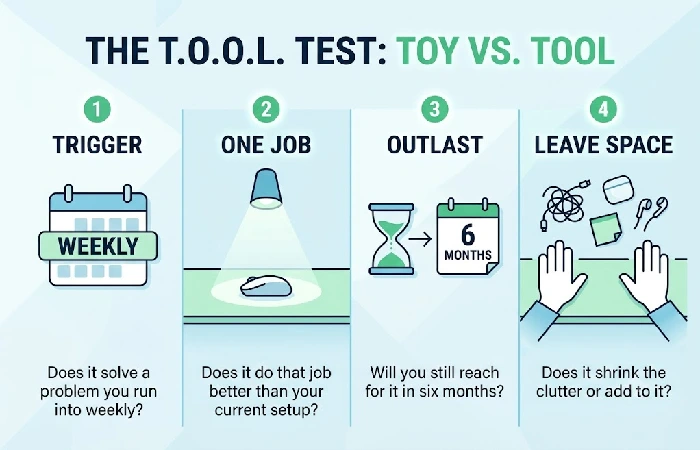
Here’s the filter I’d run before buying anything for a desk. Four quick questions, and a gadget needs to clear most of them to deserve the space.
- Trigger — Does it solve a problem you actually run into at least once a week? A coffee warmer fails this hard for people who drink fast.
- One job — Does it do that job better than whatever you’re using right now? A second mediocre lamp isn’t an upgrade, it’s just more stuff.
- Outlast — Be honest with yourself: will you still reach for it in six months, or is this a two-week novelty you’ll forget about?
- Leave space — Does it shrink the clutter or add to it? A device that quietly replaces three others wins big here.
Fail two of these and you’re looking at a toy, however cool it seems in the moment. The test sounds almost too obvious written down, yet it’s astonishing how few impulse buys survive it once you’re honest. I think the reason it works is that it forces you past the “ooh, neat” reaction and onto the boring question of whether you’ll use the thing on a normal Wednesday. That’s usually where the truth lives.
Run your own wishlist through it before you read another word of recommendations. If you mostly want gear that sharpens focus and workflow rather than comfort.
Office Desk Gadgets by the Problem They Solve
Forget alphabetical lists and brand roundups. The useful way to shop is by whatever’s annoying you right now, so that’s how I’ve grouped things. Find your pain point and start there.
- Cable chaos. Nobody talks about how cheap this one is to fix. Clips along the desk edge, an under-desk tray for the power strip, a braided sleeve to bundle the runs, and nine cords become three without much effort or money. You notice it every single time you sit down
-
Eye strain and bad lighting. Clamp a BenQ ScreenBar to the top edge of your screen and it directs light onto your desk surface, not toward your face. That last part matters. A normal desk lamp tends to reflect off a glossy display, which is exactly what you don’t want. Asymmetric light bars are built to avoid it, and for anyone working past sunset they’re one of the higher-value upgrades on this whole page.
- Posture and comfort. A simple riser, or a monitor arm, lifts the screen to eye level and does more for your neck than most of the gadgets marketed as “ergonomic.” Add a wrist rest if your keyboard sits high enough to bend your wrists upward. None of this is glamorous and all of it adds up over a long week.
- Charging and connectivity. A USB-C dock collapses a drawer’s worth of bricks and dongles into one unit — Qi2 wireless stand if you want the phone off the cable entirely. If your desk currently has four chargers scattered across it, this is probably the first thing to fix. One purchase, clutter gone, and every device has a home.
- Focus. Programmable macro pads, the Elgato Stream Deck being the obvious example, used to be a streamer-only thing. They’ve crossed over. A single tap handles a keyboard shortcut, drops you into a different app, kills a call, or kicks off a small automation, no code needed. Repetitive multi-app work is where the time savings are real, though I wouldn’t push one on someone whose day is mostly reading and replying to email.
-
Air and comfort. CO2 monitors are newer to the desk setup conversation, and I didn’t walk in convinced. A closed room with poor airflow makes concentration harder than most people account for, and if your door stays shut through most of the workday, the monitor isn’t the gimmick it looks like at first glance. You can only do something with that reading if you have options to act on it. Windows, exhaust fans, HVAC adjustments, that’s where most indoor air-quality guidance lands, not on a gadget. So the monitor works best as a prompt, not a fix. Shut windows and no airflow options? All it does is put a number on what your head already knew.
Best Desk Gadgets by Budget
You don’t need a big spend to feel a real change. Here’s roughly how the category breaks down by price, with the kind of thing each tier buys you.
The 4 Desk Stacks: Build Your Setup by Work Style
Most guides hand you a flat list of products and wish you luck assembling them. What fits your desk depends on what your day actually looks like. A writer’s setup and a calls-heavy setup are solving completely different problems, so find the stack closest to your situation and start there, not as a prescription but as a direction.
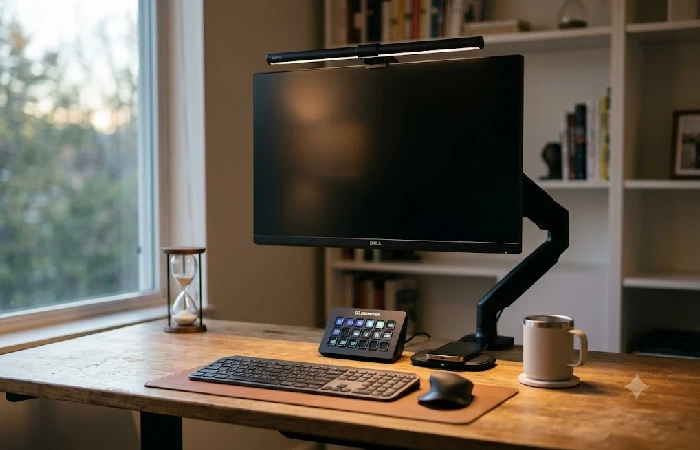
- The Deep-Focus Desk. When the work is writing, coding, or designing in long uninterrupted stretches, two things quietly grind you down: distraction and eye fatigue. A macro pad handles your most-used actions without breaking flow. A decent light bar keeps your eyes from giving out before the afternoon’s over. And charging stays off the main surface. Keep the surface bare. Every object in your eyeline is a small invitation to look away.
- The Calls-Heavy Desk. Back-to-back meetings mean camera presence is part of your actual job, not a nice-to-have. Your laptop lens isn’t cutting it. A tidy dock means you’re not fumbling cables thirty seconds before someone joins. And an AI meeting recorder handles the notes so you can actually listen instead of scribbling. The goal is to show up present rather than frazzled.
-
The Small or Minimal Desk. You’re working with limited surface, a dorm desk or a bedroom corner. One all-in-one riser dock lifts the laptop, covers the ports you’re missing, and handles phone charging, three gadgets gone, surface area back. That trade is the whole point.
- The Hybrid or Hot-Desk. You move between the office and home, or you don’t own a fixed desk at all. Everything you buy should pack down and travel: a foldable Qi2 charger, a lamp that flattens, accessories light enough to toss in a bag without thinking.
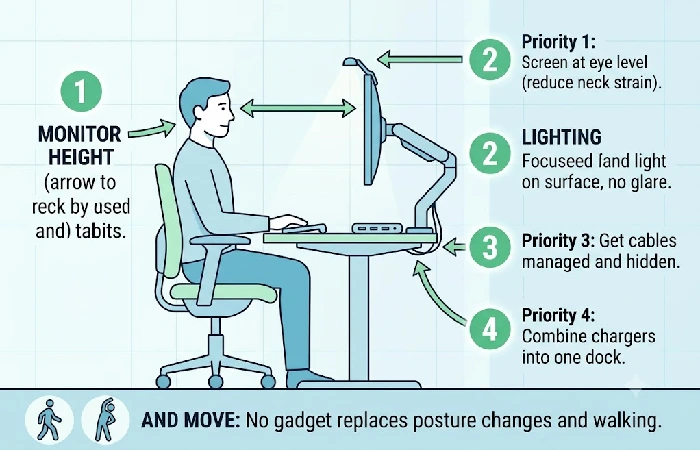
One principle cuts across all four stacks, so don’t skip it. Get your monitor up to eye level. OSHA’s workstation guidance puts the top of the screen at or just below eye level and the display roughly an arm’s length away, which spares your neck no matter which bundle you build. A stack of books works in a pinch, but a proper riser or arm is one of those quiet upgrades you stop noticing precisely because it’s doing its job.
What’s New in 2026 (and What’s Just Hype)
A few things genuinely shifted this year, and a few are just marketing turned up louder. Here’s how I’d separate them.
Wireless charging finally settled down, which is the change I’m happiest about. Qi2, the updated wireless charging standard from the Wireless Power Consortium, adds magnetic alignment and supports up to 15W charging on compatible devices, so you spend less time sliding your phone around the pad hunting for the sweet spot. As the standard spreads, prices on those foldable 3-in-1 stands eased off too, which makes the hybrid stack above a lot more affordable than it was a year ago.
Macropads crossing over from streaming rigs to ordinary office desks is the trend I didn’t see coming this fast. They’ve gone from niche to genuinely useful for regular work. CO2 and air-quality monitors are creeping onto desks as more people pay attention to how a stuffy room saps their afternoon. And AI meeting tools have quietly matured past the demo stage into something you’d actually keep using. The catch with all of it is the same. New and interesting doesn’t mean it belongs on your desk. Buy the piece that maps onto your real work and let the rest stay on someone else’s. If the smart and connected end of things is where your curiosity sits.
Overrated Desk Gadgets to Skip
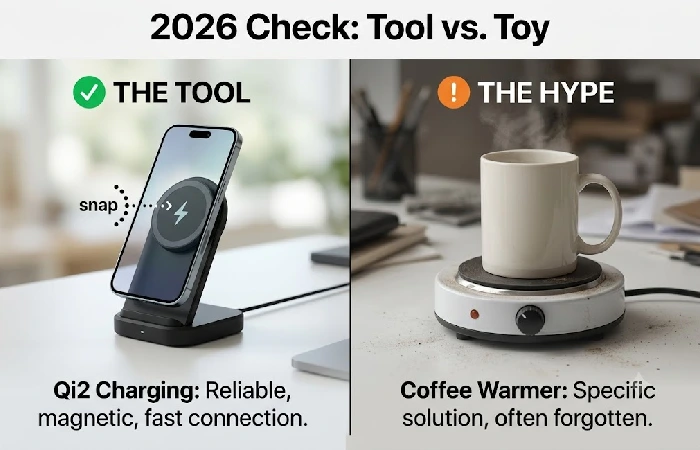
Some gadgets are just not worth the desk space. Skip them and keep the money.
Desktop vacuums look adorable in the ad and clean almost nothing in real life. Levitating pens are desk jewelry — buy one if you want something that looks interesting, but productivity isn’t part of the deal. Coffee warmers are the tricky one. They’re genuinely useful for people who get pulled away mid-task and come back to a cold mug. For anyone who drinks fast, it’ll sit plugged in for weeks doing nothing.
The marketing around standing desks oversells them pretty consistently. Swapping one static posture for another doesn’t fix much, and a full day on your feet locks you into its own set of aches. The real benefit is movement: changing positions, walking, stretching. The WHO’s guidance is to cut down sedentary time and replace it with activity of any intensity, which a sit-stand desk only helps you do if you actually change position and move around. Bought as a prompt to stand, stretch, and walk more often, it’s worthwhile; bought as a magic health fix you can stay frozen at, it’s an expensive way to be uncomfortable in a different way. The desk is just a tool — your habits do the real work.
How to Set Up Your Desk Without New Clutter
The classic mistake is buying everything at once and recreating the exact same mess in a nicer color. Go in order instead, fixing the things that affect you most first.
Start with posture and lighting, because those touch you every single minute you’re at the desk. Get the screen to eye level, get light onto your work without glare, and you’ve handled the two issues most likely to leave you sore and tired. Sort your cables next, so the surface reads calm rather than chaotic. Then consolidate charging into a single dock or stand. Save focus tools like a macro pad for last, once you know your real workflow well enough to program one in a way you’ll actually stick with. If your work involves health, finance, or other high‑stakes decisions, treat this setup advice as comfort and workflow guidance only, and always check any tool’s security and compliance details on its official site before adopting it into your routine.
And build movement into the day rather than trusting a gadget to do it for you. As that WHO guidance suggests, the win is replacing sedentary stretches with light activity, so stand up, stretch, and walk on some kind of rhythm. A timer or a simple habit does this better than any device sitting on your desk. One purchase at a time, then live with it for a couple of weeks before adding the next thing. You’ll be surprised how often the next thing turns out to be unnecessary.
Before you buy anything: join our Desk Upgrades email list and we’ll send you one tested, no-fluff gadget pick a month, only the ones that pass the T.O.O.L. Test. No product-of-the-week spam, just the stuff genuinely worth your desk space.
Frequently Asked Questions
Do desk gadgets really improve productivity?
The right ones do, by removing friction you hit daily. Cable management, lighting, and posture fixes consistently pay off. Gadgets bought purely for looks usually don’t.
What are the must-have office desk gadgets in 2026?
For most people it comes down to four things: a monitor light bar, a USB-C dock or Qi2 charger, a riser to bring the screen to eye level, and decent cable management. Add a macro pad on top of that only if your work is genuinely repetitive.
These recommendations are based on typical knowledge‑work setups as of 2026, so if your work is more specialized — audio production, stock trading, medical documentation — layer industry‑specific gear on top of this core instead of replacing it.
What’s the best desk gadget under $50?
Honestly, a good cable management kit or a monitor light bar. Both sit at the cheap end and both fix problems you’ll notice every day, which is the whole point.
Which gadgets actually reduce desk clutter?
Look for anything that replaces several things at once. An all-in-one riser dock or a multi-port hub quietly does the work of three separate gadgets, so your surface ends up emptier rather than fuller.
Are smart and AI desk gadgets worth it?
Sometimes. An AI meeting recorder is a real time-saver if you live in back-to-back calls. If your days are mostly heads-down solo work, you’re paying for features you’ll never open.
What desk gadgets are overrated?
Desktop vacuums, levitating pens, and coffee warmers for anyone who drinks quickly. I’d put standing desks on the watch list too, unless you treat one as a prompt to move rather than a fix you can stand still at.
What works best for a small or hybrid desk?
Go portable and consolidated. A foldable Qi2 charger plus a single riser dock keeps a tight or shared desk usable without leaving permanent clutter behind when you pack up.
Where I’d Start If It Were My Desk
I’ll plant a flag on this one: most people’s problem with office desk gadgets isn’t owning too few, it’s owning too many. That drawer of half-used chargers and the levitating pen that lost its charm by week two cost more, added up, than the two or three things that would’ve genuinely helped. If you buy nothing else this year, get your screen to eye level and your cables off the floor. That’s it. Those two unglamorous fixes quietly outperform almost anything with a battery in it.
So look at your desk right now, before you add a single thing to a cart, and ask which object you’d actually miss tomorrow if it vanished overnight. Whatever you can’t answer for, you already know what to do with.
