Published: September 3, 2026
Last Updated: September 3, 2026
Small business owners shouldn’t need a formal research paper on AI. What they actually need is to know which task to automate first — then what it costs today, and whether it pays back fast enough to bother. This guide names actual tools, what they cost right now, and gives you the ROI math to run before you spend a cent on any of them.
Quick answer: pick one repetitive task and find out what the AI tool actually costs. Track the return before you touch anything else.
Definition: Small business owners don’t need two separate tools to see this in action — a chatbot handling basic customer questions is one example, a no-code tool moving data between two apps so nobody retypes the same info twice a day is another, and once either one’s running you’re not the one sitting there operating it.
Compare tool costs and best-fit tasks before choosing a platform:
| Tool |
Category |
Entry price |
Best-fit task |
| ChatGPT Business |
AI assistant |
$25/user/month monthly, $20/user/month annual, 2-seat minimum |
Drafting customer replies, internal Q&A |
| Zapier Free |
No-code connector |
Free, 100 tasks/month, 2-step Zap limit |
Testing one simple automation |
| Zapier Professional |
No-code connector |
~$19.99–29.99/month, scales to 2M tasks/month |
Syncing forms, CRM, and email triggers |
| n8n (self-hosted) |
Open-source automation |
Free software, $5–20/month server cost |
High-volume workflows, technical teams |
| n8n Cloud Starter |
Hosted automation |
$20/month, 2,500 executions |
Non-technical teams, hosted setup |
| Lindy |
AI agent builder |
Free up to 40 tasks; paid up to 1,500 tasks/month |
Lead qualification, support agents |
Methodology: prices reflect public vendor rates cross-checked against official documentation, verified current between July and September 2026.
How can small businesses use AI automation?
Small firms automate mundane digital tasks like responding to boilerplate emails, inputting information into spreadsheets, or confirming appointments, without a person doing every step by hand. 58% of small firms now employ generative AI, up from 40% in 2024 and 23% in 2023, says the U.S. Chamber of Commerce.
Adoption is rising because the reported returns are measurable:
AI is already paying off for most small businesses that use it. Salesforce put out a number this year that’s hard to ignore: 91% of small businesses running AI say it’s boosted their revenue. Efficiency gains track close behind at 90%.
So where’s it actually getting used? Mostly marketing and customer service, with admin work not far behind, according to Intuit QuickBooks’ 2025 numbers. Chatbots aren’t the whole story either. A workflow connector can shuffle data between two apps on its own now, and some AI agents will take a customer request and just handle it, no one watching the screen.
Want the bigger picture? The AI automation for small business page maps out every category, from customer service bots to internal workflow tools. Trying to pick between actual platforms is a different question, and the tool comparisons page is built for that.
What are the best tasks to automate with AI first?
Begin with the most mechanical, least judgmental task in the business, not the sparkly new AI feature out there. Clear right-and-wrong scenarios are the most reliable use cases to begin with, as it’s easier to correct mistakes before a customer ever sees them.
Use three filters to pick a first task:
- High repetition, low judgment: data entry, appointment confirmations, invoice reminders.
- Unequivocal success signal: an email either got a reply or it didn’t. There is no gray area.
- It also helps if there’s already a digital record somewhere, a spreadsheet, a CRM field, whatever the automation can pull from instead of someone typing it in fresh.
The easiest way to stay safe is steering clear of anything that needs a human reading the customer’s tone or making a judgment call specific to that account. Save the negotiating for a person too, at least for now. Hold off on agentic, decision-making automations until you’ve had a clean 30-day run of repetitive workflows.
Which AI automation tools are affordable for small teams?
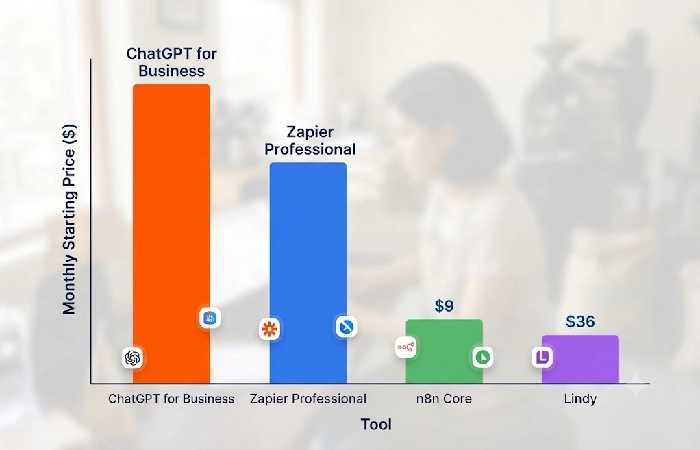
Pricing depends a lot on what you’re actually using it for. A general assistant or a no-code connector might not cost you anything to start. Go for something like a self-hosted workflow engine and you’re looking at up to $25 or so per user per month.
Three pricing tiers worth knowing:
- ChatGPT Business costs $25/user/month billed monthly, or $20/user/month billed annually, with a 2-seat minimum — suited to drafting replies and internal documentation.
- Zapier’s free tier caps at 100 tasks per month and blocks Zaps longer than two steps; paid plans start near $20–30/month and moved to model-based billing in mid-2026.
- n8n can run self-hosted for free, with only a $5–20/month server cost, or on n8n Cloud Starter at $20/month for 2,500 executions.
Match the tool to the task’s technical complexity, not to which platform has the most features advertised.
How do you build your first AI automation?
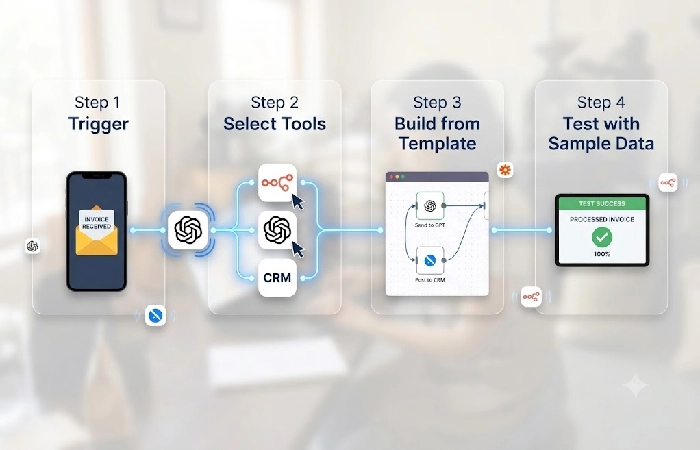
Getting a first automation running isn’t complicated, it’s really just four moves. Know what you’re automating and what tool’s handling it, then hook the trigger to the action and run it against real data before you let it anywhere near production.
- Start with the trigger and action. Something like “new form submission” triggers “send Slack notification,” that’s the whole idea.
- Whatever tool you land on, make sure it talks to both apps on its own. No point writing custom code if someone’s already built a template for exactly this.
- Don’t start from a blank canvas either. Chances are decent whatever platform you picked already has a template sitting there for your exact trigger.
- Before flipping it live, run it against 5 to 10 real past cases. Not hypothetical ones, actual data you already have sitting around.
Want the deeper version, template picks and how to handle errors and all that? Here’s the full workflow guide. Most bad-data incidents trace back to one thing: someone skipped the testing step.
How do you calculate the ROI of AI automation?
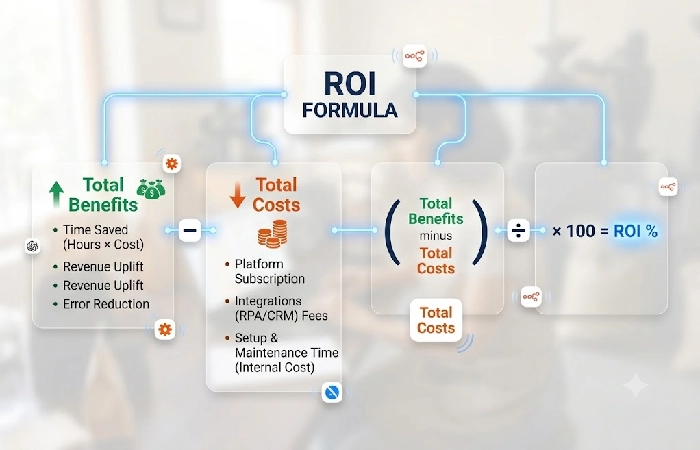
ROI on AI automation follows a fixed formula: (Total benefits − Total costs) ÷ Total costs × 100. Run this calculation before scaling any single automation to additional tasks or departments.
Break the formula into two inputs:
- Total benefit = hours saved per month × fully loaded hourly wage for the person who used to do the task.
- Total cost = monthly tool subscription + one-time setup time, converted to a dollar cost at the same hourly wage.
Recalculate after 30 days of live use — not before — since initial setup time skews the first-week numbers. A negative result at 30 days signals the task was either too complex for the tool chosen or too low-volume to justify the subscription cost.
Frequently asked questions
1. Can AI automation replace employees?
For most small businesses, AI automation doesn’t eliminate the whole job, it cuts out the routine part of it. What’s left tends to be the stuff that needs actual judgment, or a relationship the AI can’t read, or some exception it just wasn’t built to catch.
2. How much does AI automation cost for a small business?
Entry costs range from free — n8n self-hosted or Zapier’s free tier — up to about $25 per user per month for tools like ChatGPT Business. Total cost also includes setup time, which should be factored into the ROI calculation above.
3. What’s the difference between AI automation and traditional workflow automation?
Take a basic Zapier connector, that’s regular automation. It runs on hardcoded if-then rules and doesn’t interpret a thing. AI automation is different because it can actually read something messy, an email, a form someone filled out weirdly, and figure out what to do next without a rule sitting there for every possible case.
4. Is AI automation worth it for a business under 10 employees?
Yes, though it depends on the task. It needs to be repetitive, and there needs to be enough volume that the hours saved actually show up somewhere measurable. Run the ROI formula above before you commit to anything. A positive result within the first 30 to 60 days is a fair signal to scale the automation to a second task.
Pick the single task with the least judgment attached, run it through the ROI formula above, and give it 30 days before layering on a second automation.
