Published: September 2, 2026
Last Updated: September 18, 2026
Most explanations of AI workflow automation stop at the definition and never show what changes once AI is actually running inside a process. This piece goes further: it shows the mechanism, the processes worth automating first, the build sequence, and — the part almost every competitor skips — how to measure whether it worked.
Quick Answer: AI workflow automation blends AI judgment into repeatable tasks — cutting manual steps and errors compared to fixed-rule automation alone.
Definition: “AI workflow automation is the use of AI models inside automated workflows to handle steps that require judgment, not just fixed if/then rules.”
What is AI workflow automation?
AI workflow automation merges AI with automated, repeatable business processes so that it can read context, whereas traditional automation Robotic Process Automation (RPA) is a simple automation technique that runs a fixed set of commands every time no matter what the data looks like. AI workflow automation adapts its commands depending on the data it’s given.
The scale of adoption is one example of why this distinction matters commercially. This category should reach a market size of $78.26 billion by 2035 with a compound rate of growth of 21 percent from 2025 to 2035 according to the market research by Meticulous Research.
Key structural difference from legacy automation:
- Rule-based automation has a set sequence, identical input, and identical output each time.
- AI workflow automation takes unstructured input (emails, tickets, documents) to determine next steps automatically.
- Hybrid systems — the most common deployment pattern — use rule-based automation for the repeatable spine of a process and AI for the judgment-heavy branches.
This hybrid pattern is why “AI workflow automation” and “RPA” are not competing categories — one extends the other.
How AI improves traditional workflows
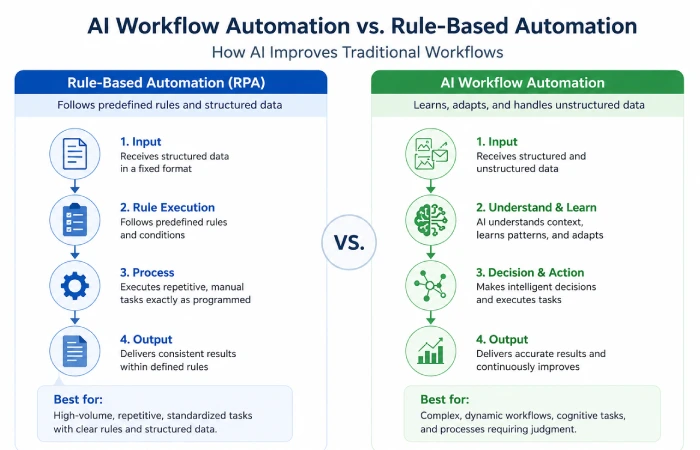
AI improves traditional workflows primarily by removing the judgment bottleneck that used to force a human handoff. Instead of an employee reading a ticket, deciding a category, and routing it, an AI layer performs that classification and routing itself.
In the State of AI study, McKinsey tested 25 organizational attributes and concluded workflow redesign has the largest single impact on whether an organization realizes true EBIT benefit from generative AI. Only 21% of organizations deploying gen AI have actually gone back and rebuilt their workflows. That gap is why most automation results disappoint. You add AI to a process that was never designed to use it, and nothing changes because the process itself didn’t.
Zapier documented what this looks like at two real companies. Take Remote: AI now handles 28% of their support tickets, which cleared 600-plus hours off the team’s monthly workload. Erewhon runs a similar setup, with 70% of AI-drafted replies going out untouched, roughly 1,500 support hours saved over the year. Getting there wasn’t a matter of switching a tool on. Both teams spent months tuning against real ticket history until the output was reliable enough to trust.
Best processes for AI workflow automation
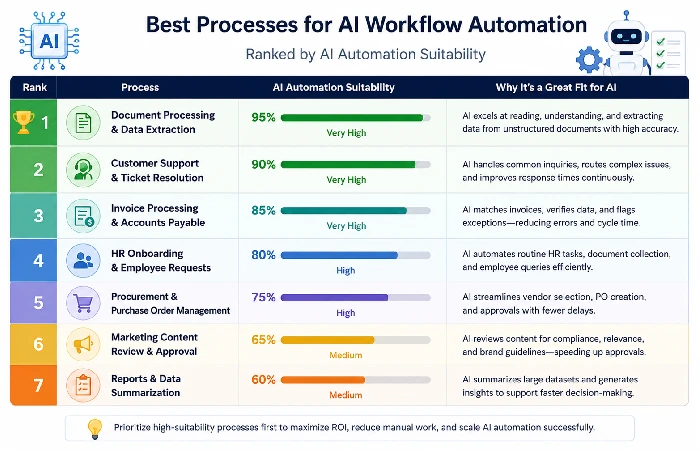
The processes that lend themselves most readily to AI automation have one thing in common: high volume combined with decisions that follow a recognizable pattern, rather than physical or creative work. Prioritize these first:
- Ticket triage and routing — classification is repetitive and rule-learnable from historical tickets, as demonstrated in Remote’s 28%-automation result cited above.
- Draft generation for responses – AI writes a first pass and a human edits or approves it, matching the Erewhon pattern of a 70% unedited-send rate.
- Document data extraction – pulling structured fields (dates, amounts, names) out of unstructured documents like invoices or contracts.
- Anomaly flagging — surfacing outliers in transaction or usage data for human review rather than full autonomous action.
Processes to automate last or avoid automating with AI: decisions with legal or compliance exposure, one-off/non-repeating tasks, and anything where the input volume is too low to generate a reliable pattern. McKinsey’s data on the 21%-redesign gap suggests most failed automation attempts come from picking the wrong process, not the wrong tool.
How to create an AI-powered workflow
Establishing an end-to-end AI-enabled process should begin by capturing the existing human process without any AI involved first, since failing to do this is one reason automation can be unreliable. The order should be:
- Document how it is done using the manual process step-by-step, noting all decisions a human involved would have at each stage.
- Decide which decision points are pattern-based (classification, routing, extraction) instead of judgment-based & non-repeatable (skip these).
- Choose a tool appropriate to the nature of the process for example, n8n for custom multi-step orchestration, versus a more limited point-solution for single-task automation.
- Develop the workflow with a human-in-the-loop checkpoint at the highest risk decision point prior to full autonomy.
- Pilot on a small volume before increasing to 100% of the process volume.
- Establish a review cadence to monitor for drift as inputs change over time.
This build sequence directly avoids what Gumloop’s own framework describes: automations built without upfront planning depth tend to degrade into unreliable “AI slop” rather than dependable workflow automation platforms your team can trust long-term.
Measuring AI workflow performance
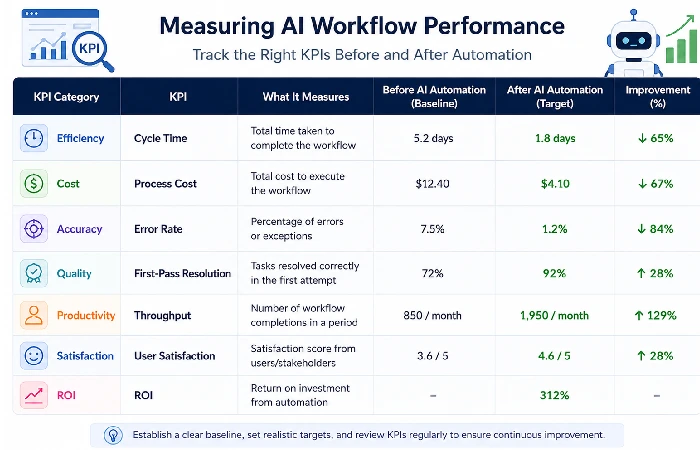
Measuring AI workflow performance means comparing a documented baseline metric — time, cost, or error rate — against the same metric after automation, not just observing that the process “feels faster.” Skipping baseline measurement is why so many automation projects can’t prove their own value.
The scale of this problem is documented directly: nearly 70% of global respondents call digital transformation their single most important value-driving investment, yet Deloitte’s global research found that three out of four of those same respondents struggle to define what success actually means. Separately, McKinsey’s research found that while 88% of organizations regularly use AI in some form, only 6% report a significant enterprise-wide EBIT impact of 5% or more — a gap almost always traceable to absent or poorly defined measurement.
Minimum KPIs to track before and after automating any workflow:
- Cycle time — hours or days from task start to completion.
- Error/rework rate — percentage of outputs requiring correction.
- Volume handled per hour — throughput comparison, human-only vs. AI-assisted.
- Hours reclaimed — but tracked net of rework time; if recovered hours go into validating AI output instead of new productive work, the ROI is smaller than it appears.
FAQ
1. What’s the difference between AI workflow automation and RPA?
RPA follows a fixed script regardless of input variation, while AI workflow automation reads context and adapts its next step. RPA is cheaper to deploy on stable, unchanging processes; AI automation is better suited to processes with variable, unstructured input like emails or support tickets.
2. Which business processes should be automated with AI first?
Start with high-volume, pattern-recognizable decisions such as ticket triage, document data extraction, and draft response generation. Avoid starting with low-volume or compliance-sensitive decisions, since AI needs repeated patterns to perform reliably.
3. How much time does AI workflow automation actually save?
Documented results vary by process: Remote’s support team automated 28% of tickets and saved over 600 hours monthly, while Erewhon saved roughly 1,500 support hours annually through AI-drafted replies, per Zapier’s case studies. Generic percentage claims without a named source should be treated skeptically.
4. What KPIs should I track after implementing AI automation?
Track cycle time, error/rework rate, throughput per hour, and hours reclaimed net of any new validation work. Skipping a documented pre-automation baseline is the most common reason teams can’t later prove ROI.
5. Does AI workflow automation require a full process rebuild?
Not always, but McKinsey’s research found that workflow redesign has the largest measurable effect on EBIT impact among 25 tested attributes, and only 21% of organizations have done this redesign. Bolting AI onto an unchanged process typically underperforms a rebuilt one.
