Published: September 3, 2026
Last Updated: September 3, 2026
IT automation subs out manual, repetitive IT work with software that runs the task on its own. Maybe it fires on a schedule. Maybe a specific event triggers it. A server gets provisioned, a patch goes out, a network gets reconfigured, and no one has to click through any of it by hand. The category matters now because of scale — by 2028, the market for software that enables hyperautomation will reach $1.07 trillion, growing at a 13.9% CAGR. So this guide unpacks what IT automation actually does, and the tool categories behind it.. It covers the ROI organizations report after adopting it too, and closes with a five-step framework for building a real strategy instead of a patchwork of disconnected scripts.
Quick Answer: IT automation runs infrastructure and network tasks through software, workflow work included, instead of manual steps. The numbers back it up: documented deployments show measurable cost and labor reductions in provisioning, in patching, and on the service desk.
Definition: IT automation is the use of software, scripts, and orchestration tools to perform IT infrastructure and operations tasks with minimal manual intervention.
At a glance: IT automation by the numbers
| Metric |
Figure |
Source |
| Hyperautomation-enabling software market by 2028 |
$1.07 trillion, 13.9% CAGR |
Gartner |
| Three-year ROI, composite enterprise, workflow automation |
248%, payback under 6 months |
Forrester Consulting TEI (2024) |
| Basic automation operational cost reduction |
20–30% |
McKinsey/Gartner/Formstack analysis |
| Intelligent automation operational cost reduction |
50–70% |
Same analysis |
| Ensono: hours saved after Ansible migration (1 year) |
210,000+ hours, 40 million tasks, 225,000 jobs |
Red Hat/Ensono |
| ABB: SAP patch time per server (100+ servers) |
Cut from 6.5 hours to 20 minutes |
Red Hat/ABB case study |
| Cloud orchestration market by 2032 |
$75.39 billion, 20.6% CAGR |
Coherent Market Insights via IBM |
| NinjaOne per-endpoint pricing range |
$1.50–$6.00 per endpoint/month |
Community-reported MSP pricing data |
| Atera per-technician pricing range |
$129–$219/month, unlimited endpoints |
Atera published pricing |
Methodology: figures are pulled directly from named primary sources — Gartner forecast documents, Forrester Consulting studies, Red Hat customer case studies, and IBM Think documentation — verified via live search in September 2026. No figure is estimated.
What is IT automation and how does it work?
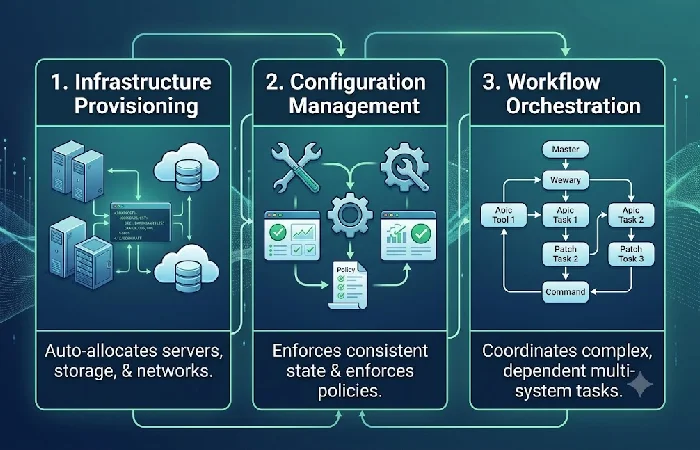
IT automation swaps out manual admin work for code-driven workflows. Configuring a server, provisioning it, keeping an eye on it after — all of that. Those workflows just run. Something sets them off — a schedule, usually, though an event can do it too. No admin logging into each server by hand. The tool reads a defined set of instructions and applies them the same way, every time, across the whole environment.
The mechanics break down into three linked functions, according to IBM: infrastructure automation operates through three core functions: infrastructure provisioning, configuration management and workflow orchestration. The performance difference is stark — to manually deploy a microservices application across cloud regions for a high-traffic event, a company would need weeks to provision servers, configure load balancers and establish network connections, while automation tools can complete the same deployment in minutes.
This matters at scale: a 2023 IBM Institute for Business Value study found that 92% of executives expected their workflows to be digitized and use AI-powered automation by 2025 — meaning most IT organizations are no longer choosing whether to automate, only how fast.
What are the common types of IT automation?
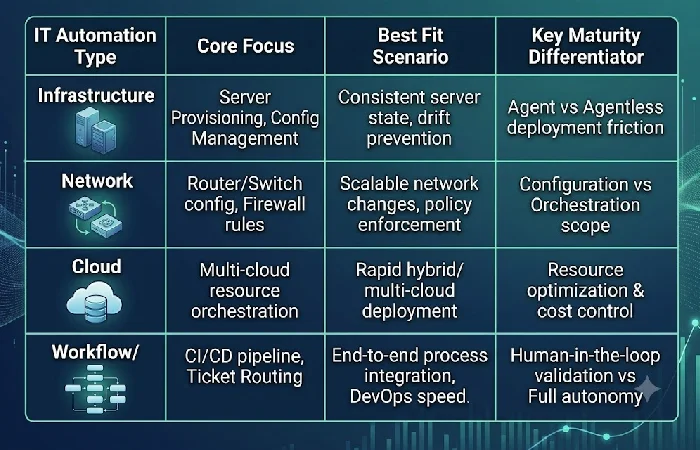
IT automation splits into distinct functional layers — infrastructure, network, cloud, and workflow/DevOps automation — each solving a different operational bottleneck. Understanding which layer applies to which problem prevents teams from buying overlapping tools.
Infrastructure automation and Infrastructure as Code (IaC)
Infrastructure automation provisions and manages servers, storage, and network infrastructure, no manual clicks on consoles needed, leaning on a pair of tools to get it done. A typical pipeline uses Terraform to provision, centralize, standardize, and administer infrastructure. Ansible handles the configuration side, installing software and defining security policies. IaC is what codifies all of it. Automation engines run provisioning and configuration off predefined code, working through infrastructure definitions written in configuration files. That code is what turns into actual IT resources — servers, networks, databases, the works.
A key operational distinction is agent architecture. Ansible is an automation tool from Red Hat that manages configuration without requiring agents on target systems — it connects directly using SSH to execute commands. This lowers deployment friction versus agent-based tools that require software installed on every managed node.
Network and cloud automation
Network automation applies the same code-driven logic to routers, switches, and firewalls, while cloud automation extends it to multi-cloud provisioning. IaC also helps support configuration management and prevent configuration drift through the provisioning of consistent environments, and tools like Terraform and Ansible can be used with container orchestration tools like Kubernetes to increase efficiency in microservices architectures. The distinction between automation and orchestration matters here: infrastructure automation focuses on eliminating manual work for individual tasks — an automated workflow might provision a VM, create a database backup, or restart a failed service without human intervention — while these automated tasks work independently, executing specific functions when triggered. Orchestration coordinates many of these individual tasks across systems, in sequence, with dependency handling.
Workflow and DevOps automation
Workflow automation takes repetitive structured processes and drives them through a prescribed flow without manual handoffs. Approvals, ticket routing, onboarding — that kind of thing. Use it for software delivery and you’ve got DevOps automation. It runs on a CI/CD pipeline. Build, test, deploy — the pipeline handles all three without anyone touching it. Infrastructure automation supports these DevOps practices too. It ties the infrastructure and application layers into one automated route to production. CI/CD pipelines handle the release. Container orchestration and infrastructure as code handle the rest.
What are the benefits of automating IT operations?
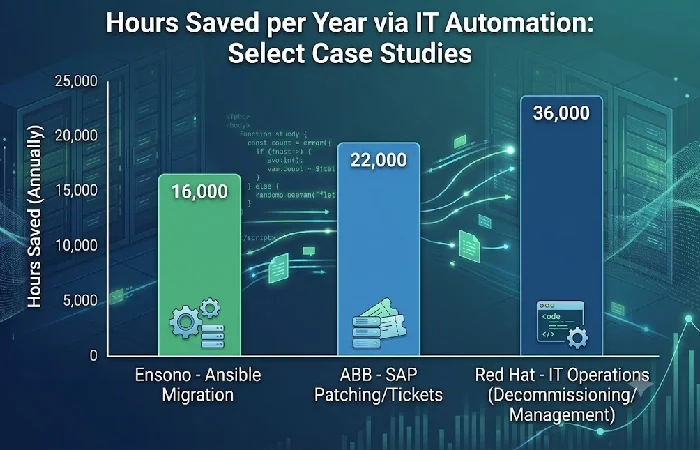
Field-measured deployments have shown savings of between 20 and 70 percent depending on automation maturity, plus measurable labor-hour recovery in the hundreds of thousands. These aren’t projections, they’re reported outcomes from named enterprise deployments.
About cost: cost cut from basic automation is 20–30%; cost cut from intelligent automation is 50–70%. And in terms of return, Forrester’s 2024 Total Economic Impact study found that a composite organization saw a three-year return on investment of 248% and a payback period of less than six months, with a net present value of USD 39.85 million.
Real deployment evidence reinforces this:
- Managed service provider Ensono reported managing over 30,000 IT assets and resources using Ansible Automation Platform, with the system running 40 million tasks and completing 225,000 jobs, and saving more than 210,000 hours of IT labor by automating repetitive and manual tasks in its first year.
- Manufacturer ABB cut server patching time from 6.5 hours to just 20 minutes per server across more than 100 servers, and automated 4,000 service desk tickets, reducing processing time by nearly 40,000 hours.
- Red Hat’s own IT team saved 150 hours per month by automating end-to-end legacy server decommissioning, and more than 14,000 hours annually by automating email list and product cluster management.
As Sathish Balakrishnan, Vice President and General Manager, Ansible at Red Hat, put it: “As a leader in the market, our goal is to set the standard for what IT automation can help customers achieve. Customers rely on Ansible Automation Platform to bridge knowledge gaps, tackle operational complexity and unify varying tools across the enterprise.”
What are the best IT automation tools and platforms?
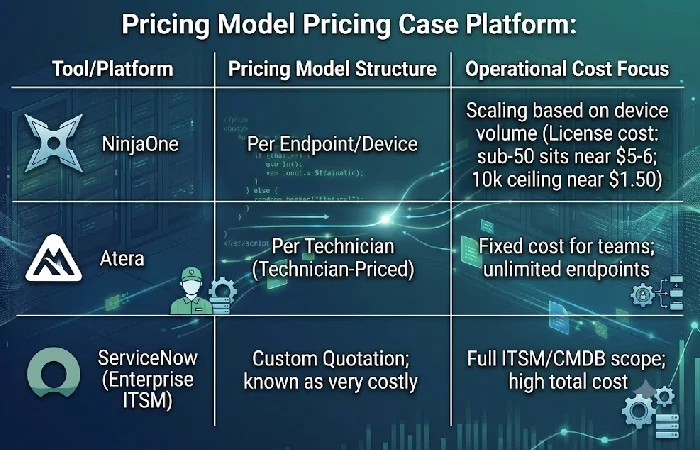
Choosing the right tool is a matter of scope: configuration management, workflow orchestration, and endpoint/RMM platforms address different kinds of problems and come at different price points. No one platform does an equally good job of automating infrastructure, network, and helpdesk. Most organizations end up running two or three of them together.
| Tool category |
Example tools |
Pricing model |
Best fit |
| Configuration management / IaC |
Terraform, Ansible, Puppet, Chef |
Open-source core; enterprise tiers vary |
Server provisioning, drift prevention |
| Cloud orchestration |
Kubernetes, cloud-native orchestrators |
Usage-based |
Multi-region, container-based deployments |
| Enterprise ITSM |
ServiceNow |
Custom quotation for most products, most charged per endpoint |
Large enterprises needing full ITSM/CMDB |
| RMM (endpoint) — device-priced |
NinjaOne |
$1.50 to $6.00 per endpoint per month; sub-50-device shops sit near $5–$6, the $1.50 floor only kicks in around 10,000 endpoints |
Teams with more technicians managing fewer devices each |
| RMM (endpoint) — technician-priced |
Atera |
Standard plans for IT departments range from $149 to $219 per month per technician, unlimited endpoints |
Teams with high endpoint-to-technician ratios |
The pricing-model split has real make-or-break implications operationally. Above roughly 200 endpoints per technician, per-technician pricing usually beats license cost. Drop 150 endpoints per technician below, though, and negotiating volume discounts can make per-device pricing the more competitive option. On the enterprise ITSM side, ServiceNow’s pricing is not publicized and is known in the industry for being very costly to most companies, which is why most mid-market IT teams will use a lighter RMM platform and configuration-management tooling rather than go the full ITSM route.
How do you build an IT automation strategy?
Start with the highest-friction manual process, automate it end-to-end, measure the result, then expand — not the reverse. Organizations that automate broadly before proving value on one workflow tend to accumulate scripts nobody maintains.
A practical five-step sequence:
- Audit manual workload. Identify the tasks consuming the most recurring labor hours — patching, provisioning, and ticket triage are the most common starting points based on the case data above.
- Pick one process and automate it fully, end-to-end, rather than partially automating five processes.
- Select tools appropriate for scope, not brand name — configuration management for infrastructure, RMM for endpoints, workflow platforms for cross-team processes.
-
Record hours saved and the change in error rate, before and after, using the same units the case studies above use (hours/month, tasks/year), so the results are comparable and defensible internally.
- Expand to adjacent processes only after the first automation is stable in production for a full operating cycle.
This sequencing speaks directly to the maturity gap most organizations operate under. Fewer than 1 in 5 has an accurate method for quantifying automation’s return. That’s exactly why step 4, measuring before you expand, matters so much. It’s the difference between a program that survives its second year and one that gets abandoned as “shelfware.”
Frequently asked questions
1. What is the difference between IT automation and AIOps?
IT automation is any execution of a given task based on static rules or conditions. Provisioning a server. Patching it. AIOps works with the same data, logs, metrics, alerts, but with machine learning behind it, catching anomalies and forecasting incidents. It gets there before a human or a script would. Automation acts; AIOps decides what needs attention. Several platforms are now mixing the two, with AIOps driving automated remediation.
2. Is RPA the same as IT automation?
No. RPA automates business-process tasks at the application/UI layer, things like entering data or handling forms. IT automation is different — it usually operates at the infrastructure and systems layer instead: servers, networking, configurations. They are often found together in hyperautomation programs, as they address different problems.
3. What’s the difference between infrastructure automation and infrastructure orchestration?
Infrastructure automation focuses on eliminating manual work for individual tasks — an automated workflow might provision a VM or restart a failed service without human intervention, executing independently when triggered. Orchestration coordinates multiple automated tasks together, in the correct sequence, across systems, handling dependencies and failures as a unit rather than one task at a time.
4. How much can IT automation actually reduce costs?
Reported figures range from 20–30% for basic automation up to 50–70% for intelligent, AI-assisted automation. That’s based on data from McKinsey, Gartner, and Formstack. But actual results depend heavily on two things: which processes get automated first, and how consistently the automation gets maintained afterward.
Start with the one manual process costing your team the most hours this month. Automate it fully, using a single tool matched to that scope. Then track the hours saved before you queue up a second workflow.
