Published: July 28, 2026
Last Updated: September 18, 2026
Purchasing a smart doorbell camera once was simply the decision to buy the same as your neighbor. That simply is no longer the case. Over the last two years the market has bifurcated thoroughly into subscription-based and local-storage based models where the up-front purchase price versus the 3-year purchase price can be in the hundreds of dollars, and if you‘re already tackling a larger smart security set up in your house the doorbell is probably the piece people botch most often, partly because they don‘t check wiring considerations or subscription math before they purchase.
A smart doorbell camera is a WiFi-connected video doorbell that streams live video, records motion-triggered clips, and sends smartphone alerts when someone approaches your front door. A good choice will be distinguished from a bad one by three factors: Will it work for your wiring, how much will it actually cost in year one, and whether the smart alerts are accurate enough that you don’t start ignoring them.
Quick answer: The best smart doorbell camera is all down to your wiring, subscription budget, and if you want Alexa or Google Home.
Definition
A smart doorbell camera is a WiFi video doorbell that provides a live video stream, records motion-activated clips, and sends you an alert on your phone when someone is at your front door.
Quick Comparison
| Model |
Price |
Subscription |
Best For |
| Ring Battery Doorbell Plus |
~$179 |
$4.99/mo (optional) |
Alexa households, renters |
| Google Nest Doorbell (Wired, 3rd Gen) |
~$180 |
$8/mo Nest Aware |
Google Home users, accurate AI alerts |
| Eufy Video Doorbell E340 |
~$180 |
None |
Anyone who wants zero subscription |
| Aqara Doorbell Camera G400 |
~$99.99 |
None |
Budget buyers who still want HomeKit |
What to Look For Before You Buy
A 180-degree field of view catches both the person at your door and the package on the ground, which a narrower lens misses. Ring’s Doorbell Pro 2, for example, captures a head-to-toe view that shows packages on the ground and faces at eye level in the same frame, something narrower-lens doorbells miss entirely.
Response time, the delay between a person pressing the doorbell and your phone actually buzzing, varies between brands more than most buyers realize at a rate that makes one or two seconds the difference between getting someone live, versus just seeing them in hindsight.
Battery life estimates are also more optimistic than accurate. Companies tout “up to six months,” but the practical reality typically ranges from two to eight weeks of time between charges, given a hectic front porch or a relatively weak WiFi link.
Best Smart Doorbell Cameras for 2026
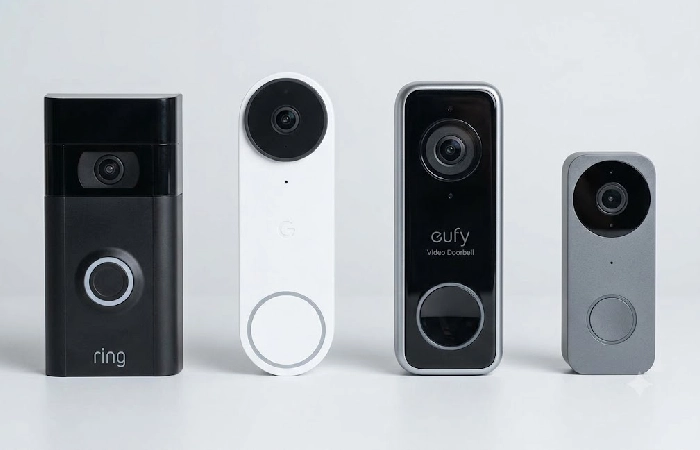
- Ring Battery Doorbell Plus is the simplest place to start if you’re already in the Alexa world, or have a Ring Alarm system. The Ring also has a 180 degree diagonal field of view (the Nest is a 145-degree view) and HDR video quality. The small price to pay? Recorded video history is under a subscription. Without the Ring Protect subscription, you only have live view, all live alerts and nothing to go back to. Over a two-year span, the Basic subscription plan brings the realistic total cost of ownership to roughly $220, which is worth budgeting in upfront if you plan to use the doorbell as a security camera as much as a doorbell.
- If you’re already part of the Google Home family, Google Nest Doorbell (Wired, 3rd Gen) is the better choice. The Gemini AI-centered Familiar Face ability is programmed to identify a share of the porch’s residents and notify you of them instead of generic motion alerts, and in independent testing it produced fewer false alerts than Ring over a multi-week comparison on the same porch. It’s also wired and that’s constantly powered, so it records 24/7 instead of only when it detects motion, which matters if you want a complete record of your porch, not just triggered clips.
- Eufy Video Doorbell E340 is the choice if you’re willing to end the monthly payments. It comes with 2 K video recording feature powered by dual cameras, for both face-level and package-level detection with local storage and no monthly subscription needed. The drawback is that you‘ve to take care of your local storage instead of cloud backup so if the device is stolen or damaged, your footage may go with it.
- The Aqara Doorbell Camera G400 is the latest budget disruptor. Priced at $99.99, it delivers Power over Ethernet and Apple HomeKit Secure Video support at a price point that previously needed a significantly more expensive product. If you’re already an Apple user and you want HomeKit native recording without a subscription, you’re looking at the most affordable genuine choice right now.
Do You Need Existing Wiring to Install One?
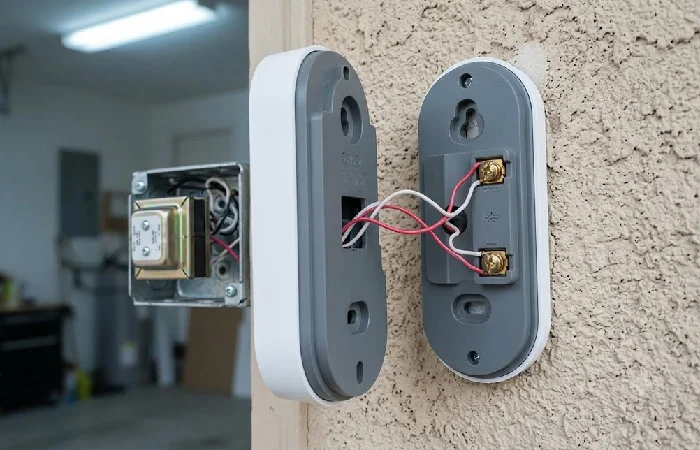
No, you don’t. This is the most prevalent complication that prevents people from purchasing a smart doorbell camera; however, this isn’t one of the more difficult obstacles that most product listings tend to imply. Battery-operated models are installed via a bracket and screws, operate via WiFi and don’t require any electrical installation at all. As a result, they’re often the best options for renters or anyone else without existing doorbell wiring. The entire installation process takes less than 30 minutes, most of that time adjusting the camera’s angle versus wiring concerns.
If you already have wiring you may prefer continuous power over battery changes, so first verify your transformer voltage. Even the best wired doorbells require 16 to 24 volts AC, and many old houses have been running on 8 V or 12 V transformers that don’t provide enough voltage for a wired doorbell. Skipping this check is the most common reason a wired install fails on the first try.
The renter should also check with the landlord before screwing into siding or brick even for a battery model. The bracket itself is a small hole, but it’s still a modification some leases restrict.
Smart Doorbell Subscription Costs Compared
This is where most of the true long-term difference in costs lies, and it can be easily overlooked if a simple stare at the sticker price is made. For example, for a doorbell costing $100 and a subscription costing $5/ month for 5 years, the total is $400, for a no-subscription doorbell costing $200, the total is only $200 for 5 years. The numbers now show the “cheaper” option in an entirely different light.
Here’s how the major brands break down:
- Ring: Protect Solo costs $4.99 monthly or $49.99 annually, Multi provides unlimited cameras for $9.99 monthly or $99.99 annually, and Pro includes professional monitoring as well as face recognition at $19.99 monthly or $199.99 annually.
- Nest: The most with Nest Aware is about $8 a month and would enable you to have constant recording as well as the Familiar Face feature. Otherwise, you still get basic alerts, just not extended history.
- No-subscription options (Eufy, Aqara, Wyze): These options are totally free to use, with recorded footage stored either locally on your device (or microSD card). The disadvantage of this is that you are in charge of backing up and safe storage of the recordings.
If you want the cloud convenience and don’t mind the recurring cost, Ring or Nest are both solid. If you want a single purchase, and one you don’t ever think about again, a local-storage option like the Eufy E340 or the Aqara G400 can save you real money over three to five years
Ring vs Nest Doorbell: Which Should You Buy?
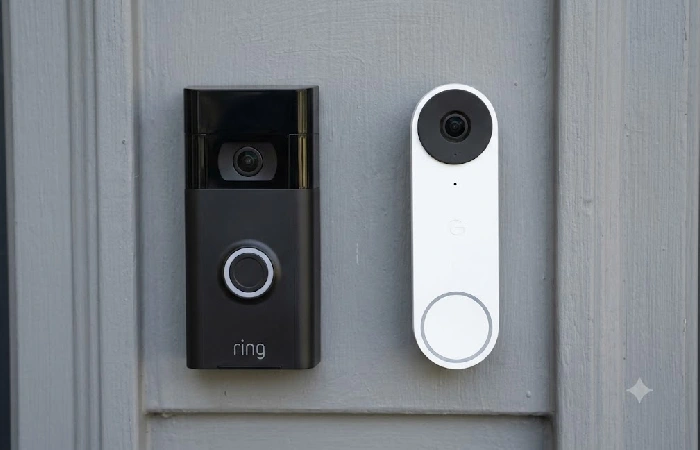
It’s really a matter of which smart home platform you’re already most committed to rather than any one specification. Ring works seamlessly with Alexa and Echo Show devices, whereas Nest is most effective with Google Home and has the superior identification offered by Gemini AI for people and parcels. If you already use Ring cameras or an existing Ring Alarm system, then your app and automations are easier to keep consistent. For the Google Home household, it really is the greater detection accuracy and non-stop recording that make the Nest Doorbell a strong contender.
Neither is a wrong choice. The mistake is picking based on price alone and ending up with a doorbell that doesn’t talk to the rest of your smart home devices.
FAQ
1. Do smart doorbells work without a subscription?
Yes, but they have compromises. Live view, motion alerts, and two-way talk generally function without a subscription for most brands. What you’re sacrificing is the recording history of the video. With Ring, for example, you’re getting live alerts, but there is no way to watch recorded clips unless you get a Protect plan.
2. Can I install a smart doorbell without existing wiring?
Yes, the battery-powered designs are made specifically for this purpose and are installed without any electrical work at all in as little as 30 minutes.
3. Which is better, Ring or Nest?
It very much depends on your smart home ecosystem. Ring is more suitable for Alexa-using households and Nest for Google Home based households, although Nest tends to be marginally better in detection.
4. How much does a Ring doorbell subscription cost?
The cost of Ring Protect Solo is $4.99 a month, or $49.99 a year; with higher tiers up to $19.99 a month for professional monitoring of an entire Ring Alarm system.
5. Do I need WiFi for a smart doorbell?
Absolutely, most smart doorbell cameras connect to the internet through a home WiFi, which is used to send alerts or stream pictures/video to your mobile. If your WiFi signal is weak or disconnects it will dramatically impact battery life and alerts.
6. How long does a battery-powered doorbell camera last?
Manufacturers often advertise up to six months, but real-world use typically lands between two and eight weeks. But it depends on the amount of motion activity and live viewing of each device.
7. Is a smart doorbell camera worth it?
For most homeowners, yes, mainly for the package theft deterrent, and to be able to view who’s at your door when you’re not home. It really depends on your own valuation of the cloud video history versus a one time purchase without a subscription.
