Published: May 30, 2026
Last Updated: October 1, 2026
As of 2025, a majority of organisations report using at least one AI capability in their operations, according to McKinsey’s State of AI research. That’s not a future projection. It’s where we are right now.
If you are running your organisation successfully using basic scheduling apps, static templates, and email filters, then you’re working very hard. Using AI in office automation does a lot of work in a very fast way; it can predict potential problems, and even take corrective actions, because it thinks on its own and speaks to the actions on the system.
This how-to makes sense of the reality of AI office automation, which products are worth the investment, and how to roll it out without breaking the bank and creating fresh aggravations. Big or small, from a 2-man startup to 5000 seats, there are actionable directions here.
For the full picture of how office automation fits together (beyond just the AI piece), check out our office automation guide.
What AI in Office Automation Actually Means
AI in office automation refers to the use of machine learning, natural language processing, and intelligent decision systems to handle office tasks that previously required human judgment — not just human time.
This difference is crucial. Conventional automation (auto-replies, “send report in 10 minutes,” “email reminders” are all examples) obeys simple rules. If X occurs, do Y. Intelligent auto-processing/automation behaves very differently: it recognizes patterns, predicts what might happen next, manages unpredictable situations, and observes.
Beyond Basic Task Scheduling
The “old-school” automation takes care of the predictable. The “AI” takes care of the middle Like fishing out which customer replies to escalate, summarize that lengthy 40-page contract, or point out the budget deviation before your CFO spots it.
Here‘s a simple analogy for you: Rule-based automation is like a conveyor belt. AI automation is a highly trained assistant who‘s observed you doing your job for a year.
The Three Layers of AI Office Automation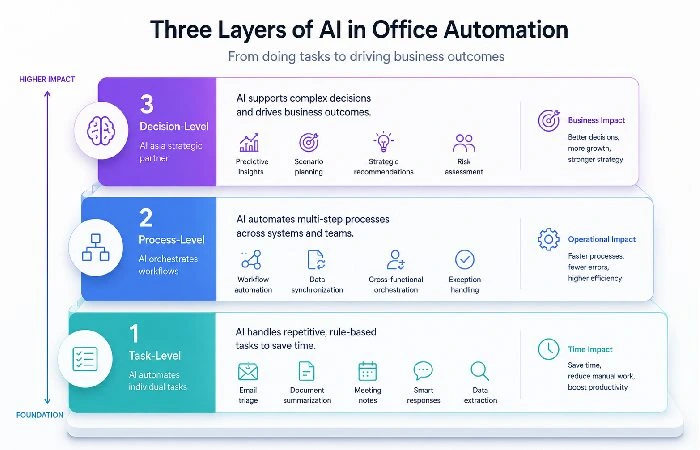
Not all AI office tools are created equal. There’s a hierarchy:
-
Task-level AI performs individual repetitive tasks (auto-categorisation of documents, transcription of meetings, composition of email drafts).
- Process-level ai carried out on a process-wide basis. Controls a process straight through to completion (routing approvals, activating multi-stage workflows as needed)
- Decision-level AI proposes or makes judgments (scheduling work, foreseeing resource conflicts, setting alert flags for compliance violations)
As of 2026, most companies are somewhere in between the first two layers. This is the sweet spot within that third layer, where the true advantage is, but you‘ll need better data and more confidence in your organization‘s AI to get there.
Why Businesses Are Investing in AI Workflow Automation Now
This push is no longer theoretical. Companies are not spending money because AI sounds futuristic. They are investing because the math is right.
The Productivity Gap AI Fills
Research in 2024 by McKinsey into AI utilization in business found that organizations using AI in operations experienced a 20 – 25% efficiency improvement related to the administrative functions, including paperwork, scheduling meetings, communication between divisions, and reports.
The gap is straightforward: knowledge workers currently spend an average of 28% of their week managing e-mail and 20% of their week searching for content inside their organizations. Ai automation aims to solve precisely those problems.
Cost Savings and ROI Data (2025–2026)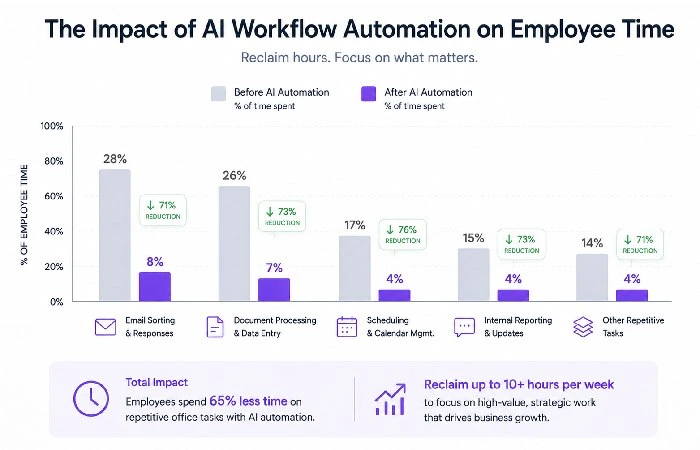
Here‘s how it breaks down for mid-market companies (50–500 employees) that have implemented artificial intelligence office applications:
- Average time saved per employee, 5–8 hours/week, for telephony, editing, answering emails, tracking and following up on calls
- Average ROI break-even: 3–6 months with workflow automation platforms
- Average price of AI productivity tools: $15-45/user/month (fluctuates based on tier and supplier)
- High-stakes situations Where the stakes matter more, it‘s always worth reviewing the current price pages and ROI calculators for each vendor, since published subscription levels and case histories may be modified several times in a year.
These ranges are pulled from published vendor estimates, review aggregators, and publicly available case studies of tools such as Zapier, Microsoft 365 Copilot, and Notion AI.
Top AI Office Tools Worth Considering
Not all tools work for all teams. Here is the list of what‘s really working in 2026 from user reviews, adoption, and community feedback. While you shortlist tools, pay particular attention to their potential fit in your stack, ease with data residency requirements, and transparency about their use of your data to develop models.
AI productivity software comparison (indicative pricing and capabilities as of 2026)
| Tool |
Best For |
AI Capabilities |
Pricing (per user/month) |
Notable Limitation |
| Microsoft 365 Copilot |
Enterprise teams on the Microsoft stack |
Drafting of documents, minutes of meetings, and analysis in Excel |
$30 |
Requires M365 E3/E5 license |
| Google Duet AI (Gemini) |
Google Workspace users |
Slides can be generated, drafting for email, and data insights |
$20 |
Limited offline functionality |
| Notion AI |
Small teams, project docs |
Auto-summaries, database queries, Writing assistance |
$10 add-on |
Weaker on structured workflows |
| Zapier AI + Central |
Cross-platform automation |
Multi-app workflows, AI-powered decision routing |
$20–$50 |
Learning curve for complex zaps |
| ClickUp Brain |
Project management teams |
Task generation, standup summaries, doc writing |
$7 add-on |
AI features still maturing |
Best Picks by Business Size
- Solopreneurs and micro-teams (1–5 people): Notion AI or ClickUp Brain. Low cost, quick wins on content and project management.
- Small businesses (5 50 People): Zapier AI Central + Google Duet AI. Fantastic way to integrate tools and avoid manual entry of data between various platforms.
-
Mid-market and enterprise (50+ users): Microsoft 365 Copilot. Seamlessly integrates with the enterprise‘s existing systems and, behind the firewall, provides administrator controls and is secure.
Looking for the software side of things? We‘ve gone into more detail in our best office automation software 2026 guide.
How AI Automation Works in Practice
Theory’s nice. But what does AI office automation look like when it’s actually running?
Document Processing and Data Extraction
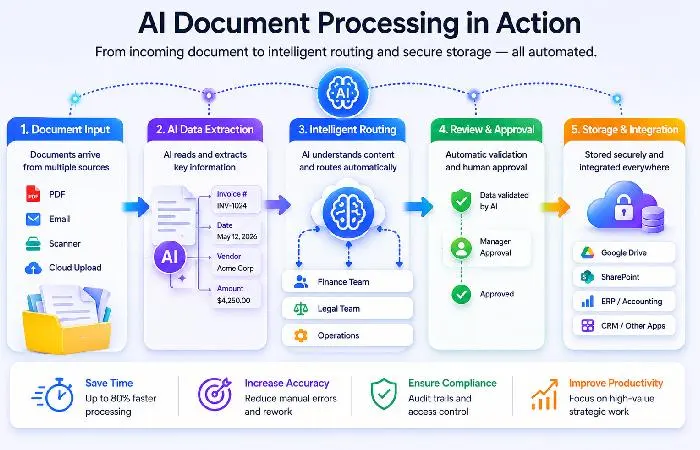
This is where most businesses start. AI reads invoices, contracts, receipts, and forms — pulls out the relevant data — and routes it to the right system. No manual data entry. No copy-paste between PDFs and spreadsheets.
These are managed at scale by tools such as Microsoft 365 Copilot and separate OCR+AI tools such as Rossum and Docsumo. In numerous applications, initial accuracy on structured documents is very high and improves with model tuning to the customer‘s templates and edge cases.
Intelligent Email and Communication Routing
This goes way beyond spam filtering. AI reads incoming messages, determines urgency and intent, suggests replies, and in some cases auto-routes messages to the right department — all without hard-coded rules.
Google’s Gemini integration in Gmail, for example, now drafts contextual replies based on your previous response patterns. Quick note: it’s not perfect. It tends to be overly polite and slightly generic. But as a starting point that can shave time off each email thread, it is often a worthwhile assist for high‑volume teams, provided someone still reviews important messages.
Predictive Scheduling and Resource Allocation
This is layer two and three territory. AI tools analyze past project timelines, team workloads, and deadline patterns to predict conflicts before they happen.
ClickUp Brain and Monday.com’s AI features both offer versions of this. Based on community feedback, the predictions are most useful for teams running 10+ concurrent projects where manual oversight starts breaking down.
Step-by-Step: Implementing AI in Your Office
You don‘t have to re-engineer everything at once. In fact, that‘s the quickest way to break the bank and drive your team crazy.
Audit Your Current Workflows First
Plan where your company spends its time doing predictable, low-judgment activities. Common candidates:
- Meeting scheduling and rescheduling
- Data entry between platforms
- Report generation (weekly standups, expense summaries)
- Email triage and response drafting
- Document formatting and template filling
Pick the two or three biggest time drains. That’s your starting point.
Start Small, Scale Smart
Here’s a practical rollout plan:
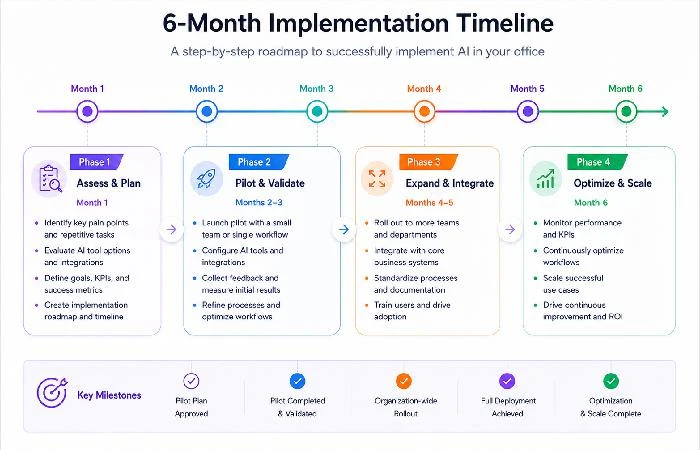
- Weeks 1–2: Pick one (or more) of the one-time or consistent time drains and test drive (free trial, pilot with 3–5 users).
- Weeks 3–4: Record time ultimately saved. Solicit feedback for effectiveness and obstacles.
- Month 2: Second use case if performance encourages. Additional users.
- Month 3–6: Include AI workflows in team SOPs. Establish accuracy drift monitoring.
Typically, a team that does well in this area will have all workflows owned by someone, review error cases frequently and have a simple runbook for onboarding new team members to understand how the automation operates. And the single worst mistake you can make? Trying to automate both at the same time. You might have different results based on how clean your data already is and your team‘s ability or interest in changing.
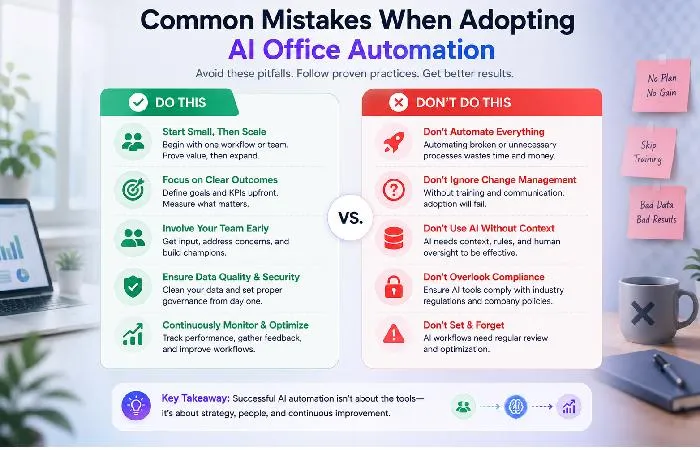
Common Mistakes When Adopting AI Office Automation
Based on what we’ve seen across dozens of case studies and forum discussions:
- Automating broken processes. If your workflow doesn’t make sense manually, AI won’t fix it. It’ll just automate the chaos faster.
- Ignoring the training period. AI tools need 2–4 weeks of data to calibrate. Teams that judge results after day three get disappointed.
- Becoming too dependent on AI outputs without cross-checking. Particularly, when it is being used for client-facing communications and financial reporting. AI makes misjudgments. Make sure to have humans double-check all significant outputs.
- Choosing tools based on hype, not integration. The “best” AI tool means nothing if it doesn’t connect to your existing stack.
- Skipping change management. Your team won’t use tools they didn’t help choose. Involve end users early.
Limitations and Risks You Should Know
AI office automation isn’t a magic fix. There are real trade-offs.
Data Privacy and Security Concerns
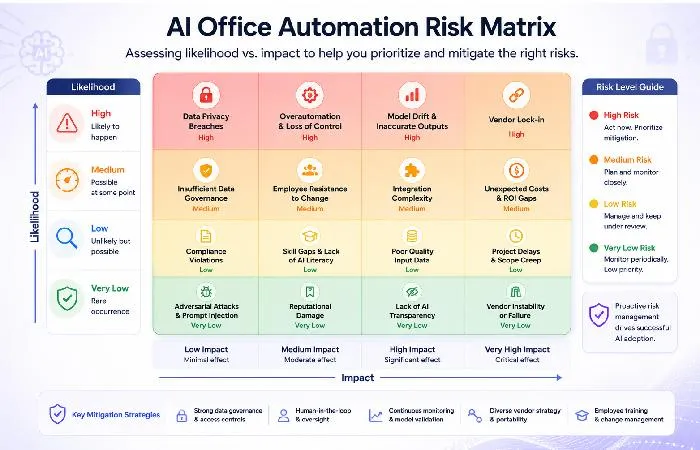
All AI tools have to process your data. Some are via third-party LLM APIs like OpenAI, Google, Anthropic. That means that your internal docs, mail, and customer data might leave your environment. Before deploying any new integration, check the provider‘s security whitepaper or trust centre for information on encryption, data retention, subprocessors, and whether customer data is used to train shared models.
If sensitive data is being used, U. S. National Institute of Standards and Technology guidelines recommend organizations undergo a risk analysis before implementation of any AI system. How about in practice? Review the data location, if it was used to train the model, and the vendor‘s certifications (SOC 2, GDPR, HIPAA)
In addition to the above, note the various local data residency requirements for teams in the UK and India. Ensure your vendor has region-specific hosting.
The Overautomation Trap
The line is when becoming too automated breeds fragility. If each decision is processed through an artificial intelligence and no one knows how it works, the system can go wrong because of a minor model update or an unusual set of data.
In the “sweet spot” for AI implementation, rule-based automation will free humans from tedium in the decisions they make, and keep them in the loop for the decisions that matter, which will be supported by “recommendations rather than actions”.
AI Office Automation for Small Businesses vs. Enterprises
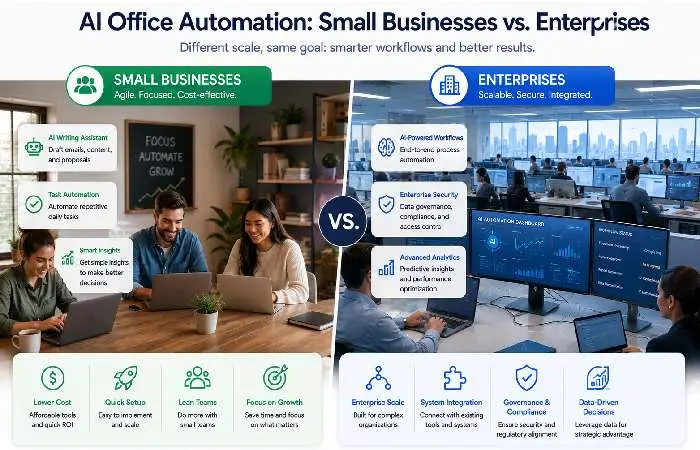
Although there are many overlaps in the tasks that the tools accomplish, part of their success is their individual approach.
| Factor |
Small Business (1–50) |
Enterprise (50+) |
| Budget |
$10–$30/user/month |
$30–$100/user/month |
| Priority use case |
Email, docs, scheduling |
Cross-department workflows, compliance |
| Implementation time |
1–2 weeks |
2–6 months |
| Biggest risk |
Overlap of tools, paying for features you do not use. |
Integration complexity, change management |
| AI maturity needed |
Low (pre-built templates work) |
Medium-high: Custom workflows, API connections. |
Time value for the small business trend is faster as processes are simpler, fewer aligned stakeholders, although the absolute payback is less. Enterprise teams need more lead time but can enjoy a significantly greater scale once connectivity is in place.
What’s Coming Next: AI Office Trends for Late 2026 and Beyond
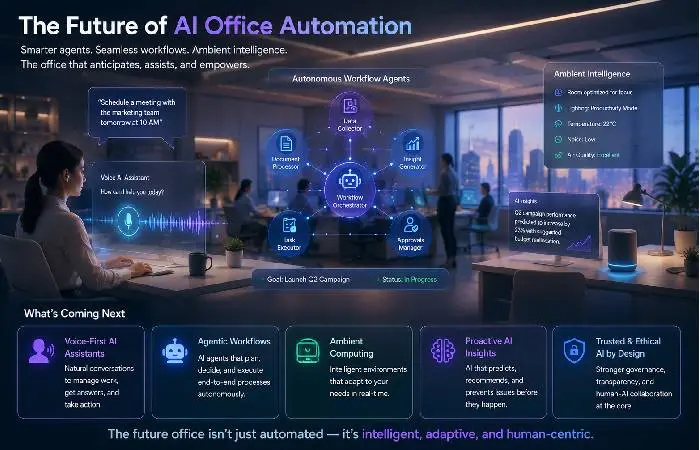
A few patterns are forming based on product roadmaps and early previews:
- Agentic AI workflows: AIs that can take several actions on their own, rather than just one. we are seeing both Microsoft and Google offering such workflows.
- Voice First Office AI meeting assistants that do more than just “transcribe meetings, generate tickets, update CRMs, and follow-up in real time ”
- AI- powered compliance monitoring: Spoton uses its expertise and machine-learned risk indicators on documents and messages to identify regulatory risks early.
- Personalized AI assistant systems that understand individuals’ work habits (rather than only team preferences) and take the initiative to recommend the next step.
When mapping out your roadmap, remember that these trends will be directional, not set in stone. Be sure to verify these trends by cross reference them with vendor roadmaps, preview programs, and documentation, and if necessary, allocate budget for these features that are still in development.
The World Economic Forum‘s 2025 Future of Jobs Report forecasts AI and automation replacing some routine jobs but generating net new roles for AI stewarding, prompt engineering and process designing. It´s not displacement, but transformation.
Frequently Asked Questions
1. What is AI in office automation?
Office Automation (OA): Use of machine learning, NLP (Natural Language Processing), intelligent decision systems for automating the judgment-based office tasks (such as routing mails, preparing summaries of documents, predicting scheduling conflicts, generating reports.. Etc.) but not yet automatable by Rule-Based Automation Engine.
2. Which AI tools are best for office automation in 2026?
The above top picks exactly fit your stack. Microsoft 365 Copilot is best for enterprise Microsoft users. Google Duet AI (Gemini) would be perfect for Google Workspace teams. Zapier AI Central would be a good choice for cross-platform workflows. Notion AI and ClickUp Brain are great for smaller teams.
3. Is AI office automation expensive?
Not necessarily. Entry-level tools are $7–$10/user/month, mid-tier are $20–$30, and enterprise products running on custom workflows are $50–$100+/user. Most teams see a return on investment within 3–6 months.
4. Can AI automation replace office workers?
Whole job descriptions are being replaced by AI, but more accurately, jobs are being replaced by AI. Continual job responsibilities such as data entry, appointments, and report creation are becoming automatic. But people are still necessary.
5. Is AI office automation safe for sensitive business data?
It‘s on the vendor. Look for SOC 2 certification, data residency options, and if the data is used for model training, etc. For sensitive data use, NIST recommends formal risk assessments before use.
6. How long does it take to implement AI automation?
Smaller teams would see benefits in 1-2 weeks with off-the-shelf solutions. However, organizations of larger sizes with custom processes/ workflows will generally take 2-6 months for integration and acceptance.
7. How current is this information?
This briefing is updated with all the more recent information on AI in office automation up to 2026, which we could find. But individual specs, prices, and regulations can change, so recheck the headings on the official sites before you make any decisions in the shortest possible time.
8. What’s the difference between AI automation and regular automation?
Regular automation is rule-based (if-then-rules). Fully-AI (artificial intelligence) automation system learns from data, can cope with uncertainties, learns and predicts –without reprogramming the system.
