Published: May 27, 2026
Last Updated: October 1, 2026
The technology is evolving rapidly, and at the same time, automation software in 2026 is growing like anything. The question is, in such situations, choosing the right automation software package from dozens of uniform-looking platforms, and every platform claiming AI functionalities, and seamless integration.
The main objective of this guide is to address in detail by bringing all the essential available information from published expert opinions, vendor sites, and user review platforms, to help to choose the right one with the help of use cases, budget, and team size.
The suggestion below is worthwhile and based on publicly available data as of May 2026, including supplier documentation, Capterra, G2, and industry reports. To be fully clear, we didn’t test any of these tools ourselves. As a substitute, we gathered and organized all available data to give you a quick summary that makes your decision easier.
For instance, if you are running a 60- person SaaS team in Bengaluru, or a five-person agency in London, or a 2000 members in Chicago, there is the right pick here for you.
Let’s get into it.
What Office Automation Software Actually Does in 2026
A working definition
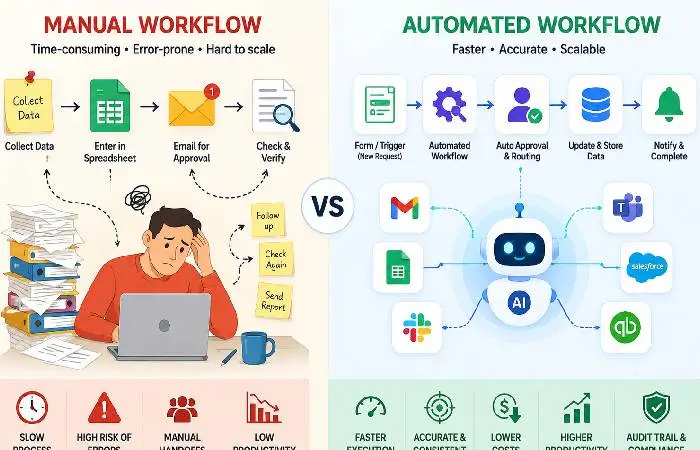
Office automation program: any piece of software that automates a task you would normally do in work pressing “send invoices”, “route for approval,” “copy data from one app to another,” “draw a report,” etc. Without someone needing to hover.
That’s the short version.
The more extended: current office automation is a combination of all three of the older forms. With workflow automation (think triggers à la Zappier), business process automation, or BPA (“longer, multi-step workflows with some human approval”), and robotic process automation, or RPA (“a piece of software click-faking away in an antiquated app”) in the year 2026, AI agents are beginning to combine all three.
A project management tool tracks work. Automation software does the work.
Tools like Monday.com and ClickUp now blur this line by adding automation features inside their PM platforms.
That‘s all pretty convenient for small teams. But for serious automation across dozens of apps, you‘ll still want a dedicated tool like Zapier or Make sitting in the middle.
Why Businesses Are Spending More on Automation This Year
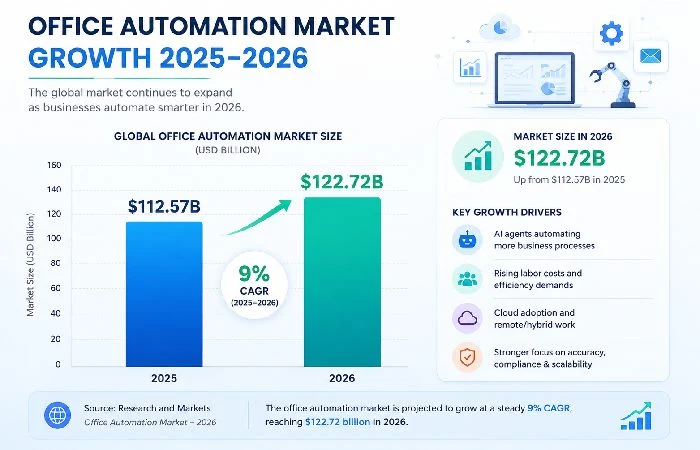
The numbers are big. The global office automation market reached $122.72 billion in 2026, growing at 9% CAGR, according to Research and Markets. That’s not hype — that’s spend.
What’s driving it?
- Labor costs went up. Automation costs went down.
- AI agents now handle tasks that needed humans 18 months ago.
- Remote and hybrid teams created handoff problems that automation solves cleanly.
Based on McKinsey‘s 2025 workplace research, despite high AI spending, few have attained AI maturity. MC Kinsey highlighted that there‘s still a lot of money being spent and a lot of room to do it better.
The early adopters are pulling ahead. The late adopters are starting to feel the gap.
How We Picked the Best Office Automation Software
We didn’t just rank by popularity. Here’s what we looked at:
- Real pricing (not just the “starting at” sticker)
- Integration count and quality — does it connect to what you actually use?
- AI features in 2026 — most vendors added them; some did it well
- User reviews from 2025–2026 across G2, Capterra, and Reddit
- Support quality — especially for non-US customers
- Learning curve — can a non-technical manager run it?
We didn’t accept any vendor payment. We also didn’t test every tool personally — we compared documentation, current pricing pages, and aggregated user reviews across multiple sources.
Fair warning: no tool below is perfect. We’ll say where each one falls short.
Best Office Automation Software for Businesses in 2026 (Top 8 Picks)
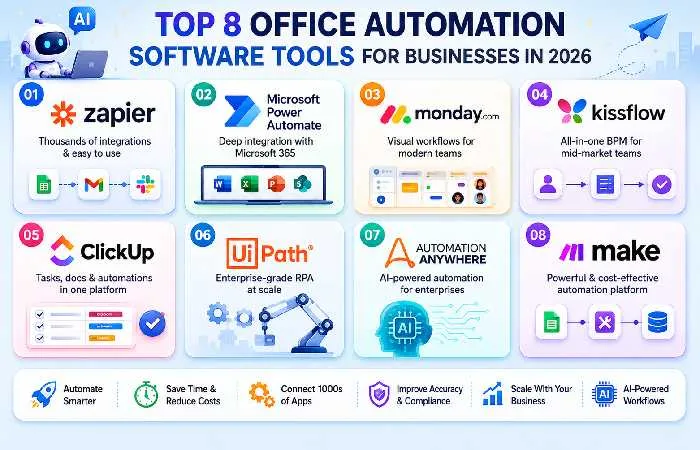
Zapier ideal for smaller teams seeking quick wins
Zapier is the name most people think of for a reason. It integrates thousands of apps (more than 7,000 according to the definition provided on Zapier‘s website). In addition, its new AI Copilot can create workflows based on simple English explanations.
What is good: massive app library; the new AI “Copilot” which helps build Zaps from a sentence; free tier that is really usable for solo founders.
What’s not: pricing scales fast. Once you cross 2,000 tasks/month, your bill jumps. Teams running heavy data flows often outgrow Zapier and switch to Make for cost reasons.
Best for: any marketing teams, agencies, founders, and small ops teams.
Microsoft Power Automate — best for Microsoft 365 shops
If you use Outlook, Teams, SharePoint, and Excel within your business, then Power Automate is nearly an absolute must-have. You get it free with all or nearly all of the Microsoft 365 business plans, and the integration with Office apps is far beyond what Zapier offers.
For official pricing and feature details, see Microsoft’s Power Automate page.
Only problem? The interface is still like a Microsoft enterprise product from 2018. The learning curve is steeper. The documentation can be sparse.
But for compliance-heavy industries already locked into Microsoft, it’s hands down the best fit.
Monday.com can be considered as an automation tool but it isn‘t one. It is rather a work OS with automation features embedded. Ideal for teams that would prefer one tool to follow up on their projects and automate tasks between them.
The visual board strategy takes away some of the fear that automation is intimidating for non-technical staff. It takes about 90 seconds to create triggers such as “when status changes to done, notify Slack and create an invoice in QuickBooks.
Starting plan: $9/user/month with a 3-seat minimum. Automations are limited on the basic tier — you’ll likely need Standard or Pro.
Kissflow — best mid-market all-rounder
Kissflow is the platform most US/UK buyers haven‘t heard of, but Indian and Southeast Asian mid-market teams wouldn‘t be without. It it combines BPM, workflow automation and a low-code app builder.
Strong for HR, procurement, and finance workflows. Pricing is more transparent than that of competitors. The community is smaller, so finding power users to hire takes effort.
UiPath — best enterprise RPA
Still the leader for huge enterprises with legacy systems (banks, insurers, hospitals, etc.) UiPath manages RPA at scale, connects with SAP and Oracle, and now delivers AI agents able to read documents and make decisions.
It‘s expensive. Roughly outlined implementation time frames range from six to twelve months and a dedicated team of developers. Published case studies from UiPath (enterprise focus) and by industry specialists strongly indicate the roi potential on high-volume processes such as invoice processing and claims handling (although actual results may vary considerably according to implementation quality and process complexity).
Make is what you switch to when Zapier gets too expensive or too simple. The visual scenario builder lets you handle branching logic, iterators, and error handling that would take hours to configure elsewhere.
Pricing is operation-based and not task-based so it will generally be cheaper for teams that will be doing a lot of work. The learning curve is it is a real one; expect a couple of weeks before you feel comfortable.
Worth it for technical teams. Probably overkill for a four-person startup.
ClickUp — best for teams that hate switching tabs
ClickUp is adding features every day. Some folks adore it. Some folks have had enough. The automation engine within ClickUp really works, creating tasks, changing statuses, rule-based assignments, and recurring actions.
It’s not a Zapier replacement for cross-app workflows. But if 80% of your work happens inside one tool, ClickUp’s built-in automation removes a lot of noise.
The free plan is generous. Paid plans start around $7/user/month.
Automation Anywhere — best for regulated industries
For banking, pharma, and government, Automation Anywhere is built around governance, audit trails, and compliance. The platform handles attended and unattended bots, has strong AI document processing, and recently added agentic AI features for 2026.
The downside is the same as UiPath: expensive, complex, and not suitable for small teams.
Comparison Table: Pricing, Best For, AI Features
Community ed = Free community edition available with limited features, typically for learning and non-commercial use
Prices vary by region. Indian buyers often get localized pricing via authorized partners.
Security note: For regulated industries or workflows with sensitive data, please check the tool provides SOC 2, GDPR compliant data hosting (important for UK/EU teams) and right audit logging before use.
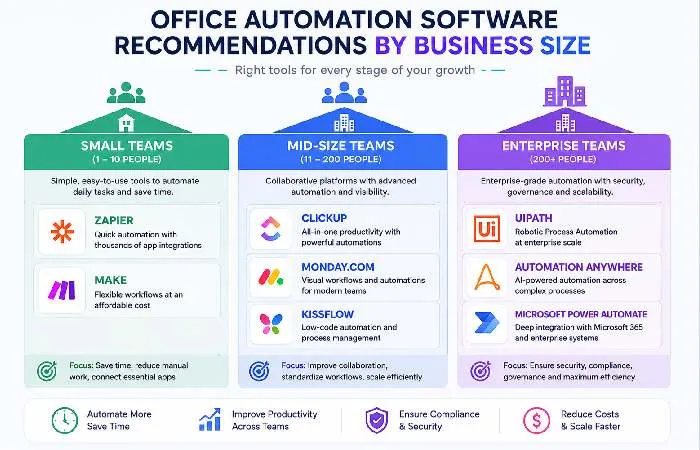
Small businesses (1–25 people)
For most small teams, Zapier or Make can do 90% of what you want to achieve in terms of automation. If you also need a project tracker, also add Monday. Com or ClickUp.
If you’re already paying for Microsoft 365, Power Automate is essentially free — use it before paying for another tool.
In India, ClickUp and Zapier have the best price-to-value with INR pricing through resellers. UK teams should check for VAT-inclusive billing.
Indian teams should also consider Zoho Flow as a local alternative with INR billing and strong integration with the Zoho ecosystem.
Mid-sized teams (25–250)
This is where it gets interesting. You’ll likely need two tools — a workflow platform (Zapier/Make/Power Automate) plus a work OS (Monday.com/ClickUp/Kissflow).
Avoid the “one-stop” platform that performs “okay” at all tasks when two specialized tools excel. In user commentary on Reddit, G2 reviews, mid-market teams lament the excess weight of bloated single-vendor stacks that fall short of the capabilities of the optimal specialized tool combinations.
Enterprises (250+)
Any number of employees greater than 250, then the terms RPA, AI agents and compliance come into play. UiPath and Automation Anywhere are the sure-fire choices. Microsoft Power Automate with Power Platform stacks is amongst the best here too, especially if a shop is heavily on Azure.
Implementation timelines are six to eighteen months. Budget at least one full-time automation lead and business analyst to map processes before you buy.
Common Mistakes Businesses Make When Choosing Automation Software
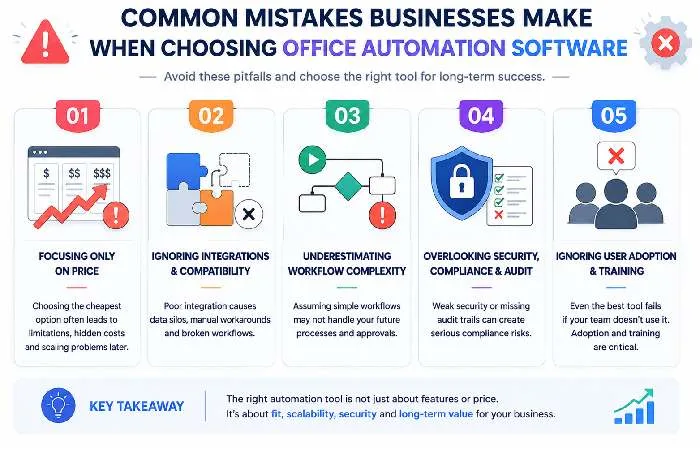
A few patterns keep coming up across reviews and forums:
- Buying before mapping. Teams pick a tool, then try to figure out what to automate. Reverse it. Map your top five painful processes first. Then pick the tool that fits.
- Underestimating change management. Software is the easy part. Getting people to use it is the hard part. Plan for training.
- Ignoring per-task pricing. A $20/month plan sounds great until you discover you’ll hit 10,000 tasks and pay $399.
- Skipping the audit trail. For anything finance-related or HR-related, you’ll want logs. Some cheaper tools don’t keep them long enough.
- Trying to automate broken processes. Automating a bad process just gives you a faster bad process.
According to research analyzed by Grand View Research, the AI productivity tools market is on track to reach $36.4 billion by 2033, growing nearly 16% per year. Pick tools that can grow with that — not just what’s hot right now.
Quick Start Checklist: First 30 Days
- Week 1:Find your top 3 priorities that are most time taking repetivie tasks
- Week 2: Choose an application depending on your ecosystem (Microsoft -> Power Automate, Multi-app -> Zapier, Make, All-in-one -> Monday, ClickUp)
- To complete by Week 3: Fully automate ONE simple workflow (e.g. Form CR Mm notification)
- Week 4: Put numbers on the time saved; take the second flow only if the first one appears to be reliable
What’s Coming Next: 2026 Automation Trends Worth Watching
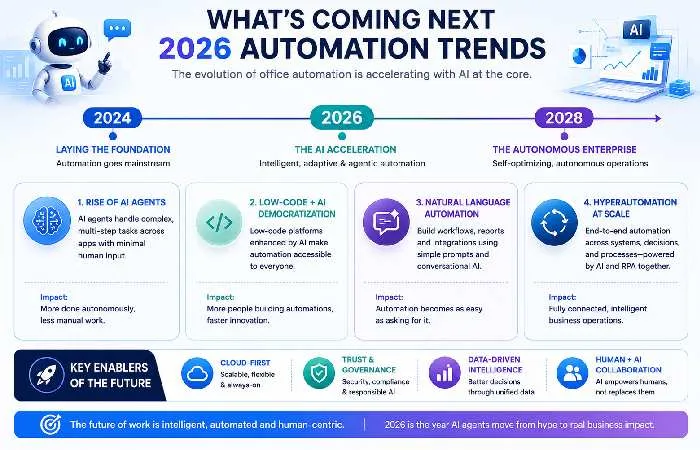
A few things shifted hard in the last twelve months:
- Agentic AI exists today. Zapier Agents, UiPath Autopilot, and Power Automate‘s AI flows are capable of making multi-step decisions without a human in the loop. And they haven‘t quite hit perfection. But they‘re close enough to use.
- Pricing models are changing. Per-task pricing is giving way to per-outcome and per-agent pricing. Some teams will save money. Others will pay more for the same work.
- No-code is turning into “low-code AI.” The boundary of “drag and drop” and “describe what you want” is diluting. The future direction is to allow for prompt-based automation configuration, while classic flowchart builders will continue to be essential for complex logic creation and debugging.
Items that will be worth paying attention to. Not worth losing your head over. The simple, clean, owned down, well-documented for the most part count more than the tool.
For more on how AI is transforming all workspaces, read our full office automation guide and our collection of AI-empowered tools accelerating the era of smart offices. If physical office spaces are what you‘re after, check out our guide to smart switches for home and office automation.
Final Take
But, the truth is, there is no one “best” office automation software for 2026 for every type of business, but in each broad category, you have the following winners:
- Small teams → Zapier or Make
- Microsoft shops → Power Automate
- Visual workflow lovers → Monday.com
- Mid-market → Kissflow or ClickUp
- Enterprise → UiPath or Automation Anywhere
Start small. Automate one painful process. Measure what you save. Then expand.
That’s how the smartest teams scale automation — and it’s how you avoid spending $50K on a platform you barely use.
FAQs
1. What is the most suitable small business office automation software for the year 2026?
In most cases, for small businesses, mostly using Zapier is the easiest choice since it has a tremendous amount of integrations and its AI Copilot. If you‘re tight on cash but need to utilize sophisticated logic, Make is the best choice, whereas Microsoft Power Automate is practically free if you‘re a Microsoft 365 user.
2. How much does office automation software cost?
Basic plans begin at about $7–$20 per user/month. Platforms targeted towards the mid-market may cost $1,500/month for 15 users (ex. Kissflow). Pricing for Enterprise RPA tools like UiPath and Automation Anywhere is custom and usually in high five figures per year.
3. Is Zapier still worth it in 2026?
Yes, for small to mid-sized teams. It‘s got way more integrations (>7,000) and more new AI features than most rivals. The only reason team leaves Zapier is for the per-task price when your usage crosses 2,000+ tasks/month, Make becomes considerably cheaper.
4. What is the difference? Workflow automation vs. RPA
Workflow automation automates data exchanges among apps via API (Zapier, Make). RPA simulates click-humanly on screen, ideal if some part of a legacy system isn‘t API-enabled(UiPath, Automation Anywhere). Most new solutions are couplings of several systems.
5. How long does it take to implement office automation software?
Small-team implementations range from several days to several weeks. Mid-market BPM rollouts are usually one to three months. Large enterprise RPA initiatives are generally six to eighteen months in duration with incremental optimization following deployment.
6. Can office automation software work without IT support?
With Zapier, Make, Monday.com, and ClickUp, yes, a non-technical manager can generally do this alone. With UiPath, Automation Anywhere, and a full Power Automate roll-out, you‘ll require IT or developer support.
7. What office automation tools are best for businesses in India and the UK?
Kissflow and Zoho‘s automation package work really well within India with local pricing and support. UK teams often select monday.com, ClickUp or Power Automate, billing inclusive of VAT and data hosted within the EU.
