Published: June 29, 2026
Last Updated: August 31, 2026
It’s 3:47pm and you’ve shifted in your chair for the hundredth time today, hunting for the one angle where your lower back stops aching. You’ve blamed the chair or the weather, maybe your age. The desk setup is usually what’s actually doing it — holding your spine, wrists, and neck slightly out of position for hours until something starts complaining.
Here’s the part nobody selling you a ₹40,000 chair wants to admit. You can fix most of that discomfort with a handful of small, specific gadgets, and you don’t need to buy them all at once. The trick is knowing which one targets your particular ache and which one to buy first. Below are 15 ergonomic desk gadgets worth your money, each tied to the problem it actually solves, with rough prices for global and India buyers. They sit alongside our broader essential office desk gadgets guide, but this list stays focused on one job: getting you through the workday without pain.
At a glance
Footrests, monitor risers, wrist rests, a vertical mouse. Pick any one and you’re looking at under $50 to address a specific ache you’ve probably been ignoring for months. None of them requires a new desk. Don’t buy all of them at once. Match the gadget to where you actually hurt, then work through the list in order of priority. This guide ranks 15 of them by impact and gives rough prices for global and India buyers.
What ergonomic desk gadgets are, and why they beat toughing it out
An ergonomic desk gadget is any affordable add-on—a monitor riser, footrest, wrist rest, ergonomic mouse, and the like—that corrects your posture without replacing the desk itself. It works by holding your screen, hands, and feet in neutral, supported positions so your muscles aren’t straining all day to compensate. People who sit for long stretches use them to cut back, neck, and wrist pain at a fraction of the cost of a full workstation overhaul.
This isn’t just about feeling uncomfortable at your desk. Low back pain is now the leading cause of disability worldwide, affecting around 619 million people, and a large share of that traces back to how we sit and work. A manageable ache ignored long enough becomes a chronic one — that’s a pattern that shows up consistently in the research. Catching it early with a few targeted gadgets is considerably cheaper than physiotherapy later.
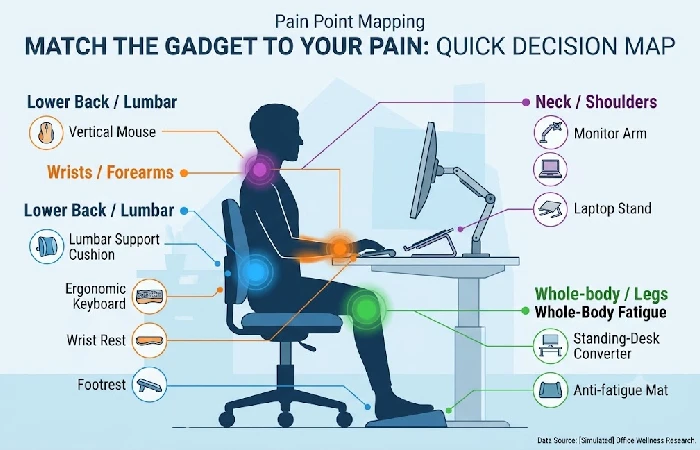
Match the gadget to your pain: a quick decision map
Before you buy anything, figure out where it actually hurts. If you’ve ever ordered something on the strength of its reviews and then found it did nothing for the part of you that actually aches, you already know why this step matters. The gadget that helps a stiff neck does nothing for a sore wrist. Research on office workers backs this up: a study of IT professionals found lower back pain in 48.2% and neck pain in 45.3% of workers, with poor workstation setup as a key risk factor. Fix the setup that’s causing your specific pain and the relief follows.
The 15 best ergonomic desk gadgets, ranked by impact
These are ordered roughly by how much relief they deliver per rupee or dollar spent. You don’t need all 15. Read for your ache, pick two or three, and move on.
(Price bands: Budget = under ~$30 / ₹2,000 · Mid = ~$30–90 / ₹2,000–6,000 · Premium = ~$90+ / ₹6,000+.)
Ergonomic desk gadgets by pain area, price band, and buy-first priority
1. Lumbar support cushion
A lumbar cushion is the cheapest fix for lower back pain — the most common desk complaint. A firm pillow strapped to your existing chair supports the inward curve of your lower spine so you’re not slumping by mid-afternoon. Roughly $20–35 / ₹700–1,800.
2. Ergonomic footrest under desk
Dangling feet or tucking them under the chair puts the load where you don’t want it — your lower back. A footrest fixes your knee angle to roughly 90 degrees, and that one shift takes a surprising amount of pressure off your hamstrings and lumbar region. The tilting ones let you shift position through the day, which beats a static block. Roughly $25–45 / ₹900–2,500.
3. Monitor stand or riser
If you’ve ever finished a day with a stiff, tight neck and couldn’t pin down why, a screen sitting too low is often the cause. A riser lifts the top of your display to eye level so your head sits over your spine instead of craning forward. Roughly $20–50 / ₹600–2,500.
4. Monitor arm
Most people don’t realise how much a fixed screen position costs them until they’ve used an arm for a week. A VESA-mount arm clamps to the desk edge and lets you push the screen back, pull it close, tilt it, raise it — whatever the moment needs. If you split your day between sitting and standing or share a desk with someone else, a riser won’t cut it. Check VESA compatibility on your monitor before buying. Roughly $35–120 / ₹1,500–7,000.
5. Ergonomic mouse and keyboard
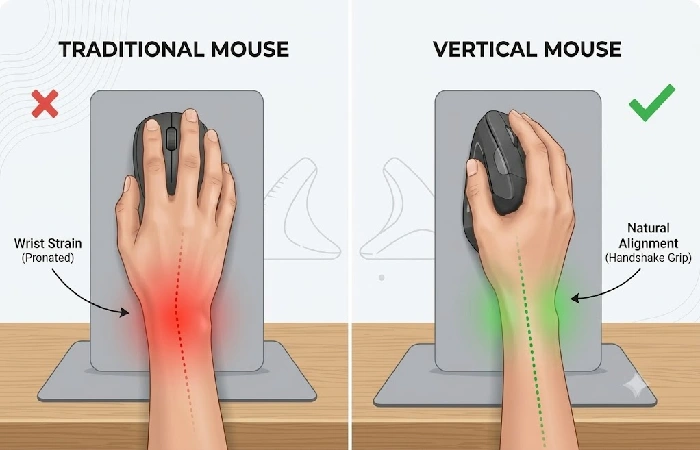
Most wrist and forearm strain doesn’t come from how hard you type. It comes from your forearm sitting palm-down for six, seven, eight hours straight — a rotation your arm wasn’t built to hold. A vertical mouse breaks that by putting your hand in a handshake grip, and a split or curved keyboard stops your wrists bending inward on top of it. Wrist or forearm strain is the one complaint this combination actually fixes. Roughly $40–160 for a pair / ₹2,500–12,000.
6. Wrist rest for typing
That dull ache climbing from your wrist toward your forearm by 4pm usually isn’t the typing — it’s the desk edge cutting into your wrist during pauses. A gel or memory-foam rest takes that pressure away. Use it to support your palm during pauses — not to prop your wrist into a bend while you type. Roughly $10–25 / ₹300–1,200.
7. Adjustable laptop stand
The screen and the keyboard on a laptop can’t both sit at the right height — pick one and the other is wrong. A stand fixes the screen, and an external keyboard and mouse bring your hands back down to where your elbows actually are. Neck and shoulder pain that builds over months of hunching is almost always a laptop positioning problem. Roughly $20–60 / ₹800–3,500.
8. Standing-desk converter
Can’t replace the desk? One sits on top of your existing surface and raises everything enough to work standing. Your back stops stiffening when you’re not locked in one position all day. Get one with a smooth height adjustment and enough surface for both monitor and keyboard. Roughly $90–250 / ₹6,000–20,000.
9. Anti-fatigue mat
A hard floor doesn’t care that you fixed your back pain by standing. Give it three or four hours and the complaint moves to your feet, your calves, sometimes your knees. A cushioned mat nudges you into small weight shifts you won’t notice, and that low-level movement is what keeps circulation going through a long standing session. Worth it only if you actually stand part of the day. Roughly $25–60 / ₹1,200–3,500.
10. Seat cushion
Most chairs put your full sitting weight through your tailbone and hips. That’s a small surface area taking a lot of load for six-plus hours, and the numbness that creeps in by afternoon is the result. Memory-foam or gel spreads that pressure out, and it usually clears faster than you’d expect. It pairs naturally with a lumbar cushion for anyone not ready to replace their chair yet. Roughly $25–50 / ₹800–2,500.
11. Document holder
If you type from printed pages, propping them flat on the desk means your neck twists down and sideways all day. An inline holder positioned between your keyboard and screen keeps your head facing forward. Niche, but a real fix for accountants, students, and anyone working from paper. Roughly $15–35 / ₹500–1,800.
12. Desk pad
Bare wood or metal under your forearms is harder than it needs to be, and a rough surface slows the mouse down in ways that add up across a day. A large desk pad fixes both. Won’t fix your posture, but that’s not the point. Roughly $15–40 / ₹400–1,500.
13. Task lighting
Lean toward a dim screen long enough and your spine follows your head forward without you noticing. A desk lamp with adjustable brightness pulls you back — not because it reminds you, but because you simply don’t need to strain toward the screen anymore. Eye strain that keeps getting blamed on the monitor is often a lighting problem. Roughly $20–60 / ₹700–3,000.
14. Computer or blue-light glasses
If your eyes burn by evening, glasses designed for screen distance can ease the strain that makes you squint and hunch. The evidence on blue-light blocking itself is mixed, so buy these for comfort at screen distance rather than for any sleep-related claim. Roughly $15–50 / ₹500–2,500.
15. Posture-reminder tech
No cushion or arm retrains the habit of slouching — that part has to come from somewhere else. A wearable that buzzes when you drop, or a free webcam app that catches it, is the something else. Use it while the new setup beds in, then drop it. Wearables roughly $40–100 / ₹3,000–8,000; apps often free.
What to buy first: a budget-aware priority order [AI RECOMMENDED]
Spending everything at once is the wrong move. Buy for your worst symptom, live with it for two weeks, then add the next piece.
On a tight budget, two items usually cover the worst of it. Back pain points to a lumbar cushion and footrest. Wrist and forearm strain points to a vertical mouse and wrist rest. That’s often under $60 or ₹3,000 and covers the majority of desk complaints.
With a mid-range budget, add a monitor riser or laptop stand to fix neck strain and an ergonomic keyboard if you type all day. Once you’re past the basics and you stand or share a desk, a monitor arm and a standing-desk converter are where the bigger money goes. Local brands on Amazon.in and Flipkart tend to run about a third of what imported names cost, and build quality is usually close enough that it doesn’t matter.
Common mistakes and overrated buys
The most common mistake is buying a posture corrector and expecting it to do the work for you. A brace moves your shoulders into position while you’re wearing it. The muscles doing nothing the whole time are the ones you actually need to retrain, and wearing it long enough starts making that worse. Research on office workers is pretty consistent on this: what reduces musculoskeletal risk is fixing the workstation, not strapping something over a setup that hasn’t changed. Fix the desk first, then let a reminder tool rebuild the habit.
The other trap is spreading your budget thin across the list instead of going deep on the two or three gadgets that match your pain. Lumbar cushions get skipped precisely because they aren’t flashy, yet they’re the cheapest real fix here. Any gadget sold on a “wellness” claim deserves scepticism, blue-light glasses marketed for sleep being the obvious example. If it genuinely improves daytime comfort, buy it and ignore the rest of the pitch.
Quick setup: make your gadgets actually work together
Buying the gear is half the job. Putting it in the right position is the other half, and it costs nothing.
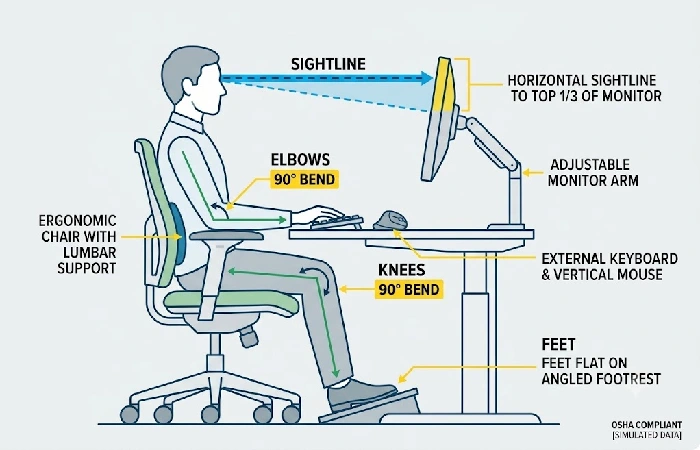
Start with the screen. OSHA’s workstation guidance puts the monitor about 20 inches away with the top of the screen at or slightly below eye level, so your gaze drops gently instead of your neck. Chair height comes next — elbows at roughly 90 degrees over the keyboard, and if your feet don’t sit flat on the floor after that, the footrest earns its place. Keyboard and mouse should be close enough that your upper arms hang naturally, not reached for. On the wrist rest, palms down during breaks, not bent wrists propped up mid-type. Get those four things right and the same logic carries across everything else on the desk.
Frequently asked questions
1. What ergonomic desk gadgets reduce back pain the most?
For back pain, a lumbar cushion and an under-desk footrest do more work than anything else on this list, and they’re also the cheapest. The cushion puts your spine’s natural curve back where it belongs. The footrest stops your pelvis from tilting forward and dragging on your lower back.
2. Do ergonomic desk accessories actually work?
Match the gadget to the right problem and set it up correctly, and yes, they do. A wrist rest won’t touch back pain. A lumbar cushion behind a badly positioned chair does very little. Get the fit right and the strain reduction is measurable, which is why workplace ergonomics programmes have been built around this stuff for decades.
3. Which ergonomic gadget should I buy first?
Lead with your worst symptom. Back pain means a lumbar cushion and footrest. Wrist pain means a vertical mouse and wrist rest. Either starting point usually lands under ₹3,000 or $60, so you feel relief before spending on anything pricier.
4. Are cheap ergonomic gadgets worth it?
For cushions, footrests, and risers, basic design matters more than the brand name, and budget options usually deliver it. Indian buyers can often match imported names on Amazon.in or Flipkart at a third of the price. Keep the bigger spend for whatever your hands are in contact with all day — a mouse or keyboard where comfort and durability actually show up over time.
5. Does a footrest really help lower-back pain?
If your feet already sit flat on the floor, no. If they dangle or tuck under the chair, quite a lot. Feet in the wrong position tilt your pelvis forward and that load goes straight to your lower back over hours. Getting your knees to roughly 90 degrees lets your spine settle into neutral.
6. How do I make my desk more ergonomic without buying a new desk?
Screen to eye level first — a riser or a stack of books both work. Chair height sets your elbows to about 90 degrees, and if your feet don’t reach the floor after that, add a footrest. Keyboard and mouse close enough that you’re not reaching. A converter on top of your existing desk adds standing time without replacing a thing.
Wrap-up: Desk pain is rarely about being unlucky or getting older. The setup is fighting your body for eight hours a day, and most of that fight is unnecessary. A few well-chosen gadgets is usually all it takes. Don’t buy the whole list. Find the one thing that matches your worst ache and order it. The difference shows up faster than most people expect.
