Published: September 15, 2026
Last Updated: September 15, 2026
Would you believe that millions of passwords are recycled, stolen, and guessed in a single year due to data breaches? Two-factor authentication fills that void by providing an additional indicator of identity before granting access to your account even if your password falls into the wrong hands. In this article, we will discuss what exactly two-factor authentication is, which methods actually stand up to real-world exploits, how to enable it, and what can be done about the fact that it can still be circumvented.
Quick answer: 2FA is an additional identity verification requirement on top of your password and an authenticator app trumps sms.
Definition: “Two-factor authentication (or 2FA) means that you, or a standard login, is going to need two different items of evidence for example ‘a code sent to your mobile phone’ as well as ‘your password’ before it will let you onto an account”.
2FA Methods Ranked by Security
| Method |
How the code reaches you |
Main vulnerability |
Relative security ranking |
| SMS text code |
Sent over the mobile carrier network |
Vulnerable to SIM-swapping and SS7 interception; can be redirected without physical phone access |
Baseline — better than no 2FA, weakest of the common methods |
| Authenticator app (TOTP) |
Generated locally on your device every 30-60 seconds |
Vulnerable if the phone itself is compromised by malware, but not to network-level interception |
Stronger than SMS for the large majority of account types |
| Push notification |
App-initiated approval tap, potentially combined with biometric unlock |
Susceptible to prompt-bombing if owner approves blindly |
On par with, or perhaps slightly better than TOTP-seeded apps using biometric unlock |
| Security key/passkey |
A cryptographic credential stored in a physical hardware key or device-bound form |
Requires physical possession or device access and is resistant to remote phishing |
The most robust known consumer product at present |
How Two-Factor Authentication Works
You enter two different types of evidence before being granted access to your account, specifically two types of evidence from two different categories – something you know (passwords) and something you have (e.g., a phone or security token), or something you are (e.g. a fingerprint or face scan). You can’t use two passwords to achieve two-factor authentication, since both come from the same knowledge category.
2FA is part of multi-factor authentication (MFA). A 2FA setup is always MFA but MFA can need more than 2 factors; 2FA only ever uses 2. It matters because some services claim ‘MFA’ when they only require 2 factors, which as noted above is the same as 2FA.
The process is simple: you type your password, the service verifies it, then it asks for a second proof of your identity by one of the following methods before opening the door.
Types of Two-Factor Authentication
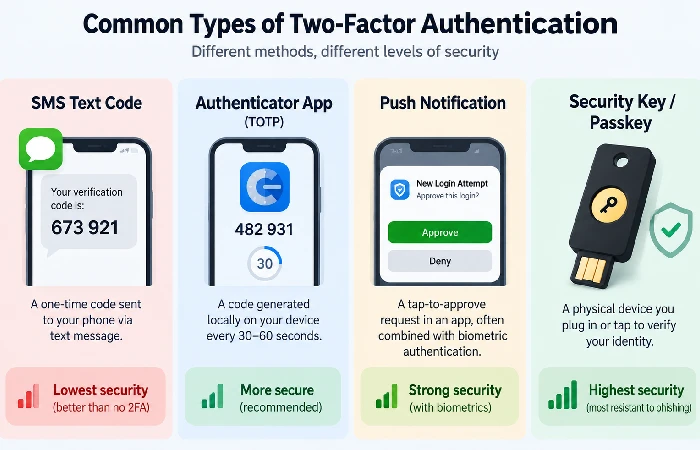
Each 2FA method verifies you through something you possess, a biometric trait, or a physical token, but they can differ in how much safeguarding they provide.
- SMS text codes — a one-time code sent by text message
- Authenticator app (TOTP) codes — generated locally and refreshed every 30 to 60 seconds
- Push notifications — a tap-to-approve prompt in an app, often combined with Face ID or a fingerprint
- Physical security keys — a hardware device you plug in or tap
- Biometric verification — a fingerprint, face scan, or retinal scan tied to the device itself
However, push notifications and authenticator apps are becoming more and more similar. Neither of them is truly based on your phone number being secure, which is the single biggest weakness in SMS.
Authenticator App vs. SMS: The Security Gap
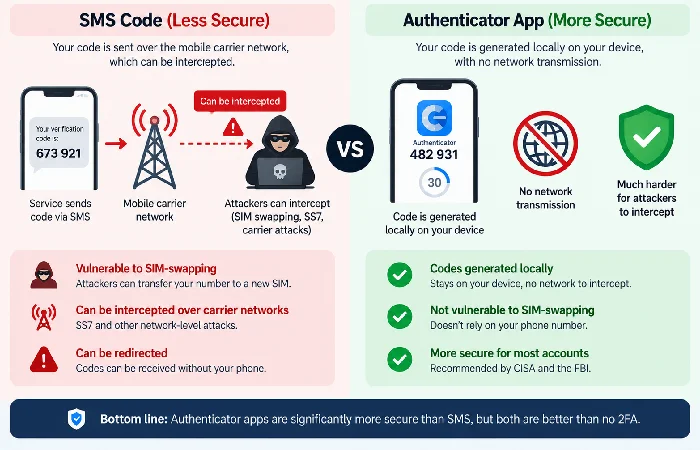
No question, the authenticator app is more secure than SMS. SMS codes go across your mobile carrier’s network, which wasn’t built with security in terms of authentication in mind, and are vulnerable to SIM-swapping and SS7 interception. If an attacker convinces your carrier to transfer your number to another SIM, they get all of your SMS codes, without ever touching your phone.
Authenticator apps generate codes locally on the device itself, so there’s no network transmission to intercept. That’s specifically why CISA and the FBI now recommend authenticator apps over SMS for corporate multi-factor setups, a guidance shift that’s shown up repeatedly in current security reporting.
None of this makes SMS worthless. SMS 2FA is still far better than no second factor at all. But if a service gives you a choice, use the app, and reserve SMS only for accounts that don’t offer anything stronger.
How to set up two-factor authentication
Setup steps vary slightly by platform, but the core flow is the same everywhere:
- Open the security or login settings for the account
- Look for “Two-factor authentication,” “2-Step Verification,” or “Multi-factor authentication”
- Choose a method — pick an authenticator app or security key over SMS when it’s offered
- Scan the QR code or enter the setup key into your chosen app
- Save the backup/recovery codes somewhere outside your email inbox
- Confirm the setup by entering a generated code
Do this on every account tied to your financial information, primary email, and any service holding personal data. For a broader look at locking down the rest of your digital footprint, see how to protect your personal information online. Once set up, disable any weaker fallback methods (like SMS) if the service allows it, so an attacker can’t downgrade your account to the weakest option.
Yes, 2FA Can Still Be Bypassed
Yes. Most attackers don’t break 2FA outright. They go around it. Phishing is one route, it tricks you into handing over your own details. Session tokens get stolen. Weak account-recovery systems are another way in, letting someone quietly swap your password without you noticing. A fake login page usually does the work. It grabs your password the moment you type it. Your 2FA code goes with it. Both get passed to the real service before that code has time to expire.
This is not just hypothetical. In one case, attackers used a privately circulated OTP bypass technique to take over a wave of Comcast Xfinity accounts. In another, a security researcher discovered a bug in Meta’s Accounts Center that allowed anyone to brute-force a target’s SMS code using just their phone number as the system lacked any failed attempt restrictions.
The policy does not say that 2FA can never work. It says that if the restoration email address, the mobile device, and the backup codes all belong to the same security boundary, and you are always “refused” when trying to type in a 2FA code on a page you have arrived at after clicking on a phishing link or urgent message.
FAQ
1. Is 2FA the same as two-step verification?
The answer is yes. In most consumer scenarios, two-step verification and “two-factor authentication” are interchangeable (though some providers use “two-step” more loosely to include steps that aren’t considered a distinct authentication factor).
2. What’s the difference between 2FA and MFA?
2FA always uses exactly two factors. MFA is the broader category and can require two or more. All 2FA is MFA, but not all MFA is limited to two factors.
3. What happens if you lose the device tied to your 2FA?
Use your saved backup codes to regain access, or the account’s recovery flow if you don’t have them. This is why backup codes should be stored somewhere separate from your primary device and inbox.
4. Do passkeys replace two-factor authentication?
Passkeys and hardware security keys are more secure than SMS and authenticator apps because they prevent phishing in ways that a typed code doesn’t. They’re often seen not as a replacement, but rather as the next step up, since not every service supports them yet.
