Published: September 15, 2026
Last Updated: September 18, 2026
Most password advice on the internet is out of date. If you’re following the “12 characters with a symbol and a number” rule, you’re building passwords to a standard the federal government stopped recommending in 2025. Here’s what actually holds up an account against a real attack today.
Quick Answer: NIST’s dropped the old 12-character rule for password-only logins – you’re looking at 15+ characters now.
Definition: A strong password runs at least 15 characters when it’s your only login method. It leans on length and randomness instead of forced complexity rules, and you don’t reuse it anywhere else.
Password length and security at a glance
| Password type |
Minimum length under current standard |
Crack resistance note |
| Password as sole login method |
15 characters minimum per NIST SP 800-63B-4 |
Below 15 characters, it no longer meets the current federal minimum |
| Password used alongside MFA |
8 characters minimum per NIST SP 800-63B-4 |
MFA absorbs some risk, but 8 characters with no MFA is not safe on its own |
| System-supported maximum length |
64 characters, per NIST guidance to system designers |
Allows passphrases of 4 to 7 words, as CISA recommends |
| Weak all-numeric password (12 characters) |
Not standards-compliant |
Crackable in roughly 25 seconds, per LastPass’s reported benchmark |
| Passphrase (4 to 7 unrelated words) |
Usually exceeds 15 characters |
Recommended directly by CISA as an alternative to random strings |
Methodology: figures pulled from publicly available guidance and third-party reporting, including NIST SP 800-63B-4, CISA, the National Cybersecurity Alliance, and LastPass, as cited throughout this piece — not estimated.
What Actually Makes a Password Strong
A secure password is everything to do with three factors, size, randomness and lack of repetition. Rules of complexity such as needing a symbol or a capital letter is way less important than the majority of people believe.
For years, the standard advice was to mix uppercase, lowercase, numbers, and symbols into a short password. That’s backwards. The National Cybersecurity Alliance states that a strong password should be at least 16 characters, and that complexity matters less than length and randomness — a long, random password beats a short “clever” one with substitutions like P@ssw0rd!, since those patterns are exactly what cracking tools are built to guess first.
- Length does more work than symbols
- Randomness beats predictable substitutions (0 for O, @ for a)
- Uniqueness prevents one leaked password from exposing every account
The real threat isn’t a person guessing your password. It’s automated software trying billions of combinations per second, and predictable “complexity” barely slows that down.
15 Characters Is the New Minimum
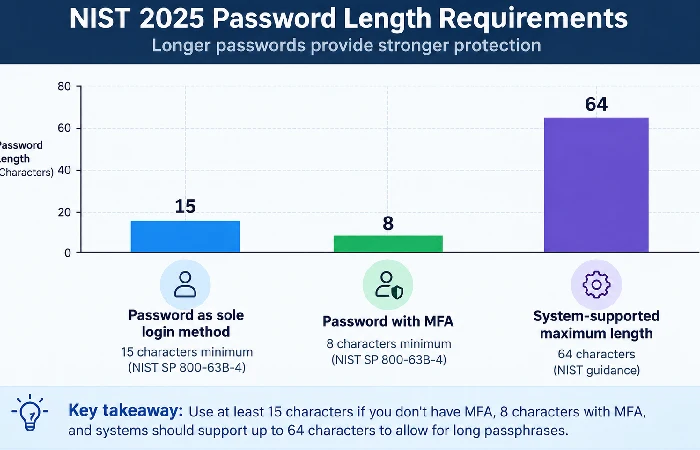
If you would like to only use your password to log in, your password needs to be 15 characters long. For future reference, NIST reduced that down to 8 if the account had Multi-Factor Authentication (MFA).
This comes from NIST SP 800-63B-4, finalized on July 31, 2025, which officially replaced the older standard many sites still quote. That’s why you’ll see conflicting numbers across the internet right now — Google’s own help documentation still references 12 characters, and some tool sites still say 12 as well. Neither reflects the current federal standard.
- 15 characters: minimum with no MFA
- 8 characters: minimum with MFA active
- 64 characters: maximum length systems should support
Any site that limits your password to 10 or 12 characters and doesn’t have an MFA option is not following current security guidelines, not you.
Passphrase vs. Password: The Real Difference
Passphrases just work better than passwords. Length beats complexity, plain and simple, and a passphrase is long by nature but you still remember it.
CISA’s advice is 4 to 7 random words. That’s already past the 15-character NIST floor, and you’re not stuck memorizing some jumble of random characters. Four random words strung together beats an 8-character password loaded with symbols when it comes to brute-force resistance. Add length and the number of combinations an attacker has to grind through shoots up fast, exponentially, not just a little.
- Use genuinely unrelated words, not a common phrase or song lyric
- Add spaces if the site allows them — NIST-compliant systems should
- Skip the “clever” substitution trick (swapping 3 for E) — it adds almost nothing against modern cracking tools
If you can turn a passphrase into a full sentence you’d never say out loud to anyone, you’re on the right track.
Why a Password Manager Is Worth Using
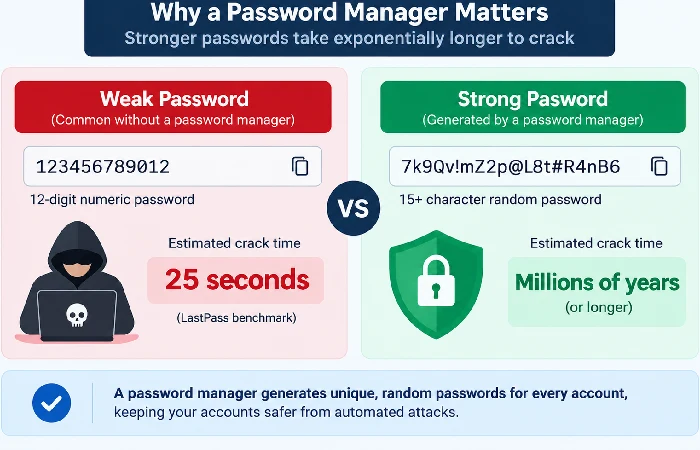
Yes. With a password manager being the only practical solution for maintaining distinct, 15+ character passwords for each of your accounts, the consequences of not using one are quantifiable.
If you check LastPass, a 12-character password made only of numbers would be cracked in 25 seconds. That’s the password that people would make when not using a tool. A password manager makes random, complex login details on every single website and autofills them, removing the temptation to use the same password elsewhere or just go for something simpler for the sake of remembering it.
- Generates unique, random passwords per account
- Autofills only on the legitimate site, which also blocks some phishing attempts
- Removes the need to memorize anything beyond one master passphrase
Pick a manager with strong encryption on the vault itself, since the manager becomes a single point of failure if it’s compromised.
Password mistakes that can put your accounts at risk
The most common mistakes are reusing passwords across sites, relying on personal information, and changing passwords on a fixed schedule instead of when there’s an actual reason to.
NIST guidance today makes it much more explicit that you should not be forcing periodic password changes (SP 800-63B-4 states that password changes should only happen when there is evidence of compromise in the form of a leaked password found in breach data, not on a 90-day calendar). Forced rotation without any reason will naturally encourage people to use weaker, more predictable passwords since they don’t have much time to think up a new one.
- Reusing one password across multiple accounts
- Using names, birthdays, or pet names that show up in public records or social media
- Rotating passwords on a schedule with no evidence of a breach
- Skipping MFA on accounts that support it
If any account you use has been part of a known data breach, that’s the trigger to change the password — not the calendar.
FAQ
1. Is a passphrase actually more secure than a password?
Indeed, in most practical cases. CISA’s recommended 4-to-7 word passphrase is naturally longer than the NIST 15 character minimum, but still easier for the user to remember than a random string and so less likely to be written down or used elsewhere.
2. Do you still need symbols and numbers if the password is long enough?
Not as a rule. NIST examines length, not what characters the password is using; in other words, a very long passphrase with no characters is possibly equal to NIST standards that a shorter, symbol-laden passwords isn‘t.
3. How often should you change your password?
Only when there’s a compelling need, such as an established compromise or abnormal account behavior. The suggested forced periodic rotation on a set schedule was ruled out by NIST’s SP 800-63B-4.
4. Should you use a password manager or write passwords down on paper?
A password manager is the superior choice for the average user, as it creates a unique random password for every site and Auto fills only on valid pages. Saved written passwords can also work if kept in a physically secure location, but they are not sustainable once you have much more than a few accounts.
If you’re auditing your accounts, reviewing how you protect your personal information online is the natural next step after locking down your passwords — start with whichever account holds your email, since that’s the one attackers use to reset everything else.
