Published: September 14, 2026
Last Updated: September 14, 2026
In 2024, the FBI reports that U.S. internet-crime losses exceeded $16 billion, an increase of 33%. Those over age 60 suffered the highest financial loss of any demographic. Three things matter here. Share less. Lock your accounts down. And know what to do the moment something leaks.
Quick answer: store your assets elsewhere, protect your private keys with a strong password and 2FA, and be prepared for any eventuality.
What does it actually mean to protect your info online? Mostly it’s limiting what you share in the first place. Then locking accounts down with unique passwords and two-factor authentication. And after a breach happens, actually keeping an eye out for where your info shows up.
What personal information should you protect online?
Your most exposed data can be grouped into four kinds of data: ID numbers, financial data, contact data and answers to security questions. Handle each according to how damaging it would be to leak such data.
- Identity numbers — Social Security numbers, driver’s license numbers, and passport numbers enable direct identity theft and should never be entered on unencrypted (non-HTTPS) sites.
- Financial details — Card numbers, bank account numbers, and routing numbers should only be shared on sites you navigated to directly, not through email or text links.
- Contact information — Home address, phone number, and date of birth are commonly used to answer “security questions,” so treat them as sensitive even though they feel harmless to share.
- Security-question answers – The FTC recommends avoiding questions with answers a stranger could find online or in public records – like your zip code or mother’s maiden name – and treating any unavoidable answer like a password: random and unique, not memorable.
How do you keep personal information private on websites and apps?
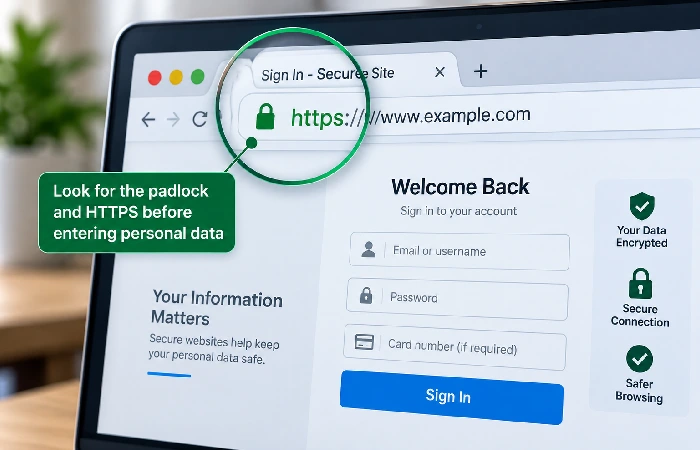
Check for HTTPS before entering any data. Audit which applications can access your contacts, location, and camera. These two checks catch most unnecessary exposure before it happens.
- Check the link. A padlock in the URL bar and “https://” at the beginning indicates the site is using an SSL certificate to encrypt data being sent; if it isn’t you shouldn’t be giving them your personal or payment details.
- Audit app permissions quarterly. Go into your phone’s settings and review which apps have access to your location, contacts, microphone, and camera – revoke anything a given app doesn’t need to function.
- Close dormant accounts. Old accounts with saved card or address details are exposure you don’t need; search your email inbox for old signup confirmations to find accounts you forgot you had.
- Read the privacy policy summary, not the full document – most services now post a short version explaining what they collect and why; if a business can’t explain why it needs a piece of information, that’s a signal to withhold it.
How do you protect your social media accounts and personal data?
Make everything private by default and remove identifying information – hometown, birth date, location tags – from publicly viewable fields. Most defaults are to make things public so you have to do something to make things private.
- Set profiles to private so only approved followers see posts, rather than relying on platform default settings, which typically favor public visibility.
- Remove location and travel details from public posts — announcing travel dates publicly signals when a home is unattended.
- Think again about what you are asked to do in quizzes and surveys. Many “fun” personality quizzes ask for data (first pet, school name) that is also used to identify you in your security questions, and can be harvested by third parties.
- Review the photos and posts you are tagged in on a monthly basis and untag anything that reveals more than you intended to share.
How do you prevent identity theft and data exposure?
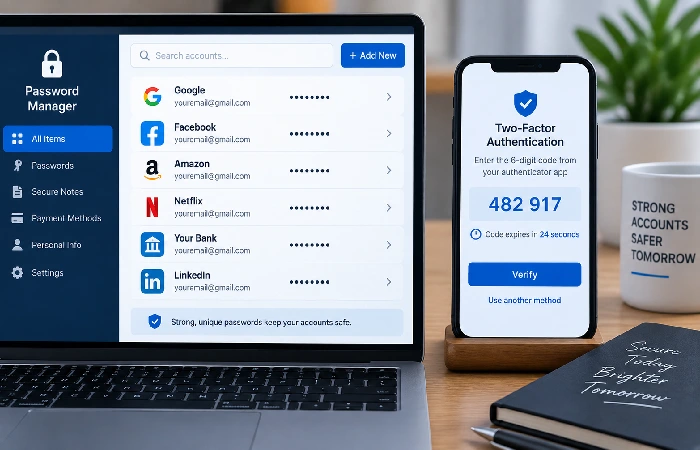
Use a password manager to generate a strong, unique password for each account, and enable 2FA everywhere it‘s available. Most account hijacks are the result of one or the other.
- Create a distinct password for every account you have. If one gets reused and leaks, every account sharing it goes with it. Let the password manager remember them – you don’t have to.
- Turn on 2FA for email, banking, and social accounts first. Someone who gets into those can usually reset their way into everything else you own.
- Update your software as soon as updates are available. Per the FTC, attackers go looking for weak points before a patch even ships – turning on automatic updates skips the lag of checking manually.
- Watch for phishing before you click anything. An unexpected email or text with a link in it is reason enough to go to the company’s site directly instead – a fake link can look identical to a real one.
What should you do if your personal information is leaked?
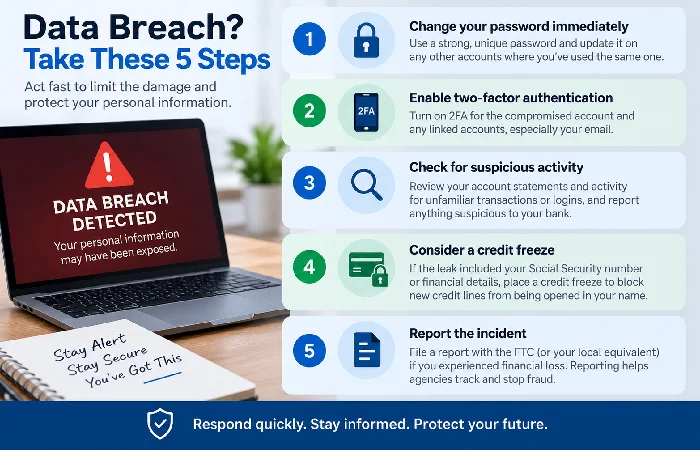
Perform the following steps in order: First, change the compromised password to something new. Then enable two factor authentication if you haven‘t before. Check your account for any suspicious activity. Step order is crucial since maintaining a changed password without active two factor authentication could be rolled back by an attacker with an active session.
- Change the exposed password immediately, and change it on any other account where you have used the same password.
- Turn on 2FA on the account that was compromised and any linked accounts, especially email, since it’s often the recovery path for everything else.
- Check statements and account activity for unfamiliar transactions or logins, and report anything suspicious to your bank directly.
- Consider a credit freeze if the leak included your Social Security number or financial account details — this blocks new credit lines from being opened in your name.
- File a report with the FTC or your local equivalent if financial loss occurred, since consistent reporting is how agencies like the FBI’s IC3 track and respond to emerging fraud patterns.
FAQ
1. What should I do first if my data is leaked in a breach?
Change the password on the affected account first, then enable 2FA, then check for unfamiliar account activity. Don’t skip straight to a credit freeze before securing the account itself — an attacker with active session access can undo a password change if 2FA isn’t also turned on.
2. How do data brokers get my information?
Data brokers aggregate from public records, social media sites, loyalty cards, and other firms that sell or share your data and create profiles of consumers to sell to marketers and third parties. You can opt out with individual brokers, but you will have to do this on an ongoing basis as the data will again be recirculated.
3. Is a VPN necessary for public Wi-Fi if I already use 2FA?
2FA protects your accounts if a password is stolen, but it doesn’t hide your browsing activity from others on the same public network. A VPN encrypts your connection so others on the same Wi-Fi network can’t intercept your traffic — the two protections cover different risks and work best together, not as substitutes for each other.
For broader protection beyond personal data — including device hardening and network security — see our full internet security guide.
