Published: September 10, 2026
Last Updated: September 10, 2026
SCADA sounds like acronym soup, but the idea behind it is simple. One person in a control room watches and runs equipment spread across a plant, a pipeline, or an entire power grid. This page covers what SCADA does, what it’s built from, and where it sits next to PLCs and DCS platforms, as part of the broader industrial automation guide.
Quick Answer: SCADA ties together sensors, PLCs, and a central HMI, giving operators a way to monitor and control industrial processes from anywhere.
Definition: A SCADA system pairs hardware and software to let operators keep watch over and control industrial equipment — pumps, valves, sensors, and more — all from one central location, sometimes far removed from the physical site itself.
What is a SCADA system?
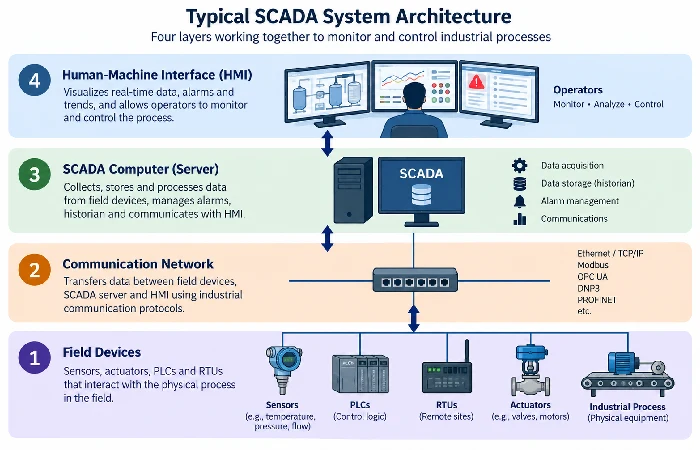
A SCADA system pulls real-time data straight from field equipment, letting operators see and control that equipment from a different location entirely. It’s not a single box — it’s four parts working together: field devices, a communication network, a supervisory computer, and an operator interface.
Different sources name these layers differently, but the jobs don’t change. Sensors and actuators sit at the equipment level. RTUs and PLCs grab that data and make the immediate local calls. A communication network, usually running Modbus, DNP3, or OPC UA, carries it back to a central system. A historian database stores it so someone can dig through it later, as AVEVA lays out. Take away any one of those four pieces and what’s left isn’t SCADA anymore, just a fragment of it.
Main components of SCADA
Four components make up a working SCADA setup:
- RTUs (Remote Terminal Units): gather data out in the field and send it upstream
- PLCs (Programmable Logic Controllers): make the fast, local calls — like cutting power to a motor before it overheats
- HMI (Human-Machine Interface): the screen the operator is actually watching
- Historian database: records everything with a timestamp, so someone can piece together what happened before an alarm triggered
The PLC automation page goes deeper on how that control logic layer works, including programming and ladder logic.
How SCADA systems work
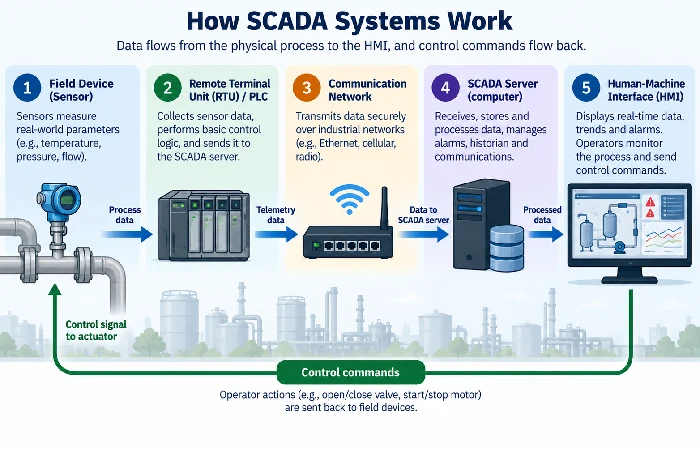
Sensors collect data. RTUs or PLCs process it locally. The network moves it to a central computer. The HMI shows it to a person. Commands flow back down that same path, so it’s a loop, not a one-way broadcast.
- A sensor measures something physical: temperature, pressure, flow rate
- The RTU or PLC checks that value against a preset threshold
- If it needs immediate action, like a pump running hot, the controller handles it on its own, before the data even reaches the control room
- The data still travels to the supervisory computer over Modbus, DNP3, or MQTT, depending on how old the system is and how much bandwidth it has to work with
- The HMI turns it into a graph, a status light, or an alarm, and the historian logs it
Worth knowing: SCADA is event-based. It reacts when something crosses a line, rather than scanning continuously the way a DCS does, as DO Supply explains. That distinction is the root of most of the confusion below.
SCADA vs PLC and DCS: what’s the actual difference
These three terms get used interchangeably far more than they should. A PLC handles fast, local logic on a single machine or process. A DCS runs large, continuous processes across an entire plant, with control spread across many controllers. SCADA sits above both — supervising and gathering data over a wide, scattered area, the way a utility might monitor wells and pipelines spanning an entire state.
A thread on r/SCADA shows this confusion playing out in real time — people asking which system they actually need, because product pages list overlapping features without ever marking where one ends and the next begins. The rough rule: controlling a single machine fast is a PLC’s job. Running a plant-wide, continuous process with heavy redundancy needs is DCS territory. Supervising and logging data across sites spread out over distance is SCADA. See industrial automation systems for the fuller comparison.
SCADA applications across industries
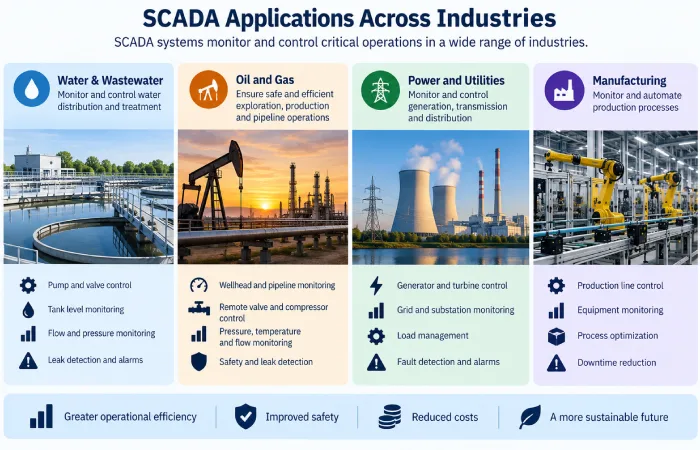
SCADA shows up wherever something is too spread out, too dangerous, or too continuous to check by hand.
- Water and wastewater: pump stations and treatment plants across a municipal system
- Oil and gas: pipeline pressure, well sites, and compressor stations spread across long distances
- Power generation and distribution: covers every stage, from fuel input through to electrical output
- Manufacturing: tracks temperature, pressure, and humidity on production lines, along with real-time quality checks
- Buildings: manages HVAC and energy use in large or smart buildings
What connects those five: distance or scale big enough that walking around and checking things by hand stops being an option.
SCADA security challenges
Most SCADA security problems aren’t generic IT problems wearing an industrial disguise. They’re specific to how these systems got built. A lot of SCADA deployments still run legacy protocols designed decades ago for isolated networks, with no authentication baked in at all, as Automation.com breaks down. The trouble starts the moment modern connectivity gets bolted onto that.
Three weak points come up again and again. Unpatched or unpatchable firmware tops the list — older RTUs and PLCs often can’t be updated without swapping out hardware, which leaves known vulnerabilities open indefinitely. Flat network segmentation isn’t far behind: a single compromised device can sometimes reach the entire control network, because SCADA and IT traffic were never kept separate to begin with. And physical access is consistently underrated — SCADA hardware sitting in an unsecured location gives an attacker a direct path that bypasses network defenses altogether.
Real fixes look more like proper segmentation and scheduled hardware refreshes.
FAQ
1. Is SCADA the same as IoT?
No. SCADA can pull in data from IoT devices, and current SCADA setups lean on IoT sensors much more heavily than in the past — but SCADA remains the layer that supervises, not the devices themselves. SCADA was operating for decades before anyone had even coined the term “IoT.”
2. How much does a SCADA system cost?
It depends heavily on scale. A small, single-site PLC and HMI setup might cost a few thousand dollars. A distributed utility deployment spanning hundreds of remote sites can reach into six or seven figures.
3. What programming language is used for SCADA?
Mostly ladder logic at the PLC level, along with vendor-specific scripting or configuration tools — not general-purpose languages like Python or Java for the core control logic.
4. Can SCADA systems be hacked?
Yes. SCADA carries well-known vulnerability categories, such as legacy protocols that skip authentication entirely and firmware that’s gone unpatched — and real-world attacks on critical infrastructure have gone straight through those exact weaknesses.
5. What’s the difference between SCADA and DCS?
SCADA is event-based and built for supervising sites spread across distance. DCS scans continuously and is built for centralized control of one large, continuous process inside a single facility.
