Published: September 17, 2026
Last Updated: September 17, 2026
Most small business owners hear “digital transformation” and picture a six-month IT project with a five-figure price tag. That’s wrong for a company with five employees or fifty. The real version starts smaller. One manual process. It gets replaced with a digital tool. That tool has to prove itself before you touch anything else.
Quick Answer: Digital transformation for small businesses starts with one automated process. Not a full tech overhaul.
Definition: “Digital transformation for a small business means replacing one manual, error-prone process with a connected digital tool. Then repeating that swap deliberately across the business.”
Digital Transformation, Defined for Small Business
Digital transformation for a small business means swapping manual, paper-based, or spreadsheet-driven work for connected digital tools, one process at a time. It’s not a single event. It’s a sequence.
A retail shop replacing a paper ledger with a point-of-sale system that syncs inventory automatically is doing digital transformation. So is a service business that moves from phone-tag scheduling to an online booking calendar. Neither needed a company-wide strategy document first. Both needed to identify the one process costing them the most staff hours per week and fix that first.
This is the core idea covered at greater depth in the digital transformation guide, which maps the full category for businesses of any size. For a small operation, scope matters more than ambition does. Most projects that stall before month three have the same root cause. Somebody tried to digitize everything at once.
The One-Process Rule for Getting Started
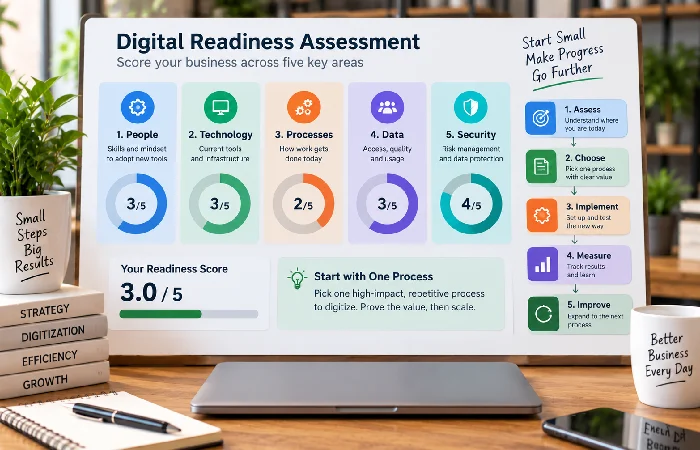
Start with a readiness check, not a purchase. A structured self-assessment across five dimensions, current tools, staff digital skills, budget, data practices, and customer-facing touchpoints, takes one to two weeks and should happen before any software gets bought, according to a 2026 SMB digital transformation guide from Digital Applied.
Score each dimension 1 to 5. Start with the lowest-scoring dimension. If your data practices score a 2 because customer information lives in three different spreadsheets, that’s your first project, not your marketing website.
Here’s the mistake most guides encourage: treating this as a linear checklist where step one is “define your vision” and step two is “assess capabilities.” In practice, the businesses that actually finish their first digital swap skip the vision statement and go straight to fixing whatever process is bleeding the most hours. Vision documents can come later, once there’s a working example to build on.
Affordable Tools That Actually Move the Needle
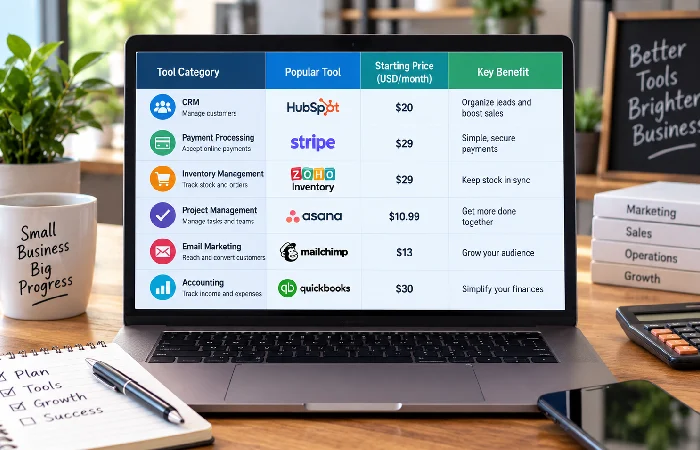
Small business tool costs are lower than most guides admit, and naming actual numbers beats vague claims like “cost-effective” every time.
- CRM software: Starter tiers commonly run $0 to $25 per user per month at the entry level, enough to centralize customer records out of spreadsheets.
- Digital and contactless payments: No high upfront cost. Processing fees typically run 2.6% to 3.5% per transaction.
- Inventory or scheduling software: Entry-level plans commonly run $20 to $50 per month.
- Cybersecurity baseline: Multi-factor authentication is free on nearly every major platform and closes the single most common small-business breach vector.
None of these require a developer or an IT department. For real-world examples of how these categories play out by industry, the digital transformation examples page breaks down retail, service, and manufacturing cases side by side.
Automating the Processes That Eat the Most Hours
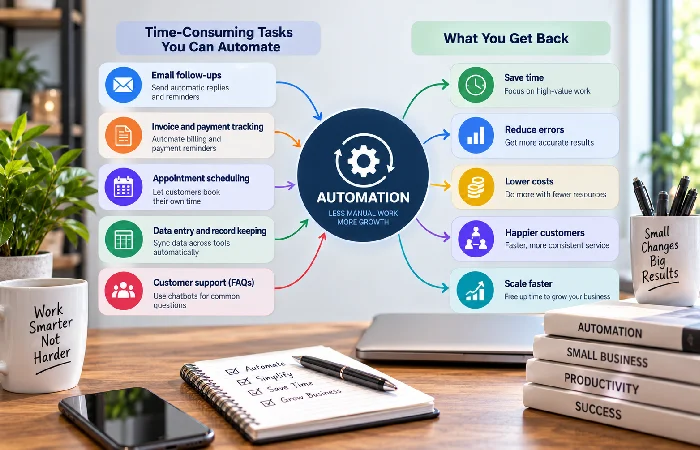
Automation candidates aren’t hard to spot. They’re the tasks someone on your team repeats every single week with zero decision-making involved: invoicing, appointment reminders, inventory reordering, follow-up emails.
Broader research backs up how much of this is genuinely automatable. Digital, social, mobile, analytics, and cloud tools combined can automate an estimated 20% to 60% of tasks across a typical business, depending on the function, according to McKinsey research cited by Sanka. That’s a wide range because it depends entirely on which processes you target first. Automating customer follow-up emails might save two hours a week. Automating inventory reordering for a retail shop with thin margins can prevent stockouts that cost far more than the software.
Pick the task with the clearest pattern. The most repetitive one you’ve got. If it changes every time you run it, skip it for now, it’s not automation-ready. Not yet, anyway. Same five steps every time, though? That one’s ready.
Building the Plan Once You’ve Proven the First Swap
Only after one process is automated and working does a full plan make sense. Trying to write a company-wide digital transformation roadmap before proving a single swap works backward, and it’s why so many small business “strategy documents” never survive contact with an actual budget meeting.
Once you have one working example, whether that’s a CRM that’s actually being used daily or a payment system that’s cut reconciliation time in half, you have something concrete to build the next phase around. That’s the point where a full staged plan, covering budget sequencing, staff training, and a 90-day rollout, actually earns its place. The digital transformation strategy guide covers that full planning process in detail, including how to sequence multiple tool adoptions without overwhelming a small team.
Frequently Asked Questions
1. How much does digital transformation cost for a small business?
CRM, scheduling, inventory. Entry-level tools in each category commonly run $0 to $50 a month. Payment processing works differently. Not a flat fee. Usually 2.6% to 3.5% per transaction. Add it up and most small businesses can get started for under $100 a month in new software.
2. What is the first step in digital transformation for a small business?
Run a short readiness assessment. Five dimensions: current tools, staff skills, budget, data practices, customer touchpoints. Whatever scores lowest, fix that first. Not a company-wide plan.
3. What tools do small businesses actually use for digital transformation?
Three starting points show up most often. CRM software, for customer records. Point-of-sale or booking systems, for scheduling. Digital payment processing. Cybersecurity basics like multi-factor authentication typically come next since they’re free to implement.
