Published: September 11, 2026
Last Updated: September 11, 2026
Cloud computing means you’re renting, not buying. Servers, storage, software — all of it lives somewhere else and runs over the internet, so there’s no hardware sitting in a closet that you have to maintain. Most businesses run their IT this way now because it’s cheaper to pay as you go than to own equipment outright.
Quick Answer: You rent computing resources — servers, storage, software — over the internet instead of owning the hardware.
Definition: Buying and maintaining physical servers used to be the only option. Cloud computing replaced that with renting computing power, storage, and software over the internet instead.
Quick facts on cloud computing
| Metric |
Standalone fact |
| IaaS market size |
The global IaaS market is projected to reach $212.34 billion by 2028, growing at an 18.3% CAGR from 2024 (The Business Research Company, 2025) |
| SaaS market size |
Needs source verification before publishing — see note above |
| Hybrid cloud adoption |
More than 77% of businesses and IT professionals report using a hybrid cloud approach (IBM Institute for Business Value) |
| Multicloud usage |
Needs a real source and accurate figure before publishing — see note above; current wording appears unsupported |
| Public cloud spending |
Worldwide spending on public cloud services is forecast to double between 2024 and 2028 (IDC) |
| First commercial cloud service |
Amazon Web Services launched its first cloud storage and computing products, S3 and EC2, in 2006 |
Methodology: These figures come from public sources, things like vendor disclosures, analyst reports, and third-party write-ups.
What’s actually happening behind the scenes with cloud computing?
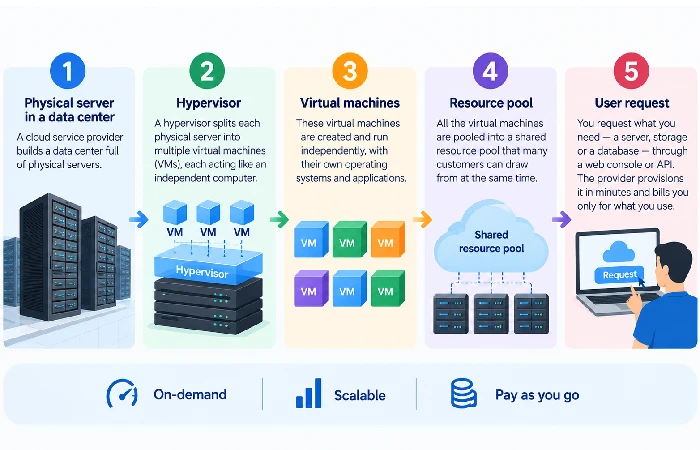
Take one physical server, split it into several smaller virtual ones, and make each available over the internet — that’s the short version. The provider owns the data centers and keeps the actual machines running, which means you’re never dealing with hardware yourself. Log in, use what you need, done.
Here’s the mechanism in order:
- A CSP builds a data center full of physical servers.
- A piece of software called a hypervisor splits each physical server into multiple virtual machines, with each one acting like its own independent computer.
- Those virtual machines then get pooled into a shared resource pool that many customers draw from at the same time.
- From there, you simply request what you need — a server, storage, a database — through a web console or API.
- The CSP provisions what you asked for in minutes, and bills you only for what you use.
The credit for starting the first commercial cloud providers was acquired by Amazon Web Services in 2002 initiated cloud-based services then, in 2006 came its first service, Elastic Compute Cloud (EC2) allowing customers to rent virtual servers on the fly. Google followed in 2006 and introduced an integrated software suite: Google Apps (later known as Google Workspace), one of the earliest mainstream SaaS products. The first product from the giant known as Microsoft was released in 2008- Business Productivity Online Suite (BPOS), followed by the greatly improved Office 365 in 2011.
The concept itself is actually dating back way before any of the launches. It was first envisioned by computer scientist J. C. R. Licklider in a succession of memos he wrote in the early 1960s, decades before the infrastructure existed to create anything akin to it.
What are the main types of cloud computing services?
There are 3 main service models, varying primarily by the proportion of the technology stack that is managed by the provider versus yourself:
Infrastructure as a service (IaaS) provides you with the basic infrastructure resources – virtualized servers, storage and network resources – in the cloud on demand and you simply need to run the OS and installed applications of your choice on top. It is just like setting up your own physical servers, but without the need to purchase one. It is expected to grow at a CAGR of 18.3% from 2024 to $212.34 billion by 2028 according to an IaaS market report by The Business Research Company.
Platform as a service takes the IaaS layer and adds the operating system, middleware, and development tools back on top, so developers can build and launch applications without worrying about the server level underneath. Basically, PaaS is IaaS with an extra layer stacked on — easier to picture once you already know what IaaS handles.
Software as a service (SaaS) is where you just use an app through your browser and the provider deals with everything else, servers, storage, security patches, upgrades, all of it. SaaS is the experience most users are engaging with on a regular basis Gmail, Salesforce, and Netflix are all SaaS products.
Finally, there’s the fourth model (serverless computing), which is layered over IaaS and PaaS, executing your code in response to an event, and charging you per execution rather than for idle server time.
Public, private and hybrid cloud deployment models explained
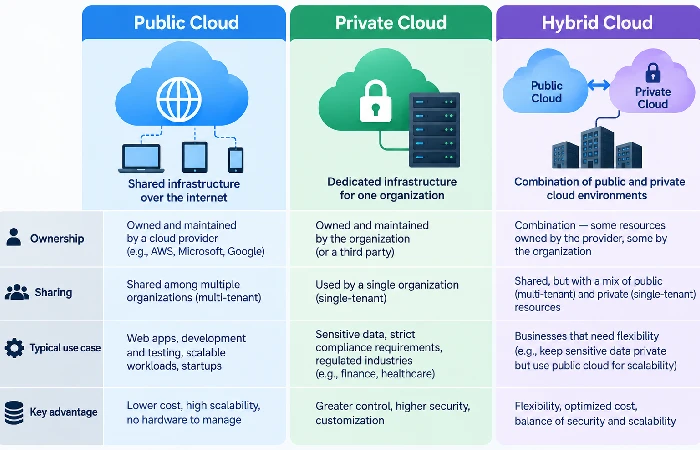
A deployment model describes who owns the infrastructure and who else shares it with you, not what services run on it.
- Public cloud is infrastructure owned by a third-party provider that anyone can share. Providers such as Amazon Web Services, Google Cloud and Microsoft Azure all provide access to public cloud with charging generally based on units of use.
- Private cloud refers to one organization’s dedicated infrastructure, run in locations owned by that organization or rented infrastructure not shared in any way with other tenants. Many regulated industries such as health care and finance tend to favor private clouds for compliance reasons related to sensitive information.
- A hybrid cloud model combines with each other the public cloud, private cloud, and traditional on-premises infrastructure into one unified system. Using this approach, an enterprise could keep the security of critical workloads in a private cloud environment, and, if necessary, scale out to a public cloud environment.
What are the benefits and disadvantages of cloud computing?
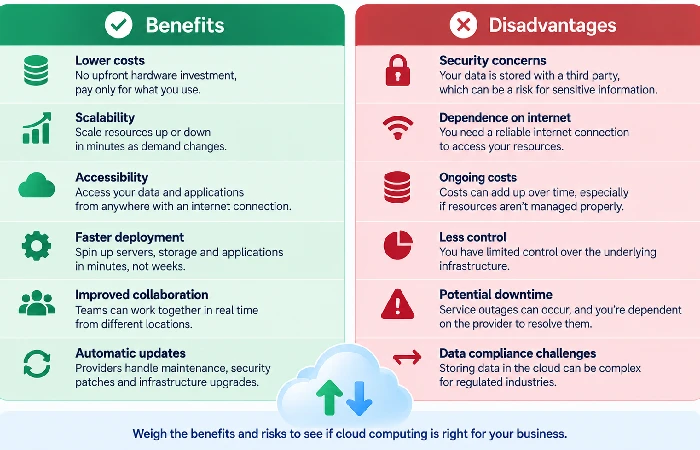
The honest answer: cloud computing isn’t universally cheaper than running your own servers. It’s cheaper for variable or growing workloads. It can cost more for steady, high-utilization workloads that would keep owned hardware busy around the clock anyway. Most vendor pages skip this because the simpler pitch sells better.
Real benefits, with numbers attached:
- Cost structure shifts from fixed to variable. You stop paying upfront for servers you might not fully use and instead pay only for what you consume, which is why AWS lists this as the first of its six core advantages.
- Speed to deploy drops from weeks to minutes. New IT resources become available almost immediately instead of waiting on procurement and hardware setup.
- Energy and carbon impact can drop meaningfully. Shifting workloads to the cloud can cut energy consumption and carbon emissions by at least 30%, according to an analysis by Future Processing.
- Global reach happens without new data centers. Applications can deploy across multiple regions in minutes, reducing latency for users far from your original location.
Real disadvantages, without softening them:
- Downtime is out of your hands. Cloud systems depend entirely on internet connectivity and the provider’s uptime. Google suffered three severe outages in 2020 that affected the majority of its services and users worldwide — a reminder that even top-tier providers go down.
- Costs can creep past estimates. Pay-as-you-go pricing sounds simple, but overall spend can end up higher than expected if usage isn’t monitored and auto-scaling isn’t configured correctly.
- Vendor lock-in is a real switching cost. Moving workloads between providers later can be expensive and technically complex once you’ve built around one vendor’s specific tools.
Cloud computing applications, security and on-premises alternatives
Cloud security runs on a shared responsibility model: the provider secures the underlying infrastructure, while you’re responsible for securing your own data and access controls within it. That split matters, because a secure cloud provider doesn’t automatically mean your data is secure — misconfigured permissions remain one of the most common causes of cloud data exposure.
Common cloud computing applications:
- Data backup and disaster recovery — replacing physical backup infrastructure with redundant cloud storage across multiple locations.
- Software development and testing — spinning up and tearing down test environments in minutes instead of provisioning physical servers.
- Big data analytics — processing large volumes of data using elastic compute resources that scale up only when needed.
- Remote work enablement — making applications and files accessible from any device with an internet connection.
- Edge and IoT support — bringing data processing closer to connected devices to reduce latency.
For organizations that can’t shift some workloads to the cloud, whether for compliance, speed or cost reasons, the other option is on-premises. There are many organizations that operate both side by side under a hybrid model instead of one or the other.
IDC’s spending guide puts it plainly: public cloud spend should roughly double between 2024 and 2028. That lines up with something Gartner’s been saying for a while now too — cloud isn’t emerging tech anymore, it’s just infrastructure at this point.
Frequently asked questions
1. So what actually is cloud computing?
Cloud computing means using computers that belong to someone else. Amazon Web Services and Google are two examples of companies that actually run the machines behind it, while you just use them, storing data or running programs over the internet rather than setting anything up yourself.
2. What are the 3 types of cloud computing?
There are basically three types of services available: Infrastructure as a Service (IaaS), Platform as a Service (PaaS) and Software as a Service (SaaS). These service categories differ according to how much of the stack the provider takes care of and how much on your own.
3. Is cloud computing safe?
Cloud computing operates on the model of shared responsibility. While you handle everything related to your data, access policy and its configuration, the provider is taking care of the infrastructure.
4. What’s a real-world example of this?
Gmail. Netflix. Dropbox. None of them ask you to think about servers or data centers — you open the app, it works, and that’s the whole experience. All of it runs on infrastructure somewhere else entirely.
5. What is the difference between public, private, and hybrid cloud?
Public cloud is shared infrastructure owned by a third-party provider. Private cloud is dedicated to a single organization. Hybrid cloud combines both, alongside on-premises systems, in one connected setup.
