Published: September 1, 2026
Last Updated: September 1, 2026
Picking the right business process automation platform isn’t about the one with the most features on paper. It’s about fit – does it match how your team actually works? A five-person marketing agency connecting Slack to Google Sheets doesn’t need what a 500-person finance department routing invoice approvals through SAP needs.
This guide compares seven BPA tools at verified September 2026 pricing, use-case fit, and technical needs. Every price cited below comes directly from the vendor’s public pricing page. The comparison table is organized by team scenario — small team to enterprise — so you can skip straight to your category.
Quick Answer: New to this – go Zapier. Need visual workflows – Make’s your pick. Team of developers – n8n. Already living inside Microsoft – Power Automate. Really it comes down to your team size and what you’re already running, not whoever has the longest feature list.
Definition: “Basically, software that picks up the repetitive manual stuff and runs it for you – through rules, or these days often AI. Less room for error, work moves faster, and your team stops burning hours on tasks that don’t need a person doing them..”
What are business process automation tools?
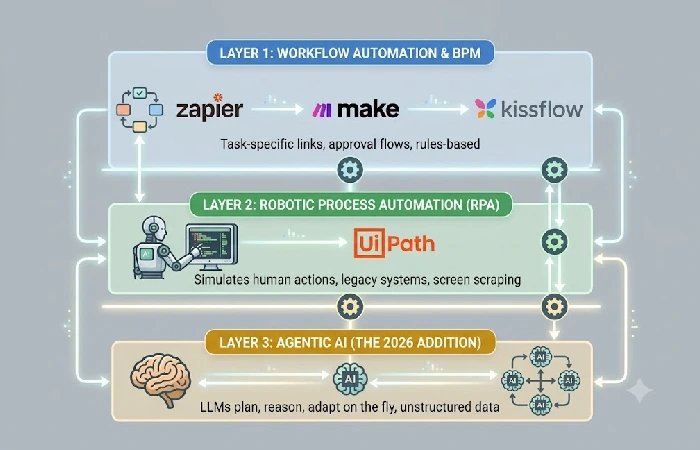
Business process automation (BPA) tools are applications that perform the various business functions that are performed repeatedly without human intervention. These are form approval applications, data transfer applications, notification applications, document routing applications etc. They facilitate the functions between your existing systems and the organization. They are rules based applications or applications that are data conditions and rules based.
Most listicles conflate these as just “BPA,” “BPM,” and “RPA.” They are not. Each works at a different level.
-
- Workflow automation controls simple, task-specific, app-to-app links (e.g., “the moment somebody submits this form, the program will generate a Customer Relationship Management record.”). Applications: Zapier, Make.
- Business process management (BPM) manages end to end processes of departments along with governance, compliance and measuring performance. Tools: Appian, Kissflow.
- Robotic process automation (RPA) modeled on the actions performed by humans at the screen level on legacy systems that have no APIs. Tools: UiPath.
- Agentic AI, the 2026 addition, uses large language models to plan, reason, and adapt on the fly instead of following a fixed script.
Gartner defines hyperautomation as the disciplined use of multiple technologies – AI, ML, RPA, and low-code – to do more than any single tool could alone. Before comparing vendors, ‘which layer do you require?’ is the primary filter.
Essential features to look for
Your team’s technical capabilities and integration requirements should guide your choice of the right BPA platform. Determine these seven capabilities, then compare those against the platform’s features:
- Low-code/no-code builder. If your team doesn’t have engineers to spare, this matters more than anything else on the list – drag-and-drop building means business users can put workflows together themselves.
- Native API integrations – your platform needs to integrate directly into the apps your team is already using (CRM, ERP, collaboration tools). The more native connections you have, the less customization you will need.
- Visual workflow editor. Being able to actually see your automation logic laid out on a canvas – instead of buried in settings menus – speeds up debugging, audits, and handoffs between team members.
- Conditional branching. This is the if/then logic – work gets routed down different paths depending on data values, how an approval went, or whether something triggered an exception.
- AI document processing. Finance and ops teams especially need this – pulling data automatically out of PDFs, emails, and scanned invoices instead of typing it in by hand.
- Audit trails and governance — Timestamped logs of every automated action. Non-negotiable for regulated industries or SOC 2–compliant organizations.
- Scalability controls — Usage caps, role-based permissions, and centralized monitoring to prevent uncontrolled “shadow automation” across departments.
Best BPA tools for different business needs
The right BPA tool depends on three variables: your team size, your technical capacity, and your existing software stack. The table below compares seven platforms with pricing verified from vendor pages as of September 2026.
| Tool |
Best for |
Starting price (Sept 2026) |
Free tier? |
Key strength |
Key limitation |
| Zapier |
Small teams connecting cloud apps without coding |
$19.99/mo (Pro, 750 tasks) |
Yes — 100 tasks/mo |
7,000+ app connectors; 5-minute setup |
Costs scale fast with multi-step workflows |
| Make |
Teams building visual, branching workflows |
$9/mo (5,000 operations) |
Yes — 1,000 ops/mo |
Visual scenario builder; cheaper than Zapier at scale |
Steeper learning curve; fewer connectors |
| n8n |
Developers wanting code-level control and self-hosting |
$24/mo (Cloud, 2,500 executions) or free self-hosted |
Yes — self-hosted is free |
Charges per execution, not per step; full source access |
Requires technical setup for self-hosting |
| Power Automate |
Microsoft 365 organizations |
$15/user/mo (Premium) |
Limited — basic flows in M365 |
Native M365 + desktop RPA; unlimited cloud flows |
Premium connectors require paid license |
| UiPath |
Enterprises automating legacy screen-based tasks |
~1,500–1,500–2,000/robot/yr (attended) |
Limited — free Community Edition |
Industry-leading RPA for legacy systems |
Opaque enterprise pricing; high TCO |
| Kissflow |
Mid-market HR, finance, and procurement teams |
~$1,500/mo (Basic) |
No |
Unified low-code platform; rapid deployment |
Expensive for small teams |
| Appian |
Large enterprises needing case-centric BPM with compliance |
~70–70–100/user/mo (est. Standard) |
Limited — Community Edition |
Enterprise governance and audit trails |
Opaque pricing; high minimum user commitments |
Pricing source: Vendor pricing pages and official documentation, confirmed 1st September 2026. Enterprise pricing is estimated from industry benchmarks where vendors do not publish prices.
For real-world use cases showing how these tools apply to specific departments, see business process automation examples.
How to compare automation platforms
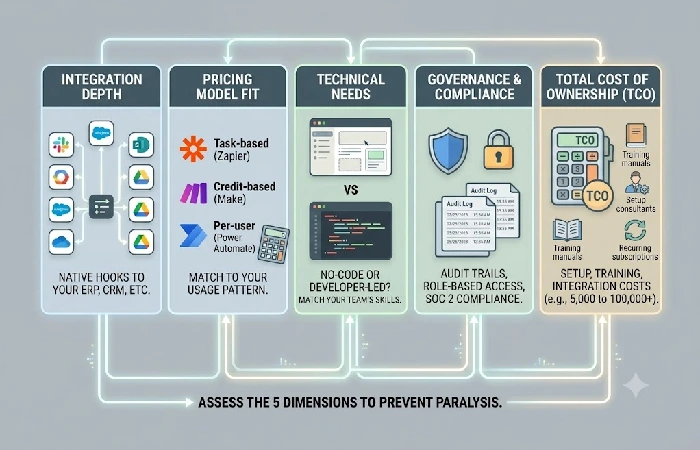
Assess BPA platforms based on the following five aspects (not features) so as to prevent comparison paralysis. Basically you want to knock out anything that won’t fit your setup before you even get to demos or free trials.
- First, integration depth – whether it hooks natively into what you’re already running, your CRM, ERP, whatever you use to communicate.
- Pricing model fit — Task-based pricing (Zapier) charges per action. Credit-based pricing (Make) charges per operation. Per-user pricing (Power Automate at $15/user/mo) charges per seat. Match the model to your usage pattern — high-volume teams often overspend on task-based models.
- Technical needs – Can your team develop workflows that don’t have to be built by a developer? No-code tools such as Zapier and Kissflow are more limited but easier to use. Developer-oriented tools like n8n and Camunda allow greater control but must be developed by an engineer.
- Governance and compliance if your sector needs audit trails, role-based access, or SOC 2 compliance, eliminate options that don’t provide these features prior to comparing cost.
- Total cost of ownership (TCO): Enterprise BPA implementations can cost anywhere from 5,000 to more than 100,000 in setup, training, and integration costs (see: Stepper.io TCO guide).
One thing that routinely gets overlooked: don’t automate a flawed process. According to McKinsey’s 2026 State of AI report, only 6% of firms are “high performers” with automation that actually saves money, despite the fact that 80% of employees say their own productivity went up. What’s the difference? Most teams automate the chaos instead of fixing it first. Chart it out, eliminate the waste, and then automate.
Choosing the right BPA software
Begin by plugging your scenario into a tool tier and confirm that with a one pilot workflow before moving on to an annual plan.
- Small team (1–20 people), without developers: Use Zapier (free tier, 100 tasks/month) or Make ($9/month). Create a link between your two most-utilized tools. Only add additional automation once the first workflow is saving real time.
- Microsoft 365 organization: Default to Power Automate ($15/user/mo). It shares everything you use in your existing M365 stack identity management, permissions, data residency. No extra vendor onboarding required.
- Developer led team wanting cost control: Use n8n self-hosted (free). You are in charge of infrastructure. Your data will not leave your servers and, a sophisticated multi-step workflow costs nothing extra per step.
- Enterprise with compliance needs: Select Appian or Kissflow via a formal RFP. Before presentations, verify audit trail granularity, role-based access rights, and ERP integration.
Your next challenge: select one rules-based, high-volume business activity (invoice processing, onboarding or expense approval) and create the existing manual operation flow in 30 minutes then go create the automation in the free tier of whatever tool you chose. Full strategic framework for this pick-and-build process is in the business process automation guide.
Subnote: for any web location with the capability to embed a Google Preferred Sources follow button or email capture call to action here. The highest propensity for return to the tool-specific deep dive will be among those who make it to the decision framework.
Frequently asked questions
1. What should I automate first?
Start with tasks that happen a lot and rarely throw exceptions – high volume, rules-based stuff. Invoice matching and validation is a solid first pick, same with onboarding form routing, expense approvals, or just syncing data between two systems (CRM to a spreadsheet, say). They’re repetitive and predictable, so the time savings show up fast. Don’t automate processes that involve frequent human interpretation. Save those for after you’ve won confidence with the basics.
2. What is the difference between BPA and RPA?
BPA automates end-to-end business processes across departments, multi-step approval flows, document processing, and integrations of data between systems. RPA is less broad, it mimics particular manual actions on legacy software with no APIs, doing them on the screen (like copying data from a mainframe terminal). In 2026, agentic AI provides a third layer, placing steps autonomously, understanding unstructured data (such as PDFs or emails), and handling deviations instead of sending an error message like traditional RPA bots.
3. How much does business process automation software cost?
BPA software ranges from free to over $15,000/month depending on team size and complexity. Entry points: n8n self-hosted costs $0 (you pay only for server hosting at ~$3-$7/mo). Zapier’s free tier includes 100 tasks per month. Mid-range: Make starts at $9/mo; Power Automate Premium runs $15/user/mo. Enterprise: Kissflow starts at ~$1,500/mo; Appian is estimated at $70-$100/user/mo with minimum user commitments. Implementation costs for enterprise rollouts add $5,000 to $100,000+ on top of subscription fees (source: Stepper.io).
Just a heads-up for future pastes: this “missing spaces” corruption usually happens when copying from a PDF or a source with unusual character encoding — worth double-checking the source text before pasting it into the master prompt, since I can’t always tell the difference between “spaces stripped” and “words legitimately run together” without asking.
