Published: September 1, 2026
Last Updated: September 1, 2026
Business process automation is basically software doing the repetitive, rules-based stuff so people don’t have to, and it does it quicker with fewer mistakes along the way. The market for it globally is sitting close to $19 billion this year. The ROI for automation investment in the BPA market is reported as an average of 240%, with 60% of companies experiencing the payback within 12 months (source: LeadResponse industry benchmark, 2026).
This primer takes you through real automation cases in business processes including finance, HR, sales, and customer service that result in a clear metric, and wraps up with a framework for deciding which processes to automate first.
Quick answer: Real BPA examples span invoice processing, employee onboarding, lead routing, and ticket triage. Every one of them shows real ROI, but only on tasks that are rules-based and high-volume to begin with. And if the process was already broken before you touched it, automating it doesn’t fix that. It just moves the same mess along quicker.
Definition: It is an application that does the repetitive, rule-based tasks once done by hand by a finance, HR, or sales person. This is the core benefit. Less errors get through, each task is less expensive, and speed-wise it’s faster than a human ever could be.
BPA examples at a glance
| Department |
Automation Example |
Measurable Outcome |
Automation Type |
Best-Fit Tool Category |
| Finance |
Invoice processing, where a bot pulls the data off the invoice using OCR, then it’s checked against the purchase order, and anything that doesn’t match gets kicked to a person to approve |
Cost-per-invoice declined from $12.44 to $4.98, a 60 percent reduction (Quixy, 2026) |
End-to-end process automation (RPA + IDP) |
Enterprise RPA (UiPath, Blue Prism) |
| Finance |
Bank reconciliation, a bot grabs the statements, works through the transactions to confirm they’re valid, and anything off gets flagged. |
Cuts manual reconciliation hours during month-end closing (QBotica) |
Task-to-workflow automation |
RPA or Microsoft Power Automate |
| HR |
Employee onboarding automates offer letters, document gathering, IT setup |
Compresses onboarding from 1–2 weeks to 1–3 business days (Faberwork) |
Multi-step workflow automation |
BPM platform (Kissflow, Appian) |
| Sales |
Lead scoring and routing auto-scores leads, enriches CRM, routes to assigned rep |
Eliminates manual CRM entry and cuts down lead response time (Activepieces) |
Event-triggered task automation |
No-code connector (Zapier, Activepieces) |
| Support |
Ticket triage, AI classifies tickets by intent and urgency, and assigns or resolves them automatically |
Deflects 30–50% of tier-1 tickets (Taskifylabs/Moveworks) |
Intelligent automation (AI + RPA) |
AI-native platform (Moveworks, ServiceNow) |
Methodology: The examples below come from finance, HR, IT, sales, and customer service, the five departments most often covered in current search results on this topic. Outcomes are pulled from publicly available industry reports and vendor documentation, not estimates. Tool categories reflect how vendors themselves describe each product’s role in a workflow.
What are business process automation examples?
Business process automation examples are specific workflows where software handles multi-step, rules-based tasks that previously required manual effort. Roughly 66% of organizations have now automated at least one business function, according to industry data compiled by CflowApps and McKinsey.
Not every automated task qualifies as BPA. The distinction matters:
- Task automation handles a single action, like firing off a confirmation email the moment someone submits a form.
-
Workflow automation links together a series of steps, such as those involved in sending an approval request to three managers in turn.
- Business process automation orchestrates an entire end-to-end process across departments — such as the full invoice lifecycle from receipt to payment to reconciliation.
The examples below focus on true BPA: multi-step, cross-system workflows with measurable business outcomes. For a deeper explanation of how BPA fits alongside RPA and BPM.
Finance and accounting automation examples
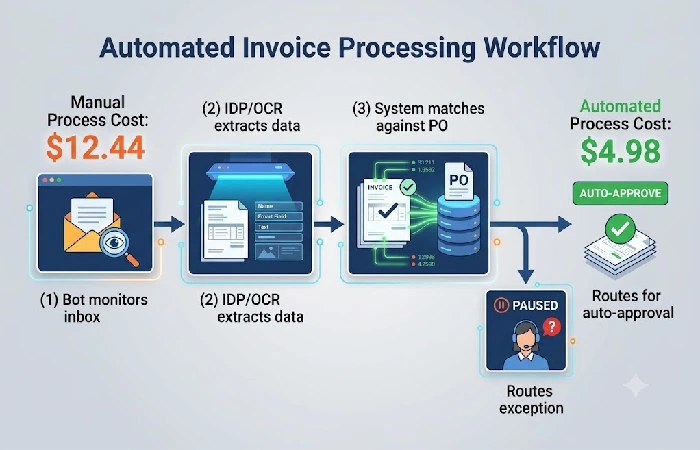
Finance departments are the most common starting point for BPA because their workflows are high-volume, rules-based, and data-heavy — three traits that make automation deliver fast, measurable returns.
Invoice processing is the most common finance process automated with RPA. A bot watches over a common inbox or vendor portal, pulls invoice information through Intelligent Document Processing (IDP) with OCR, compares against purchase orders from the ERP system and sends back exceptions to human review. BPA statistics from Quixy show this reduces cost-per-invoice from $12.44 for manual processing to near $4.98: a 60% saving per transaction.
Other high-impact finance automation examples include:
- Expense management: Employee uploads the receipt electronically. It gets checked against spending policy first. Then it goes to the manager for approval. Once that’s done, reimbursement kicks off automatically, nobody’s touching a spreadsheet at any point.
- Bank reconciliation: A bot grabs the bank statements every day. It works through each line item against what’s already on record, and anything that doesn’t line up gets kicked over to a person to look at. Cuts down the hours normally lost to this during month-end closing.
- Order-to-cash (O2C): This one covers the whole run from the moment an order comes in to invoicing, getting paid, and recognizing the revenue on the books. Sales, fulfillment, and finance stop waiting on each other to hand things off manually, which is where a lot of the delay usually creeps in.
HR process automation examples
HR automation removes the administrative bottleneck that slows down hiring, onboarding, and compliance tracking. The highest-ROI HR automation target is employee onboarding, where BPA compresses the cycle from 1–2 weeks of manual coordination to 1–3 business days (source: Faberwork, 2026).
A typical automated onboarding workflow works like this:
- Offer accepted triggers the system to generate a personalized offer letter and send it for digital signature.
- Documents collected — the system sends the new hire a checklist for tax forms, ID verification, and policy acknowledgments. Completed forms are auto-filed.
- IT provisioning – the system opens email accounts, allocates software licences, and commercial equipment delivery is scheduled. No manual IT call is required.
- Day-one scheduling welcome email, orientation calendar invite, introducing the manager, are automatically sent.
Beyond onboarding, HR teams automate these processes:
- Payroll integration: Time-tracking information is imported directly into the payroll system, withholdings are calculated, and pay stubs are created. No more errors in manual calculations.
Compliance reporting: automatically records when a training is completed, when professional certifications expire, and when audit-required documentation is due, then generates reports on demand.
Offboarding: When an employee departs, systems are disabled, tools are collected, and records are archived – a step most competitors overlook entirely.
Sales and customer service automation
Sales and customer service automation targets the two stages where speed determines revenue: lead response and ticket resolution. Automating lead routing alone eliminates manual CRM data entry and cuts the time between form submission and first sales contact.
Lead scoring and routing is the most common sales automation. When a new lead submits a form or visits a pricing page, the system:
- Scores the lead based on behavior signals (pages visited, email engagement, company size)
- Enriches the CRM record with firmographic data from connected databases
- Routes high-intent leads to the assigned sales rep with a Slack or email notification
On the support side, AI-powered ticket triage is replacing manual sorting. An AI agent analyzes each incoming ticket for intent, urgency, and category. It either routes the ticket to the correct team or resolves tier-1 requests autonomously — such as password resets or order status lookups. Organizations using AI triage report deflecting 30–50% of tier-1 tickets without human involvement (source: Taskifylabs/Moveworks case documentation).
Other sales and service automation examples:
- Follow-up sequences: Automated nurture email or SMS sequences triggered by certain customer milestones or inactivity periods.
- Contract approval workflows: sales contracts moving through legal and management approval flow, escalation rules based upon set time standards.
How to choose processes worth automating
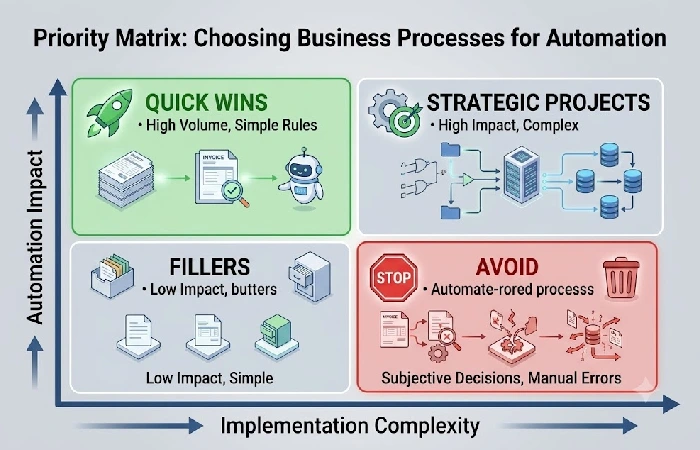
The fastest way to waste an automation budget is to automate the wrong process. Before selecting any tool, evaluate each candidate process against four criteria.
The 4-criteria scoring framework:
- Rules-based: Is the process definable by explicit if-then logic? If it involves subjective judgment at each stage it is not suitable for automation.
- Repetitive: Is the task performed daily or weekly in the same way? One-off processes do not justify automation setup costs.
- High-volume: Does the process consume significant staff hours due to its frequency? Low-frequency tasks deliver marginal ROI even if fully automated.
- Error-prone: Do manual handoffs frequently produce mistakes, delays, or compliance gaps? Error reduction is one of the fastest measurable wins.
Score each process on a 1–5 scale across these four criteria. Prioritize the processes that score highest across all four — these are your “quick wins” that build internal momentum for larger initiatives, based on the Nintex framework for identifying processes to automate.
One important warning: don’t automate a broken process. If your workflow’s undocumented, inconsistent or already flawed, automation’s just going to amplify the failures. Map the as-is process first, then fix what’s broken, then automate it (source: SystemHub BPA implementation methodology, backed up by Boomi’s automation readiness research).
Frequently asked questions
1. What is the difference between BPA and RPA?
BPA automates complex, multi-step workflows that span entire departments or cross multiple systems — like the full invoice-to-payment cycle. RPA automates a single repetitive task which is simulating the actions that would be performed by humans interacting with the software, e.g. copying data from one application to another. RPA is a tool that supports a BPA implementation rather than replacing BPA.
2. What tools are used for business process automation?
BPA tools fall into four main categories based on process complexity:
- No-code connectors (Zapier, Activepieces) — best for simple app-to-app triggers like lead routing
- BPM platforms (Kissflow, Appian) — best for structured approval workflows and task management
- Enterprise RPA (UiPath, Blue Prism) these are great for your legacy desktop apps that have no APIs.
Ecosystem-native tools (Microsoft Power Automate): more appropriate to those organizations which are already using Microsoft 365
3. What is an example of workflow automation?
Another familiar one is invoice processing. An RPA bot keeps track of the emails received in an invoice inbox, then pulls key numbers using OCR, compares it to purchase orders in the Enterprise Resource Planning ‘ERP’ system, and finally passes the differences to a human for review; one workflow like this drops the cost-per-invoice by an estimated 60%.
Start with one process, then scale
The most effective BPA strategy does not start with buying a platform. It starts with documenting one high-volume, rules-based process, automating it, measuring the result, and expanding from there.
Ready to identify automation opportunities across your business? [Explore your next automation use case →]
