Published: September 24, 2026
Last Updated: September 24, 2026
Quick answer: A password manager for families gives each person a private space for personal accounts. Shared vaults handle the household logins. No more texting passwords around, no more everyone using one shared account, family members get only the credentials they actually need. Locked out? Emergency access and recovery features exist for exactly that, a separate way back in when it matters.
It also changes the password habit itself. Every family member can run a different, long, random password on every account, rather than reusing something memorable across five different services.
Selective sharing is what makes a family password manager actually work. Wi-Fi, streaming services, utility accounts, that kind of household credential belongs in a shared vault. Personal banking, work logins, email, those stay private. 1Password and Bitwarden both document this shared-versus-private model in their official family guidance.
There’s a security case for it too, not just a convenience one. CISA recommends passwords that are at least 16 characters long. Password managers, CISA notes, make that kind of secure password practical to actually manage.
Why use a password manager for your family?
A family password manager gives household members a structured way to store, use and share credentials without putting every password in the hands of every person.
Families often have two different password needs. Some accounts are genuinely shared, while others belong to one person. A useful setup keeps these categories separate.
For example, a household may need shared access to:
- Home Wi-Fi credentials
- Streaming accounts
- Utility accounts
- Shared shopping accounts
- Family email accounts
- Emergency payment or account information
Personal accounts should normally remain in each person’s private vault. These can include personal email, banking, work accounts and other credentials that the rest of the household does not need.
This distinction is supported by the family-sharing models documented by 1Password and Bitwarden. 1Password gives family members private and shared vaults, while Bitwarden uses individual vaults alongside organization collections for shared information.
If you’re new to password managers, start with the site’s password manager guide to understand the broader concept before setting up family sharing.
How family password sharing works
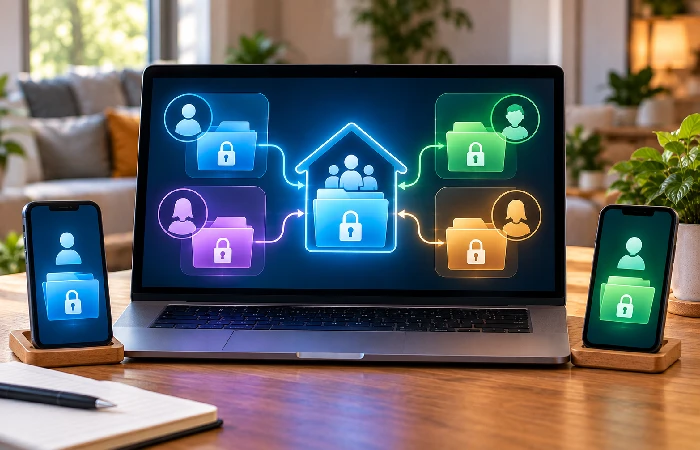
Family password sharing works by separating membership, private storage and shared access.
A typical setup looks like this:
- Each family member creates their own account.
- Each person keeps personal credentials in a private vault.
- Household credentials are moved into a shared vault or collection.
- Access is given only to the family members who need it.
- Emergency access is configured separately for situations where normal access is not possible.
1Password gives each family member a Private vault for personal credentials and a Shared vault for household information such as Wi-Fi or streaming logins. Families can also create additional vaults and share them only with selected people, while family organisers can help eligible members recover access when needed. See 1Password’s family account guidance for its current vault-sharing and recovery model.
Bitwarden uses collections to organise shared logins and control which members can access them. Its documentation states that collection access can be assigned to individual members and that permissions can be changed later.
The important point is that family sharing does not require one password vault that everyone can open. The safer structure is based on individual accounts plus controlled sharing.
Before you share an account
- Confirm that the account is genuinely shared.
- Check whether the service offers separate user profiles or household members.
- Give access only to the people who need it.
- Remove access when household circumstances change.
- Enable multi-factor authentication where available.
What accounts should families store securely?
The shared vault should contain accounts that more than one household member actually needs. Personal credentials should stay separate.
| Account type |
Recommended location |
Typical access |
| Home Wi-Fi |
Shared vault |
Family members who use the network |
| Streaming service |
Shared vault |
Household members using the account |
| Utility account |
Shared vault |
Adults responsible for household bills |
| Shared shopping account |
Shared vault |
Family members who use the account |
| Personal email |
Private vault |
Individual account owner |
| Personal banking |
Private vault |
Individual account owner |
| Work account |
Private vault |
Individual account owner |
| Child’s school account |
Private or limited shared vault |
Child and parent when needed |
Every family’s setup looks a little different. Depends on their needs, and on what the password manager’s sharing controls actually allow. 1Password, for example, supports a shared vault for the whole family, plus separate vaults that can go to just the people you pick.
Bitwarden’s collection system similarly allows access to be assigned to specific members and permissions to be changed.
The practical rule is simple: share an account because someone needs access to it, not simply because they are part of the family.
Privacy and access controls for family members
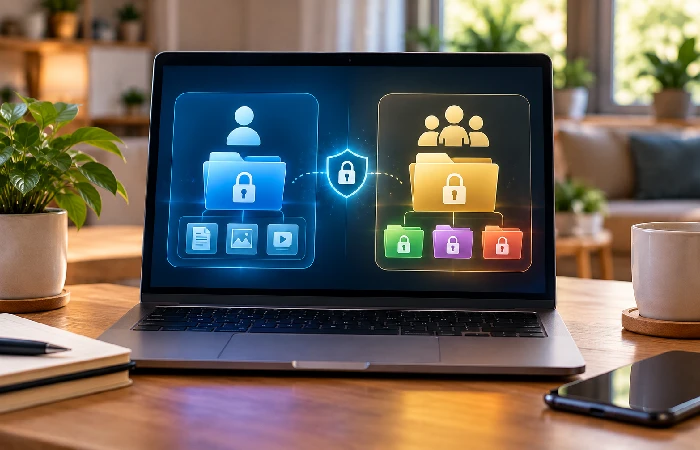
A family password manager should let you control who can see shared credentials without exposing every personal account.
This matters most when adults and children use the same family plan. A child may need access to a school or gaming login but does not need access to a parent’s banking or work credentials.
A private vault handles personal accounts. A shared vault or collection handles credentials that several people need. Some services also allow more selective sharing with individual members.
Bitwarden’s documentation says collections can be assigned to specific members or groups, with permissions controlling what those users can do.
1Password also lets families create additional vaults and share them only with the people who need access.
When choosing a family password manager, check these controls before looking at secondary features:
- Individual private vaults
- Shared vaults or collections
- Member-specific access
- Permission controls
- Ability to remove a family member
- Emergency access or recovery options
- Support for the devices your household uses
For a broader explanation of the underlying technology, see the guide to how password managers work.
What is emergency access, and how is it different from sharing?
Emergency access is a recovery feature, not a replacement for everyday password sharing.
The purpose is to give a trusted person a way to request access when the account owner cannot provide it normally. Bitwarden, for example, allows a trusted emergency contact to request access and supports a user-defined waiting period before access is granted if the request is not manually approved or rejected.
That is different from putting a Netflix password in a shared vault. Shared access is for normal household use. Emergency access is for situations where someone needs access to a person’s vault because the account owner cannot provide it.
Bitwarden supports different emergency-access levels, including view access and account takeover access.
Families should therefore treat these as two separate systems:
| Situation |
Use |
| Everyone needs the home Wi-Fi password |
Shared vault |
| Parents need a household utility login |
Shared vault or limited family vault |
| A child needs a school login |
Private or limited shared access |
| A spouse needs access during an emergency |
Emergency access |
| A family member needs access to every personal credential |
Emergency access, if the service supports it and the owner chooses it |
Keeping these functions separate reduces unnecessary exposure of personal credentials.
How to choose a family password manager
Choose a family password manager based on how well its sharing and access model fits your household.
Start with the number of people who need accounts. Family plans differ here, both in how many members are included and how they handle adding more. Bitwarden Families, at the time of checking, includes six Premium accounts. 1Password Families works a little differently, capping invitations at five family members.
Check each provider’s current plan page before subscribing, though. Features change. Pricing changes. Member limits do too.
Then check the sharing model. You want a way to share household credentials without making every personal password visible to everyone.
Also check:
- Private storage: Each person should have a place for personal credentials.
- Shared access: Look for shared vaults, collections or equivalent controls.
- Permissions: Check whether access can be limited by person or group.
- Emergency access: See how trusted contacts request and receive access.
- Account recovery: Check what happens if someone loses access to their account.
- Device support: Confirm support for the browsers, phones and computers your family actually uses.
- Member management: Check how easily an organiser can add or remove family members.
- Pricing: Compare the current family plan price, included users and billing period on the provider’s official site.
A useful test is to describe three accounts before subscribing: one that everyone needs, one that only the parents need, and one that belongs to a single person. The service should let you handle those three cases without creating unnecessary access.
Common mistakes families should avoid
The biggest problem is usually poor sharing structure, not the number of passwords stored.
Avoid these common mistakes:
Using one account for everyone
A single shared login removes the separation between family members and makes it harder to control access.
Putting every password in a shared vault
Family membership does not mean everyone needs access to personal banking, work or email accounts.
Using everyday sharing as emergency access
Emergency access serves a different purpose. It should not be the normal way to share a household login.
Ignoring access after someone leaves the household
Review shared access when family circumstances change. Remove people who no longer need access.
Skipping account recovery planning
A password manager can protect credentials while still leaving users unable to access them if recovery arrangements are poorly understood. Check the provider’s documented recovery process before moving important accounts.
If you’re concerned about whether password managers are safe in general, see the guide on whether password managers are safe.
Frequently asked questions
1. What is a password manager for families?
A password manager for families lets several household members manage their own credentials while securely sharing selected accounts. Family plans commonly combine private storage for individual accounts with shared vaults or collections for household credentials.
2. Can family members see all my passwords?
Not necessarily. Family password managers separate private credentials. Shared credentials stay separate too, that’s the point. 1Password, for instance, gives each family member their own private vault, with shared vaults set aside for whatever the family actually chooses to share.
3. What should families put in a shared password vault?
Store credentials that multiple household members genuinely need, such as Wi-Fi, streaming, utility and shared shopping accounts. Personal banking, work and individual email accounts should normally remain private unless there is a specific reason to share them.
4. Should parents share passwords with children?
Share access only when the child needs the account and the account’s terms, privacy implications and available permissions make that appropriate. A family password manager can provide selected shared credentials while keeping unrelated personal accounts private.
5. What is emergency access in a family password manager?
Emergency access allows a trusted person to request access to a user’s vault if the user cannot provide access normally. The exact process varies by provider. Bitwarden, for example, supports a waiting period and different access levels.
6. How many people can use a family password manager?
The number depends on the provider and plan. Current examples include up to six users on Bitwarden Families and up to five people on 1Password Families. Check the provider’s current plan before subscribing because plan limits can change.
7. Is a family password manager better than sharing passwords by text?
A dedicated family password manager provides a structured way to separate private credentials from shared ones and manage access. Text messages do not provide the same built-in vault and permission structure, so they are a poor system for managing a growing collection of family credentials.
Set up your family password sharing system
Start with one simple rule: shared accounts go into shared storage, personal accounts stay private, and emergency access stays separate.
Invite each family member to their own account, create a small shared area for household credentials, and give access only to people who need it. Then set up emergency access if the provider supports it and your family has a trusted person who should handle account access during an emergency.
Once the basic structure is working, move accounts gradually instead of trying to reorganise every password at once.
