Published: September 15, 2026
Last Updated: September 15, 2026
Most articles on this topic still treat public wifi like a minefield. That’s outdated. Encryption has caught up with the risk, mostly, and this guide walks through exactly where the real gaps still sit, so you’re not left guessing between “totally fine” and “never connect.”
Quick Answer: Public wifi gets a bad reputation it doesn’t fully deserve. Most guides oversell the danger. Still, two things are worth real caution: don’t log into banking apps on open networks, and watch for fake captive portals designed to steal your credentials.
Definition: Public Wi-Fi security isn’t one tool. It’s a set of habits. Check for HTTPS before logging into anything. Don’t trust the network by default, use a VPN instead. And turn off auto-connect, or your phone will latch onto any open network it finds. Get these three right and you’re covering the real basics: protecting your data on shared, unencrypted connections.
Public Wi-Fi Safety at a Glance
| Activity on public wifi |
Verdict |
Why |
| Browsing HTTPS sites, reading news |
Generally safe |
Encryption protects page content; confirmed by FTC’s 2026 guidance |
| Logging into a bank account |
Avoid unless on a VPN |
SNI still exposes the domain; captive portals can intercept credentials pre-encryption |
| Checking personal email with 2FA on |
Low risk |
Major providers encrypt end to end; 2FA blocks takeover even if a password leaks |
| Connecting to a near-match network name |
Avoid |
Classic Evil Twin setup for traffic interception |
| Using a free VPN app |
Avoid |
Free VPNs often log and resell traffic, a worse trade than no VPN |
Public wifi safety has come a long way
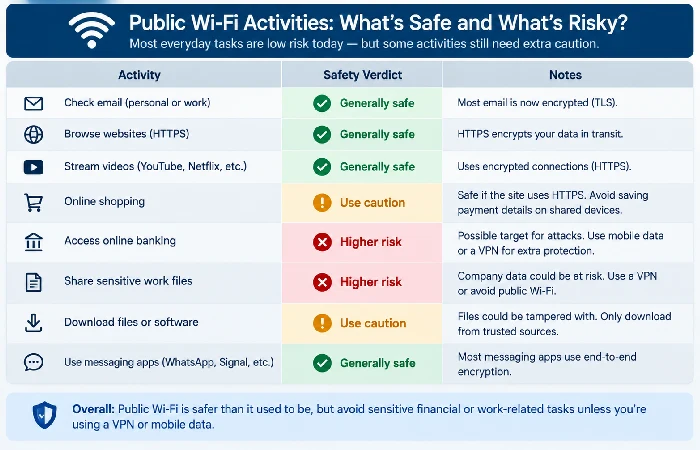
Public wifi isn’t the danger zone it was a decade ago. Most websites encrypt traffic by default now. Because of that, the FTC says connecting through a public network is usually safe for everyday browsing.
Early 2010s. None of this held yet. HTTP ran wide open, no encryption anywhere, and anyone with basic packet-sniffing software could just grab your traffic in plain text. No special skills needed. Now look at your address bar. That lock icon, that “https,” it’s not decoration. It means your data gets scrambled before it ever leaves your device. Check for that lock. It takes two seconds, and it resolves most of the fear-based advice still floating around online.
Here’s the catch, though. Encryption protects what you send. It doesn’t protect where you’re sending it. That distinction matters more than most guides admit, and it’s worth unpacking.
What HTTPS doesn’t cover
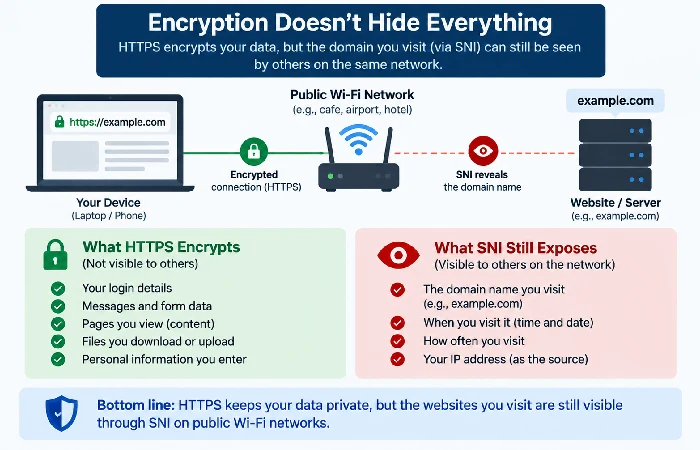
HTTPS keeps your session contents private. It doesn’t hide your destination. A 2026 technical writeup on public wifi breaks this down well: HTTPS protects content, but not the SNI, the piece of the connection handshake that names the domain you’re visiting. So the network operator still knows which sites you’re on, even when your actual traffic stays unreadable.
Six attack types remain documented on public networks in 2026. Man-in-the-Middle. Evil Twin. Packet sniffing. ARP spoofing. Session hijacking. Compromised captive portals. That last one is the sneaky exception to “HTTPS keeps you safe.” The login screen you click through to get online often runs over plain HTTP, before you’re granted full network access. If someone’s intercepted that step, they’ve got whatever you typed into it.
Five habits that cover almost everything
You don’t need new software for most of this. Just a few settings changes:
- Confirm the exact network name with staff before connecting. “CoffeeShop_Free” and “CoffeeShop-Free” aren’t the same network, and that gap is exactly what attackers exploit.
- Turn off auto-connect for open networks. Otherwise your device might silently rejoin a spoofed network you touched once before.
- Skip banking, tax filing, or anything tied to a saved credit card while you’re on open wifi.
- Enable two-factor authentication wherever it’s offered. It neutralizes a stolen password on its own.
- Turn off file sharing and Bluetooth discoverability before you connect.
Most of these are a single toggle. For the account-level side of this, protecting your personal information online covers what to lock down beyond the wifi layer itself.
The honest answer on VPNs
A VPN earns its keep on public wifi when you’re handling anything financial or work-related. It’s not the universal fix vendor blogs love to claim, though. What it actually does: encrypt your traffic end to end, closing the SNI-exposure gap and making captive portal interception mostly useless to an attacker.
Here’s the part most guides skip. A free VPN can be worse than no VPN at all. The same 2026 technical analysis points out that free VPNs are explicitly counter-productive on public wifi. Why? They tend to monetize your data more aggressively than the network operator ever would. If you’re running a VPN, pay for one with a published no-logs policy. If paying isn’t in the cards, skip it. Stick to HTTPS-only browsing plus the habits above.
What not to do on public wifi
Worth memorizing, short and simple:
- Don’t enter financial credentials on a network you can’t verify with staff.
- Don’t connect to anything with no password requirement and no landing page. That’s a red flag for a rogue hotspot, full stop.
- Don’t leave Bluetooth on. It’s a secondary attack surface people forget about constantly.
- Don’t ignore a “connection is not secure” browser warning. Your device is telling you something specific there.
- Don’t assume your smartwatch or tablet gets the same protection as your phone. Wearables often ship with weaker defaults.
FAQ
1. Is it safe to use public Wi-Fi for banking?
No, not without a paid VPN. Banking involves high-value credentials and account access, exactly what attackers on public networks are hunting for. That standard advice still holds, even as general wifi safety has improved.
2. Can someone see what I do on public Wi-Fi?
They can see which domains you visit, thanks to SNI exposure, even on an encrypted connection. But they generally can’t read the actual content of an HTTPS session. A VPN closes that visibility gap entirely.
3. What is an Evil Twin Wi-Fi attack?
A fake hotspot, name almost identical to a real one. That’s the trick. It doesn’t ask permission. Your device just latches on, no warning, no hesitation, and somewhere in that gap an attacker starts pulling your traffic before you’ve even noticed the network’s wrong.
4. Is hotel Wi-Fi safer than airport Wi-Fi?
Not really. Both are open networks, full of strangers, same risks either way. So the precautions don’t change based on venue. Stick to HTTPS. Skip auto-connect. Pull out a VPN if you’re doing anything sensitive.
Public wifi’s just one piece of this. Internet security essentials cover the accounts, devices, and habits you carry with you, on any network, anywhere.
