Published: September 2, 2026
Last Updated: September 2, 2026
Picking an AI automation tool usually starts with a feature comparison and ends with a billing surprise. Zapier, Make.com, n8n, and Gumloop all claim to “automate workflows with AI,” but they charge for that automation in four different ways — by task, by credit, by execution, or by seat — and that mechanic determines your real monthly cost more than any feature list does. This guide sorts the leading platforms by use case, names the exact pricing structure behind each one, and flags where vendor claims outrun verified performance.
Quick Answer: AI automation tools connect apps and LLMs to run tasks without manual triggers — the pricing model determines real cost more than features.
Definition: “AI automation tools are software platforms that combine large language models with workflow triggers to execute multi-step tasks across connected apps without manual intervention.”
What are AI automation tools?
AI automation tools connect common business applications to a large language model so a workflow can be initiated, deliberated, and carried out without manual mouse clicks at every stage. They can’t be classified into one single group, but more as a spectrum of how deep that orchestration goes.
At the simple end, a tool watches for a trigger (a new form submission, a new row in a spreadsheet) and passes it through pre-set steps. At the advanced end, platforms now support agent orchestration, and Mastra.ai frames 2026-era platforms around full agent orchestration with MCP server integration and built-in observability for tracing agent runs. That distinction matters because it determines whether a tool can only run a fixed script or can actually make decisions mid-workflow.
For the underlying category definitions and how this fits into the wider automation stack, see the broader AI automation landscape.
What features should you look for in an AI automation platform?
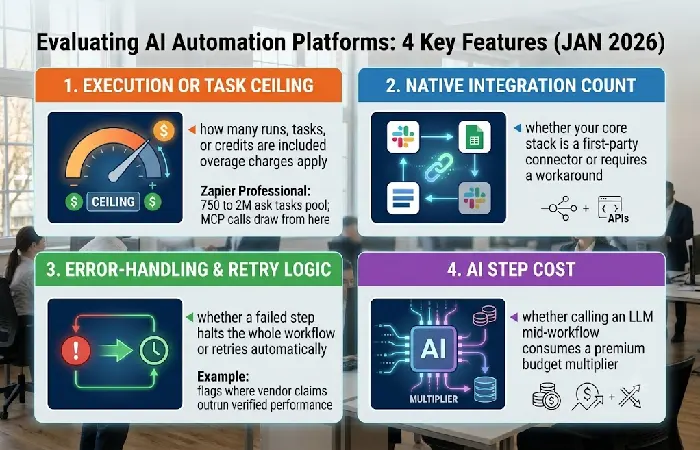
The three features that actually predict long-term fit are execution ceiling, integration depth, and error handling — not interface polish. Vendors rarely lead with these because they cap free and entry tiers.
Check for:
- Execution or task ceiling: how many runs, tasks, or credits are included before overage charges apply
- Native integration count: whether your core stack (CRM, spreadsheet, email) is a first-party connector or requires a workaround
- Error-handling and retry logic: whether a failed step halts the whole workflow or retries automatically
- AI step cost: whether calling an LLM inside a workflow consumes the same budget as a simple action
Zapier’s Professional plan pricing scales from 750 tasks up to 2 million tasks per month, and in 2026 AI steps, code steps, and MCP calls draw from that same task pool, a detail that changes real cost far more than the interface does.
Best AI automation tools by use case
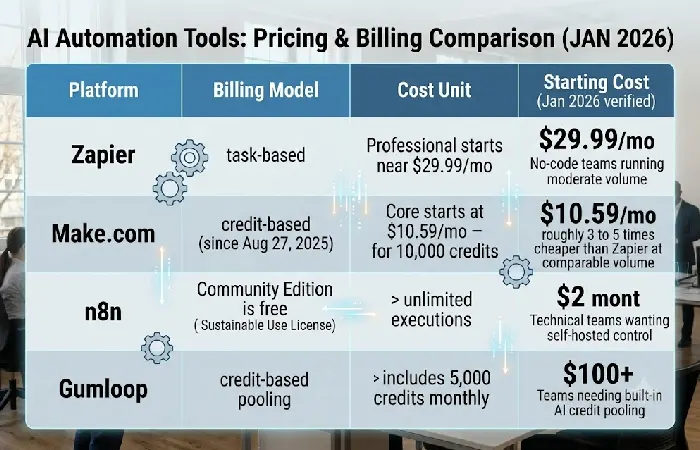
No single platform wins every use case; the right tool depends on your team’s technical comfort and execution volume, not brand recognition. Here is how the leading platforms sort by who they actually fit.
For no-code teams running moderate volume:
- Zapier — task-based billing; Professional starts near $29.99/month, best for teams already on other Zapier-connected apps
- Make.com — credit-based billing since the platform switched from “operations” to “credits” on August 27, 2025; Core starts at $10.59/month for 10,000 operations, roughly 3 to 5 times cheaper than Zapier at comparable volume
For technical teams wanting self-hosted control:
- n8n — execution-based billing, where one workflow run counts as one execution regardless of step count; the Community Edition is free and self-hosted with unlimited executions, though it runs under a Sustainable Use License rather than an OSI-certified open-source license
For teams needing built-in AI credit pooling:
- Gumloop — credit-based billing where a standard AI call costs 2 credits and an advanced call using a model like Claude Sonnet 3.7 costs 20 credits; the free tier includes 5,000 credits monthly with one active trigger
Match your volume estimate against these ceilings before committing to a paid tier — undercounting execution volume is the single most common cause of surprise overage bills.
How do you choose an AI automation platform?
Choose based on billing-model fit first, integration coverage second, and interface preference last — in that order, not the reverse. Most buyers do this backward and discover the cost mismatch only after a month of use.
A practical selection sequence:
- Estimate monthly volume in whatever unit the tool bills (tasks, credits, or executions)
- Confirm your core apps have native connectors, not generic webhook workarounds
- Test AI-step cost specifically — some platforms charge a premium multiplier when a workflow calls an LLM mid-run
- Check self-hosting eligibility if data residency or per-execution cost at scale is a concern
For a broader framework on choosing the right automation platform for your team within a full stack rather than a single tool, the pillar overview covers stack-level sequencing decisions this cluster page does not.
What are the limitations of AI automation tools?
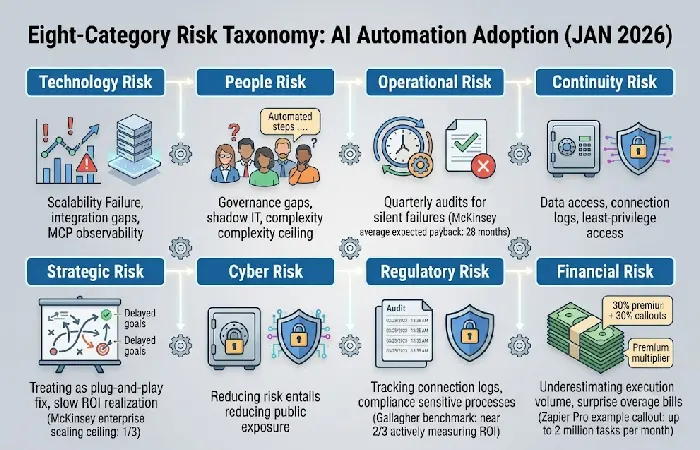
AI automation tools carry real adoption risk that vendor marketing pages rarely quantify — scalability failure and slow ROI realization are the two most commonly cited. Treating automation as a plug-and-play fix ignores both.
Named data points on this:
- Per Gallagher’s 2026 AI Adoption and Risk Benchmarking survey, nearly two-thirds of organizations are actively measuring ROI, with an average expected payback period of 28 months
- McKinsey’s global survey found 88% of organizations use AI in at least one business function, but only about a third have scaled it enterprise-wide
- A structured risk taxonomy for automation adoption spans technology, people, operational, continuity, strategic, cyber, regulatory, and financial risk categories — most vendor comparison pages address only the technology category
Budget for a 12- to 24-month adoption curve rather than expecting immediate return, and audit workflows quarterly for silent failures rather than assuming a “set and forget” state.
Frequently asked questions
1. What is the difference between AI automation and RPA?
Robotic process automation (RPA) is hard-coded step-by-step. When the interface changes, the process fails. AI automation tools use a language model to understand context instead, which is what lets them handle input that shifts around without falling over.
2. Is Zapier considered an AI automation tool?
Yes. Zapier added native AI steps that invoke language models directly from within a Zap to its original trigger-action automation. That’s why it appears in both “AI automation” and “workflow automation” tool groups.
3. Can AI automation tools replace human employees?
No verified data in this research supports full replacement. The Gallagher and McKinsey figures cited above point to augmentation and partial task handling, not full headcount replacement, as the dominant enterprise pattern.
4. How much do AI automation tools cost per month?
Cost ranges from $0 for self-hosted n8n to over $100/month for mid-volume Zapier plans, depending entirely on billing model and execution volume — see the Best Tools by Use Case section above for exact figures per platform.
5. What is the best free AI automation tool?
n8n’s self-hosted Community Edition is the only reviewed platform offering unlimited executions at no cost, though it requires technical setup and server hosting that no-code platforms do not.
