Published: August 21, 2026
Last Updated: August 21, 2026
The smart home market in 2026 appears vastly different from what was imagined in 2023. The fringe world of granular, incompatible gadgets coalesced into a united field united by the Matter interoperability standard, local-first processing frameworks, and AI-enabled automation patterns. However, in terms of shopping, it has not simplified matters: the number of available devices jumped in each category, the number of competing protocols increased, and vendors promised easier interoperability that is not always achieved initially.
Unlike the norm of a ‘best products’ shopping list, this is a decision framework. It will guide you through choosing an ecosystem, then how to learn about protocols, then a gradual purchasing roadmap, then clear budget levels with energy-savings ROI numbers from the U. S. EPA, and then the privacy trade-offs that most guides overlook completely. The aim is fewer, more effective purchases — sorted by impact, not lowest initial cost.
Definition: A smart home buying guide is a systematic decision matrix that aligns connected devices to your home’s true objectives, ecosystem, and budget — not a product list ordered by brand buzz.
Quick answer: Begin with your ecosystem and a smart thermostat, not a cart full of gear. Buy in phases, and buy by ROI.
What is a smart home and why does it matter in 2026?
A smart home is a home that uses devices connected to the internet to perform tasks automatically or from a remote location via a computer, smartphone or other networked device to control the lighting, climate, entertainment systems, security, and energy usage. When comparing the definition between 2010 and 2026, we see that the difference is between single devices and full ecosystems connected through one of many protocols.
Three developments make 2026 a genuine turning point for buyers:
- The adoption of Matter has achieved critical mass. The Connectivity Standards Alliance (CSA) is now certifying devices on all four major platforms (Amazon Alexa, Google Home, Apple HomeKit, and Home Assistant), and just one Matter-certified smart plug works perfectly within any of those platforms without any bridge.
- Local processing is now replacing dependence on the cloud. For instance, Apple HomeKit and Home Assistant process automations on-device by default, which cuts response times to under 100 milliseconds and prevents automation breakdowns when the internet isn’t available a long-standing complaint with cloud-only solutions.
- Energy management is a dominant purchase driver. Growing residential utility bills have changed the smart home value proposition from innovation and convenience to quantifiable savings. Smart thermostats especially show a lot of savings to new buyers documented at 10–15% annual savings in HVAC costs (source: U. S. EPA ENERGY STAR program).
Which smart home ecosystem should you choose?
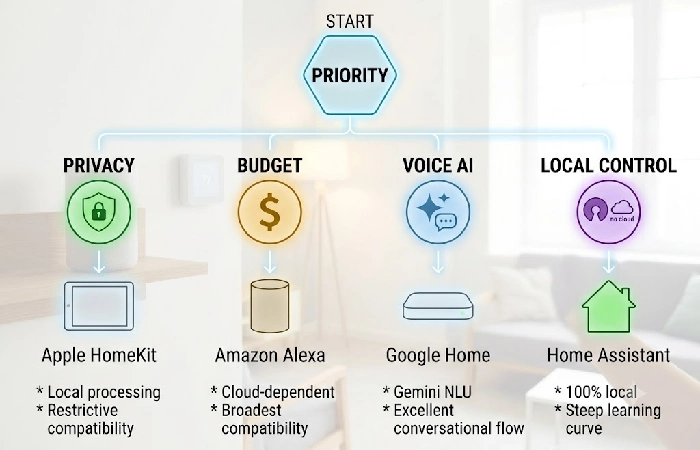
Your ecosystem, the platform that is your smart home’s central “brain,” will impact what devices are compatible and what data will be leaving your home network. If you choose the incorrect ecosystem, you will experience app fragmentation, compatibility frustrations, and wasted money. Decide on this before you purchase one device.
There is no one best smart home platform, the “right” choice will depend on your home, priorities and how much control you want over your data. Use the profiles below to find the one most suited to your home.
Ecosystem comparison matrix (August 2026)
| Ecosystem |
Best for |
Device compatibility |
Privacy model |
Local control |
Voice assistant quality |
Setup difficulty |
Biggest limitation |
| Amazon Alexa |
Budget-conscious buyers wanting wide device selection and flexible routines |
100,000+ third-party devices (security.org, 2026) |
Cloud-dependent; voice data used for ad personalization |
Limited — most routines require cloud processing |
Good for direct commands; weaker at follow-ups than Google |
Very easy — plug in Echo, open app, follow prompts |
Automations fail during outages; ad-cluttered app |
| Google Home |
Android users valuing voice-assistant intelligence and Google services integration |
50,000+ devices; growing Matter certification |
Cloud-dependent; data used for service improvement and ad targeting |
Limited — mostly cloud-routed; local SDK has narrow adoption |
Best-in-class NLU; Gemini for Home launched 2025 (cnet.com) |
Very easy — pair via Google Home app |
Discontinued hardware lines; weaker routine engine than Alexa |
| Apple HomeKit |
Apple households prioritizing privacy and design consistency |
Smallest catalog of the three; expanding via Matter |
Privacy-first — end-to-end encryption, local processing, minimal data to Apple |
High — many automations run locally on HomePod Mini or Apple TV |
Siri handles basics reliably but trails on complex routines |
Easy for Apple users; needs HomePod or Apple TV as hub |
Most restrictive compatibility; higher device cost |
| Home Assistant |
Tech-savvy users wanting full local ownership, zero lock-in |
2,000+ integrations across Zigbee, Z-Wave, Matter, Thread, Wi-Fi, Bluetooth |
Full local control by default — no data leaves your network unless enabled |
Full — 100% local by default; outages don’t affect automations |
Depends on paired assistant (Alexa, Google, or Wyoming/Rhasspy) |
Moderate to steep — Home Assistant Green helps, but scripting needs skill |
Steep learning curve; community-on |
How to read this table
- If you have an iPhone and care more about privacy than about varieties of devices→Apple HomeKit.
- To have the biggest device catalog and most customizable routines on a budget → Amazon Alexa.
- If you use Android and want the best conversational voice AI → Google Home.
- For absolute local control, no data leaving your network, and being technically inclined → Home Assistant.
Methodology
Evaluations here draw on device compatibility data (security.org, August 2026), developer documentation from Apple, Google, and Amazon, and publicly available user feedback from discussion forums like r/homeautomation and the Home Assistant Community.
What smart home protocols do you need to understand?
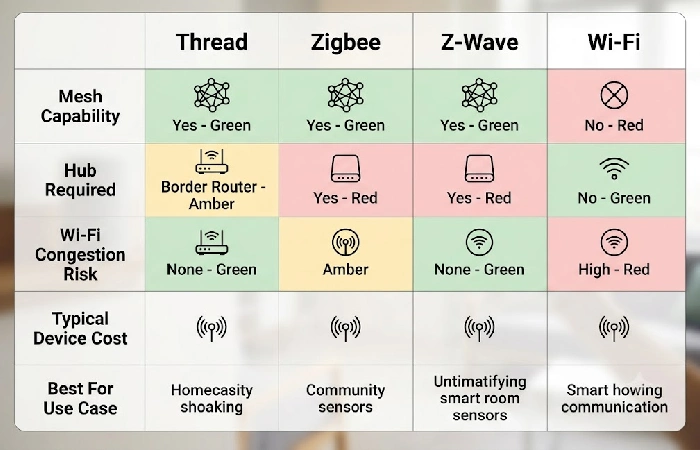
Smart home protocols are the language your devices communicate with each other and your hub. This is by far the most common reason why a new buyer gets “why won’t my devices connect” frustration they bought the wrong protocol (or a device that didn’t support their hub’s protocol). 5 minutes of learning how these protocols are different prevents costly returns/dead-end compatibility issues.
What is Matter, and is it actually ready for everyday use?
Matter is the royalty-free, open, unified connectivity protocol based on IP acquired by the Connectivity Standards Alliance (CSA), which will enable devices to work together regardless of brands across Alexa, Google Home, Apple HomeKit, and Home Assistant without any proprietary bridge.
Devices certified against the standard by August 2026 provide basic control actions (ON/OFF, dimming, thermostat set-points) robustly across all four ecosystems.
Nonetheless, the honest evaluation is “ready with caveats,” not “plug-and-play.” Known real-world friction points as documented on Home Assistant community forums and Reddit r/homeautomation are:
- Thread mesh instability: Thread (the network layer for networks based on the mesh technology used in many Matter devices) necessitates a secure Thread Border Router (possibly the HomePod Mini, Google Nest Hub 2nd Gen or even a dedicated router). Several border routers on one network can interfere with each other leading to devices going offline or unresponsive.
- IPv6 requirement: Matter requires IPv6 networking. If your home router has IPv6 turned off likely the default setting of many older consumer routers from ISPs your Matter devices will not commission (pair).
- Firmware dependency: Often devices will come with outdated firmware that must be updated immediately using the manufacturer’s app to work reliably on Matter, undermining the “no proprietary apps needed” promise.
- Wi-Fi channel overlap: Thread works on the 2.4 GHz. A Wi-Fi router transmitting on channel 11 will create a lot of radio frequency interference with Thread mesh networks and will break the devices’ connection.
Which mesh protocol should you choose — Thread, Zigbee, or Z-Wave?
For a full smart home protocol comparison, the summary:
| Protocol |
Best for |
Mesh capable |
Hub required |
Wi-Fi congestion risk |
Typical device cost |
| Thread |
New Matter-certified devices; future-proofing new installations |
Yes (self-healing IP mesh) |
Thread Border Router (often built into smart speakers like HomePod Mini or Nest Hub) |
None — operates on 802.15.4 radio, separate from Wi-Fi |
Moderate ($20–$50 per sensor/switch) |
| Zigbee |
Budget sensors, motion detectors, and existing legacy ecosystems |
Yes (mesh via coordinator) |
Yes (dedicated Zigbee coordinator like Sonoff ZBDongle or built into hubs like SmartThings) |
None — operates on 802.15.4 radio |
Low ($8–$25 per sensor/switch) |
| Z-Wave |
Long-range coverage in large homes; interference-free operation |
Yes (mesh via controller) |
Yes (Z-Wave stick or hub like Aeotec Z-Stick or Hubitat) |
None — operates on sub-GHz frequency (908.42 MHz in US), fully separate from both Wi-Fi and Thread |
Higher ($30–$60+ per device) |
| Wi-Fi |
Individual devices where hub-free simplicity matters (e.g., a single smart plug or camera) |
No |
No |
High at scale — each Wi-Fi smart device is an additional client on your home network; 15+ devices strain most consumer routers |
Low ($10–$30 per device) |
Decision rule: For a greenfield approach, assume Thread/Matter for all switch and sensor devices and Wi-Fi when there is a need for increased bandwidth (cameras, display). There isn’t much sense in replacing a Zigbee or Z-Wave solution that is working, since both standards are still viable.
What should you buy first for your smart home?
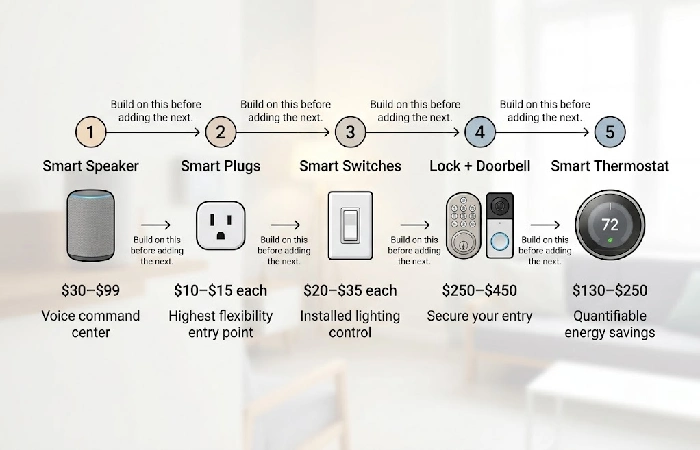
The smartest plan for a smarter home is to acquire in phases arranged by daily impact and energy ROI not by sales’ lowest prices, or a particular YouTube thumbnail. Each phase below is cumulative of the one before. Jump ahead only if it does not align with your household objectives.
Phase 1 — Smart speaker or hub (your command center)
Each additional device requires a voice interface and central controller. An Amazon Echo Dot ($30–$50) or Google Nest Mini ($30–$50) allows you to instantly control your voice and functions as the traffic cop for all of your routines. If you’ve gone Apple HomeKit, a HomePod Mini ($99) is the lowest threshold. Don’t skip this step. Trying to control devices from their individual manufacturer apps without a hub is the “ten apps for ten devices” frustration that encourages early abandonment.
Phase 2 — Smart plugs (the lowest-cost, highest-flexibility entry point)
Smart plugs ($10–$15 each) turn any existing appliance–lamps, fans, coffee pot, space heater, cell phone charger–into a programmed, remote-controlled device. They also stop the unnecessary energy cost of phantom load (the energy that standby-mode appliances consume- 5–10% of the country’s total energy according to the U. S. Department of Energy). For the 2–3 most used appliances, purchase 2–3 plugs. It will take you approximately 6–12 months to save the cost of each plug.
Phase 3 — Smart lighting and switches
For until-installed lighting in most rooms, use smart switches, not smart bulbs. A smart switch ($20–$35) installs in place of your existing switch; controls any standard light fixture; and can’t be shut off by someone flipping a physical toggle. A smart lightbulb ($15–$25) is inoperable when the wall switch is off, which most of us do 8-20 times a day in multi-person dwellings. Use smart lightbulbs in lamps that you want color-changing options on, or in rental units when you can’t replace the wall switch.
Phase 4 — Security: locks, cameras, and doorbells
You can’t beat the security value in this category using a smart lock ($150–$250) and a video doorbell ($100–$200). If you decide to buy, look for two features: (1) local storage (microSD slot or on-hub recording) so you don’t have to pay required monthly charges for cloud video playback, which average $3–$10 per camera per month, adding $36–$120 to your true cost of ownership per year, and (2) integration with your preferred ecosystem.
Phase 5 — Climate control and energy management
The best return-on-investment (ROI) in terms of quantifiable monetary value for smart homes is provided by smart thermostats. The EPA’s ENERGY STAR predicts that a qualifying smart thermostat will provide savings of between 10 and 15 percent per year in energy expenses by means of occupancy sensors, geofencing, and optimized time/day pricing.
For purchase prices ranging from $130 to $250 (Ecobee Smart Thermostat Premium at $249; Google Nest Learning Thermostat 4th Generation at $279), the large majority of U. S. Households will experience payback within less than 2 years based on annual residential heating/cooling costs of $1,000-$1,500 per year (source: U. S. Energy Information Administration residential energy costs).
How much does a smart home cost, and when does it pay for itself?
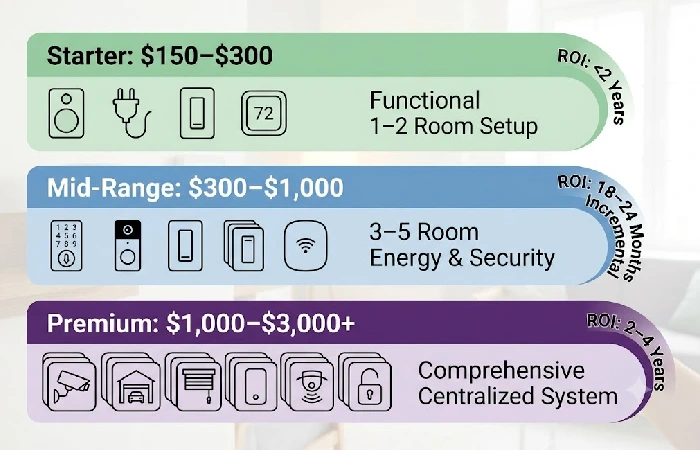
You don’t need a large budget for a functional smart home. How much you spend will be a factor of the number of rooms you automate, which categories you buy into, and if you do your own installation or hire a professional integrator. The price bands are based on an estimated USD cost from Amazon, Best Buy and manufacturer websites as at August 2026.
| Budget-tier |
Price range (USD) |
Components and functionality |
Target users |
Additional energy ROI |
Energy payback period |
Main compromise |
| Starter |
$150–$300 |
1 smart speaker ($30–$50), 2–3 smart plugs ($30–$45), 2 smart switches ($40–$70), 1 smart thermostat ($130–$250) |
Newcomers and renters to try out home automation in 1–2 rooms |
Savings from the smart thermostat, which cuts HVAC expenses by 10–15% yearly (ENERGY STAR program of EPA); plugs prevent wasteful phantom load consumption |
Thermostat: less than 2 years; plugs: 6–12 months |
Lack of any security devices and partial coverage of the entire house |
| Mid-tier |
$300–$1,000 |
Starter tier + smart door lock ($150–$250), video doorbell ($100–$200), 2–3 extra switches, upgrade to mesh Wi-Fi network ($150–$300) |
Homeowners installing home automation in 3–5 rooms along with energy and security features |
In addition to saving on HVAC with the help of the thermostat, one can save on lighting (35–70% lighting energy reduction according to DOE) |
18–24 months for the additional investments |
Necessity of having a stable Wi-Fi network in place and possible basic electric skills for installing the lock |
| Premium |
$1,000–$3,000+ |
Full-house switches/dimmers, video surveillance system (3–4 cameras), smart garage door opener, motorized shades/blinds, centralized controller (Home Assistant Yellow: $124; Hubitat Elevation: $149), whole-house audio system |
Homeowners looking for comprehensive home automation with centralized control and conditional routines |
Maximum savings when combined with time-of-use tariff scheduling, geofencing, and occupancy-based climate and lighting control |
2–4 years for the full system, depending on home size and local energy rates |
High upfront cost; setup complexity grows with device count; professional integrator recommended for 20+ device systems |
How do you protect your smart home from privacy and security risks?
All devices in your home plugged into the Internet are a target, collecting data at best, getting hacked at worst. Your privacy should be taken into consideration as a purchasing criterion, not as a secondary consideration. A study by NIST concluded that most smart home users feel they are not aware of the ways their behavioral data is collected, stored, transmitted and used by device manufacturers and that brand loyalty is heavily influenced by consumers’ trust of a company’s data practices.
What is the real privacy trade-off between cloud and local processing?
Amazon Alexa and Google Home are cloud-based, your voice commands and automation logic get shipped off to servers the platform owner controls. Benefits include access from outside your home network and an intelligent platform that can learn to recommend automations and actions to you. Drawbacks include full access for the platform provider to your activities (wake up, leave, ask questions, etc). Amazon’s pretty upfront that Alexa data feeds into ad personalization, and Google does the same thing on its end, mining usage data to sharpen its targeted ads.
Local first platforms work differently. Apple HomeKit and Home Assistant run automations right on hardware sitting in your house, a HomePod, an Apple TV, whatever hub you’ve got. Data stays inside your network by default. If privacy is your main concern, use a local first platform and make sure that all devices you add do not, in fact, need the cloud.
How do you secure your smart home network?
For a step-by-step implementation walkthrough, the essential measures:
- Segment your network. Basically, get all your IoT devices onto their own VLAN or guest network, separate from everything else. A smart bulb gets hacked, a camera gets hacked, whatever, the hacker’s stuck there. They’re not touching your laptops, your phone, your NAS drives sitting on the main network. Every mesh Wi-Fi router (Eero, UniFi, TP-Link Deco) supports IoT network segmentation from their app.
- Enable two-factor authentication. On every smart home account you’ve got, but especially your core ecosystem account, Amazon, Google, Apple, whichever you’re on. Because if someone gets into that hub account, or the cloud account behind it, they don’t just get one device. They get everything plugged into it.
- Update firmware immediately and continuously: A significant number of devices are sent out with up-to-date firmware that contains known exploits. Use the app that came with the device to periodically check for firmware updates after installing new devices, and run a quarterly check on all other devices.
- Replace default credentials at setup: Change the default user names and passwords on all the cameras, router and hub at setup. Default logins are already in the documentation from the manufacturer and as such will be the first port of call for any attacker.
What are the most common smart home mistakes, and how do you avoid them?
Most smart home frustrations come down to five easy-to-avoid mistakes. For each of the following mistakes, you will find the failure mode as well as the appropriate remedy.
Ecosystem, Network, and Lighting Mistakes
- Buying without choosing an ecosystem first. Buying from 4 or 5 different ecosystems on impulse, without a host compatibility plan in mind, results in a “Frankenstein”, which will have to be managed by a separate app for each device. Solution: Make your mind up on the ecosystem you want (4 options: Alexa, Google, Apple, Home Assistant, in any case) first, then buy the hardware, and check that each and every new device is compatible, first.
- Underestimating network infrastructure requirements. A typical ISP-supplied router for 10 – 15 concurrent clients can’t reliably support 20+ smart devices streaming, polling and coming back with responses. Results are lag, dropped connections, error message “device not responding”. Solution: Mesh Wi-Fi system (150-150-300) needs to be installed prior to scaling beyond 8 – 10 connected devices.
- Choosing smart bulbs over smart switches for installed lighting. If you flip the wall switch to the “off” position, the smart bulb won’t work at all app or automation. In a busy household, that switch will be flipped daily. Solution: Get smart switches (20–20–35 ea.) for the ceiling fixtures and wall-mounted room lights (20–20–35 each). Use the smart bulbs for the mounted lamps (and maybe get a few RGB bulbs for special color needs).
Automation and Security Mistakes
- Building complex multi-device automations before mastering basics. Complex condition-based automation chains (“if motion sensor fires AND it’s after sunset AND the door lock is engaged, then turn on hallway light at 30% brightness”) are doomed unless you understand how each device publishes its state. Solution: “Out-of-the-box” single-device time conditions (“switch off porch light at 11:00 PM”) then add conditions gradually over time.
- Ignoring device security at installation. The three most typical attack surfaces of an IoT device are default passwords, lack of enabled two-factor authentication and unpatched firmware (source: NIST IoT cybersecurity guidance).
Fix: Default logins must be changed at first configuration. Two-factor authentication should be enabled on hub accounts. Firmware updates should be checked every 3 months.
Which smart home setup works for renters, families, and aging in place?
Smarthome buying guides generally presume a home buyer who has complete access to run wiring and to alter drywall. Three major user segments renters, families, and older or mobility-impaired home buyers have limitations and priorities that may alter the story quite a bit.
Smart home for renters and apartments (no-drill, no-wire options)
Renters can build a fully functional smart home without modifying walls or wiring, and without needing landlord approval. Every device below is portable, you take it with you when you move. Use smart plugs for appliance control, smart bulbs (not switches, as they require landlord permission and may require some wiring changes) for light control, battery powered contact and motion sensors for trigger events, and adhesive mounted cameras (Wyze Cam, Blink Mini) for security. A portable smart speaker ($30–$50) serves as the hub. Total cost for a 1-bedroom rental: $100–$200.
Smart home for families with children
Kid safety comes down to three things really. Smart plugs need locks. Voice assistants need parental controls, Alexa and Google Home both have kid profiles that restrict content and block purchases. And cameras and sensors need to be tamper-proofed so a curious kid can’t mess with them.
A few automations actually earn their keep here. Nightlights that turn off a half hour after being turned on. Hallway motion sensors light the way at night so nobody’s stumbling around in the dark or waking the whole house. And “Good Morning”/”Good Night” routines handle the lights, locks, and temperature in one go.
Smart home for aging in place and accessibility
No longer having to reach over and activate wall switches, lock or unlock doors by hand, or get up to adjust a thermostat are key features that create independence for users with mobility issues, arthritis, and blindness or visual impairment. Video and two way audio enabled smart doorbells allow users to see, hear and speak to visitors without getting off the couch. Daily scheduling assistance through automated medication-reminder routines (set up through Alexa Reminders or Home Assistant notification automation) is available. Fall-detection sensors and emergency-alert integrations (via Home Assistant, dedicated eldercare-oriented Alexa routines, or other options like the Apple Watch) increase the safety of elderly residents living at home alone. This is a completely unmet use case in the current backlog of smarter homes: no websites of the current top-10 ranking pages cover aging-in-place topics.
Frequently asked questions
1. How much does it cost to set up a smart home?
A simple smart home system would include the following: 1 smart speaker; 2-3 smart plugs; 2 smart switches; and 1 smart thermostat to automatically manage 1-2 rooms of your house through voice control and saving energy. 3-5 room automation with security would range from $300-$1,000. Going upmarket with a hub, security cameras, window shades, and more would add up to $1,000 or more depending on the size of your home.
2. What is the best smart home ecosystem in 2026?
Best for your user profile.
Amazon Alexa has the largest ecosystem of device integrations, more than 100,000 devices, and it’s the best budget pick. Google Home takes it for voice AI and Android integration. Apple HomeKit is the best choice for privacy-focused local processing (best for Apple-Ecosystem dwelling). For complete local control with no Google or Amazon lock-in, there’s always Home Assistant.
3. Can smart home devices be hacked?
Yes. The default logins and passwords, unenabled two-factor authentication, and deprecated firmware containing exploitable flaws (NIST IoT cybersecurity guidance) all provide sources of attack. To mitigate this, change all passwords, enable 2FA on accounts when possible, buy an IoT router to separate the IoT devices from other devices (use a dedicated VLAN or guest network), and perform patches (firmware updates) at initial setup and quarterly from then on.
4. What is Matter and do I need it?
Matter was created by the Connectivity Standards Alliance to ensure that any device would work across platforms without the need for any proprietary bridge; Alexa, Google Home, Apple HomeKit, Home Assistant. When purchasing a new device in 2026, you should look for the certification for Matter, since it will keep you away from any platform locking. Just keep in mind that to run a Matter-over-Thread device, your router should have IPv6 support.
5. Do smart homes actually save energy?
Yes, with certain documented numbers. Smart thermostats cut annual heating and cooling costs by 10–15% (EPA Energy Star program numbers). Smart LED light sockets with occupancy sensors and automated scheduling can cut lighting energy use by 35–70% (US DOE numbers). And smart plugs, which eliminate phantom-load standby waste, pay for themselves in 6–12 months at $10–$15 per plug.
6. What are the best smart home devices to buy first?
Begin with three things: smart speaker ($30–$99 depending on ecosystem), 2–3 smart plugs ($10–$15 each), and smart thermostat ($130–$250). The combo under $200 at the bottom end delivers voice control, scheduling for appliances, eliminating phantom loads, and the single most valuable energy saver device. Next, include smart switches for lighting, then security gear (lock, doorbell).
7. How do I make my existing home smart without rewiring?
Stick to wireless gear that doesn’t touch your walls, smart plugs, smart bulbs, battery powered motion and contact sensors, Wi-Fi or Thread cameras, sticky mounted video doorbells. No power or wiring changes needed. Even with wall switch level lighting control without rewiring (sometimes unavoidable), there are certain retrofit smart switch modules (e.g., Shelly 1 Mini Gen3, about $12–$15) that fit behind current face plates using current wiring and simple wire connections (no new runs or electrician visits).
Here’s your next move: one decision, not ten buy-ins. Choose your ecosystem, buy a smart thermostat and two smart plugs, and run them for a week or two. That one setup, under $200, will tell you more about whether or not you’re ready for smart home automation than any comparison-shopping list ever will.
