Published: August 10, 2026
Last Updated: September 18, 2026
Home automation: Making smart devices(dimmers, thermostats, locks, cameras, appliances) talk to one another wirelessly via a network and one central controller, then putting the whole system on an automated schedule, trigger, or routine rather than having to do something to activate them. Today I can launch the app and say to the system “Dim the lights” versus the system doing “Dim the lights” when the sun goes down.
This one-stop shop has everything you need to know about home automation including the what, how, and why of protocols like Matter and Thread, which platforms (around $ 100 to $ 1K and up) to base your build on, easy-to-understand room-by-room suggestions with realistic prices, a setup step-by-step, complex cross-platform routines with IFTTT, budget levels from $50 to over $ 5K, and most beginner mistakes first-timers make that prevent success.
Quick answer
- Home automation protocols (Matter, Thread, Zigbee, Z-Wave, Wi-Fi) are the connectivity protocols that link the smart devices into one integrated system.
- A hub, or smart speaker, is the main controller for rules and voice commands.
- The five big platforms of 2026 will be Google Home, Apple Home, Amazon Alexa, SmartThings and Home Assistant.
- Once we have the starter configuration of 50-50-200, the full house system would be 1,500-1,500-5,000+ for the house as a whole.
- Start with one room. Get the devices that are Matter. Do not pigeonhole your Wi-Fi.
- IFTTT links the other IoT platforms that could not inform each other.
Definition: “Home automation refers to being able to control lighting, temperature, security, and appliances remotely using intelligent items, communication protocols, and programmed routines.”
Home automation platforms: 2026 comparison matrix
The following table summarizes the five leading platforms in 2026. Each row is written to stand alone when read.
| Platform |
Best For |
Protocol Support |
Voice Assistant Quality |
Local Control (offline) |
Typical Entry Cost |
2026 Verdict |
| Google Home |
Most households requiring wide compatibility and the most powerful voice assistant |
Wi-Fi, Thread, Matter; Zigbee/Z-Wave via SmartThings link |
By 2026, Google Assistant is better at understanding multi-step voice commands and conversational follow-ups than any other assistant |
Limited, most automations need to be cloud based; Thread enabled devices operate locally through Nest Hub |
$30-$50 for a Nest Mini speaker; $100 for a Nest Hub display |
Great all-around choice for households that want the ease of a plug-and-play box with wide device support |
| Apple Home |
Apple ecosystem users who prioritize privacy and a polished interface |
Wi-Fi, Thread, Matter; no native Zigbee/Z-Wave support |
Siri performs well on straightforward commands, but compared to Google Assistant it has less capability to handle multi-step routines |
Strong, Apple Home executes Thread and HomeKit automations locally on Apple TV or HomePod |
$99 for a HomePod Mini; $199 for a full-sized HomePod speaker |
Ideal for privacy-focused users already invested in the Apple ecosystem (iPhone, iPad, and Mac) |
| Amazon Alexa |
Consumers who are cost sensitive and want the biggest assortment of supported items |
Wi-Fi, Zigbee (integrated into Echo Hub), Matter, Thread; Z-Wave via third-party hub |
Best for controlling smart home devices and the “skills” ecosystem, not as strong as Google for general knowledge questions |
The number of routines is limited, since practically all routines require the cloud, except Zigbee devices on Echo Hub which work locally |
$25-$35 for an Echo Dot; $55 for an Echo Pop |
Good entry point for beginners who want inexpensive hardware and access to the widest selection of devices |
| Samsung SmartThings |
Mixed-device households using legacy Zigbee/Z-Wave gear with newer Matter/Thread devices |
Zigbee, Z-Wave, Wi-Fi, Thread, Matter, largest native protocol support of any consumer hub |
No built-in voice assistant, depends on Alexa, Google Assistant, or Bixby integration |
Moderate, local execution for Zigbee/Z-Wave routines. For more advanced automations, a cloud connection is needed |
$35 for a SmartThings Station; $130 for the SmartThings Hub v3 |
Best bridging platform for households transitioning from older smart home equipment to Matter-enabled devices |
| Home Assistant |
Power users and privacy extremists who desire complete local control and maximum customization |
Zigbee, Z-Wave, Wi-Fi, Thread, Matter, Bluetooth, KNX, 2,000+ third-party integrations |
No native voice assistant, but supports Alexa, Google, and its own open-source Assist pipeline for completely local voice control |
Full local processing of all automations, no reliance on a cloud provider, fully functional without internet access |
$0 for software (open-source); $55-$150 for a dedicated hub |
Most suitable for technically adept users who desire complete independence from cloud providers and vendor lock-in |
Methodology: Platform assessments are conducted by evaluating the official product specifications provided by the vendors Google, Apple, Amazon, Samsung and Home Assistant as of August 2026. Protocol support is checked against the Connectivity Standards Alliance (CSA) Matter-certified device directory.
Pricing is checked against the manufacturer’s current retail prices. All vendors were not paid for use of devices.
What is home automation?
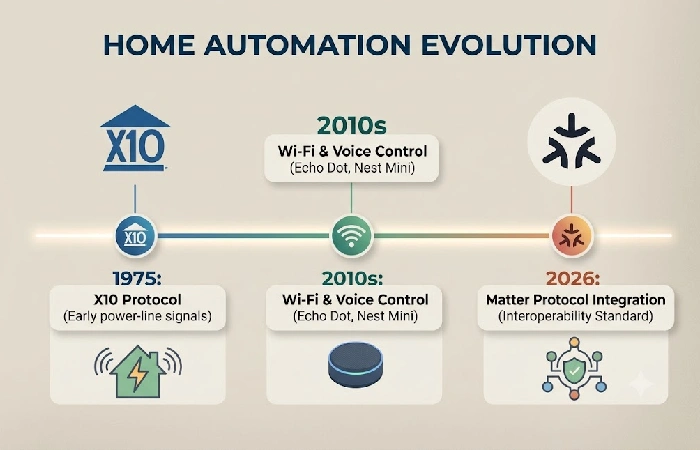
The phrase “home automation” is commonly used to refer to the integration of smart devices at the system level to form a single network capable of performing tasks based on time, sensors, and if-then statements as opposed to remote operation via a smartphone application. The difference is whether it is a “smart home,” smart devices are connected to the internet and controlled by the user through manual commands, or a “home automation” system, smart devices are connected to one another and communicate via routines which function automatically.
This is far from a new idea. 1970s X10 power-line protocols could only send simple on and off signals to individual appliances. By the 2010’s, Wi-Fi and Bluetooth gave most individual devices internet access, and platforms like Amazon’s Alexa and Google’s Google Home introduced voice control. Then 2024 to 2026 happened, and that’s really when Matter (sitting at version 1.5 now) finally grew up. Before that, you had this weird standoff between protocol standards, a Zigbee light literally couldn’t talk to a Wi-Fi thermostat unless you bolted on a third-party bridge to translate between them. Matter fixed that. Now a Matter-certified device just works across Google, Apple, Amazon, Samsung, whatever, no proprietary app needed, no separate hub required.
How does home automation work?
Home automation involves many devices that are linked using wireless protocols and controlled through a central hub (smart speaker, app etc). Home automation is achieved through predefined “scenes” or automation that occurs when a certain phenomenon is detected or a certain time is reached. This could be through time, noise thresholds, location, reading from a person or environmental sensors. Two factors dictate the range, security and effectiveness of your home automation system: the protocol between the devices, and the hub.
Smart home protocols — Zigbee, Z-Wave, Wi-Fi, Matter, and Thread
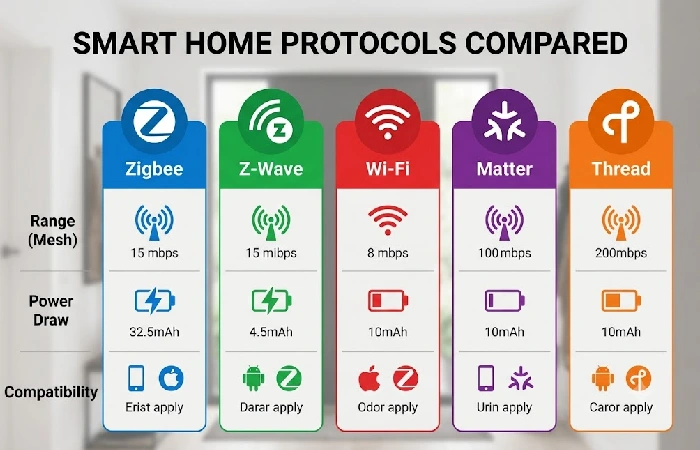
The protocol you choose defines the range, energy consumption, compatibility of devices, and whether automations stay on during an internet outage. Every device in your home automation talks through one or more of the five protocols below:
| Protocol |
Range |
Power Draw |
Matter Compatible |
Best For |
| Zigbee |
10-20 m (mesh extends range) |
Very low |
Yes, through Matter bridge |
Sensors, light bulbs, battery-powered devices |
| Z-Wave |
30-100 m (mesh, fewer interference issues) |
Very low |
Yes, through Matter bridge |
Locks, thermostats, bigger houses |
| Wi-Fi |
30-50 m (router dependent) |
High |
Yes (many Matter devices use Wi-Fi) |
Cameras, smart speakers, high bandwidth devices |
| Matter |
May be limited to the capabilities of the underlying transport (Wi-Fi or Thread) |
Varies |
Native standard |
Unifying protocol, ensures cross-ecosystem interoperability |
| Thread |
10-30 m (self-healing mesh network) |
Ultra-low |
Yes (Thread is the desired mesh transport for Matter) |
Battery sensors, low-latency automation, local control |
Special attention should be paid to Thread in 2026. Thread’s a low-power IPv6 mesh protocol. Nothing new there. What’s new is this year it finally hit critical mass, enough devices, enough support, actually usable. Zigbee and Z-Wave, meanwhile, still need a bridge if they want to talk to anything outside their own bubble.
Smart home hubs and controllers
The smart home hub is basically the decision maker. Signals come in from your sensors and devices, it figures out what your automation rules actually mean, then fires commands back out. No hub, and each device is kind of stuck on its own, you can control it manually but it’s not really automated.
Two types of hubs still exist in 2026, and honestly neither one has really gone anywhere. Cloud-based ones, Google Nest Hub, Amazon Echo Hub, that sort of thing, run most of the logic on remote servers. Which means when your internet drops, so does your routine. Annoying, but that’s how it works. Local-processing hubs are different. Home Assistant Green, Apple TV paired with HomeKit, SmartThings Hub v3 for your Zigbee and Z-Wave stuff, these keep the logic on-device. Lights, locks, sensors, all of it keeps running whether your internet’s up or not.
Real-world cutoff, and this is the part people skip: under five devices, and you don’t care about surviving an outage, just grab a smart speaker. Echo Dot, Nest Mini, either works fine as your controller. Past five devices, or if going offline-proof actually matters to you, that’s when a dedicated hub starts pulling its weight.
Home automation ideas for every room
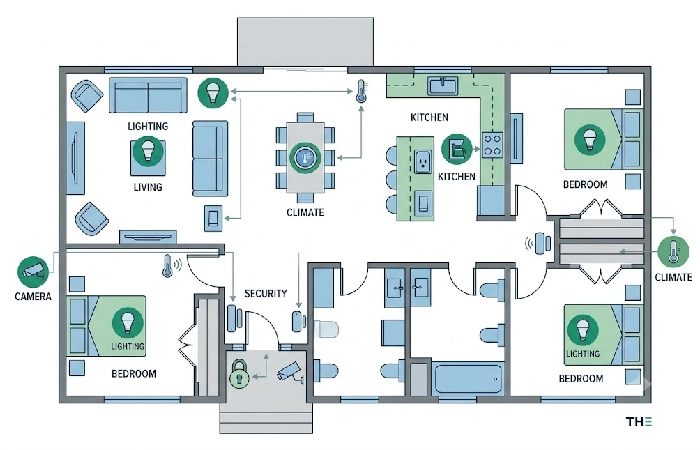
Automation of home appliances yields its biggest savings when focused on recurring daily home management tasks such as lighting or darkening, heating or cooling, locking doors and opening or closing entryways. Five categories based on rooms are listed, each with a brief description, device type, and pricing.
Smart lighting automation
Smart lighting is the lowest cost-highest impact way of getting into home automation. A trio of three smart bulbs (8–8–25 each) or two smart switches (15–15–40 each) can automate a room. Potential automations include scheduling evening lights to come on at sunset, hallway pathlighting using motion detectors at night (“on” setting at 20% so you don‘t blind yourself when you walk through), varying the color temperature through the day to modulate circadian rhythm (warm for sleep, cool-white for work), and preset scenes “Movie Night” turns all the lights off and closes the blinds; “Focus Mode” provides cool, bright overhead light.
Automated blinds and window treatments
Automate solar heat and privacy controls without manual operation. A typical motorized window shade costs between 150–150–400 per window (depending on motor type, battery vs. hardwired in). The main automation case for window shades is to open/close them on a schedule when it provides benefit (often around noon to 4 pm in summer), in order to reduce HVAC draw and cooling costs. Nearly all motorized window treatments in 2026 support Zigbee, Wi-Fi, or Matter, integrating with all five major platforms.
Smart thermostat automation
An intelligent thermostat (120–120–250) is capable of learning your home schedule and then automatically changing heating and cooling based on occupancy, time of day and geofenced presence or departure. The concrete performance indicator will be the energy saving: as per KNX Association – intelligent climate and light management can cut the energy bills by 25-40% by optimizing usage based on actual ones rather than fixed timers. Geofencing is the strongest performing technology: the thermostat goes on eco mode when all the phones of the members of the house leave the defined area, then pre-heat or pre-cool the home before the first one comes back.
Smart security and surveillance
Smart security automation uses trigger-based routines run all the time instead of manual arming and observation. Typical hardware is a video doorbell (100–100–250), one or two indoor/outdoor cameras (50–50–150 each), a smart lock (150–150–300), and contact sensors for doors and windows (15–15–30 each). Useful automations involve “away mode”, triggered by geofencing or a routine, which arms all sensors, locks all doors, activates all cameras, and sends instant notifications to your phone. In 2026 AI in cameras will distinguish people, pets, packages, and cars from other motion, ending the false alarms that hampered early motion detection cameras.
Smart kitchen and appliance automation
By 2026, automating my kitchen will be feasible, but not necessarily affordable. Buying appliances “smart” is still not terribly useful; most connected ovens and fridges just have app control, which isn’t really anything, so I would prefer to buy a cheap, dumb appliance, then connect it to one of the cheapest smart plugs (10-10-20 each) to add scheduler and power monitoring functionality. This will work well for something like a coffeemaker: have it turn on to make coffee at 6:30 AM; turn off the slow cooker after 8 hours, a typical cook time for a slow cooker; turn off the space heater once a set of temperature sensors reads above a threshold.
Best home automation platforms in 2026
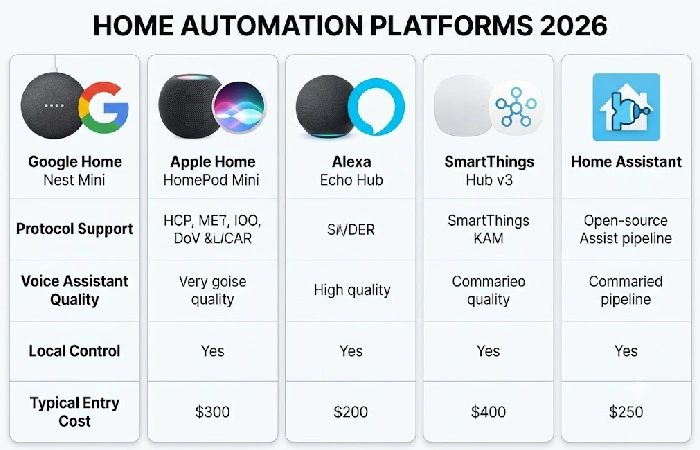
For most homes in 2026, Google Home is the best overall platform, providing the widest native device support and most robust built-in voice assistant. Apple Home is best for privacy and local control, especially if already part of the Apple environment. Amazon Alexa is the cheapest to get started with and has the largest device library. SmartThings is the best for integrating legacy Zigbee/Z-Wave gear with the newer Matter/Thread devices. Home Assistant is the only truly local platform with unlimited customization for the tech savvy.
The comprehensive comparison matrix below the guide outlines each Platform in terms of protocol support, voice-assistant quality, local control availability and entry price, in detail. For a complete comparison between the three voice-assistant-driven ecosystems.
How to set up home automation step by step
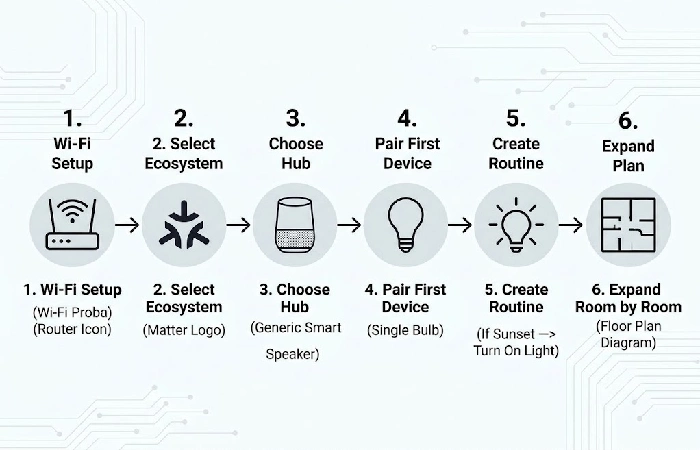
Home automation consists of six steps: build a solid network, pick an ecosystem, select a hub, add your first device, create your first routine, then expand from room to room. Don’t forget to take your time installing all your devices: a solid base of three to five networked objects is preferable to a hundred and twenty ones that are barely holding up.
- Enhance Your Wi-Fi. Though you have a single access point, it might be enough for “small” environments; if you have a home bigger than 1,000 SF, use a mesh Wi-Fi system. The cumulative load of smart appliances is too important, a single consumer router can contain only 15 to 20 networked appliances.
- Select a protocol and ecosystem. Make sure that you opt for one of the following ecosystems: Google Home, Apple Home, Alexa, SmartThings, or Home Assistant. Commit to one flagship and ensure that each device you purchase is compatible with your choice. Go for Matter compatible devices, as they play well with all five ecosystems and provide sustainability for your investment through potential future platform updates.
- Choose a hub or no hub at all. For under five Wi-Fi only devices automation, and without the need for offline reliability, a smart speaker (Nest Mini, Echo Dot, HomePod Mini) will do. For five or more devices, or if you have Zigbee or Z-Wave sensors, a standalone hub will do the job for reliability and protocol bridging.
- Take the first step of installing the first device. You may want to start off with a single smart bulb or smart plug. Set up, test, and make sure that it responds well to your app and voice commands before proceeding to add any other devices.
- Create your first automation routine. Set a simple routine: “at sunset, turn on the living room light”. Make sure that it triggers correctly for three days in a row and then move on to complex.
- Add them room by room. Only add devices to one room at a time. Have the automations for a room stable before moving on to the next. This helps troubleshoot; if it breaks, you now know what room to look in for the problem.
IFTTT and advanced home automation routines
IFTTT an interface-agnostic automation layer, allowing services and devices that weren’t design to work together to do so. For example, if your smart thermostat uses Google Home but your security camera has its own separate app, IFTTT can connect them by means of ‘applets’ (a home automation rule that will perform an action on one service after a specific event occurs on another).
Say a Ring doorbell picks up motion after 11 pm, that’s the cue for the hallway Hue light to click on to 20% for five minutes. Ecobee decides nobody’s home, boom, August lock engages and SimpliSafe arms itself. Rain in tomorrow’s forecast? You get a notification telling you to shut the motorized skylights.
IFTTT isn’t something you need for everything. Most of the day-to-day stuff runs fine on Google Routines, Alexa Routines, Apple Shortcuts, or whatever Home Assistant’s doing internally. Where IFTTT actually earns its spot is crossing ecosystems, hooking a Google Home device up to something Apple-only, or wiring a smart home product into a service that has nothing to do with smart homes at all. Spotify, Google Sheets, email, that kind of thing.
Worth poking around: Apple Shortcuts is free but locked to Apple gear. Google Routines is free too, lives inside the Google Home ecosystem. Same deal with Alexa Routines, free, Alexa-only. Home Assistant automations are also free, though you’ll need the actual hub, and honestly it’s the strongest option once you’re juggling multi-condition logic.
How much does home automation cost in 2026?
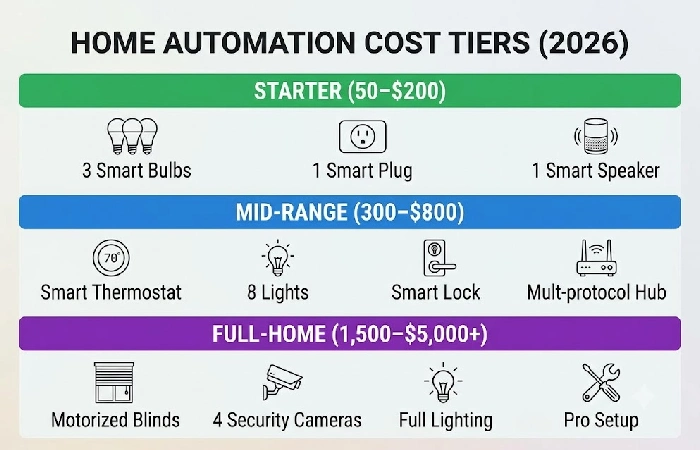
For a basic system you are looking at $50-$200. For a middle of the range system intended for duty rooms you are looking at300–300–800. To install a full home automation with motorized blinds, multi-room lighting and climate controls and security systems costs 1,500–1,500–5,000+ depending on the size of the home and whether you are installing wireless retrofit devices or hard wired professional systems.
| Tier |
Budget (USD) |
What It Includes |
| Starter |
50–50–200 |
2–3 smart bulbs (8–8–25 each), 1 smart plug (10–10–20), 1 smart speaker (25–25–50) |
| Mid-range |
300–300–800 |
Smart thermostat (120–120–250), 5–8 smart lights, smart lock (150–150–300), hub (35–35–150) |
| Full-home |
1,500–1,500–5,000+ |
Motorized blinds (150–150–400/window), security cameras (50–50–150 each), full-room lighting, professional setup labor |
The main cost driver retrofit vs. new-build. The costs for retrofit wireless devices (smart switches replacing a wall switch, smart plug, battery powered sensors) are significantly lower because no electrician required whereas the wired systems (KNX, Lutron Caseta, professional ZigBee) have higher front end costs but many more benefits in terms of reliability that people are willing to pay a premium for (a wired KNX system will last around 15-20+ years without worrying about batteries or wireless interference).
Common home automation mistakes to avoid
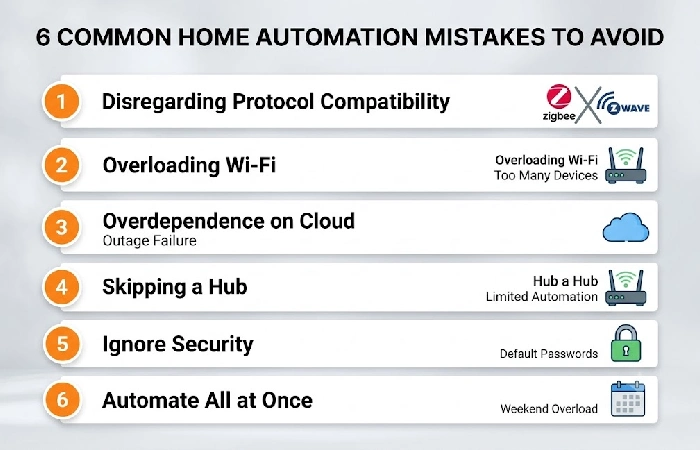
Most common home automation failures not caused by bad hardware but by rushing into installing the system without proper planning, purchasing competing devices, and overstretching the network. Six mistakes made by beginners cause frustration, as documented in the published troubleshooting guides of The Smart Home Hookup and on the user community forums.
- Disregarding protocol compatibility. Purchasing a Zigbee sensor that will not have a Zigbee hub (and does not have a built-in Zigbee receiver); or having Zigbee and Z-Wave devices with no multi-protocol bridge such as SmartThings. Before buying any device do check it has your hub’s protocol or is a Matter device.
- Overloading Wi-Fi. Running 30+ Wi-Fi smart devices on a consumer router results in flaky connections, sluggish response, and failed automations. Offload non-critical devices such as sensors and switches to Zigbee or Thread on the side, and bring only cameras and speakers onto Wi-Fi.
- Overdependence on cloud-only devices. If your automations rely solely on cloud execution, all those automations will stop working when the internet goes down. Choose devices with support for local execution. Thread sensors, HomeKit accessories, and Home Assistant integrations.
- Skipping a hub. Hubless (smart speaker + a handful of Wi-Fi devices) was fine up to about 3-5 devices, but over that, having a dedicated hub gave reliable local processing, protocol translation, and a central automation driver.
- Ignore security. Default passwords, unpatched firmware and thwarted two-factor authentication make the smart home susceptible to attack. Change all default passwords at setup, activate 2FA on your hub and cloud accounts, and patch your device’s firmware within 48 hours of release.
- Automate all at once.15 devices in one weekend adds all automations at once, increases network congestion, and turns into a debugging nightmare. Get one room working for a week, then add a second.
Home automation FAQ
1. What is the best home automation system for beginners?
Google Home or Amazon Alexa are the best options for an easy: start. Google Home has the most powerful voice assistant, and one of the widest Matter ready ecosystem. While Amazon Alexa has the cheaper hardware to start (Echo Dot at $25-$35), and the most numerous library of compatible hardware. For mixed-home use: plus older Zigbee/Z-Wave hardware and new Matter hardware, the easiest bridging hub will be Samsung SmartThings.
2. Can I automate my home without a hub?
Exactly, for small scale installations. If you’re not automating more than 4-5 Wi-Fi-only devices, such as a couple of smart bulbs and a smart plug, then any smart speaker (Nest Mini, Echo Dot, HomePod Mini) with the respective app that communicates directly to the device(s) can be the controller. Anything over five or if you’d like to use Zigbee, Z-Wave or Thread sensors, then the hub brings the protocol bridging and local processing, at the very least.
3. How much does a full home automation setup cost?
A comprehensive home automation solution encompassing lighting, climate, security, and window treatments costs around $1,500-$5,000+ in the U.S., depending on the size of the home and whether a wireless retrofit solution or a hardwired professional installation chosen. A basic working system is around50–50–200, while a mid-range system for central living areas is about300–300–800.
4. Is home automation worth it in 2026?
Yes, for the vast majority of household consumers. Energy savings (per KNX Association, saving 25–40% on climate-control bills with a smart thermostat), greater home security (to alert on the phone of movement inside), and daily life convenience benefits of automation (scripting one’s morning operations) more than justify the expense. Granted, ROI is more significant the larger the household and the more comprehensive the automation. The common household consumer in a one-bedroom apartment with three smart bulbs will experience less ROI than a couple with a four-bedroom house.
5. What is the difference between smart home and home automation?
“Smart home” the name for various internet-enabled gadgets that you control from a distance (an Android app that turns a light on, viewing a camera from your office). “Home automation” is the system-level programming that makes those gadgets operate automatically: on-time schedules, event triggers, sensor-based routines, if/then rules. All automated homes are smart homes, but not all smart homes automated. This distinction is important, because if you buy gadgets but don’t program routines, you get remote control, not automation.
6. Does home automation increase home value?
Yes. Embedded home automation technology especially security, smart thermostat, and smart lighting systems tends to be valued more by homebuyers and appraisals. The premium effect is more pronounced if the consumer considers the automation as part of a system (e.g., integrated security and climate system).
7. What are the disadvantages of home automation?
The key negatives are that there is compatibility friction between ecosystems (although mitigated by Matter) and not all products support all ecosystems, if you are choosing a cloud-based platform then you need internet connectivity, security flaws if firmware is not up-to-date and an upfront cost which can be several thousand dollars if you want a full home automation system and an initial learning curve to setting up well working automation routines.
