Published: August 6, 2026
Last Updated: August 24, 2026
All protocols specialize, and one protocol is not ideal for every device found in a smart home. ZigBee 3.0 works best for inexpensive sensors and lighting, Z-Wave is best for security-related applications like locks and alarm panels, and Wi-Fi is the only option in the case of cameras and video doorbells that require a steady high-bandwidth stream. Protocol choice should be based on the end-use of that device, not on allegiance or any single comparison chart.
2026 adds a fourth factor into the mix. Matter. An application-layer interoperability spec, spanning Thread, Wi-Fi, and Ethernet – basically the glue that lets appliances from competing ecosystems actually talk to each other. Doesn’t mean your Zigbee or Z-Wave gear is dead, either. Both are capable of being bridged into a Matter ecosystem by way of a multi-protocol hub, though consumers should look for devices that are Thread compatible.
Definition: The three wireless protocols Zigbee, Z-Wave, and Wi-fi along with the corresponding smart home devices, operate over different radio bands, each tuned for a different task, and operate best when combined via a multi-protocol hub and not individually.
Direct answer: no single protocol wins outright. It comes down to the use case: sensors lean Zigbee, security leans Z-Wave, cameras lean Wi-Fi. And if you’re doing a new install, Matter-over-Thread is where things are headed.
How Zigbee, Z-Wave, and Wi-Fi actually differ
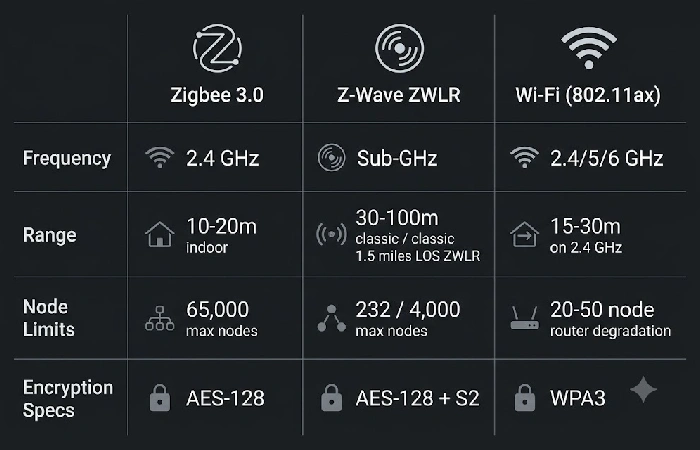
The methods of operation for these three protocols are varied. Each unique protocol operates on a different radio frequency, utilizes different network topologies and caters to a different device family. Zigbee and Z-Wave both utilize a self-healing mesh topology to increase range via powered repeaters whereas Wi-Fi connects devices directly to home routers.
The core differences that matter for a purchasing decision:
| Specification |
Zigbee 3.0 |
Z-Wave / ZWLR |
Wi-Fi (802.11ax) |
| Frequency |
2.4 GHz (IEEE 802.15.4) |
Sub-GHz (908 MHz US / 868 MHz EU) |
2.4 / 5 / 6 GHz |
| Topology |
Mesh (multi-hop) |
Mesh (classic) or Star (ZWLR) |
Star (router-centric) |
| Range per hop |
10–20 m indoor |
30–100 m (classic); 1.5 miles LOS (ZWLR) |
15–30 m on 2.4 GHz |
| Max nodes |
65,000 (theoretical) |
232 (classic); 4,000 (ZWLR) |
20–50 before router degradation |
| Data rate |
250 kbps |
9.6–100 kbps |
600+ Mbps |
| Hub required |
Yes (coordinator) |
Yes (controller) |
No |
| Battery life |
2–5 years (coin cell) |
Up to 10 years (ZWLR, coin cell) |
Poor; most devices need mains power |
| Encryption |
AES-128 |
AES-128 + S2 framework |
WPA3 |
The open-standard approach of Zigbee (administered by the Connectivity Standards Alliance) results in a more diverse range of low-cost devices by manufacturers such as Aqara, IKEA and Sonoff. The robust proprietary certification (done by the Z-Wave Alliance, through Silicon Labs) of Z-Wave results in very tight cross-brand compatibility, but higher price per device and more limited product selection.
Frequency, interference, and how to fix Zigbee–Wi-Fi channel overlap
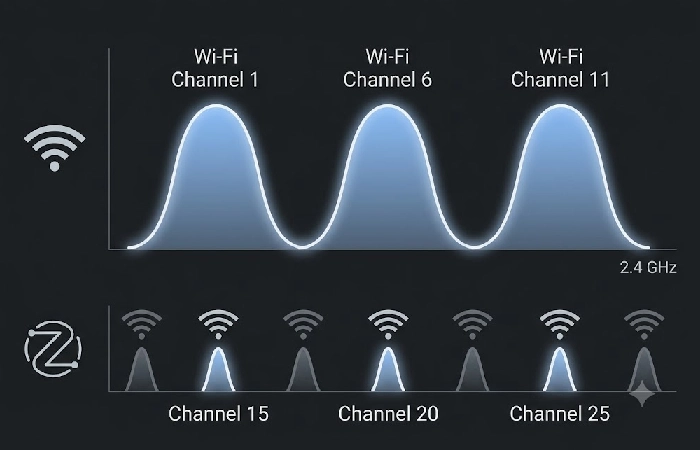
Same band. Both live on 2.4 GHz, actually. Not a dealbreaker though, not if you pick channels right. Wi-Fi only gets three non-overlapping channels – 1, 6, 11. Zigbee’s got more real estate, 11 through 26 under IEEE 802.15.4. Put it on 15, 20, or 25 and you clear Wi-Fi’s masks completely. No overlap.
The fix is simple. Put your Wi-Fi router on channel 1 or 6. For Zigbee, go to 25 if you picked Wi-Fi channel 1, or 15 if you picked channel 6. You can usually set this by hand during setup. Sonoff ZBDongle-P and SLZB-06, both work this way.
Z-Wave doesn’t deal with any of this. Different bandwidth altogether, sub-GHz. 908.42 MHz if you’re in the US, 868.42 in Europe. Nothing else lives there – not Wi-Fi, not Bluetooth, not Zigbee. Crowded house full of wireless gadgets? That alone might be reason enough to go Z-Wave.
When to use each protocol — a device-by-device decision matrix
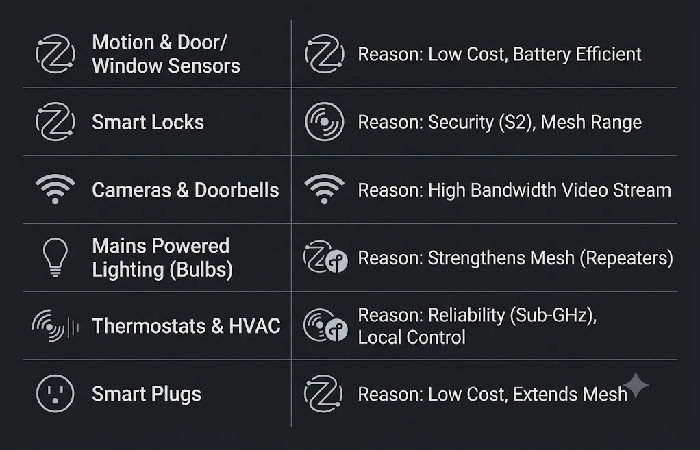
It all depends on what you want each device to do, not on which protocol scores best overall. A camera needs bandwidth. A lock needs reliability. Sensors want low cost hardware to run on for years.
| Device category |
Recommended protocol |
Reason |
| Motion sensors, door/window contacts |
Zigbee 3.0 |
Lowest per unit cost (5–5–12 per sensor); coin-cell battery life of 2–5 years; mesh extends coverage |
| Smart locks, alarm panels |
Z-Wave |
Sub-GHz frequency avoids interference; S2 security framework provides authenticated encryption; 30–100 m range penetrates walls |
| Security cameras, video doorbells |
Wi-Fi |
If you want to stream live video, the throughput must be greater than 250 kb/sec, neither Zigbee nor Z-Wave supports this |
| Smart bulbs, LED strips |
Zigbee or Thread |
Each mains powered light bulb is a mesh repeater node, which strengthens the network; low cost per unit |
| Thermostats, HVAC controllers |
Z-Wave or Thread |
Reliability-critical; Z-Wave’s sub-GHz signal reaches HVAC installations in basements and storage closets |
| Smart plugs, outlet switches |
Zigbee |
Mains powered plugs are this type of mesh router, which can extend the coverage of the network at 8-8-15 per unit |
This matrix is based on a multi-protocol hub (see below) that supports at least Zigbee + Z-Wave. For a single protocol if you are new to it, Zigbee offers the highest breadth-to-cost ratio for most homes.
Where Matter and Thread fit into the decision
Matter is not a radio protocol. It is the application layer interoperability standard supported by the Connectivity Standards Alliance that allows products from Apple, Google, Amazon and Samsung to be compatible in one ecosystem. Matter runs over Ethernet, Wi-Fi or Thread, whatever device you are using.
Thread is the new network layer protocol that is beginning to phase out Zigbee on newer devices. Managed by the Thread Group, Thread is an IP native low-power mesh network, using the 2.4 GHz radio (same as Zigbee) but with native IP addressing. Having a Thread enabled device means you have a native connection to your home network without any translation.
For 2026 buyers, the practical implication is:
- New buys: always go with “Matter over Thread” devices where possible. It brings the best of both worlds in that you use the low-energy mesh provided by Thread, along with the ecosystem agnostic interoperability of the Matter standard.
- Current Zigbee/Z-Wave hardware: Not technically obsolete at this stage. Both protocols could be reasonably integrated into the Matter domain through a bridge (built into multi-protocol platforms such as Home Assistant or Homey Pro).
- Thread Border Router requirement: There must be at least one Thread Border Router within the house. The majority of the recent smart speakers (Apple HomePod Mini, Google Nest Hub 2nd gen) and streaming devices (Apple TV 4K) also have one.
The multi-protocol hub is the real answer
Most comparison guides place Zigbee versus Z-Wave versus Wi-Fi in a mutually exclusive context. However, the recommendation for 2026 is that all three should be used together using a multi-protocol hub.
Three hub platforms currently support Zigbee + Z-Wave + Thread/Matter on a single device:
- Home Assistant (open-source, on dedicated hardware or a Raspberry Pi with Zigbee/Z-Wave USB dongles)
- Homey Pro(consumer grade, integrated multi-radio hardware, no need for any dongles, just plug in).
- Hubitat Elevation (local-processing focus, has native support for Zigbee and Z-Wave, with a software update adding support for Matter)
A multi-protocol hub enables the device-by-device matrix described above to be followed without compromise: Zigbee sensors, Z- Wave locks, Wi-Fi cameras and Thread bulbs are all controllable via a single interface and automations.
FAQ
1. Do I need a hub for Zigbee or Z-Wave?
Yep. You’ll need a hub for both Zigbee and Z-Wave, well, a coordinator, technically. That’s the box that turns the radio signal into something your phone or voice assistant can actually understand. Wi-Fi communicates directly with your current router with no extra hub gear. Come 2026, a multi-protocol hub will even be compatible with Matter, removing the necessity for a dedicated brand-specific bridge to run each technology; one central hub for all three (Zigbee, Z-Wave and Matter-over-Thread).
2. Which protocol is most reliable for smart locks?
Z-Wave. Sub-GHz, 908 MHz in the US, 868 MHz in Europe. Almost nothing else lives on that band. Compare that to Zigbee, stuck on 2.4 GHz alongside every socket radio in the house, occasionally fighting for space. Pairing and network traffic get locked down by Z-Wave’s S2 security protocol. Then there’s Long Range. Same protocol, bigger reach: 4,000 nodes, 1.5 miles line of sight, coin cells that keep going for up to 10 years. That’s straight from the Z-Wave Alliance’s own ZWLR spec.
3. Can Zigbee, Z-Wave, and Wi-Fi devices work together?
Not in the native mode. Each of the three protocols operates on separate radio bands and has incompatible network stacks. To unify them, you need a multi-protocol hub such as Home Assistant, Homey Pro or Hubitat that has different radio hardware for each protocol. They also need to be able to present all devices through a single unified control interface. Matter bridges can also allow old Zigbee and Z-Wave devices to be presented to a Matter system so you see them in Apple Home, Google Home or Alexa alongside newer Thread devices.
4. What is the difference between Matter and Thread?
Matter is the application layer language; Thread is the network layer road. Matter is how devices recognize and communicate with each other across ecosystems (Apple, Google, Amazon). Thread is the low power, IP-based mesh radio that transports the Matter messages between the devices. “Matter over Thread” is both: the Thread mesh RF running in between, and the Matter device ensuring platform compatibility.
What to do next
Audit your existing devices by protocol: how many are on Zigbee, how many are on Z-Wave, how many are on Wi-Fi. Use the matrix above to identify gaps. For example, if your locks are on Wi-Fi it may be better to run them on Z-Wave; if your sensors run over Wi-Fi it will be a major benefit to field them on Zigbee. This will allow you to free router capacity and give your battery life a boost from months to years.
The most affordable high leverage investment one can make is a multi-protocol hub. For hub hardware recommendations, setup instructions, and ecosystem comparisons, check out the full smart home hubs and voice assistants guide.
