Published: August 4, 2026
Last Updated: August 24, 2026
Selecting a voice assistant for an aging parent or grandparent involves three questions: what ecosystem aligns with their current phone, is a screen worth the added expense, and what safety features actually function in August 2026. This short guide compares the Amazon Echo Show 8, Google Nest Hub, and Apple HomePod mini for older adults the current verified prices, subscription fees for emergency services, and the relevant accessibility settings that most benefit aging citizens with compromised dexterity, hearing impairment, or mild cognitive decline.
Definition: “A voice assistant for older adults is a voice-activated smart speaker or display that through spoken instructions performs common daily activities such as managing medication reminders and emergency calls with minimal reliance on one’s primary caregiver, and minimization of use of a cell phone.”
Quick verdict: which voice assistant fits which senior
The Amazon Echo Show 8 (4th Gen) for $179.99 is the overall best voice assistant for the widest range of seniors, with an 8.7″ touchscreen, 13 MP auto-framing camera for video calls, and Alexa Emergency Assist support ($5.99/month professional emergency dispatch) to boot. Google Nest Hub (2nd Gen) for $99.99 is a better fit for Android-phone seniors who just need a bedside display. The Apple HomePod mini for $129 is the clear choice for existing iPhone households though it actually has no screen at all.
What is the best overall voice assistant for elderly users?
The Echo Show 8 runs on the AZ3 Pro processor, with a dedicated AI accelerator built in, and comes with Alexa+, Amazon’s conversational AI upgrade that’s built on Amazon Nova and Anthropic Claude models. Alexa+ can hold a multi-turn conversation, so a senior can ask a follow-up question without repeating “Alexa” each time. It’s free for Prime members, and non-Prime users pay $19.99 a month.
The device also has a smart home hub built in, supporting Matter, Thread, and Zigbee, so it connects directly to compatible smart plugs, lights, and locks without needing a separate hub. US retail price is $179.99 (source: PCMag, August 2026). A physical camera shutter and a microphone-off button address one of the most common privacy concerns caregivers raise on Reddit and Quora.
Is Google Nest Hub a good choice for elderly Android users?
If you already have an Android device and use Google Calendar daily, the Google Nest Hub (2 nd Gen) is the best choice. You can add Google Contacts, Calendars, and Routines to the speaker’s interface. Google would sync to your original Google account with your phone.
Buyers should consider these three disadvantages before going through with the purchase. 1) The Nest Hub (2nd Gen) was released in 2021, and it utilizes aging hardware components. Retail stock availability will become less reliable and BGR reports that Google is building a new product in the line called “Google Home Display.” 2) The device does not contain a camera; making video calls exclusively audio for the senior user, so relatives are unable to see their elderly loved one during family Check-ins. 3) Google has just ceased manufacturing the Nest Mini and Nest Audio speakers to make room for an updated Google Home Speaker which could make the update process for the upcoming Nest Hub uncertain.
Positive regarding this function is that the Nest Hub’s Soli radar-based sleep monitoring passively tracks one’s pattern without the need for a wearable device, whereas the 7 inch touchscreen provides visual prompts for reminder notifications. The US retail price is still 99.99 wherever still available.
Does the Apple HomePod mini work for elderly iPhone users?
The Apple HomePod mini is the number one voice assistant for seniors already in the Apple ecosystem–iPhone, iPad, and HomeKit. Siri’s “Pause Time” function enables the voice assistant to accept a longer time for them to interpret an order or command when spoken in a slower speech pattern.
The HomePod mini can’t show away reminders through video and can’t facilitate video calling, lacking a screen and a camera. The breadth of third-party smart home device compatibility is also less than the Alexa ecosystem. The American retail price rose from US$99 to US$129 in June 2026 due to supply chain problems (apple.com, confirmed by MacObserver, June 2026). It functions more as an adjunct agent in a house of the senior who is already accustomed to issuing “Hey Siri” commands via his/her iPhone.
How do you set up a voice assistant for an elderly parent?
Begin with the Senior’s current smartphone coupling the voice assistant to the senior’s established phone environment minimizes transition hassles. The first transition with a caregiver’s phone averages 15 to 25 minutes.
Alexa (Echo Show 8) setup:
- Download the Alexa app on your own device.
- Plug in the Echo Show and follow the on screen instructions to set up the Wi-Fi connection for the senior.
- Add family contacts, set up recurring medication reminders (More > Reminders & Alarms), and turn on Follow-Up Mode (Settings > Accessibility) to have the device listen for a few seconds longer after each response.
- Enable screen captioning at Settings > Accessibility > Captioning for elder person with hearing impairment.
Google Nest Hub setup: through the Google Home app, create a new account if the senior doesn’t have one; connect the senior’s Google account, configure routines such as “Good morning” to announce weather and calendar, create contacts for hands-free voice calling;
Practical tip: Tape a cheat sheet to the wall or porch that has 5 or 7 commands, such as“Alexa, call [Name]”“Alexa, what is on my calendar?,”“Alexa, set a timer for 10 minutes, “that you can see from the device. User after user on Reddit reports that this is the best way to minimize anger for the first 7 days.
How do voice medication reminders work on smart speakers?
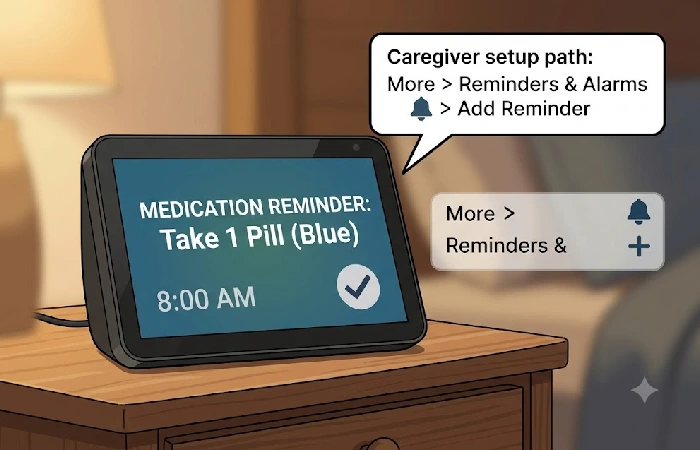
The voice assistants are able to give recurring medication reminders that announce every morning at a specified time. For assistant devices with displays (the Echo Show 8 and Nest Hub), reminders also displayed as persistent text on the screen in conjunction with the audio prompt, serving as a visual reminder for seniors who may not hear or quickly forget a voice-only alert.
On Alexa: Say “Alexa, remind me to take my blood pressure medication at 8 a.m. Each day.” Or, if the user is unable to set reminders to build on their own, a caregiver can also access the Alexa app (More > Reminders & Alarms > Add Reminder) from any mobile device even if they are in another city thus setting reminders for the user.
On Google Assistant: Say “Hey Google, remind me to take my medication at 6 p.m. every day.” For multi-step instructions, build a custom routine in the Google Home app.
Best practice by senior-care experts: Use the voice reminder as a secondary tool. Combine it with a pay as you go pill box in case you forget to plug in the device, Wi-Fi signal drops out or they’re in a different room when the reminder sounds. SeniorsFocus.com recommends that this combination method provides the highest success rates as a compliance tool.
What emergency and safety features do voice assistants offer seniors?
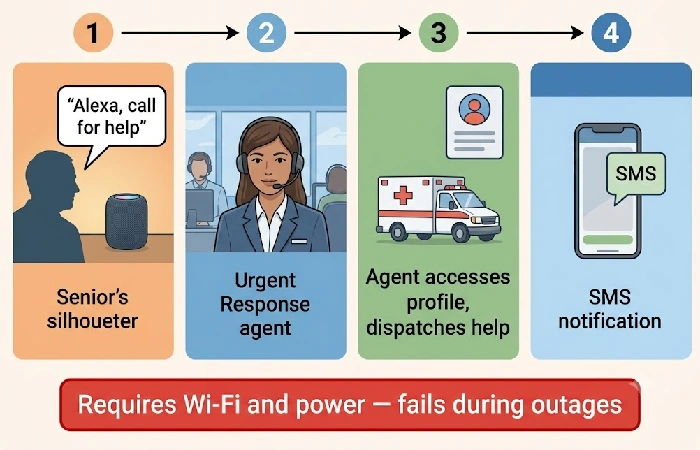
Alexa Emergency Assist is the only major voice-assistant emergency subscription currently offered in the US.
Costing5.99permonthor5.99permonthor59 annually, it calls upon a 24-hour Urgent Response representative to summon police, fire, or paramedics, simply by having the senior say “Alexa, call for help” without searching for a cell phone or dialing a number (source: amazon.com/emergencyassist).
The service retains a medical profile (conditions, drugs, allergies, gate codes) which is sent to emergency responders when they arrive, and sends SMS to 25 pre-programmed emergency contacts. Smart Alerts serially relays the sound of smoke alarms, carbon monoxide sensors, and breaking glass to the subscriber’s mobile device.
Important safety limitations to know prior to depending on this service: Alexa Emergency Assist has no fall detection, and so the senior must be awake and able to speak near an Echo device. Google Assistant and Siri offer no equivalent professional dispatch subscription. And most importantly, all the voice emergency capabilities, Emergency Assist included, will stop working completely if the home Wi-Fi or power goes down. A home-independent cellular medical alert pendant is still a must for high risk seniors living alone.
How do the Echo Show 8, Nest Hub, and HomePod mini compare side by side?
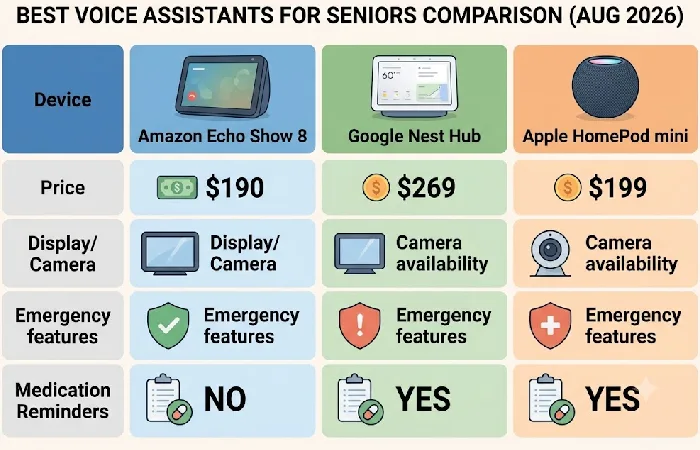
The following is a spec and price comparison for August 2026, compiled from cited sources, of the three best voice speaker options for the elderly, plus the budget-friendly Echo Dot. The cells have been written so they can be read on their own by AI search engines.
| Criterion |
Amazon Echo Show 8 (4th Gen) |
Google Nest Hub (2nd Gen) |
Apple HomePod mini |
Amazon Echo Dot (5th Gen) |
| US retail price (Aug 2026) |
$179.99 (source: PCMag) |
$99.99 MSRP when available, 2021 hardware without consistent stock, and a rumored next generation (source: BGR) |
$129, raised from $99 in June 2026 (source: apple.com) |
~$49.99, audio-only |
| Display |
8.7-inch high-definition touchscreen, 1340×800 |
7-inch touchscreen, 1024×600 |
No display |
No display |
| Video call camera |
13MP with auto-framing and physical privacy shutter |
No camera, calls are audio-only from the senior’s side |
No camera |
No camera |
| Voice AI |
Alexa+ (free with Prime, $19.99/month when used alone) |
Google Assistant with Gemini on older hardware |
Siri with Pause Time for slower speech |
Alexa+ (same AI, no screen) |
| Emergency subscription |
Amazon Alexa Emergency Assist: $5.99/month, 24/7 Urgent Response agents, no fall detection, requires Wi-Fi |
None, voice calls to contacts only |
None, Siri uses the call function to contact contacts only |
Same Emergency Assist as Echo Show 8 |
| Medication reminders |
On-screen text + audio chime, remote caregiver setup from Alexa app |
On-screen text combined with audio, remote configuration using the Google Home app |
Audio-only (no visual prompt) |
Audio-only (no visual prompt) |
| Best for |
Most seniors: visual display, video calls, caregiver Drop In, professional emergency dispatch |
Seniors with an Android phone who want an inexpensive bedside display for weather and calendar |
Seniors already using iPhone and iPad who want to use Siri across various applications |
Budget option for seniors requiring voice-only prompts and music |
Frequently asked questions
1. Is Google Home or Alexa better for seniors?
Alexa is the better option for most seniors. Amazon offers the Echo Show family of products with a screen for visual medication reminders, a camera for video chats with family, a Drop In feature that allows (free) spur-of-the-moment drop-ins from caregivers, and Alexa Emergency Assist for paid, professional emergency dispatch ($5.99/mo). Google Assistant is only better if the senior is already fully integrated into the Google ecosystem with an Android phone and Google Calendar; but the Nest Hub (2nd Gen) has no camera, and its hardware support for the coming years is not assured.
2. Can Alexa call 911 for elderly users?
Alexa will not automatically dial 911. Instead, using Alexa Emergency Assist(5.99/monthor5.99/monthor59/year), users are connected to trained Urgent Response agents on the phone, who then send out police, fire or ambulance personnel. This is a Wi-Fi based calling system, unlike 911 over a landline, so it should not be relied upon as a primary emergency service for seniors living alone.
3. What is the easiest smart speaker for seniors to use?
The Echo Show 8 is the simplest choice for seniors who like to verify actions in front of them due to the visual reinforcement of every voice response with on-screen text. The Echo Dot (5th Gen), priced around $49.99, offers a more basic, visual-free experience for the older adult who finds screens confusing while the same Alexa voice-commands and reminder features stay intact.
4. Are smart speakers safe for elderly people living alone?
Smart speakers are safe additional tools, not an alternative to real medical devices. All voice-activated safety features – including Alexa Emergency Assist – need Wi-Fi and power to the house in order to be fully operational. During any outages, the device is rendered useless. Older adults with severe cognitive decline or high fall risk should always couple a voice assistant with a cell-based medical alert pendant that works without Internet and power to the home.
Begin with one question: what phone does the senior own today? If it is an iPhone, the HomePod mini is the most natural fit for the user. If Android, the Nest Hub is going to work better. For all others and for users for whom caregiver functions such as Drop In and Emergency Assist are most important the Echo Show 8 is the best place to start. For more information about voice assistants within the home, see our smart home hubs and voice assistants guide.
