Published: August 11, 2026
Last Updated: September 18, 2026
Smart Lighting Automation automates away flip-the-switch by using trigger-based logic platform rules, schedules, and sensors that change the lights in your home based on activity, time, or presence. The issue with 99% of the guides ranking for this is that they treat smart lighting as a hardware buy. It‘s not. The interesting part is the automation layer: the triggers you set up, the protocol used, and the platform it all runs on. Here is 25 examples of this by use case, with context and price benchmarks as of August 2026.
Definition: Automated smart lighting – technology that uses sensors, timers and platform engine logic to control the lights in your home without manual switches, setting the brightness, colour, and on/off state by time, occupancy, or activity.
Quick answer: 25 ideas to automate home lighting by routine, sensor, security, mood, and platform — with cost and protocol guidance.
Quick-reference summary
| Category |
Example ideas |
Setup complexity |
Cost per device (USD, Aug 2026) |
| Daily routine scenes (1–6) |
Wake-up brightening, goodbye/all-off, geofenced arrival |
Plug-and-play — pair bulb via app, create a scene |
12–12–55 per smart bulb; Philips Hue Starter Kit ~$130 |
| Sensor-driven (7–11) |
Hallway night-light at 10%, daylight harvesting, occupancy auto-off |
Moderate — mount a PIR sensor, configure a rule in the hub app |
15–15–40 per PIR sensor (Aqara, Philips Hue) |
| Security and away-mode (12–15) |
Vacation mock-up, doorbell flash alert, alarm flood |
Moderate — link lighting routines to a security system or doorbell |
30–30–70 per outdoor smart floodlight |
| Colour, mood, and wellness (16–20) |
Accent wall strip, TV bias sync, pre-sleep wind-down dimming |
Plug-and-play for bulbs; moderate for TV-sync hardware |
25–25–65 per RGBW smart bulb; TV-sync strip ~$120 |
| Advanced and platform-specific (21–25) |
NFC tag trigger, Home Assistant blueprint, IFTTT calendar lighting |
Advanced — requires YAML, scripting, or an NFC-writer app |
$0.50 per NFC tag; Home Assistant OS is free |
What is smart lighting automation?
Smart lighting automation is the application of technology to turn on or change your home’s lighting based on rules you set into the system (such as time of day, motion in a room, whether you’re in the neighborhood, or even a voice command). This overlay involves 3 separate components: smart hardware (such as bulbs, switches or LED strips that have native radio + controllers), a radio protocol (wifi, Zigbee, Thread, etc.)and a control platform (such as a maker’s app, a voice assistant or an opensource hub like Home Assistant) that can take the rules you set and “trigger” your lights to do what you want them to do
How does smart lighting automation work?
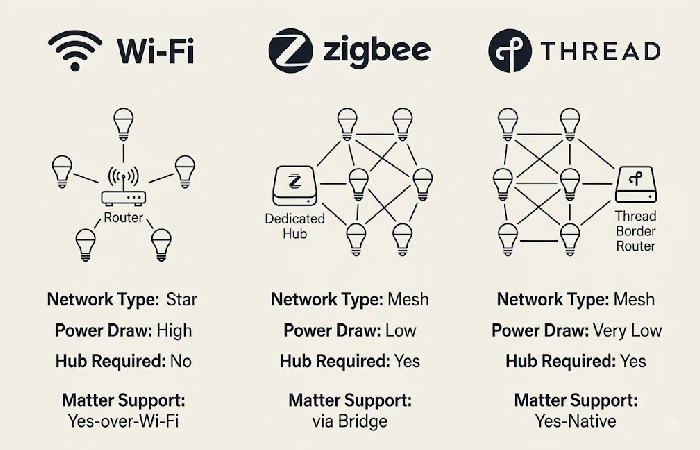
Smart lighting: Hardware talks to the control platform on a wireless protocol then executes the trigger-based rules you create. There are three major protocols in 2026. Wi-Fi: connects the bulb directly to the home router. No hub required. Can overload home networks if more than 1520 devices. Zigbee: mesh network using a low-power radio through a dedicated hub. More mature, reliable, and supported than Thread. Thread: newer low-power mesh protocol. The newest transport layer for the Matter interoperability standard supported by the Connectivity Standards Alliance they run it. Matter isn’t a radio protocol though. It is an application-layer language over Wi-Fi, Thread, or Ethernet that ensures a single bulb works natively with Apple Home, Google Home, and Amazon Alexa without separate bridges.
25 smart lighting automation ideas for 2026
The twenty-five ideas are categorized five ways based on primary trigger type (time, motion, security event, mood, platform logic), so that you can begin the exercise with the category that overlaps most with your highest friction daily moment:
Daily routine scenes (ideas 1–6)
Scheduled scenes allow you to activate several lights at once based on time or other events without having to set each fixture individually. Philips Hue users can create scheduled scenes directly within Hue’s automation tab. Hue’s default automation tab includes built-in support for wake-up, departure, and custom time-based routines.
- Bedroom. From 0% to 80% during a morning wake up alarm 20 minutes before the actual alarm.
- Goodbye / All-off: This command will shut down everything. It‘s even possible to arm your security system.
- Welcome Home Geofencing: Home to Lights & Lighting Hallway. Smart Home Lighting Living room when the phone crosses the geo-boundary (150 meters).
- This is done throughout the day: from 5 000 K at morning (cool white) and gradually going down to 2 700 K when the sun has set in your city.
- During movie night, a similar process happens in the living room. Lights dim down to 15%, then the kitchen lights turn off and the accent strip comes on.
- The dining room has warm tone lights which are set at 2700 K with 60% brightness. Also, Warm white strips are placed below each shelf level as a layered lighting effect.
Motion and sensor-driven ideas (ideas 7–11)
Sensor-activated automations need not remember to flip a switch, and respond instead to your presence, the light levels, or both. PIR (passive infrared) sensors are most commonly used indoors and pick up body heat, while costing approximately $15-$40 per sensor from Aqara or Philips Hue:
- Hallway night-light: PIR sets hallway light to 10% from 11 pm to 6 am, minimum brightness required to find the sofa without waking anyone up.
- Bathroom motion auto-on: The lights shall turn on to 50% brightness when occupancy is detected, then turn off after no occupancy is detected for 5 minutes.
- Daylight harvesting: A lux sensor will turn off or dim the interior lights during the daytime period when the available natural light is greater than a certain threshold.
- Stairway safety strip: LED strips along the stair risers turn on at a dim level when sensing motion and light up the face of the steps avoiding any direct bright ceiling lights.
Security and away-mode ideas (ideas 12–15)
Smart lighting also acts as a visible security layer by/or in conjunction with imitation occupancy or alarm activation, thus can often minimize the overhead of another monitored security subscription, in some cases.
- Vacation mockupancy: Lights automate to turn on and off at random across rooms, giving the impression that someone is at home.
- Video doorbell Flash alert: Lights flash blue or white when the video doorbell is activated. Useful if you are wearing a headset or are far away in a different room.
- Flooding in the event of an alarm: When activated, all lights in the house go to full brightness at the same time to confuse intruders, while lighting up the house thoroughly.
- Outside perimeter lights: Motion-activated smart floodlights (30–30–70 per unit) outside the perimeter activate by motion to warn off intruders while illuminating the path from a distance.
Colour, mood, and wellness ideas (ideas 16–20)
RGBW smart bulbs and addressable LED strips also make it possible to control mood and wellness through coloured lighting, rather than just scheduling of white light. Smart bulbs with colour capability will average between 25 and 65 each depending on brand and lumen output.
- Color-shifting accent wall: A strip behind a bookshelf or headboard cycles slowly through complementary hues, adding visual depth without overhead glare.
- TV bias lighting sync: A gradient lightstrip (~$120) placed behind your TV automatically adjusts the ambient color to what is currently on screen, easing the strain of prolonged watching.
- Reading-mode warm tone: A voice command sets your bedside lamp to 2700K at 70% brightness, optimised for extended reading.
- Pre-sleep wind-down: Lights dim from 50% to 5% over the 30 minutes before your set bedtime, supporting your natural melatonin production cycle.
- Party-mode colour loop: RGBW bulbs cycle through a user-defined colour palette in sync across the room, creating dynamic ambience for social events.
Advanced and platform-specific ideas (ideas 21–25)
For those using Home Assistant, IFTTT, or NFC-enabled devices, these can be extended just beyond predefined routines into conditional automation based on events. For Home Assistant, scenes can be specified and activated through the scene.turn_on action which provides an example use as part of their integration documentation.
- NFC tag scene trigger: Put a $0.50 NFC tag on your nightstand and just tap your phone (no need to open anything!) to turn on a “Bedtime” scene immediately.
- Adaptive lighting with Home Assistant: With the community Adaptive Lighting integration, your colour temperature and brightness will be adjusted based on your local sunrise and sunset, without you having to go change it in each season.
- Voice-assistant multi-room sync: Allows individual lights to be grouped together across rooms (e.g. “Downstairs”) so a voice command will turn out the entire group as a logical set.
- Lux-sensor adaptive brightness: An ambient light sensor the live lux readings are piped to the hub which compensates for light, brighter with less natural light, dimmer with direct sunshine.
- Calendar-triggered lighting in IFTTT: Connect Google Calendar to IFTTT. When a “Focus block” is entered in the calendar, your office lights are turned to 4000 K at 80% while the event is scheduled to last.
Smart bulbs vs. smart switches: which should you automate first?
Smart bulbs are a good choice for renters and people who simply want color control or accent lighting; they simply replace the existing bulb socket and range from $12-$55. For homeowners trying to wirelessly control ceiling fixtures and who want a traditional wall switch for visitors, smart switches are a better option; most models require a neutral wire and most range from $25-$60.
| Factor |
Smart bulbs |
Smart switches |
| Wiring required |
None — screw into an existing socket |
Neutral wire usually required; may need an electrician |
| Colour control |
Full RGBW spectrum on colour models |
White and dimming only (controls the fixture’s existing bulbs) |
| Renter-friendly |
Yes — remove and take them when you move |
No — permanently replaces the wall switch |
| Cost per unit (USD) |
12–12–55 |
25–25–60 |
| Best first automation |
Accent lamps, bedside, TV backlighting |
Ceiling fixtures, hallway overheads, bathroom |
How much does a smart lighting setup cost in 2026?
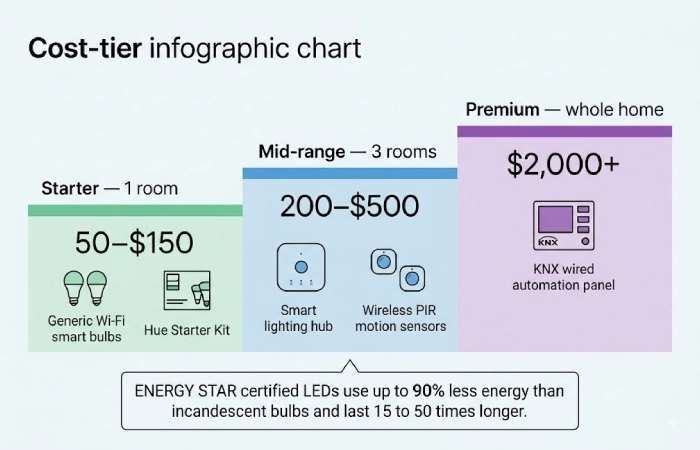
A one-room starter setup costs anywhere from $50–$150 in August 2026, depending on whether you go with Wi-Fi standalone bulbs (roughly $12–$20 each) or something like a simple hub-based system such as a Philips Hue Starter Kit (~$130 for a bridge+4 bulbs). A three-room medium-range setup goes for $200–$500. Only perfect top-end whole-home wired systems using KNX protocols go over $2000. The long-term offset is huge: energy-wise alone as per ENERGY STAR certified LEDs use “up to 90 percent less energy than incandescent bulbs and last 15 to 50 times longer”; that means drastically lower electricity bills, as well as lower costs of replacement throughout a rated lifespan of 15,000–50,000 hours.
FAQ
1. Do smart lights work without Wi-Fi?
Yes. Zigbee and Thread devices are local mesh networks and work without an internet connection for simple on/off, dimming and scene control. They communicate locally with a hub responding to commands without the cloud. Wi-Fi smart bulbs do need a working router for app and voice control.
2. Can I install smart lights myself?
Most smart bulbs are available in a “plug-and-play” form: simply remove your current bulb, screw in the smart bulb, download the manufacturer’s app, and pair the device through Bluetooth or Wi-Fi. For smart switches to replace your current wall switch, it is necessary to connect to the existing live, neutral, and load wiring. In the case your switch box has no neutral wire, or if you are inexperienced at working with mains voltage, you should contact a licensed electrician.
3. What is the best smart lighting system for beginners?
For a no-hub zero-wiring starter, having Matter-certified Wi-Fi bulbs paired with Google Home/Alexa offers the lowest start-up “friction” just purchase a bulb, screw it into the socket, and pair one or both of them through the mobile app. For a more scalable system with faster local response time and a Zigbee mesh network, a Philips Hue Bridge or a Home Assistant instance on a Raspberry Pi provides more granular control for intra- home automation.
4. How much energy can smart lighting save?
Automated LED lighting retrofit: Replacing incandescent light bulbs with smart lights that include occupancy sensors, scheduling, etc. can also lower lighting energy use by 35–70% according to GDS Lighting on automated residential and commercial installs. This is also verified by Energy Star, showing LED bulbs use up to 90% less energy than incandescent.
Your home need not begin with 25 automations. Choose the top three ideas above that address the moments of highest friction that occur most often in your daily routine either the hallway you trip down in the middle of the night, the living room you leave on all day, or the bedroom that’s too bright at night and build from it. For a complete overview of all other automation categories, see our home automation guide.
