Published: July 18, 2026
Last Updated: August 31, 2026
Your TV’s speakers are the weak link. Dialogue gets buried the second an action scene kicks in, music sounds flat, and cranking the volume just makes the same bad audio louder — it doesn’t fix a thing.
A smart TV soundbar fixes it. Prices this year run anywhere from $50 to $1,500, which is a wide enough range that most buying guides just punt — they hand you a ranked list and leave you to figure out fit on your own. Not here. Three real situations drive every pick in this guide: a tight budget in a small room, a mid-size room where you care more about hearing dialogue than anything fancy, and a bigger space where paying for Dolby Atmos actually makes sense.. If you already know what channels and eARC mean, skip ahead to the picks.
Short answer first: If you just want the answer: Dolby Atmos, a wireless sub, HDMI eARC, and some form of room auto-calibration — that’s the combination worth paying for in 2026. Most living rooms don’t need more than a 3.1-channel setup to get there. Eight specific picks below, matched to room size, budget, and TV brand, with US and India pricing side by side.
Strip away the jargon and a smart TV soundbar is just a speaker box that plugs into your TV over HDMI. What you get back is wider, clearer sound than the set’s own speakers can manage — better dialogue, real bass, surround sound, and no wires snaking across the floor.
What Actually Makes a Smart TV Soundbar Worth Buying in 2026
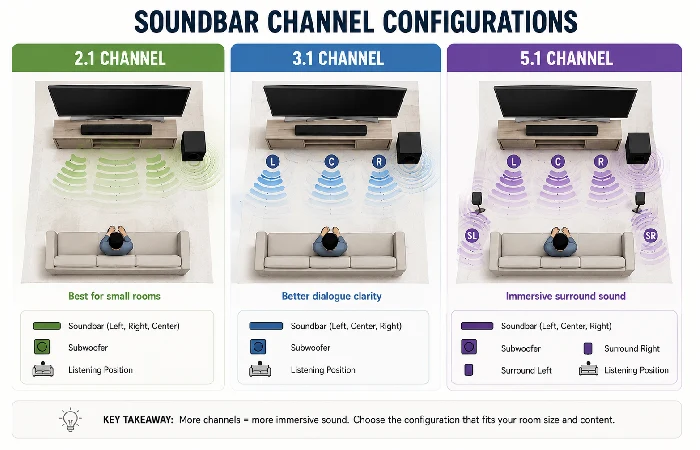
Ignore the marketing copy. Four things actually decide whether a 2026 soundbar is worth owning: Dolby Atmos, a wireless sub, HDMI eARC, and calibration that adjusts to your room rather than guessing at it. That’s the real dividing line between a soundbar worth owning and one that just prints “smart” on the box. Most people don’t need to go past 3.1 channels either — a dedicated center channel handles dialogue better than anything fancier, and it costs less doing it.
According to Futuresource Consulting, Samsung held 21.5% of global soundbar revenue in 2025 — its twelfth straight year leading the category Samsung Newsroom, March 2026. That’s the quick version. The real answer depends on your room, your TV, and which parts of the spec sheet are worth your attention.
That tracks with what shows up across review sites and forums, too. Samsung, Sonos, JBL, and Sony scoop up most of the recommendations, and the gap between those four and everyone else is wider than most buyers assume going in.
Still weighing whether a soundbar’s even the right purchase for your setup? Best entertainment gadgets covers more ground. Two things decide whether a soundbar’s worth its price, full stop: channel count, and whether the Atmos badge on the box means real up-firing drivers or just software pretending.
Channels, Decoded: 2.1 vs 3.1 vs 5.1 and When Each One Matters
Channel counts look like math problems. They’re not, really.
The first number tells you how many speaker zones the bar has. The “.1” means there’s a subwoofer somewhere in the mix. A third number after a second dot counts dedicated height speakers for overhead effects — so 3.1 is three zones (left, right, center) plus a sub, and 7.1.4 is seven zones, a sub, and four height speakers doing the ceiling-bounce trick.
More channels sounds like it should mean better sound. It doesn’t, and this trips up almost everyone shopping on spec count alone. Put a well-tuned 3.1 system in a 300-square-foot room and it’ll outperform a bargain 5.1 fighting to cover that same space — the center channel is doing the real work, cleaning up dialogue in a way extra surround speakers can’t touch. Surround effects are nice, sure, but you’re only actually noticing them maybe one stream out of ten. Dialogue is what you’re listening to the other nine.
Under 300 square feet? 2.1 or 3.1 is plenty. 300 to 500 square feet, move up to 3.1 or 5.1. Only past 500 does 7.1.4 or bigger start pulling its weight.
True Dolby Atmos vs the Virtual Kind (and Why Your Ceiling Decides)
Every soundbar over $200 slaps “Dolby Atmos” on the box these days. They don’t all mean the same thing, though.
True Atmos uses physical up-firing drivers that bounce sound off your ceiling. Virtual Atmos fakes the height effect with software processing. Both carry the official Dolby certification — but the gap in what you actually hear is significant.
True Atmos only works properly with a flat, hard ceiling somewhere between 8 and 12 feet high. Vaulted ceilings, sloped surfaces, textured popcorn finishes, anything taller than 12 feet — the sound bounces wrong or scatters before it reaches you. In that case you’d be paying for hardware that literally can’t do its job in your room.
Flat ceiling under 12 feet? True Atmos with up-firing drivers is worth the extra money. Anything else, and a quality virtual system at a lower price will genuinely sound better in your specific space. The tell is a third digit in the channel count — something like 5.1.2 or 7.1.4 confirms physical height drivers exist. No third digit means it’s virtual processing only.
The Best Smart TV Soundbars by Room and Budget
Prices below reflect July 2026 street pricing. US dollar amounts come first; Indian rupee equivalents follow where the product’s sold through Indian retail (Amazon.in, Flipkart, Croma).
| Pick |
Best For |
Channels |
Price (US) |
Price (India) |
Standout Feature |
| Samsung HW-Q990F |
Large rooms, full Atmos |
11.1.4 |
~$900 |
₹80,000–93,000 |
Q-Symphony with Samsung TVs, wireless rear speakers included |
| JBL Bar 1300 |
Large rooms, flexibility |
11.1.4 |
~$1,000 |
₹1,05,000–1,30,000 |
Detachable battery-powered surrounds, 1170W total output |
| Sonos Arc Ultra |
Mid rooms, premium sound |
9.1.4 |
~$999 |
₹99,999 |
Sound Motion driver technology, full multi-room expandability |
| Sony BRAVIA Theatre Bar 7 |
Mid rooms, Sony TV owners |
7.1.2 |
~$899 |
₹69,990 |
360 Spatial Sound Mapping, tight BRAVIA Sync integration |
| Sonos Beam Gen 2 |
Small rooms, smart features |
5.0.2 (virtual) |
~$449 |
₹44,000–50,000 |
AirPlay 2, Alexa and Google Assistant built in |
| Polk Signa S4 |
Small rooms, true Atmos on a budget |
3.1.2 |
~$299 |
Limited availability |
Physical up-firing drivers at entry-level pricing |
| Samsung HW-Q600C |
Budget, dialogue clarity |
3.1 |
~$280 |
₹22,000–28,000 |
Dedicated center channel, Q-Symphony support |
| Yamaha YAS-209 |
Budget, all-rounder |
2.1 |
~$250 |
₹18,000–22,000 |
Wireless sub included, DTS Virtual:X, Alexa built in |
If $200 is a hard ceiling for you, standalone bars without a wireless sub are your lane. Sound quality still jumps noticeably above built-in TV speakers, but you’re trading away bass depth and any real surround effect to hit that price.
Samsung TV owners get a genuine performance boost from Q-Symphony on the Q990F and Q600C — it syncs the TV’s own speakers with the soundbar, effectively doubling active drivers without adding hardware. Sony owners get something similar through BRAVIA Sync on the Theatre Bar 7. That kind of brand-matching perk won’t show up on any spec comparison site, but it can move a setup from good to genuinely impressive for zero extra effort.
And worth flagging: the Sonos Beam Gen 2 lists 5.0.2, but that’s virtual processing — no physical up-firing drivers inside. For a small apartment where you’re sitting three meters from the screen, that’s completely fine. But if you want rain actually falling from above during a movie, the Polk Signa S4 delivers that with real up-firing speakers, for $150 less. That’s the one worth picking if overhead effects are the whole reason you’re buying Atmos in the first place.
Connecting Your Soundbar Without the Headache
Three connection types show up on 2026 soundbars. Only one really matters for most setups.
| Connection |
Audio Quality |
Dolby Atmos? |
TV Remote Works? |
Use When |
| HDMI eARC |
Lossless |
Full, uncompressed |
Yes |
Your TV has a port labeled eARC (most 2020+ models) |
| HDMI ARC |
Compressed |
Yes, but lossy |
Yes |
TV has ARC but not eARC |
| Optical |
Basic |
No |
Usually not |
No HDMI ARC port at all |
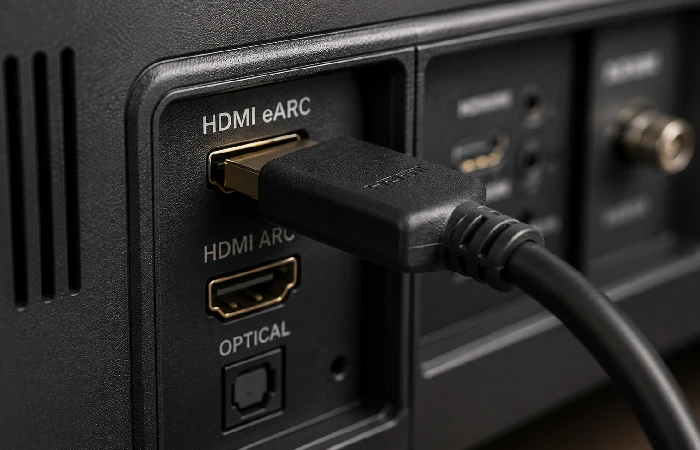
HDMI eARC is the one you want. It carries lossless Dolby Atmos and DTS:X, and it lets your TV remote control the soundbar’s volume — one cable, everything handled.
One setting trips people up constantly: CEC, short for Consumer Electronics Control. Samsung calls it Anynet+. LG calls it SimpLink. Sony calls it BRAVIA Sync. Different names, same toggle buried somewhere in your TV’s settings menu. Leave it off and the TV remote just won’t talk to the soundbar — you’ll assume something’s broken. It isn’t.
Only got ARC, not eARC? You’ll still get Dolby Atmos through Netflix, Disney+, and other streaming apps. Most people genuinely can’t hear the compression difference by ear. It shows up once you’re playing 4K Blu-rays with lossless audio tracks — that’s the one case where it actually matters.
Alexa, Google, or Neither: Smart Features That Pull Their Weight
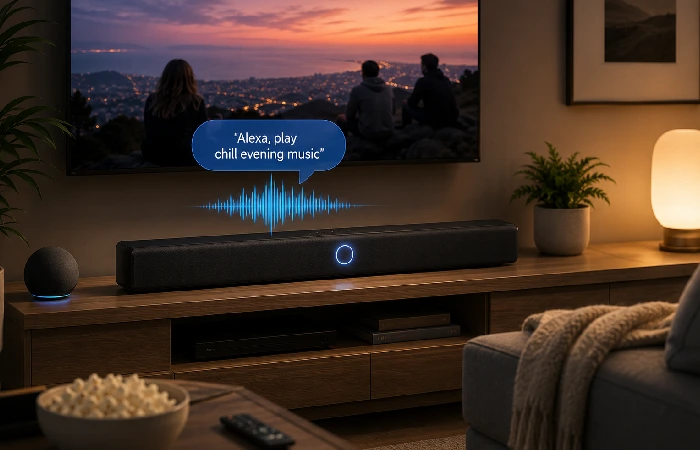
Soundbars with voice assistants split into two camps. Sonos and Yamaha built voice assistants you’ll genuinely use for music, timers, smart home control. Elsewhere it’s usually a checkbox feature — works on paper, drags in practice.
Already running Echo or Nest speakers around the house? A soundbar with Alexa or Google Assistant can take over for the smart speaker you already have in that room — the YAS-209 and Beam Gen 2 lead here. Don’t use voice assistants at all? Skip paying extra for the feature — sound quality between models with and without it is usually identical.
The smart feature actually worth watching long-term is multi-room audio. Sonos groups your soundbar with other Sonos speakers across the house. Samsung offers something similar through SmartThings. Already own speakers from the same brand? It’s genuinely useful now. Don’t yet? Still a reasonable bet for down the road.
When a Soundbar Stops Being the Smart Buy
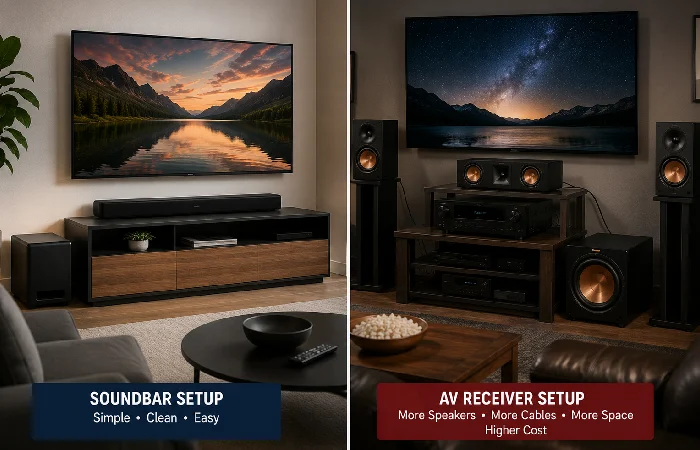
Once you cross the $500 to $700 range, you’re in territory where a basic AV receiver paired with bookshelf speakers can match or beat a soundbar on pure sound quality.
The trade-off is complexity. A receiver setup means multiple speakers, wire runs, actual calibration work. A soundbar plugs in with one cable and you’re done — for most people, that convenience is worth the audio gap.
But if you’re about to spend $900 or more, and you’ve got room for separate speakers, and you’re willing to burn an afternoon setting things up — at least compare a receiver-based option before you commit. You might land on noticeably better audio for the same money.
Quick Setup Checklist
Four steps, under 20 minutes, to get the best sound out of a new soundbar.
Connect through HDMI eARC if your TV has it, ARC if it doesn’t. Enable CEC in your TV’s settings so one remote controls everything. Then run the soundbar’s built-in room calibration — Samsung calls theirs SpaceFit Sound, Sonos uses Trueplay — and let it finish; it’s measuring how your room’s acoustics behave and adjusting output to match.
Check for a firmware update before judging the sound quality at all. Manufacturers push tuning improvements for months after launch, and plenty of soundbars ship with outdated software straight out of the box. Connect to Wi-Fi, open the companion app, update.
Turn on dialogue enhancement last. Samsung, JBL, Sony, and Sonos all have a dedicated mode for this — it lifts vocal frequencies above background music and effects. For everyday watching, that single setting makes a bigger difference than any Atmos configuration you’ll fuss over.
Frequently Asked Questions
1. Is a soundbar worth buying for a smart TV?
Pretty much always. Smart TVs get thinner every year, and speakers are the first thing sacrificed for it. A $150 soundbar will out-perform the speakers in a $1,000 TV, no contest.
2. What channel soundbar do I need for my room size?
Under 300 square feet, stick with 2.1 or 3.1. Push into 300–500, and 3.1 or 5.1 fits better. Past 500 square feet is where 7.1.4 systems with rear speakers and a dedicated sub start justifying their price.
3. Do I need a separate subwoofer with my soundbar?
Depends what you’re watching. News and casual streaming — the bar alone handles it fine. Movies, gaming, anything with real bass, a wireless sub adds depth the bar just can’t reproduce on its own. Most models above $250 bundle one in anyway.
4. What’s the real difference between HDMI ARC and eARC?
Bandwidth. Bandwidth, mostly. ARC compresses everything, fine for streaming. eARC doesn’t compress at all — that gap only shows up once 4K Blu-ray enters the picture. Both let your TV remote control the soundbar.
5. Is Dolby Atmos worth paying extra for in a budget soundbar?
Under $300, it’s almost never real. “Dolby Atmos” on a cheap box usually means virtual processing, and the overhead effect ends up subtle at best. Want the real thing? Look for a third digit in the channel count.
6. Which soundbar brand works best with Samsung, LG, or Sony TVs?
Match the brand to the TV where you can. Samsung with Samsung gets you Q-Symphony syncing the two together. Sony with Sony — BRAVIA Sync handles shared calibration. LG soundbars get their own pairing boost with LG TVs. Pick anything else, and Sonos or JBL are the safer bet — both sound good without needing brand-specific integration to get there.
Making the Call: The right pick for you comes down to three things: your room size, what you’re willing to spend, and the TV you already own. Matched those to something in the table above? You’re ready to buy.
